Azure-docs: "Modify the extensions file" - don't know what to do
I've followed the steps in these instructions easily until "Modify the extensions file." Everything up to this point is step-by-step and very clear. I have no idea how to follow these instructions:
Modify the extensions file
To configure UI customization, you copy the ContentDefinition and its child elements from the base file to the extensions file. Open the base file of your policy.
I'm totally lost about where this file might be and how to get it.
Document Details
⚠ Do not edit this section. It is required for docs.microsoft.com ➟ GitHub issue linking.
- ID: 84aabaf3-e7da-3519-995c-72d36c537843
- Version Independent ID: b35afa8d-a02c-a77a-6831-2b3f6a6c1a7d
- Content: Customize the user interface of your application using a custom policy in Azure Active Directory B2C
- Content Source: articles/active-directory-b2c/active-directory-b2c-ui-customization-custom.md
- Service: active-directory
- Sub-service: b2c
- GitHub Login: @mmacy
- Microsoft Alias: marsma
 pettys
All 8 comments
@pettys
Thanks for your feedback! We will investigate and update as appropriate.
 MarileeTurscak-MSFT
on 9 Sep 2019
MarileeTurscak-MSFT
on 9 Sep 2019
Hi,
Please check the TrustedFrameworksExtensions.xml file in the
Open the base file of your policy. For example, TrustFrameworkBase.xml.
Search for and copy the entire contents of the ContentDefinitions element.
Open the extension file. For example, TrustFrameworkExtensions.xml. Search for the BuildingBlocks element. If the element doesn't exist, add it.
Paste the entire contents of the ContentDefinitions element that you copied as a child of the BuildingBlocks element.
Search for the ContentDefinition element that contains Id="api.signuporsignin" in the XML that you copied.
Change the value of LoadUri to the URL of the HTML file that you uploaded to storage. For example, https://your-storage-account.blob.core.windows.net/your-container/customize-ui.html.
MarileeTurscak-MSFT
on 9 Sep 2019
Thanks for the same-day response, @MarileeTurscak-MSFT. No, those steps do not help. You quoted, "Open the base file of your policy..." I mentioned in my opening post that I have no idea where this file might be, nor how to get it. It looks like you're directing me to instructions about how to edit the file, which does not help me _find_ the file to edit.
Thanks for your attention.
pettys
on 10 Sep 2019
@pettys Hi Jason, just to be sure, have you completed the steps in the article mentioned in the prerequisites section?
Prerequisites
Complete the steps in Get started with custom policies. You should have a working custom policy for sign-up and sign-in with local accounts.
In that article, in which you work with custom policies provided in the Custom Policy Starter Pack, it describes the different types of files included:
Each starter pack contains:
- Base file - Few modifications are required to the base. Example: TrustFrameworkBase.xml
- Extension file - This file is where most configuration changes are made. Example: TrustFrameworkExtensions.xml
- Relying party files - Task-specific files called by your application. Examples: SignUpOrSignin.xml, ProfileEdit.xml, PasswordReset.xml
In this article, you edit the XML custom policy files in the SocialAndLocalAccounts starter pack. If you need an XML editor, try Visual Studio Code, a lightweight cross-platform editor.
Having said that, it's not immediately clear in the section you're calling out, so I will update this article to be more explicit about where that file resides (and that you should have obtained it by completing the prerequisites).
For absolute clarity, the file you're looking for is in the following location within the starter pack:
active-directory-b2c-custom-policy-starterpack/SocialAndLocalAccounts/TrustFrameworkBase.xml
reassign:mmacy
 mmacy
on 10 Sep 2019
mmacy
on 10 Sep 2019
Hi @mmacy, no, I hadn't done that part. That makes sense, and I think if you call that out in that part of the documentation, that might help others.
On the other hand, I have been able to set up all the user flow polices I needed without following those prerequisite steps, and I was able to complete my objective to customize the user interface of my application in Azure Active Directory B2C all within the portal. It seems that, instead of modifying the XML file, one can use the Azure Portal directly with these steps:
- Navigate to your AzureB2C resource.
- Under Policies, choose "User flows (policies)"
- Choose the policy you want to customize (for me, B2C_1_SignUpAndSignIn_v01
- Choose Page layouts
- Choose the layout name to customize, set "Use custom page content" to Yes, and then use your blob URL from prior steps in the "Custom page URI" textbox.
The article we're talking about is what I found when clicking the "Learn more about customizing your page" from in this section of the portal, and the documentation about creating a blob storage for the custom UI assets was really helpful. I'd still suggest that, despite the prerequisites you mentioned, the instructions about modifying a custom policy file don't seem to be the best guidance to give a user when they simply need to paste the blob URL into the correct field in the portal.
pettys
on 10 Sep 2019
Hmm... it seems the documentation I was looking for is here:
https://docs.microsoft.com/en-us/azure/active-directory-b2c/tutorial-customize-ui
Looks like I took a wrong turn in the help navigation somewhere. :( Well, I see my mistake now. Thanks for your attention and working with me on it.
pettys
on 10 Sep 2019
Another good call-out, though. We can be more clear in the Next steps section of About user interface customization in Azure Active Directory B2C, even just bolding these would help:
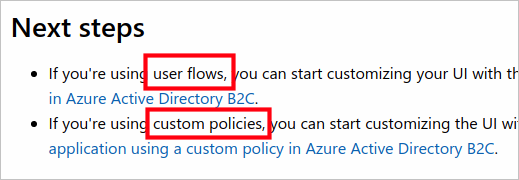
I'll add that to the PR for the fix on this article. Glad you got it sorted!
mmacy
on 10 Sep 2019
Oh, hey, that's really good. Thanks!
pettys
on 10 Sep 2019
Related issues
 monteledwards
·
3Comments
monteledwards
·
3Comments
 varma31
·
3Comments
varma31
·
3Comments
 jamesgallagher-ie
·
3Comments
jamesgallagher-ie
·
3Comments
 jebeld17
·
3Comments
jebeld17
·
3Comments
 paulmarshall
·
3Comments
paulmarshall
·
3Comments