Azure-docs: Need help: Exporting Custom Vision as Tensorflow Model
Hi,
We have followed the tutorial here..
https://docs.microsoft.com/bs-latn-ba/azure/cognitive-services/custom-vision-service/export-model-python
every thing works fine except the last piece of code
Couldn't find classification output layer: loss:0.
Verify this a model exported from an Object Detection project.
These names are part of the model and cannot be changed.
output_layer = 'loss:0'
input_node = 'Placeholder:0'
with tf.Session() as sess:
try:
#print(tf.global_variables())
prob_tensor = sess.graph.get_tensor_by_name(output_layer)
predictions, = sess.run(prob_tensor, {input_node: [augmented_image] })
except KeyError:
print ("Couldn't find classification output layer: " + output_layer + ".")
print ("Verify this a model exported from an Object Detection project.")
exit(-1)
# %tensorboard --logdir logs
Detalji dokumenta
⚠ Ne uređujte ovu sekciju. Ona je neophodna za povezivanje problema slijedom docs.microsoft.com ➟ GitHub.
- ID: 754dd7d5-dd8b-4a75-5d79-0ba621a847cd
- Version Independent ID: 3cca3535-1c16-2da1-46c6-421cbf808bc3
- Content: Tutorial: Run TensorFlow model in Python - Custom Vision Service - Azure Cognitive Services
- Content Source: articles/cognitive-services/Custom-Vision-Service/export-model-python.md
- Service: cognitive-services
- Sub-service: custom-vision
- GitHub Login: @areddish
- Microsoft Alias: areddish
 jaiswati
All 11 comments
@jaiswati , Thank you for your feedback. We will investigate and get back to you shortly.
 msrini-MSFT
on 7 Sep 2019
msrini-MSFT
on 7 Sep 2019
As stated at the top of the article - this tutorial applies only to models exported from image classification projects.
When exporting an Object Detection project the zip file contains the code to run the exported model.
 areddish
on 7 Sep 2019
areddish
on 7 Sep 2019
Hi Andrew,
Thank you for the quick response, We have both types of Custom Vision Projects.
Could you please share the documentation for Object detection CV Project as well.
I am beginner to the tensorflow, so it would be great if you share the links to debug the model and get this fixed for object detection model or may be any other way to fix this.
meanwhile will try this for Classification projects and post the response back and as suggested will go through the sample code shared in the zip file
Thanks in advance :)
Best Regards,
Swati
jaiswati
on 8 Sep 2019
As suggested tried for the 'Classification Custom Vision Project as well'
but get the same error..
Couldn't find classification output layer: loss:0.
Verify this a model exported from an Object Detection project.
jaiswati
on 8 Sep 2019
@jaiswati We re-ran the document to run the steps and it worked fine. Here is a screen shot of the prediction.
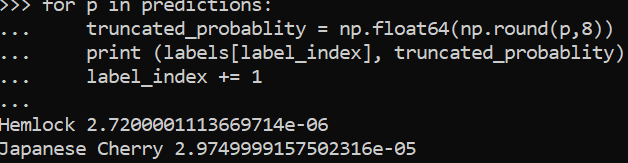
Please take a look at how the model was exported. Here are the steps to convert the same to a compact domain and then use with this tutorial.
 RohitMungi-MSFT
on 9 Sep 2019
RohitMungi-MSFT
on 9 Sep 2019
Hi Rohit,
Thank you for the response..
The classification project is exported in General Compact domain
Could you please share the images for which you have tested this sample code? need to check the format of the images (image size , type of image etc), we have tested this with png format
Also in which python environment we will need to test this?
I have upgraded Azure Jupyter notebook to Tensorflow 2.0 rc2 as with earlier , code snippets does not work.
jaiswati
on 9 Sep 2019
Here is the Classification Custom Vision Project and azure notebook
https://github.com/jaiswati/Custom-Vision-Test
jaiswati
on 9 Sep 2019
You can try any valid image type. Try using any of the sample project from the document and convert it to compact domain.
I tested with python 3.7.2 and tensorflow 1.14.0
We would recommend to post issues related to implementations on stackoverflow for the developer community to pitch in. This forum is primarily used for document issues or bugs.
RohitMungi-MSFT
on 9 Sep 2019
Hi Rohit,
I have checked that default azure notebook has tensorflow 1.12.2 and python 3.6.6, will try to upgrade it and see if that resolves the issue. Thank you for the recommendation , will post about this in stackoverflow as well ..
This is just a thought (may not be applicable here, Please forward it to concerned team if possible), It would be great if there is some mechanism to auto-update the documentation based on stackoverflow/ msdn forum discussions..( may be based on approval),
with this Documentation could be more useful and half of the developer struggles will be saved in real world use cases.
jaiswati
on 10 Sep 2019
@jaiswati Thanks for the feedback. All forums including stack and MSDN are moderated and feedback is provided to the appropriate product team to update the documentation. Our product team uses the uservoice forum for any issues or feedback regarding the product. Please feel free to update your requests in this forum.
In case of this issue you can also use the local installation of python and tensorflow. As the error is a key error it could be an issue with retraining the project after changing the domain of the project to compact.
RohitMungi-MSFT
on 10 Sep 2019
@jaiswati We hope you are able to run through the steps after using the supported versions of the packages. We will now proceed to close this thread.
RohitMungi-MSFT
on 11 Sep 2019
Related issues
 spottedmahn
·
3Comments
spottedmahn
·
3Comments
 JeffLoo-ong
·
3Comments
JeffLoo-ong
·
3Comments
 Favna
·
3Comments
Favna
·
3Comments
 bdcoder2
·
3Comments
bdcoder2
·
3Comments
 Agazoth
·
3Comments
Agazoth
·
3Comments