Azure-docs: I want to disable this, how do I do that?
I don't want this, how do I disable this. It's already impacting my tenant but I had no idea it was a "thing" and like all these "features", they're in Preview mode but being forced on us. I want it gone.
Document Details
⚠ Do not edit this section. It is required for docs.microsoft.com ➟ GitHub issue linking.
- ID: 5779b726-83b3-3242-297a-17410b372ab5
- Version Independent ID: ff902d75-e5b4-25db-4d31-80d28808efff
- Content: How to investigate risks in Azure Active Directory identity protection (refreshed)
- Content Source: articles/active-directory/identity-protection/howto-investigate-risk.md
- Service: active-directory
- Sub-service: identity-protection
- GitHub Login: @MicrosoftGuyJFlo
- Microsoft Alias: joflore
 VNJoe
VNJoe
All 17 comments
@VNJoe Thank you for your query. We will investigate and update this thread.
 shashishailaj
on 4 Sep 2019
shashishailaj
on 4 Sep 2019
@VNJoe We are sorry for a less than pleasant experience with the product. At this point what I understand from your comments is that you would not like to see the risky sign-ins preview reports. I assume that you have a azure AD premium P2 tenant and Azure AD identity protection was enabled once due to which you have azure AD identity protection enabled. Azure AD Identity Protection is a capability provided by Azure Ad Premium P2 and is automatically enabled once an Azure AD Premium P2 license is added to the tenant. At this point the dashboard cannot be disabled. The AAD premium P2 license is included within EMS E5 license . From the compliance perspective, as long as you don´t have anything configured in Azure AD Identity Protection and by this I mean (User risk Policy, Sign-in risk Policy and MFA Registration) the service won´t be used. However disabling the dashboard is not possible once created. There are some activity data that start getting generated and some reports get enabled automatically once this license is added to the tenant.
At this point If you do not want to see any risk events for the users on the risk event dashboard , you can exclude all of the users from the user-risk policy , sign-in risk policy and MFA registration except any test user which you can create within your directory in case you don't already have a test user. Also you can check that Enforce policy option is Off as shown below.
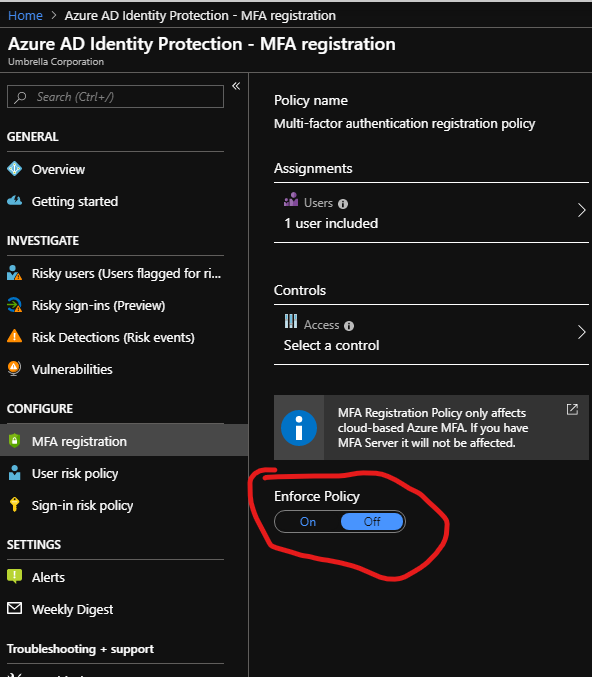
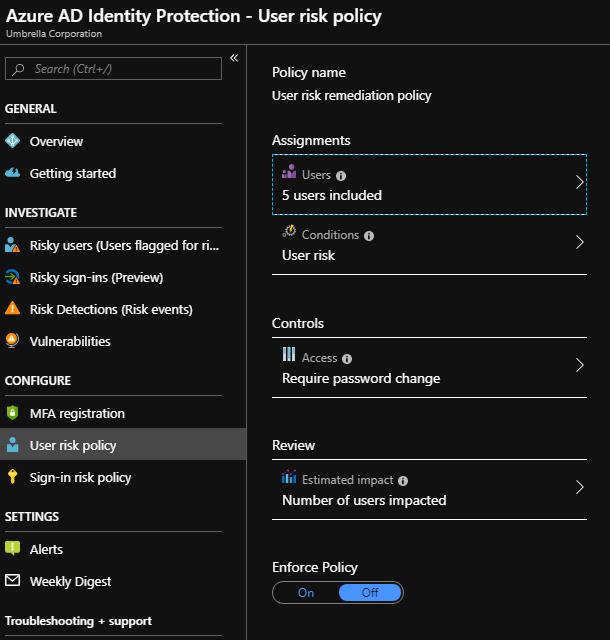
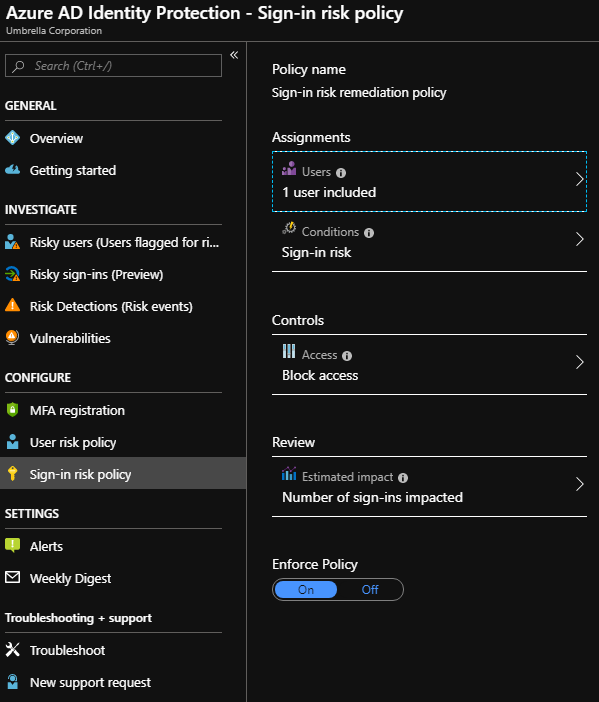
You can define the policy to basically apply only to one single test user and exclude all others as above , and this is one way i can think by which you can have an empty view of risky events .
However I would suggest to provide your feedback on Azure Feedback uservoice for providing a way to manually disable this once enabled . This page is directly monitored by Product managers and they can accordingly add this request for review as they see fit .
Hope the explanation helped. Please let me know in case you have any further queries on this.
Thank you.
shashishailaj
on 4 Sep 2019
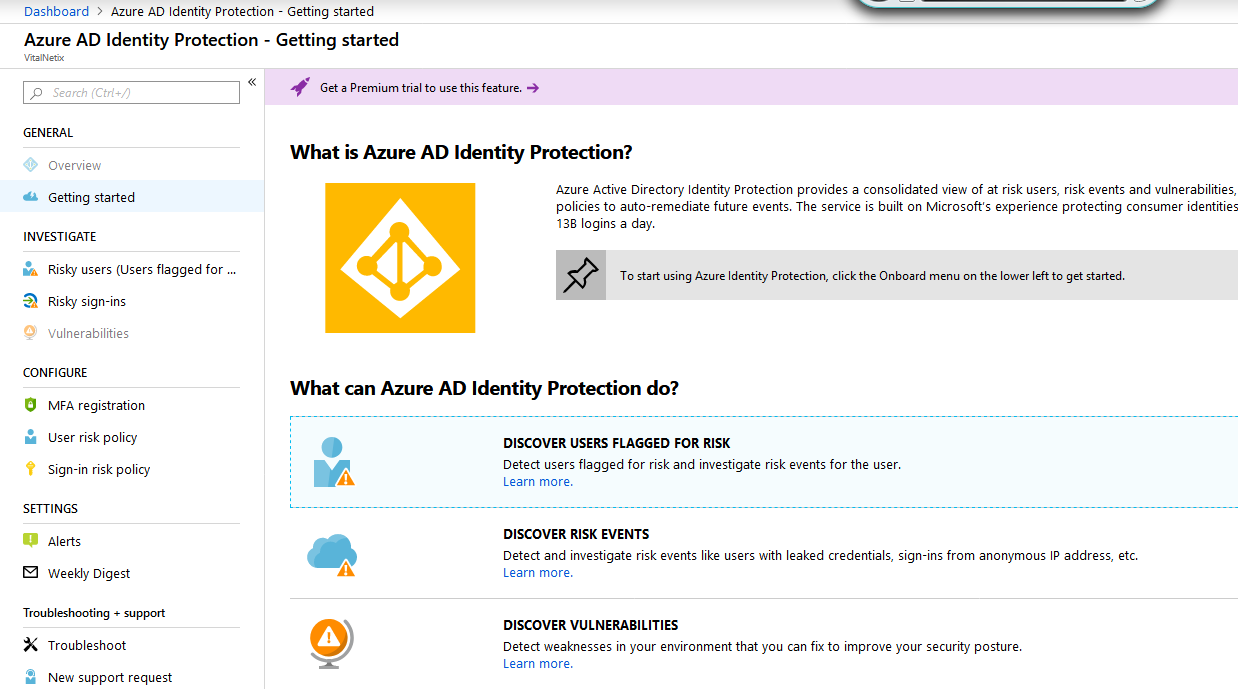
No, I definitely do not have this product, Identity Protection, nor AD Premium P2. Yet it's still forced on my tenant in some way.
VNJoe
on 4 Sep 2019
@VNJoe based on the screenshot you do not have Azure AD Premium P2 licenses or Identity Protection enabled in your directory.
 MicrosoftGuyJFlo
on 4 Sep 2019
MicrosoftGuyJFlo
on 4 Sep 2019
please-close
MicrosoftGuyJFlo
on 5 Sep 2019
Why is this closed? Because I still have RIsky Users, so, hey, instead of commenting and closing out in 18 second, maybe provide opportunities for the people to respond with screenshots showing Risky Users enabled on their Azure AD even though they don't have Premium?
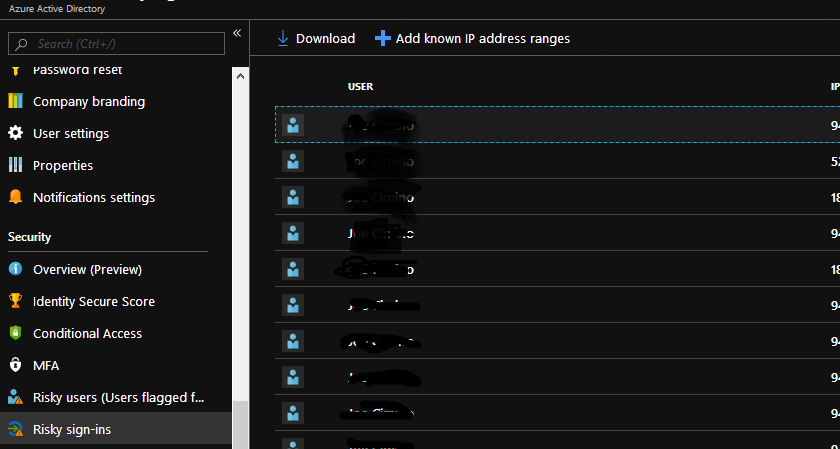
So nothing about your comment was helpful, particularly closing it.
VNJoe
on 5 Sep 2019
@PRMerger15 This issue is not resolved. I request you review and reopen it. @MicrosoftGuyJFlo I recommend you look in more detail at my images. You can clearly see in the original window that Risky Users is in the shot, so saying I don't have it enabled in my directory is not helpful to me. I cannot get into it to disable it, it was just applied to my tenant automatically somewhere and I'm trying to find out where. I've now added a second shot to see the Risky User lists, and that they are flagged, both options somehow enabled on my tenant without those subscriptions.
VNJoe
on 5 Sep 2019
please-reopen
From: John Flores notifications@github.com
Sent: Thursday, September 5, 2019 4:38:08 PM
To: MicrosoftDocs/azure-docs azure-docs@noreply.github.com
Cc: Joe Cimino Joe.Cimino@vitalnetix.com; Mention mention@noreply.github.com
Subject: Re: [MicrosoftDocs/azure-docs] I want to disable this, how do I do that? (#38230)
please-close
—
You are receiving this because you were mentioned.
Reply to this email directly, view it on GitHubhttps://github.com/MicrosoftDocs/azure-docs/issues/38230?email_source=notifications&email_token=AL2EQYEW43DF2C4RQU64JTLQIFU3BA5CNFSM4ITMJHE2YY3PNVWWK3TUL52HS4DFVREXG43VMVBW63LNMVXHJKTDN5WW2ZLOORPWSZGOD6AV3CI#issuecomment-528571785, or mute the threadhttps://github.com/notifications/unsubscribe-auth/AL2EQYGZKHKGYY6LZE5QCD3QIFU3BANCNFSM4ITMJHEQ.
VNJoe
on 5 Sep 2019
I appreciate reopening this. I still do have the effect of this feature impacting my tenant even though I haven't purchased or set it up in the tenant, so it's still an issue. It ought not impact my tenant if it's not been purchased. Thank you
VNJoe
on 6 Sep 2019
@VNJoe During the Public preview certain capabilities are available in all Editions of Azure AD. Can you help me understand how it is impacting the users? AFAIK, these reports are just for the administrators to review.
Ref: https://docs.microsoft.com/en-us/azure/active-directory/identity-protection/overview-v2#licensing
 ManojReddy-MSFT
on 6 Sep 2019
ManojReddy-MSFT
on 6 Sep 2019
@VNJoe We do not believe this impacts any users. As explained by Manoj above , the article https://docs.microsoft.com/en-us/azure/active-directory/identity-protection/overview-v2#licensing has a section which describes that the risky sign-in reports are available to Azure AD basic/Free users with very limited information while the service is in Preview. We encourage you to provide your feedback on Uservoice for Identity Protection requesting the ability to remove the risky sign-in blade on the Azure portal for customers using Azure AD free/basic version. Unfortunately at this point it is not possible. The product feedback is tracked and reviewed directly by Product group (PG) teams and if you can provide the feedback there, it can be looked into and prioritized as needed by PG teams. We will be closing this issue and request you to follow the Azure feedback channel .
Thank you.
shashishailaj
on 9 Sep 2019
I keep getting people saying this shouldn't be happening to me and closing my issue, yet, guess what? It's happening! My users are assessed as Risky Users by your system and then they have to change passwords. I even put screenshots up, but hey, just close the issue. I DON'T WANT THAT. I want it fixed!
Keep closing. You clearly don't care. Neither do I now.
VNJoe
on 10 Sep 2019
This topic is about the REPORTS of the underlying "Risky Users" feature, not about the actual feature. I have the same problem - HUNDREDS of my users are flagged as "Risky Users", but we have just the basic AAD. We never had either premium edition. Users who are flagged are unable to do certain features, like switch organizations in Teams. Asking the people who document the REPORTS page about the underlying feature isn't going to yield positive results. I'm going to open a support case, and suggest that you do the same.
 RadioActiveLamb
on 2 Oct 2019
RadioActiveLamb
on 2 Oct 2019
This issue was acknowledged and apparently remediated by Azure team. The people on here who didn't assist me, told me what I was seeing wasn't happening, and closed out my comment ought to reconsider their participation in GitHub and how they participate. Closing issues and ignoring facts is no way to support your products, especially given the detail and screenshot info I provided to support the problem.
VNJoe
on 4 Oct 2019
@RadioActiveLamb Those reports trigger additional, hidden security features for Azure and Office 365 that are undocumented, including what you'd mentioned, and, in my case, triggering a forced password reset for anyone on that list that gets MFA enabled. The reports are only in Azure and not sent to tenant admins unless you have Premium AD; otherwise, you just have to look there every day, multiple times a day, to ensure you're not impacted. All it does is check for access from risky IP addresses; unfortunately, cell phones connecting to multiple networks in a day will access from all sorts of places, and if it's a free wifi or a VPN that winds up triggering getting on that list, they're access will be restricted until the logins are remediated and they are removed from the list by an admin.
VNJoe
on 4 Oct 2019
@VNJoe Sorry about the trouble with this issue. I just had a conversation with the support team about this case. Sorry I missed the mark on this issue.
I will add some links from the updated docs I am working on to and from the baselines docs to help people who get into this scenario.
MicrosoftGuyJFlo
on 4 Oct 2019
I opened a premier case on this subject (119100121002612 ). End result is the same. Azure will flag these sign-ins as risky for whatever reason. There's no way for someone with a "Basic" subscription can clear the flags with PowerShell or change the policy that is enforced. I think it's unacceptable that Microsoft is imposing a premium feature onto basic accounts that can only be managed with an expensive premium license. My only recourse is to provide feedback. Meanwhile, I have about 600 users who are flagged as risky, which is providing a poor experience in Teams. The affected users cannot switch to Microsoft's organization, where they participate in collaboration until this flag is manually lifted in the GUI.
RadioActiveLamb
on 4 Oct 2019
Related issues
 Favna
·
3Comments
Favna
·
3Comments
 AronT-TLV
·
3Comments
AronT-TLV
·
3Comments
 Ponant
·
3Comments
Ponant
·
3Comments
 jharbieh
·
3Comments
jharbieh
·
3Comments
 monteledwards
·
3Comments
monteledwards
·
3Comments