Azure-docs: Microsoft Form Recognizer to process form image URL download
I succeed to use the Microsoft Form Recognizer using the sample from the quick start.
But what I have now is image URLs which trigger download instead of opening a raw image in the browser. How can I be able to handle that?
Document Details
⚠ Do not edit this section. It is required for docs.microsoft.com ➟ GitHub issue linking.
- ID: 9d721621-becf-6cbf-f168-8e51858e3f06
- Version Independent ID: 7d07be8b-1d15-9b67-cbb5-9b7e2d44cf2f
- Content: Quickstart: Extract receipt data using Python - Form Recognizer - Azure Cognitive Services
- Content Source: articles/cognitive-services/form-recognizer/quickstarts/python-receipts.md
- Service: cognitive-services
- Sub-service: forms-recognizer
- GitHub Login: @PatrickFarley
- Microsoft Alias: pafarley
 vionemc
All 9 comments
@vionemc Thanks for the question! We're investigating this and will get back to you shortly.
 BhargaviAnnadevara-MSFT
on 24 Aug 2019
BhargaviAnnadevara-MSFT
on 24 Aug 2019
Thank you for the response! It has been hard for me to use this tool without some flexibility to handle multiple cases
vionemc
on 24 Aug 2019
How about handling the raw image directly? I can give you the file type
vionemc
on 27 Aug 2019
@vionemc Form Recognizer works on input that meets below requirements.
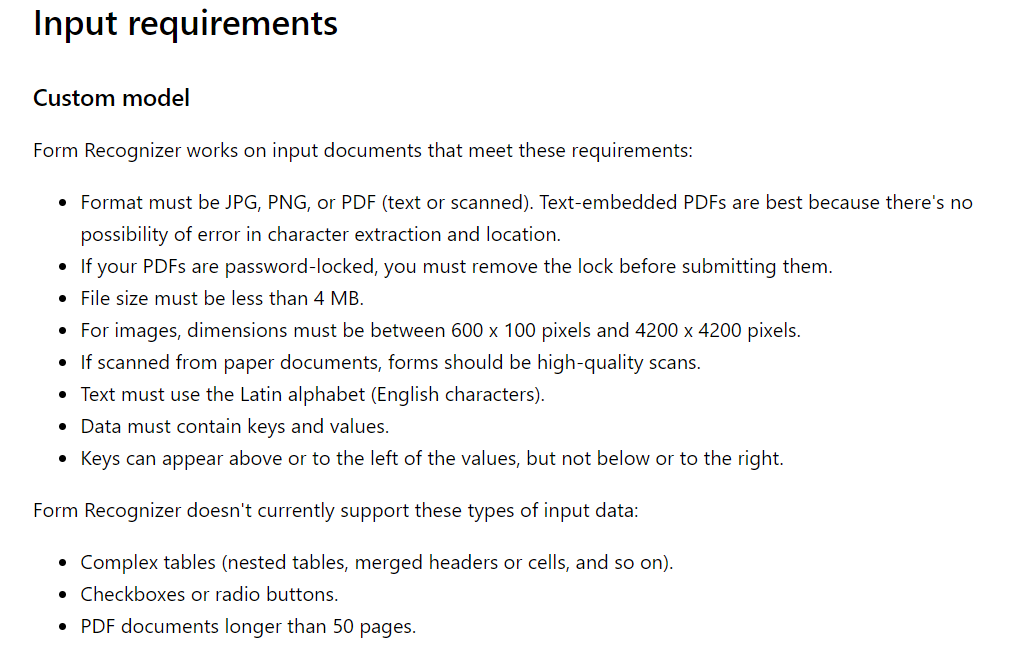
 ram-msft
on 27 Aug 2019
ram-msft
on 27 Aug 2019
@vionemc please add your use case details that you are trying to solve.
 vrishni
on 27 Aug 2019
vrishni
on 27 Aug 2019
@vrishni for example, I am trying to process this URL https://justanalytics.harvestapp.com/expenses/25592242/receipt
It triggers a download and gives the raw image body as a response when I scrape it.
If you can accept raw image body instead of a hosted URL, I can work on it
vionemc
on 27 Aug 2019
Form Recognizer custom Analyze API supports as input a local file or multi-part form it does not yet support a URL. The Form Recognizer Analyze Receipt API supports also a URL as input format.
 NHaiby
on 27 Aug 2019
NHaiby
on 27 Aug 2019
please-close
 tchristiani
on 27 Aug 2019
tchristiani
on 27 Aug 2019
For anyone out there who needs a solution for this, I found this in the documentation. You can handle it by passing the binary of the image file, but you'd need a different header.
########### Python 2.7 #############
import httplib, urllib, base64

headers = {
    # Request headers
    'Content-Type': 'application/octet-stream',
    'Ocp-Apim-Subscription-Key': '{subscription key}',
}
body = {Your binary data}
params = urllib.urlencode({
})

try:
    conn = httplib.HTTPSConnection('westus2.api.cognitive.microsoft.com')
    conn.request("POST", "/formrecognizer/v1.0-preview/prebuilt/receipt/asyncBatchAnalyze?%s" % params, "{body}", headers)
    response = conn.getresponse()
    data = response.read()
    print(data)
    conn.close()
except Exception as e:
    print("[Errno {0}] {1}".format(e.errno, e.strerror))

####################################

########### Python 3.2 #############
import http.client, urllib.request, urllib.parse, urllib.error, base64

headers = {
    # Request headers
    'Content-Type': 'application/octet-stream',
    'Ocp-Apim-Subscription-Key': '{subscription key}',
}
body = {Your binary data}

params = urllib.parse.urlencode({
})

try:
    conn = http.client.HTTPSConnection('westus2.api.cognitive.microsoft.com')
    conn.request("POST", "/formrecognizer/v1.0-preview/prebuilt/receipt/asyncBatchAnalyze?%s" % params, "{body}", headers)
    response = conn.getresponse()
    data = response.read()
    print(data)
    conn.close()
except Exception as e:
    print("[Errno {0}] {1}".format(e.errno, e.strerror))

####################################
Related issues
 bityob
·
3Comments
bityob
·
3Comments
 bdcoder2
·
3Comments
bdcoder2
·
3Comments
 mrdfuse
·
3Comments
mrdfuse
·
3Comments
 paulmarshall
·
3Comments
paulmarshall
·
3Comments
 jamesgallagher-ie
·
3Comments
jamesgallagher-ie
·
3Comments