Azure-docs: Missing "Documents" at step "Add sample data" step
[Enter feedback here]
- In Data Explorer, the new database appears in the Collections pane. Expand the Tasks database, expand the Items collection, click Documents, and then click New Documents.
I don't see the "Document". I see only "Items" and "Settings" under "Items" collection.
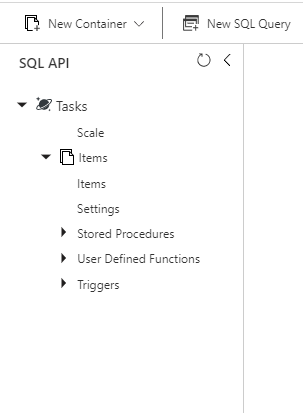
Document Details
⚠ Do not edit this section. It is required for docs.microsoft.com ➟ GitHub issue linking.
- ID: 995ff127-8028-8118-701e-53f07f3a7fc5
- Version Independent ID: dff7d0b8-f677-99a9-64b3-89d9bb4fde0d
- Content: Azure Cosmos DB: Build an app with Python and the SQL API
- Content Source: articles/cosmos-db/create-sql-api-python.md
- Service: cosmos-db
- Sub-service: cosmosdb-sql
- GitHub Login: @SnehaGunda
- Microsoft Alias: sngun
 tony-921
All 2 comments
@tony-921 Thank you for letting us know.
The user interface is continuously evolving and seems to have changed after the documentation was published.
This is being assigned to the content author to evaluate and update as appropriate.
 KalyanChanumolu-MSFT
on 2 Aug 2019
KalyanChanumolu-MSFT
on 2 Aug 2019
@tony-921 Yes the portal has significantly changed since we updated this doc. The old screens were not replaced. "Collections" are now called "Containers" and "Documents" are now called "Items". I submitted a PR to update the doc. The content should be live later today.
We will close this issue if there aren't further questions.
please-close
 SnehaGunda
on 7 Aug 2019
SnehaGunda
on 7 Aug 2019
Related issues
 behnam89
·
3Comments
behnam89
·
3Comments
 jebeld17
·
3Comments
jebeld17
·
3Comments
 monteledwards
·
3Comments
monteledwards
·
3Comments
 spottedmahn
·
3Comments
spottedmahn
·
3Comments
 Agazoth
·
3Comments
Agazoth
·
3Comments
Most helpful comment
@tony-921 Yes the portal has significantly changed since we updated this doc. The old screens were not replaced. "Collections" are now called "Containers" and "Documents" are now called "Items". I submitted a PR to update the doc. The content should be live later today.
We will close this issue if there aren't further questions.
please-close