Azure-docs: Troubleshooting page is a mess
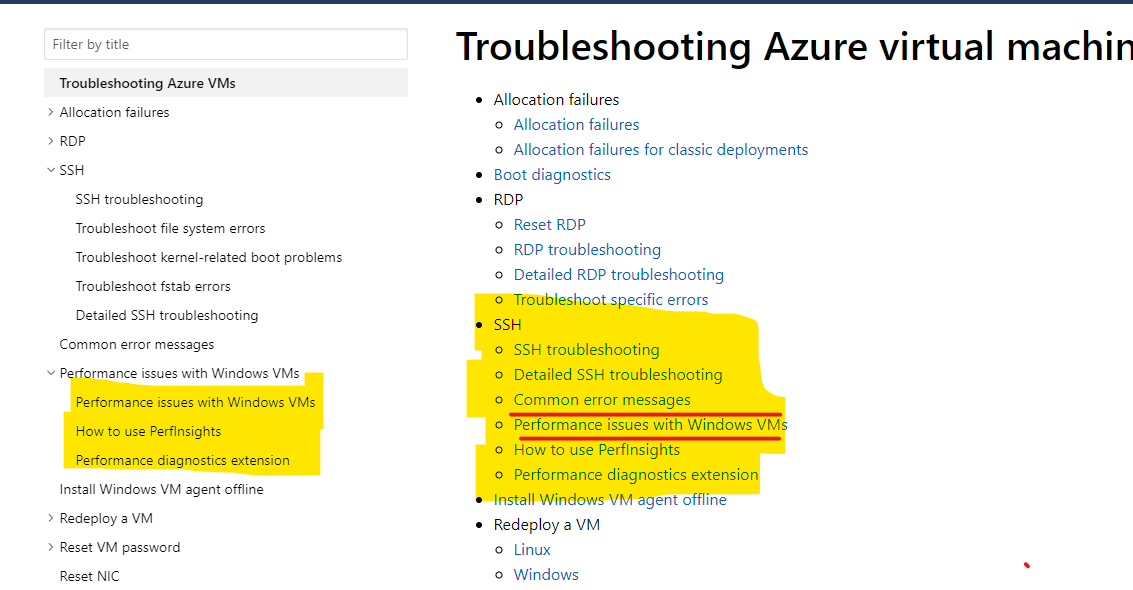
https://docs.microsoft.com/en-us/azure/virtual-machines/troubleshooting/ is just a bunch of text without proper order and subsections.
For example:
This is under SSH but doesn't in any way about it:
"Common error messages
Performance issues with Windows VMs
How to use PerfInsights
Performance diagnostics extension"
Document Details
⚠ Do not edit this section. It is required for docs.microsoft.com ➟ GitHub issue linking.
- ID: 70ed8599-3bc1-6246-ccfa-4478a3061d56
- Version Independent ID: f7019695-1c99-500f-e1fb-de8cc2280011
- Content: Performance diagnostics for Azure virtual machines
- Content Source: articles/virtual-machines/troubleshooting/performance-diagnostics.md
- Service: virtual-machines-windows
- GitHub Login: @anandhms
- Microsoft Alias: anandh
 Bafff
Bafff
All 9 comments
@Bafff Thanks for providing feedback and bringing this to our attention. I am assigning the issue to content author for getting this fixed.
 VikasPullagura-MSFT
on 31 Jul 2019
VikasPullagura-MSFT
on 31 Jul 2019
Maybe it is more related to the https://github.com/MicrosoftDocs/azure-docs/blob/master/articles/virtual-machines/troubleshooting/index.md page. But there was no link to open an issue there
Bafff
on 31 Jul 2019
@Bafff Yes, we see the menu on the left is correct but the one on the right side is not aligned correctly.
VikasPullagura-MSFT
on 31 Jul 2019
@anandhms Can you please look into the issue and fix the menu in the document.
VikasPullagura-MSFT
on 31 Jul 2019
@VikasPullagura-MSFT : I have updated the PR to include an updated index.md page with Performance Diagnostics items in a new hierarchy. Please take a look.
As far as the other items on this page, you may want to follow-up with @JarrettRenshaw
 anandhms
on 1 Aug 2019
anandhms
on 1 Aug 2019
@MicahMcKittrick-MSFT but I don't see that it is resolved
Bafff
on 2 Aug 2019
@Bafff sorry I hit close by accident.
 mimckitt
on 2 Aug 2019
mimckitt
on 2 Aug 2019
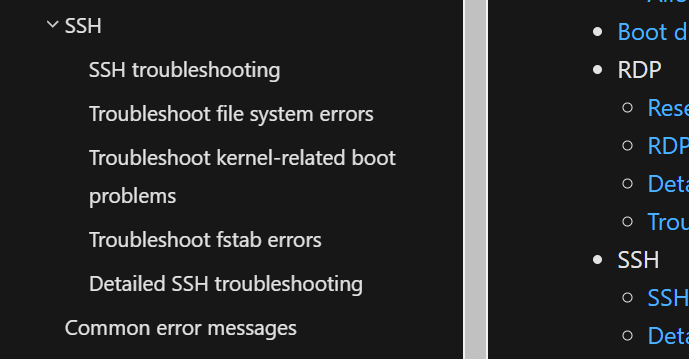
@jarretRenshaw Are you able to update the ToC? There is extra items under SSH that do not have anything to do with SSH. There are most likely others as well.
 georgewallace
on 26 Aug 2019
georgewallace
on 26 Aug 2019
@Bafff I have restructured the Troubleshooting page. I will process to close this issue. Free feel to let me know if you have any suggestion or comments. Thanks.``
please-close
 genlin
on 30 Aug 2019
genlin
on 30 Aug 2019
Related issues
 spottedmahn
·
3Comments
spottedmahn
·
3Comments
 jharbieh
·
3Comments
jharbieh
·
3Comments
 Agazoth
·
3Comments
Agazoth
·
3Comments
 JeffLoo-ong
·
3Comments
JeffLoo-ong
·
3Comments
 jebeld17
·
3Comments
jebeld17
·
3Comments