Azure-docs: require("Web3") in Truffle develop shell throwing error
Hi, I am facing a challenge in connecting to my Azure BC node using Truffle (https://docs.microsoft.com/en-us/azure/blockchain/service/connect-truffle). Pre req has been installed successfully. When trying to execute require("Web3") in Truffle develop shell, getting error and hence unable to proceed from that point.
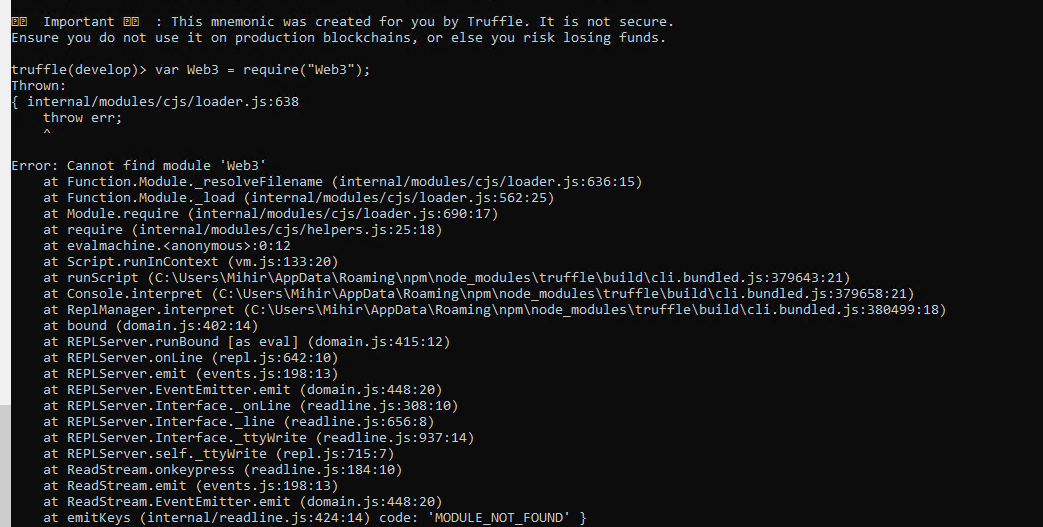
_Originally posted by @tommparekh in https://github.com/MicrosoftDocs/azure-docs/issues/34632#issuecomment-515535458_
Document Details
⚠ Do not edit this section. It is required for docs.microsoft.com ➟ GitHub issue linking.
- ID: 8a001b81-9481-749c-534f-b2dd8f7e429a
- Version Independent ID: 765d557a-b80e-bffb-fab3-c9a6eeed0e73
- Content: Connect using Truffle
- Content Source: articles/blockchain/service/connect-truffle.md
- Service: azure-blockchain
- GitHub Login: @PatAltimore
- Microsoft Alias: patricka
 tommparekh
All 23 comments
@tommparekh
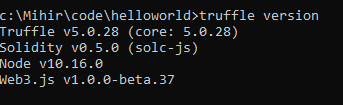
Try verifying the truffle version and prerequisites. Try the command "truffle version" at the shell / command prompt:
$ truffle version
Truffle v5.0.22 (core: 5.0.22)
Solidity - 0.5.0 (solc-js)
Node v10.16.0
Web3.js v1.0.0-beta.37
The Truffle version may be later but the other prerequisites should match the previous output.
Pat
 PatAltimore
on 29 Jul 2019
PatAltimore
on 29 Jul 2019
Thanks for your response. Here is what I see:
tommparekh
on 30 Jul 2019
I am also seeing same response as above by using truffle version but the error still persists.
 sahil839
on 30 Jul 2019
sahil839
on 30 Jul 2019
@tommparekh @sahil839, I can reproduce the issue. Can you verify you have done step 5 - "npm install [email protected]"? I think you will need to install web3 in the project directory to avoid the error you are getting.
Pat
PatAltimore
on 30 Jul 2019
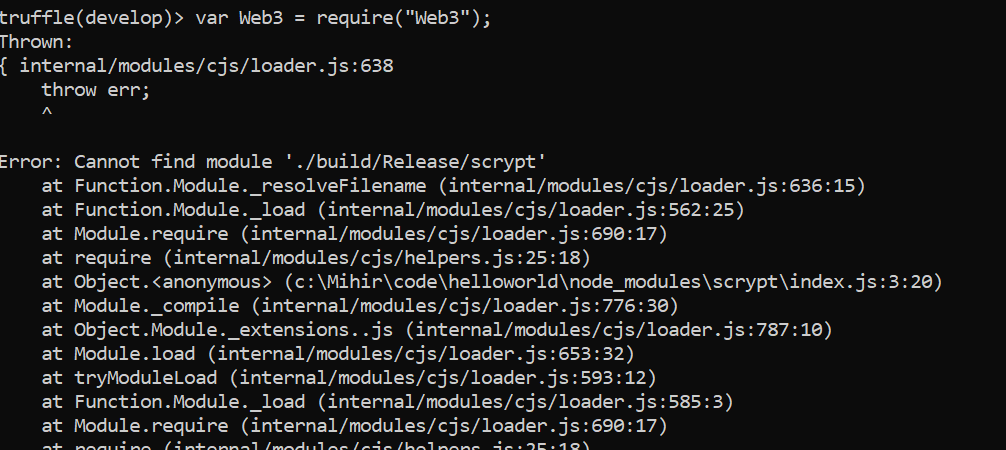
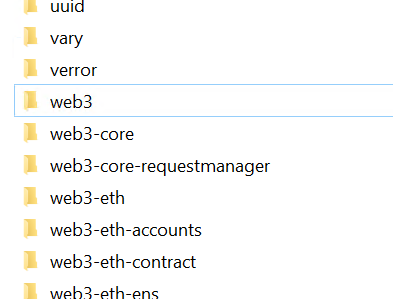
Thanks Pat. I am sure I did follow step # 5 earlier but never saw web3 dir under node_modules. I tried again and now I see web3 folder under node_modules which was never present earlier.
However, the issue persists and getting below error :
tommparekh
on 31 Jul 2019
tommparekh
on 31 Jul 2019
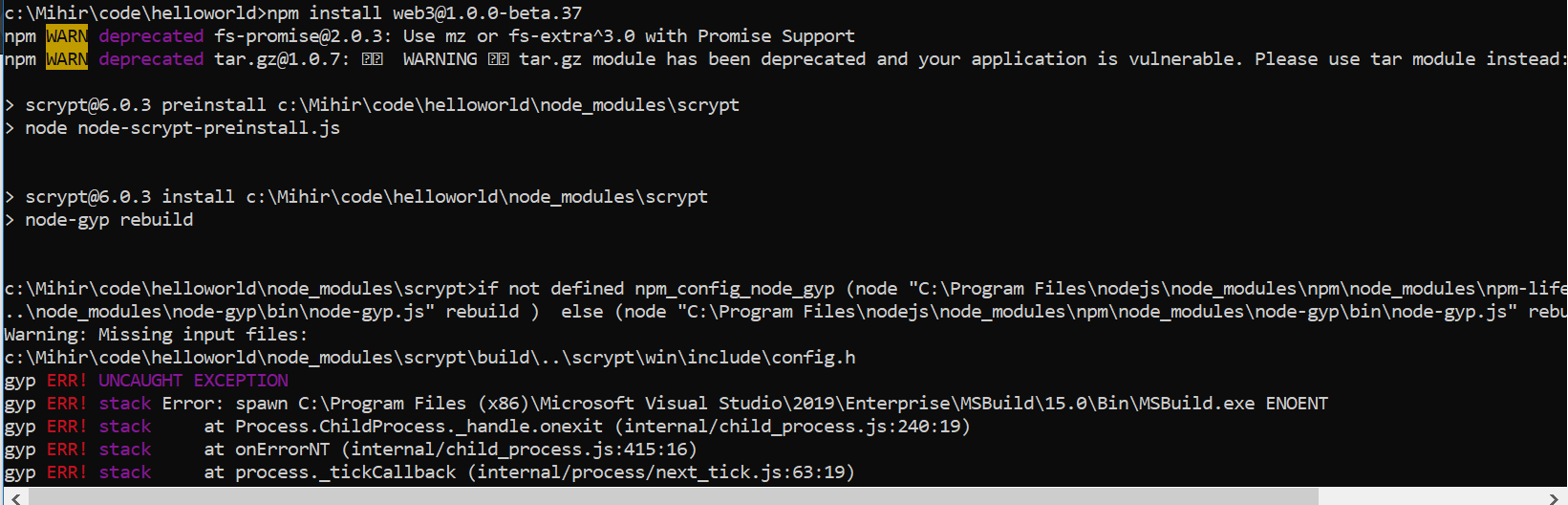
btw, while reviewing npm install, i see below error which may be a concern. Any thoughts?
tommparekh
on 31 Jul 2019
@PatAltimore I also installed web3. It didn't give any errors but it certainly showed some warnings.
Although the directory structure is same as showed by tommparekh above.
sahil839
on 31 Jul 2019
I got following warnings on running npm install [email protected].
npm WARN saveError ENOENT: no such file or directory, open '/home/sahil/truffledemo/package.json'
npm notice created a lockfile as package-lock.json. You should commit this file.
npm WARN enoent ENOENT: no such file or directory, open '/home/sahil/truffledemo/package.json'
npm WARN truffledemo No description
npm WARN truffledemo No repository field.
npm WARN truffledemo No README data
npm WARN truffledemo No license field.

+ [email protected]
updated 1 package and audited 272240 packages in 5.736s
found 0 vulnerabilities
but it says that it has been installed.
sahil839
on 31 Jul 2019
@PatAltimore, thought you should know - I am trying to install the web3 library in Azure VM (but getting errors). Just in case if it helps.
tommparekh
on 31 Jul 2019
change the last "Web3" to "web3" like this: var Web3 = require("web3");
 ghost
on 31 Jul 2019
ghost
on 31 Jul 2019
@tommparekh There's a PR with a change that should avoid the issue. It should be merged soon but you can try it: https://github.com/MicrosoftDocs/azure-docs/pull/36160/files?short_path=bdbbe7e#diff-bdbbe7ef3d0dc513ea7382e8a321529b. It uses Truffle console instead.
Thanks,
Pat
PatAltimore
on 31 Jul 2019
@PatAltimore I tried following the above PR. After editing the config file when I run
truffle console --network defaultnode it gives error that Could not connect to your Ethereum client.
sahil839
on 31 Jul 2019
Hi @sahil839, your truffle-config.js should look something like this:
var defaultnode = "https://myblockchainmember.blockchain.azure.com:3200/MyAcCeSsKeY";
var Web3 = require("web3");
module.exports = {
networks: {
defaultnode: {
provider: new Web3.providers.HttpProvider(defaultnode),
network_id: "*"
}
}
}
Note the variable defaultnode is set to your blockchain member endpoint address including the access key. If that looks correct, I'd suspect something went wrong when Web3 installed. I'd try starting the tutorial over in a new project directory. For example, truffledemo2.
Pat
PatAltimore
on 1 Aug 2019
Hi @tommparekh & @sahil839, The community submitted PR with the update has been merged. You should see it live now. I've got some minor fixes coming that will probably be merged tomorrow.
Pat
PatAltimore
on 1 Aug 2019
@PatAltimore I tried using a new project directory and followed the steps as given in updated docs but the same error still persisits
truffle console --network defaultnode

Could not connect to your Ethereum client.
Please check that your Ethereum client:
    - is running
    - is accepting RPC connections (i.e., "--rpc" option is used in geth)
    - is accessible over the network
    - is properly configured in your Truffle configuration file (truffle-config.js)

Truffle v5.0.28 (core: 5.0.28)
Node v10.16.0
Do I need to do something related to ethereum account first ?
sahil839
on 1 Aug 2019
@sahil839 definitely try using npm install [email protected] . Would be really helpful if you share your truffle project too, you can have issues in your contract, migrations or truffle-config.js .. Also you may be not using your Azure Blockchain Member account.. But first try that truffle version and don't forget to require('web3') instead of 'Web3'.
ghost
on 1 Aug 2019
@sahil839 I'm a bit at a loss why you can't connect. I tried to recreate the issue thinking it might be a version issue but couldn't reproduce it on a couple of machines. Is it possible the 3200 port is being blocked somewhere?
Pat
PatAltimore
on 1 Aug 2019
I do not think so that it has happened because of this. I checked ports using sudo lsof -i -P -n.
sahil839
on 1 Aug 2019
I have just followed the docs. My project has no contracts as of now. It just has a config file which is as per the docs.
BTW I will also try it on some other machine and let you know.
Thanks for the help.
sahil839
on 1 Aug 2019
@PatAltimore, thanks. I followed the updated steps and its working fine now. Thank you for your assistance.
tommparekh
on 1 Aug 2019
please-close
PatAltimore
on 13 Aug 2019
@pataltimore this is still an issue, along with many other things eyes, in 2020 lol
 xtianus79
on 26 Mar 2020
xtianus79
on 26 Mar 2020
Related issues
 ianpowell2017
·
3Comments
ianpowell2017
·
3Comments
 behnam89
·
3Comments
behnam89
·
3Comments
 Agazoth
·
3Comments
Agazoth
·
3Comments
 JamesDLD
·
3Comments
JamesDLD
·
3Comments
 JeffLoo-ong
·
3Comments
JeffLoo-ong
·
3Comments
Most helpful comment
@PatAltimore, thanks. I followed the updated steps and its working fine now. Thank you for your assistance.