Azure-docs: Using global temporary table in copy activity not working
The documentation states that:
> ...in Azure Data Factory, you can create a pipeline with a Copy activity chained with a Stored Procedure activity. The former copies data from your source store into an Azure SQL Database temporary table, for example, ##UpsertTempTable, as the table name in the dataset.
Can you provide more information about how to get the Copy activity to copy data into a global temporary table.
I have tried setting the Sink Table to ##EmployeeStaging. I have also tried adding a pre-copy script to create the temp table, and also set the SqlWriterTableType to a table type that has been defined. However I always get the error "System.InvalidOperationException,Message=Cannot access destination table...".
If possible can you provide the json source for the CopyToTempTable activity.
Here is what I am using:
{
    "name": "CopyToTempTable",
    "type": "Copy",
    "dependsOn": [],
    "userProperties": [],
    "typeProperties": {
        "source": {
            "type": "SqlServerSource"
        },
        "sink": {
            "type": "AzureSqlSink",
            "SqlWriterTableType": "EmployeeTableType"
        },
        "enableStaging": false
    },
    "inputs": [
        {
            "referenceName": "SourceDatabase",
            "type": "DatasetReference",
            "parameters": {
                "SourceTableName": "Employee"
            }
        }
    ],
    "outputs": [
        {
            "referenceName": "AzureDataWarehouse",
            "type": "DatasetReference",
            "parameters": {
                "SinkTableName": "##EmployeeStaging"
            }
        }
    ]
}
Document Details
⚠ Do not edit this section. It is required for docs.microsoft.com ➟ GitHub issue linking.
- ID: 09dd1d03-ae28-c5a2-7c64-2f51675f6b09
- Version Independent ID: dac74d68-2105-a029-1f49-d444c0a252f4
- Content: Copy data to or from Azure SQL Database by using Data Factory
- Content Source: articles/data-factory/connector-azure-sql-database.md
- Service: data-factory
- GitHub Login: @linda33wj
- Microsoft Alias: jingwang
 patrickgalbraith
All 23 comments
@patrickgalbraith Thank you for your query. We will investigate and update this thread further.
 shashishailaj
on 19 Jul 2019
shashishailaj
on 19 Jul 2019
@himanshusinha-msft @shashishailaj Any updates guys?
patrickgalbraith
on 22 Jul 2019
@patrickgalbraith : We need to understand that when we create a global temp table ( its accessible to all the session ) , but it gets created in the tempdb and not in the regular DB . So you need to have the required permission on the on the tempdb to read that , but if you try to read the table from a store proc it will work fine .
We are going ahead and closing this issues for now , you can always re-open the issue if you think that's appropiate .
 himanshusinha-msft
on 23 Jul 2019
himanshusinha-msft
on 23 Jul 2019
@himanshusinha-msft I am reading it from a stored procedure, and the user I am using is the database admin that Azure created. The issue is with writing the data to the temp table. This is what your docs say:
The former copies data from your source store into an Azure SQL Database temporary table, for example, ##UpsertTempTable, as the table name in the dataset.
This is what I have done with the output of the copy activity:
    "outputs": [
        {
            "referenceName": "AzureDataWarehouse",
            "type": "DatasetReference",
            "parameters": {
                "SinkTableName": "##EmployeeStaging"
            }
        }
    ]
If you have got this working can you provide an example.
patrickgalbraith
on 25 Jul 2019
When you are trying to copy data to the ## table , you can do the following .
1 . Create the table ( named tabletype below)
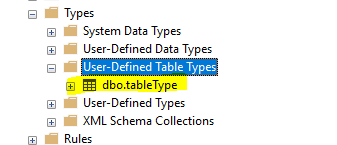
- Create a proc on the sink side . We are passing the TableType as a parameter , The SQL code you can change as per your logic .
CREATE PROCEDURE [dbo].TestProc
@TABLE1 dbo.tableType readonly
AS
BEGIN
MERGE ##Test1Destination AS target
USING @TABLE1 AS source
ON (target.id_new = source.id )
WHEN NOT MATCHED THEN
Insert (id_new) VALUES (source.id);
END
- Now got to the Sink tab and point to the proc which we created and also the TableType from Step#1 and name of the parameter as named in the proc ( in our case its table1 )

This worked for me , let me know if you have any query .
himanshusinha-msft
on 26 Jul 2019
Edit: Actually reviewing that again what you have outlined should work. I will try it and provide an update soon.
patrickgalbraith
on 26 Jul 2019
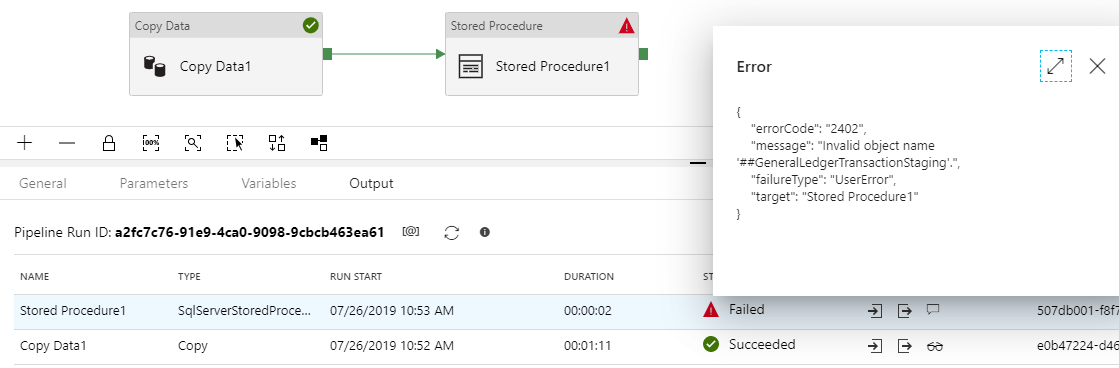
@himanshusinha-msft Copying the data to the temp table works. But accessing it from the subsequent stored procedure doesn't work.
patrickgalbraith
on 26 Jul 2019
Sorry but I really don't get why the global temporary table is immediately dropped after it's created from a stored procedure. Creating User defined table types it's only necessary to support ADF?
Doing everything from sql managment, using the same user as configured in data factory, the temp table is created and filled correctly. in ADF it's dropped as soon as it's created.
Here is the same problem found on stack overflow: https://stackoverflow.com/questions/56119601/how-to-create-temp-tables-in-sql-to-be-used-in-several-adf-activities
 myrocode
on 26 Jul 2019
myrocode
on 26 Jul 2019
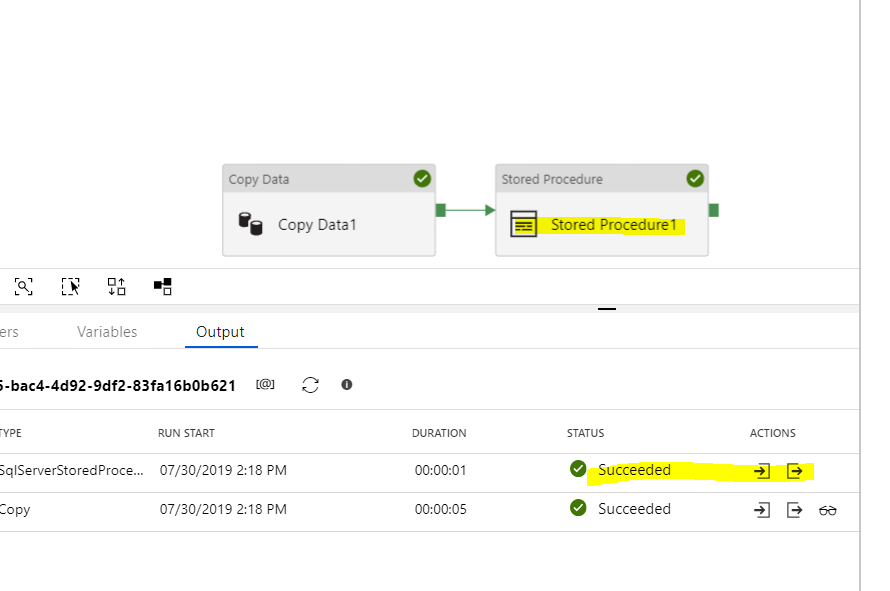
@patrickgalbraith : Apologizes for delay , unfortunately it just works fine for me . Adding the screenshot and also add the simple proc which it is calling .
Create Proc SetData
as
Insert into ##Test1Destination(id_new) values (1000)
himanshusinha-msft
on 30 Jul 2019
@himanshusinha-msft No luck on my end. Can you export the code for the pipeline that you are using.

patrickgalbraith
on 31 Jul 2019
I've been trying to accomplish the same, but have pinned the underlying issue due to scoping. The global temp table, while available to all users, persists only as long as the original session remains open. (See this link for temp table scoping.) The main points are:
- A local temporary table created in a stored procedure is dropped automatically when the stored procedure is finished.
- All other local temporary tables are dropped automatically at the end of the current session.
This is why the above recommendations fail because it's split across two separate sessions that ADF invokes. One for the initial INSERT and a second to execute the linked PROC.
To prove the issue, I opened a session in SSMS and created the global temp table there. I then left the session open and ran the ADF activities. It worked without any issue. If I close the session (and moved the create statement into the COPY job), the ADF SPROC activity will fail as it's unable to find the table referenced.
So the work around I created was creating an "Import" table that just persists forever. I know this defeats the purpose of utilizing the temp table, but I cannot find a practical way of persisting the session within ADF between two different activities. Further, this is complicated by other comments I read where session limits have a 2 hour timeout. So 1) you can't just leave a permanent session open that created the temp table and 2) if your downstream processing takes longer, the temp table would get dropped when the session hits the timeout limit.
This is why I created the other ticket, trying to get more information on the recommended approach on handling the creation of the temp table. The major benefit I have for using the temp table is that the initial INSERT into the temp table skips the transaction logging. So I would only have 1 log per record rather than 2 (initial insert into import table and then merge statement).
 jeffjwu
on 1 Aug 2019
jeffjwu
on 1 Aug 2019
@patrickgalbraith : I did revisited my pipeline and I was able to repro the issue . I have reached out to the internal team and we will update you once we hear from them .
@jeffjwu : We agree with all the inputs , while reproing the issue we did followed one of the many scenarios which you have mentioned . As mentioned before we have escalated the issue and will update the thread once we hear back from the team.
himanshusinha-msft
on 1 Aug 2019
@himanshusinha-msft Thanks for the update.
@jeffjwu Great overview of the issue. At the very least the documentation needs to be updated since what is being recommended is not possible.
The major benefit I have for using the temp table is that the initial INSERT into the temp table skips the transaction logging. So I would only have 1 log per record rather than 2 (initial insert into import table and then merge statement).
This is exactly why I am trying to do this with temp tables. This becomes important when you have millions of records to insert (something which ADF should handle).
patrickgalbraith
on 1 Aug 2019
@patrickgalbraith @jeffjwu .
The global table is active when the connection is active , once the connection is lost SQL drops the ## table. You can test it against SSMS directly.
“New Query” -> Run “createtemptable” -> Close Query & “New Query” -> Run “createtemptable” It always success in SSMS.
That is by design. . We won’t keep connection between 2 activities.
If you use a real table instead of temporary table. Then you will get the expected result.
The suggestion is don’t used temporary table in ADF if the data need more than 1 activities to access.
@linda33wj : It looks like this document needs some update , please review that and make the updates accordingly .
himanshusinha-msft
on 1 Aug 2019
I have raised this as a suggestion for Azure here https://feedback.azure.com/forums/270578-data-factory/suggestions/38287108-persist-global-temporary-tables-between-activities
For anyone reading this that might want his feature please upvote that suggestion.
patrickgalbraith
on 2 Aug 2019
@papatrickgalbraith I came across the same problem as you, and while the proposed request to persist the session (and implicitly the global temporary tables) across multiple activities will solve the problem, I think it's rather unlikely to be implemented. A more reasonable request in my opinion is to have a postCopyScript for the copy activity, the same way we have a preCopyScript. This way you could use the preCopyScript to create the temporary table (directly or using a stored procedure), then the activity to insert directly into the temporary table, and the postCopyScript to merge the data (directly or using a stored procedure).
 eugenpodaru
on 7 Aug 2019
eugenpodaru
on 7 Aug 2019
I looked, and there is already a request for that https://feedback.azure.com/forums/270578-data-factory/suggestions/34617748-post-copy-script-in-copy-activity
So please support it!
eugenpodaru
on 7 Aug 2019
@eugenpodaru Great point. I have posted a link to the feature request you mentioned on the one I raised.
patrickgalbraith
on 8 Aug 2019
@linda33wj can u update documentation and provide sample ADF code as well
 saumyasuhagiya
on 8 Jan 2020
saumyasuhagiya
on 8 Jan 2020
@himanshusinha-msft can you post sample code here. The solution is not working local/global temp tables.
saumyasuhagiya
on 8 Jan 2020
@himanshusinha-msft It seems like this was identified as incorrect doco in August. Here's a more recent stackoverflow question from someone who is still being misled by it. https://stackoverflow.com/questions/59649463/data-factory-copy-to-temporary-table
This is really just a _very_ convoluted way of getting no logging in the import table. Surely there are far better ways than this, i.e. implement bulk insert hints
 ElectricLlama
on 11 Jan 2020
ElectricLlama
on 11 Jan 2020
This approach will solve this issue: https://github.com/scoriani/azuresqlbulkupsert
 scoriani
on 19 May 2020
scoriani
on 19 May 2020
Thanks all for the feedback and sorry for the incorrect doc earlier. The section has been updated to clarify the current supported capabilities. We will continue evaluating the need to further smooth it. Please suggest/vote on https://feedback.azure.com/forums/270578-data-factory site.
please-close
 linda33wj
on 2 Jun 2020
linda33wj
on 2 Jun 2020
Related issues
 monteledwards
·
3Comments
monteledwards
·
3Comments
 JeffLoo-ong
·
3Comments
JeffLoo-ong
·
3Comments
 spottedmahn
·
3Comments
spottedmahn
·
3Comments
spottedmahn
·
3Comments
spottedmahn
·
3Comments
 jebeld17
·
3Comments
jebeld17
·
3Comments
Most helpful comment
@papatrickgalbraith I came across the same problem as you, and while the proposed request to persist the session (and implicitly the global temporary tables) across multiple activities will solve the problem, I think it's rather unlikely to be implemented. A more reasonable request in my opinion is to have a postCopyScript for the copy activity, the same way we have a preCopyScript. This way you could use the preCopyScript to create the temporary table (directly or using a stored procedure), then the activity to insert directly into the temporary table, and the postCopyScript to merge the data (directly or using a stored procedure).