Azure-docs: Need to install for VS 2019?
Use the link provided in one of the closed issues for this page.
Save the file and then run it as administrator.
I had to do this because VS tells me "Service Fabric SDK must be installed" when trying to create one of the service fabric project types. It shows an "Install" link but that just shows an error message with some long link that I cant copy and am not retyping by hand.
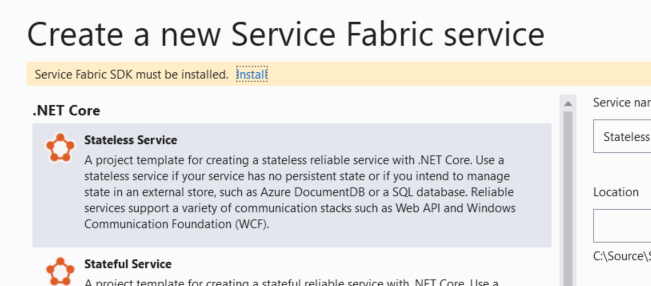
Once that installer was finished the notice on the create project wizard went away. I didn't have to close VS or anything.
Document Details
⚠ Do not edit this section. It is required for docs.microsoft.com ➟ GitHub issue linking.
- ID: 23e79576-36ff-8e39-9d21-adc897608b73
- Version Independent ID: bb904115-2166-6871-6347-0941dbb32d2a
- Content: Set up a Windows development environment for Azure microservices
- Content Source: articles/service-fabric/service-fabric-get-started.md
- Service: service-fabric
- GitHub Login: @aljo-microsoft
- Microsoft Alias: aljo
 StingyJack
All 15 comments
Please do not close this issue until the doc page is updated.
StingyJack
on 13 Jul 2019
@StingyJack, Thanks for leveraging Azure Docs feedback channel to raise this query and sharing your feedback, we are taking a look into this and will get back to you soon.
 AjayKumar-MSFT
on 14 Jul 2019
AjayKumar-MSFT
on 14 Jul 2019
@StingyJack Thanks for your feedback on the document, I am assigning the issue to the author for updating the document as appropriate.
 VikasPullagura-MSFT
on 15 Jul 2019
VikasPullagura-MSFT
on 15 Jul 2019
@StingyJack what exactly are you looking to have added to this doc? The entire doc explains and contains links to install the SDK.
Once you install the SDK, you are able to launch VS and run SF applications.
 mimckitt
on 15 Jul 2019
mimckitt
on 15 Jul 2019
@MicahMcKittrick-MSFT - See this post's title for additional installation context.
A picture of the specific thing to enable in the vs installer would be nice, cos I don't see it and may just be missing it.
Also the installer fails when not run as administrator.
StingyJack
on 15 Jul 2019
I will assign to the content authors to review
mimckitt
on 15 Jul 2019
Service Fabric Tools component must be installed in Visual Studio (2017/2019), from the Visual Studio Installer.
 pi3k14
on 24 Jul 2019
pi3k14
on 24 Jul 2019
@pi3k14 - can you share a screenshot of the option in the installer?
StingyJack
on 24 Jul 2019
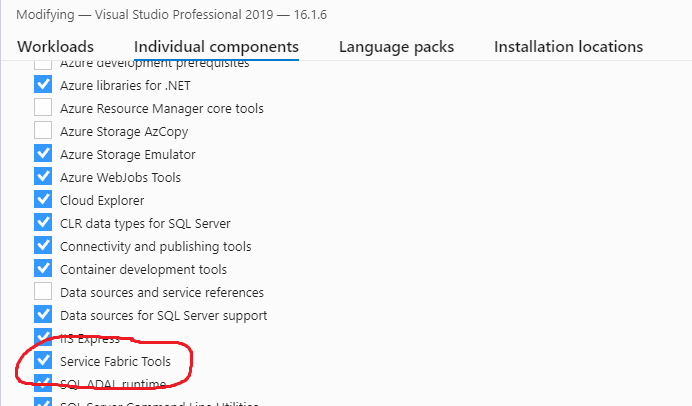
or you can install the complete "Azure development" Workload as mentioned in the install documentation.
pi3k14
on 24 Jul 2019
Thanks, that workload was definitely selected yet VS didn't find the service fabric tooling.
The manual installation instructions on the referenced content page are still missing a step or two.
StingyJack
on 24 Jul 2019
@StingyJack this issue was fixed in the 16.2 release of Visual Studio 2019. Are there any other issues that you are experiencing that you would like to have cleared up?
 peterpogorski
on 14 Aug 2019
peterpogorski
on 14 Aug 2019
Which of the issues was fixed?
StingyJack
on 14 Aug 2019
@StingyJack you can now download the SDK from Visual Studio by clicking directly on the link without having to run as an administrator.
peterpogorski
on 15 Aug 2019
please-close
 Nickomang
on 9 Sep 2019
Nickomang
on 9 Sep 2019
Sorry for the lack of response on this. Busy busy busy.
If the vs installer's individual component option for this feature could be included in the workload section, and any SDK installer missing steps be added to that linked doc page, I won't dispute the closure of this.
StingyJack
on 9 Sep 2019
Related issues
 jharbieh
·
3Comments
jharbieh
·
3Comments
 paulmarshall
·
3Comments
paulmarshall
·
3Comments
 spottedmahn
·
3Comments
spottedmahn
·
3Comments
 jamesgallagher-ie
·
3Comments
jamesgallagher-ie
·
3Comments
 JeffLoo-ong
·
3Comments
JeffLoo-ong
·
3Comments