Azure-docs: Windows Nodepool not being added to cluster
Followed all the steps documented here, however when attempting to add windows node pool this is the result:
"Operation failed with status: 'Bad Request'. Details: Windows profile definition is missing for the cluster."
Is there something that we are required to do as a prerequisite ?
This is my az cli details:
azure-cli 2.0.68
command-modules-nspkg 2.0.2 *
core 2.0.68
nspkg 3.0.4
telemetry 1.0.3
Extensions:
aks-preview 0.4.5
Document Details
⚠ Do not edit this section. It is required for docs.microsoft.com ➟ GitHub issue linking.
- ID: 6de70aec-9ebe-5655-6657-5c171de374b1
- Version Independent ID: c9eb35c8-8703-511b-987b-e2a441be2e47
- Content: Preview - Create a Windows Server container on an Azure Kubernetes Service (AKS) cluster
- Content Source: articles/aks/windows-container-cli.md
- Service: container-service
- GitHub Login: @TylerMSFT
- Microsoft Alias: twhitney
 tarifrr
All 5 comments
Thanks for the feedback! We are currently investigating and will update you shortly.
 mimckitt
on 9 Jul 2019
mimckitt
on 9 Jul 2019
reassign:MikkelHegn
I believe this is an issue on our side.
 TylerMSFT
on 9 Jul 2019
TylerMSFT
on 9 Jul 2019
These parameters for cluster creation are mandatory to get Windows support in the cluster. Please notice you cannot do this using the Portal.
    --windows-admin-password $PASSWORD_WIN \
    --windows-admin-username azureuser \
    --enable-vmss \
    --network-plugin azure
If you did add these at cluster creation time, please open a support ticket, so we can look in to why it's still failing.
 MikkelHegn
on 10 Jul 2019
MikkelHegn
on 10 Jul 2019
@MikkelHegn - yes those parameters were added. Do we need a particular subscription to use the Windows Node pool?
I am unable to open a Technical support ticket using Basic support so I have opened ticket 119071024000869 instead
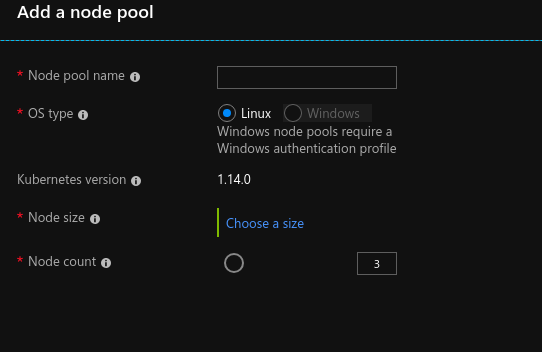
When I try to add a Windows NodePool from the portal this is what is shown:
tarifrr
on 10 Jul 2019
Currently the CLI will only create a Windows profile is the --windows_admin_username param is specified, regardless of whether the --windows_admin_password is specified, you can even specify the --windows_admin_password multiple times and it will not fail.
If you look at the cluster resource az aks show and don't see the Window profile (see below), then you would have to create a new cluster, we don't support add a Windows profile post cluster creation.
"windowsProfile": {
    "adminPassword": null,
    "adminUsername": "azureuser"
  }
Related issues
 jamesgallagher-ie
·
3Comments
jamesgallagher-ie
·
3Comments
 AronT-TLV
·
3Comments
AronT-TLV
·
3Comments
 ianpowell2017
·
3Comments
ianpowell2017
·
3Comments
 spottedmahn
·
3Comments
spottedmahn
·
3Comments
 mrdfuse
·
3Comments
mrdfuse
·
3Comments
Most helpful comment
reassign:MikkelHegn
I believe this is an issue on our side.