Azure-docs: Good information, but if the Organization doesn't give me access, I can't get rid of myself...
I now see this organization in my list of Teams until they agree to remove me, assuming they even know how. I am at their mercy! Microsoft should provide a way for lowest-level role "guest" accounts to submit a a request to have themselves removed from remote organization's Azure AD so that we can effectively Op Out of teams we no longer want to be part of...
Document Details
⚠ Do not edit this section. It is required for docs.microsoft.com ➟ GitHub issue linking.
- ID: b448cfd0-b673-7d04-047b-71aa62bebc27
- Version Independent ID: 75118bff-94de-c9f9-7666-d2a6f4253b11
- Content: Leave an organization as a guest user - Azure Active Directory
- Content Source: articles/active-directory/b2b/leave-the-organization.md
- Service: active-directory
- Sub-service: b2b
- GitHub Login: @msmimart
- Microsoft Alias: mimart
 DKiefer770
All 6 comments
Hi @DKiefer770 Thank you for your feedback! We will review and provide an update as appropriate.
 DixitArora-MSFT
on 2 Jul 2019
DixitArora-MSFT
on 2 Jul 2019
@DKiefer770 If you logon to the URL https://account.activedirectory.windowsazure.com/r#/profile/organizations#organizations-section/ you would automatically see all the organisations you are given a guest access in . and then you can just signin to the organisation to leave the organisation.
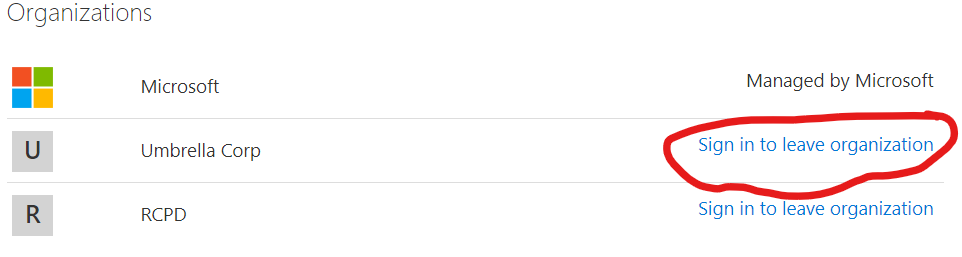
It is designed in such a way that the guest user can leave an organisation without requiring to contact any admin. they can do it themselves using the My apps portal which ultimately redirects to https://account.activedirectory.windowsazure.com/r#/applications and on the top right corner you can click your user profile picture to get a menu which has a gear symbol and can be used to get to https://account.activedirectory.windowsazure.com/r#/profile/organizations#organizations-section/ where you can achieve your goal of un-linking from the 3rd party tenant/orgnaisation as per your requirement. Should you have any further query on this , please send us an email at azcommunity[at]microsoft[dot]com and we can have an offline discussion with you and provide you alternate support options. I would like to check the scenario where you were unable to do this and help you further. We look forward to helping you on this , please get in touch with us in case the explanation provided here does not help.
Thank you.
 shashishailaj
on 8 Jul 2019
shashishailaj
on 8 Jul 2019
"you can just sign-in to the organisation to leave the organisation"...
But - that doesn't work if the account is locked, or deleted - I have 3-4 organisations that I haven't worked at for a year or more - and - I can't remove them...
 kachihro
on 21 Aug 2019
kachihro
on 21 Aug 2019
I have the same issue, I can't leave an organization where my account was blocked and I can't reach the subscription owner to unlock my account.
So how can I leave that organization?
This problem let me unable to navigate to https://account.activedirectory.windowsazure.com because I always receive the error "Your account has been locked. Contact your support person to unlock it, then try again.".
 rcappello
on 21 Feb 2020
rcappello
on 21 Feb 2020
Any updates around other methods to leave old organizations? I have someone who had a phone number change, so currently unable to sign in to MS Teams, or sign in to leave the old organization.
 edogwv
on 11 Mar 2020
edogwv
on 11 Mar 2020
I have the same issue as well. I am orphaned by "Microsoft Community and Events Tenant". I have an annoying notification showing I have activity waiting for me to check, but I can't login or access the tenant. Like the others, I am not able to login, therefore I cannot remove myself. Is there a registry hack I could do?
 Larmoyeux
on 14 May 2020
Larmoyeux
on 14 May 2020
Related issues
 spottedmahn
·
3Comments
spottedmahn
·
3Comments
 Favna
·
3Comments
Favna
·
3Comments
 behnam89
·
3Comments
behnam89
·
3Comments
 varma31
·
3Comments
varma31
·
3Comments
 Agazoth
·
3Comments
Agazoth
·
3Comments
Most helpful comment
"you can just sign-in to the organisation to leave the organisation"...
But - that doesn't work if the account is locked, or deleted - I have 3-4 organisations that I haven't worked at for a year or more - and - I can't remove them...