Azure-docs: Fails to upload pre-built oms view design file
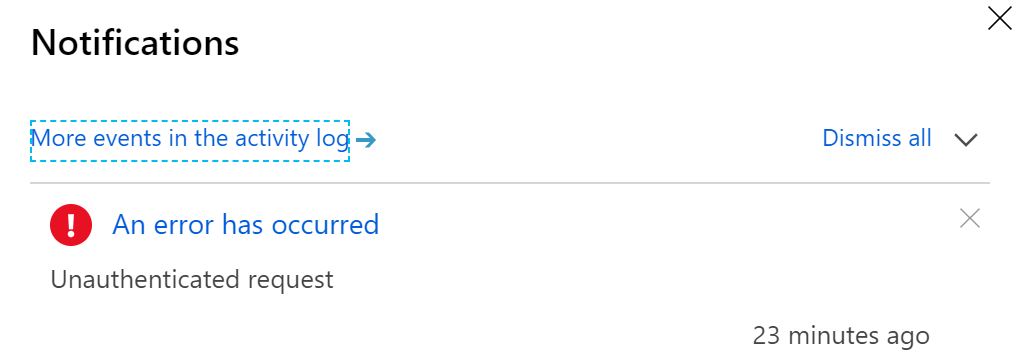
Can't upload the view design file, which notify me this is a "Unauthenticated request"
Document Details
⚠ Do not edit this section. It is required for docs.microsoft.com ➟ GitHub issue linking.
- ID: 9cae98ea-9e50-d614-5dca-5cf87af2db51
- Version Independent ID: ac34e838-5337-f978-1864-2ec4254366b5
- Content: Monitor Azure SQL Data Sync with Azure Monitor logs
- Content Source: articles/sql-database/sql-database-sync-monitor-oms.md
- Service: sql-database
- Sub-service: data-movement
- GitHub Login: @allenwux
- Microsoft Alias: xiwu
 Ccccche
All 16 comments
@Ccccche Thanks for the feedback! We are currently investigating and will update you shortly.
 Alberto-Vega
on 25 May 2019
Alberto-Vega
on 25 May 2019
@Ccccche We are unable to reproduce the error you have described.
Request you to post this issue on our MSDN Forum so that we can work with you to troubleshoot further and assist you.
 KalyanChanumolu-MSFT
on 31 May 2019
KalyanChanumolu-MSFT
on 31 May 2019
We will proceed to close this issue now.
If there are further questions regarding this matter, please comment and we will gladly continue the discussion.
KalyanChanumolu-MSFT
on 31 May 2019
I am having the same issue. When I select the file, the message "Cannot convert the view. Check the view queries." displays below the "Choose File" button. The notification in the Azure portal displays an error that says "Unauthenticated request."
 sc-bperry
on 15 Jul 2019
sc-bperry
on 15 Jul 2019
I am having the same issue. When I select the file, the message "Cannot convert the view. Check the view queries." displays below the "Choose File" button. The notification in the Azure portal displays an error that says "Unauthenticated request."
Hey, if you search it on google you can find that it may cause by a version problems. This design file only works on a powershell portal. It doesn't work on a Azure web portal(I don't know why). There is no solution for this issue, unless they would re-write the design file I guess.
Ccccche
on 16 Jul 2019
Thanks! I'm not familiar with the PowerShell portal for the monitor views. I can pull the info I need directly from Log Analytics queries so I probably don't need the views anyway. I'm guessing this feature isn't used much since the docs are old (they still use the term "OMS").
sc-bperry
on 16 Jul 2019
@Ccccche @sc-bperry Thanks for your feedback regarding the document. We will work with the document owners to update the same. We are reopening this issue.
 NavtejSaini-MSFT
on 16 Jul 2019
NavtejSaini-MSFT
on 16 Jul 2019
@allenwux Assigning this to you for further review as we are able to reproduce this issue(Attachments attached). The DataSyncLogOmsView.omsview files is not getting imported to the Log Analytics Workspace as mentioned in the doc and gives an error : "Cannot convert the view. Check the view queries" and the notifications tab gives the error of "Unauthenticated request"
Please let me know if you need any further information regarding the same and we will do the needful.

NavtejSaini-MSFT
on 16 Jul 2019
@allenwux Any update regarding this issue.
NavtejSaini-MSFT
on 12 Sep 2019
I'll look into the current behavior and verify/update the doc if needed. Thanks!
reassign:stevestein
 stevestein
on 11 Oct 2019
stevestein
on 11 Oct 2019
It looks like this is probably a bug in the portal rather than a doc bug. @CarlRabeler could you please see if you agree and pass the problem along to the product team. You can decide if we need a note in the article and then close the issue after it has been reported. Apologies to all of you who have run into this problem! #reassign:CarlRabeler
 rothja
on 14 Nov 2019
rothja
on 14 Nov 2019
@rothja opened an email thread with @allenwux
 CarlRabeler
on 14 Nov 2019
CarlRabeler
on 14 Nov 2019
Please assign to @allenwux
CarlRabeler
on 13 Apr 2020
@allenwux I'm assigning this issue to you. Thank you! #reassign:allenwux
rothja
on 14 Apr 2020
@allenwux @Ccccche @sc-bperry It looks like this is a product bug rather than a documentation issue. If you think the documentation is wrong or misleading in this scenario, please let us know, and we'll investigate further how to improve the docs. It looks like maybe there have been some work arounds that you've found, so I hope this hasn't been blocking you during this time. What I would suggest if you agree this is a product problem is to file your feedback in the SQL Server feedback channel. Other customers with the same problem can vote on these issues to raise the priority. I am going to close the issue now, but please let me know if I can help further. Thank you! #please-close
rothja
on 2 Jun 2020
rothja
on 2 Jun 2020
Related issues
 mrdfuse
·
3Comments
mrdfuse
·
3Comments
 spottedmahn
·
3Comments
spottedmahn
·
3Comments
 jebeld17
·
3Comments
jebeld17
·
3Comments
 bdcoder2
·
3Comments
bdcoder2
·
3Comments
 jamesgallagher-ie
·
3Comments
jamesgallagher-ie
·
3Comments