Azure-docs: Check-in GitHub button is grayed out
I've already synced my source control (Git repo). However this repo is empty which is expected. I'm trying to source control one of my runbooks that as of now only exists in my Azure Automation account, however I have not found in the documentation how to do this.
I noticed that the "Check-in" GitHub button was grayed out, did i miss something when setting up my source control?
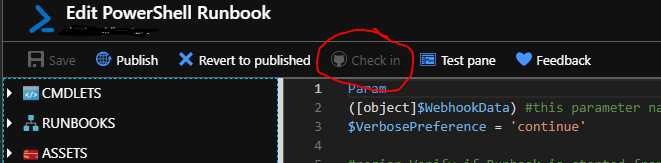
How can I push newly created runbooks from Azure Automation to GitHub?
Document Details
⚠ Do not edit this section. It is required for docs.microsoft.com ➟ GitHub issue linking.
- ID: 83c90e64-b615-711f-a53d-fc76606e2ecd
- Version Independent ID: 2d164036-6886-4440-50f7-369f99f41cea
- Content: Source Control integration in Azure Automation
- Content Source: articles/automation/source-control-integration.md
- Service: automation
- Sub-service: process-automation
- GitHub Login: @georgewallace
- Microsoft Alias: gwallace
 saulcruz
All 4 comments
@saulcruz Thanks for your comment. We are actively investigating and will get back to you shortly. Thanks for your patience.
 femsulu
on 21 May 2019
femsulu
on 21 May 2019
@saulcruz Thanks for reaching out.. This button should actually not be in the portal anymore.. We will be working to get it removed soon. The current source control feature in Azure Automation only supports single direction sync from your source control repo to your Automation Account as described in the doc. This button you point out in the UI does not work. Sorry for any confusion this may have caused, and as mentioned we will be removing this from the UI.
 georgewallace
on 21 May 2019
georgewallace
on 21 May 2019
We will now close this issue. If there are further questions regarding this matter, please reply and we will gladly continue the discussion.
femsulu
on 21 May 2019
Are there any plans to enable pushing again in the future?
If this is going away, any chance of getting a peak at the source code on the "Sync-MicrosoftAzureAutomationAccountToGitHubV1" runbook mentioned on the Legacy Source Control page to maybe develop our own push to GitHub tool?
 andrew-ps
on 29 May 2019
andrew-ps
on 29 May 2019
Related issues
 spottedmahn
·
3Comments
spottedmahn
·
3Comments
 Favna
·
3Comments
Favna
·
3Comments
 JeffLoo-ong
·
3Comments
JeffLoo-ong
·
3Comments
 jamesgallagher-ie
·
3Comments
jamesgallagher-ie
·
3Comments
 bdcoder2
·
3Comments
bdcoder2
·
3Comments