Azure-docs: Create Azure Function V1 in VS 2019
I want to target the .NET Framework 4.7.2 using Azure Functions. I understand that this is impossible using the second version of Aure functions but it is doable with V1.
I'm using VS 2019 and when I create an Azure Function it is by default V2 targeting .NET CORE. When I try to change that in .csproj I get an incompatibility in packages and it doesn't run.
How can I create an azure function V1 targetting the net framework 4.7.2 in VS 2019?
PS: I posted also this question on https://docs.microsoft.com/en-us/azure/azure-functions/functions-create-your-first-function-visual-studio since I was not sure which page is more suitable for the question
Document Details
⚠ Do not edit this section. It is required for docs.microsoft.com ➟ GitHub issue linking.
- ID: 1df5e2bd-489d-19b2-87d3-d993ebb82021
- Version Independent ID: 9e9d9ded-8f40-22be-4654-48c87f2c59e8
- Content: Azure Functions runtime versions overview
- Content Source: articles/azure-functions/functions-versions.md
- Service: azure-functions
- GitHub Login: @ggailey777
- Microsoft Alias: glenga
 YaraZakaria
All 7 comments
@YaraZakaria Thank you for your feedback! We will review and provide an update as appropriate.
 KetanChawda-MSFT
on 20 May 2019
KetanChawda-MSFT
on 20 May 2019
@KetanChawda-MSFT
Noting that I tried to uninstalled the Microsoft.Azure.WebJobs.Extensions.ServiceBus 3.0.3 (the default package which was when i created the project) and which was causing the conflict. I installed instead Microsoft.Azure.WebJobs.ServiceBus 2.3.0.
Now when I run the project I don't get errors or conflict warning, it runs but does nothing. So I tried with nothing but the default code :
using Microsoft.Azure.WebJobs;
using Microsoft.Extensions.Logging;
namespace FunctionApp2
{
public static class Function1
{
[FunctionName("Function1")]
public static void Run([ServiceBusTrigger("queue-test-1", Connection = "ServiceBusConnection")]string myQueueItem, ILogger log)
{
log.LogInformation($"C# ServiceBus queue trigger function processed message: {myQueueItem}");
}
}
}
But I get nothing! no errors, no warnings, and no logged information. The black windows console don't even pop out after running the program.
This is my .csproj too
<Project Sdk="Microsoft.NET.Sdk">
<PropertyGroup>
<TargetFramework>net472</TargetFramework>
<AzureFunctionsVersion>v1</AzureFunctionsVersion>
</PropertyGroup>
<ItemGroup>
<PackageReference Include="Microsoft.Azure.WebJobs.ServiceBus" Version="2.3.0" />
<PackageReference Include="Microsoft.CrmSdk.CoreAssemblies" Version="9.0.2.12" />
<PackageReference Include="Microsoft.NET.Sdk.Functions" Version="1.0.28" />
</ItemGroup>
<ItemGroup>
<None Update="host.json">
<CopyToOutputDirectory>PreserveNewest</CopyToOutputDirectory>
</None>
<None Update="local.settings.json">
<CopyToOutputDirectory>PreserveNewest</CopyToOutputDirectory>
<CopyToPublishDirectory>Never</CopyToPublishDirectory>
</None>
</ItemGroup>
</Project>
@YaraZakaria Here are the steps for creating Azure Function v1 using VS 2019:
- Create a new project and select Azure Function template using the VS 2019 template:

- Click
Nextand Configure your project with the required details:
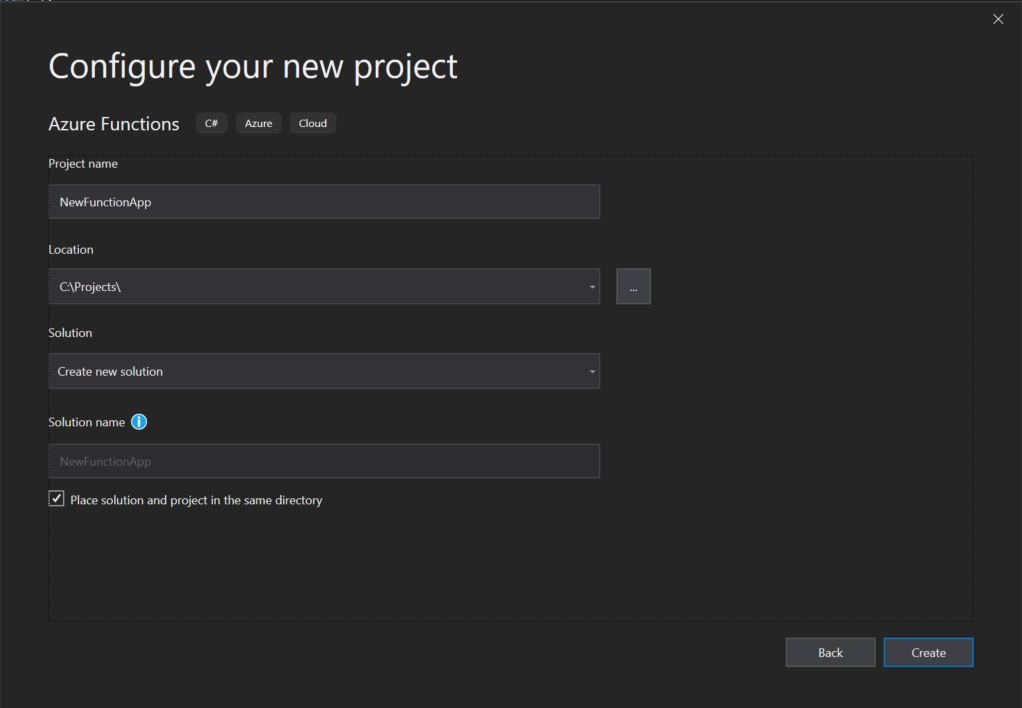
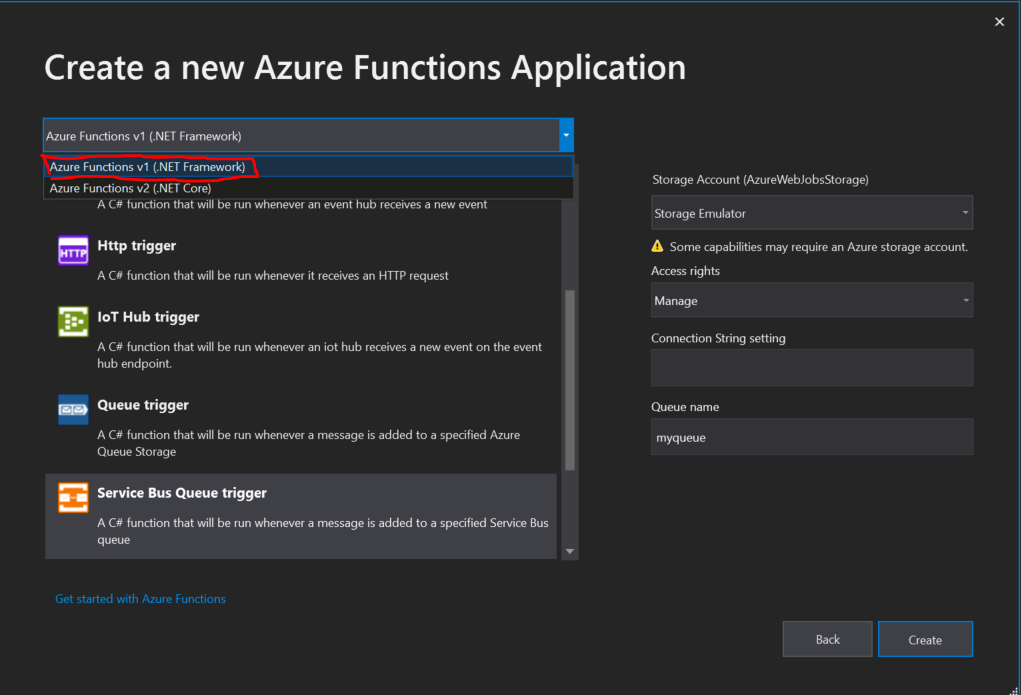
- Click Create button and select the Azure Function v1 from the drop-down and choose your function template from the list (I have selected Service Bus Queue Trigger).
- Function will be created with default code as shown below:
using Microsoft.Azure.WebJobs;
using Microsoft.Azure.WebJobs.Host;
using Microsoft.ServiceBus.Messaging;

namespace FunctionApp13
{
    public static class Function1
    {
        [FunctionName("Function1")]
        public static void Run([ServiceBusTrigger("myqueue", AccessRights.Manage, Connection = "conn")]string myQueueItem, TraceWriter log)
        {
            log.Info($"C# ServiceBus queue trigger function processed message: {myQueueItem}");
        }
    }
}
- Change the Target Framework to 4.7.2 from the project properties.
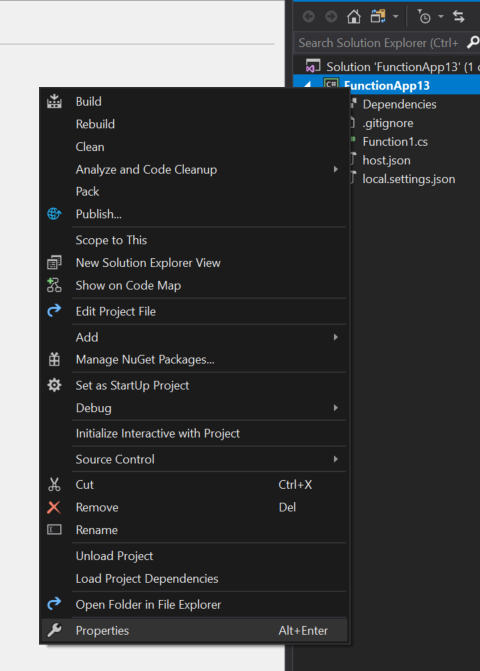
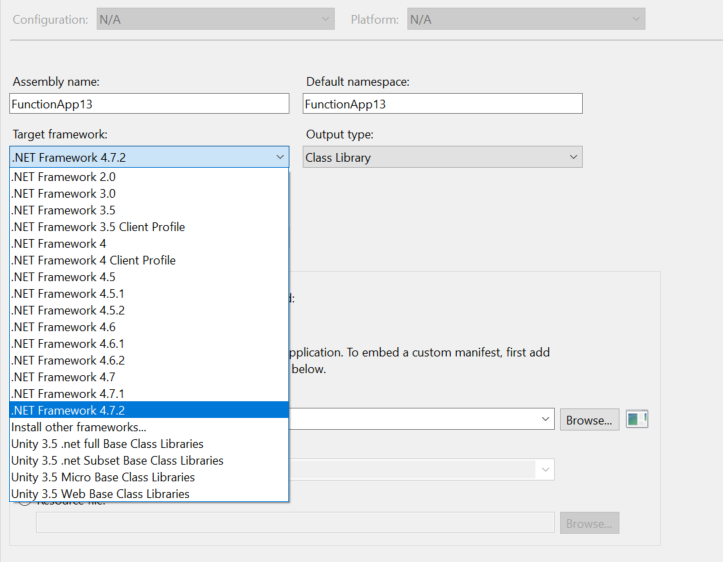
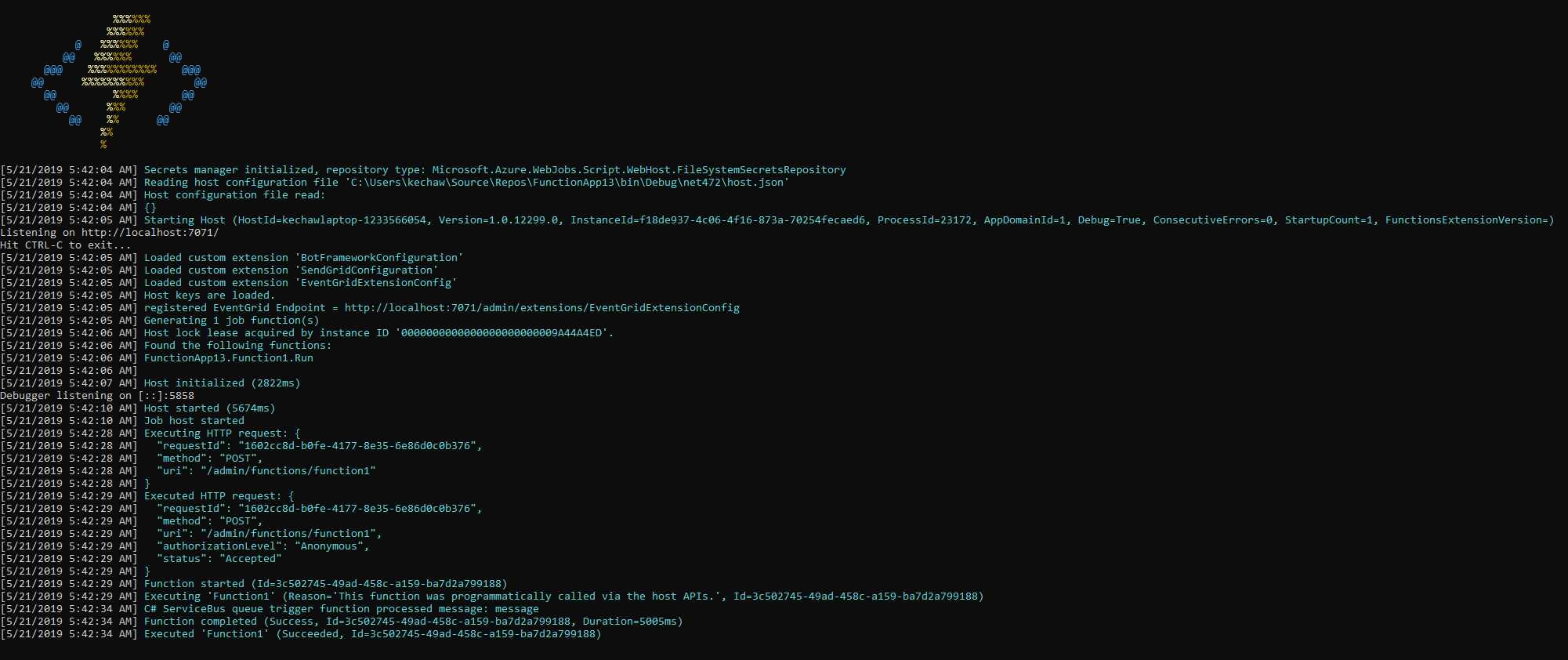
I tested running my project and it worked fine. Here is my project file look like:
<Project Sdk="Microsoft.NET.Sdk">
  <PropertyGroup>
    <TargetFramework>net472</TargetFramework>
    <AzureFunctionsVersion>v1</AzureFunctionsVersion>
  </PropertyGroup>
  <ItemGroup>
    <PackageReference Include="Microsoft.Azure.WebJobs.ServiceBus" Version="2.2.0" />
    <PackageReference Include="Microsoft.NET.Sdk.Functions" Version="1.0.24" />
  </ItemGroup>
  <ItemGroup>
    <Reference Include="Microsoft.CSharp" />
  </ItemGroup>
  <ItemGroup>
    <None Update="host.json">
      <CopyToOutputDirectory>PreserveNewest</CopyToOutputDirectory>
    </None>
    <None Update="local.settings.json">
      <CopyToOutputDirectory>PreserveNewest</CopyToOutputDirectory>
      <CopyToPublishDirectory>Never</CopyToPublishDirectory>
    </None>
  </ItemGroup>
</Project>
Function Output:
KetanChawda-MSFT
on 21 May 2019
@KetanChawda-MSFT Thank you so much.. I see it is simple now, i just couldn't see it before I was so focused on changing packages and all. It works.
Thank you again!
YaraZakaria
on 21 May 2019
@YaraZakaria had the same issue here. Wish they would make this more obvious. It is really frustrating that things you have done 100 times before, with no issues, suddenly become hidden and harder to do. This is the case with V1 functions in the Azure Portal and now in Visual Studio too. There are still many people using .NET Framework, don't forget about us or make our lives continuously harder.
 euangordon
on 21 Oct 2019
euangordon
on 21 Oct 2019
+1
I walked past that UX once without seeing it, then amazingly once again AFTER I knew it was there - and what it looked like and what page it was on - because even though I knew I had to look for it, I still wasn't seeing it!
One issue for me is probably that I did not expect to find it on the same page as the one which asks me which kind of function trigger I want to use. But a bigger issue was probably just that the 'which kind of trigger do you want' which was a much more visually obvious question, and immediately grabbed all my attention. Whereas the 'v1' vs 'v2' question I was being asked made no sense to my brain, so I just kind of skimmed past it - even though framework target was also there as explanatory text. And there was a default selection, so I could just click on by...
Also most of the other project types give you choice of target framework a different way, that was a bit confusing too...
 TimLovellSmith
on 14 Apr 2020
TimLovellSmith
on 14 Apr 2020
@TimLovellSmith My experiences exactly. If I didn't want a user to find the functionality, this is where I would have put it. Exactly where it is not expected. They could have put it on a separate modal, or even not setting the default to the latest version and forcing the user to select would have been better.
euangordon
on 14 Apr 2020
Related issues
 monteledwards
·
3Comments
monteledwards
·
3Comments
 Ponant
·
3Comments
Ponant
·
3Comments
 varma31
·
3Comments
varma31
·
3Comments
 Agazoth
·
3Comments
Agazoth
·
3Comments
 ianpowell2017
·
3Comments
ianpowell2017
·
3Comments
Most helpful comment
@YaraZakaria Here are the steps for creating Azure Function v1 using VS 2019:
Nextand Configure your project with the required details:I tested running my project and it worked fine. Here is my project file look like:
Function Output: