Azure-docs: How to enable stdoutLogEnabled=true when site is deployed with Run From Package
As the wwwroot folder becomes read only what is the recommended way to set the stdoutLogEnabled=true property in web.config.
Need some guidance on how to debug Asp.Net Core startup issues in an Azure App Service after deployment using "Run From Package" via the Azure App Service Deploy task in Azure DevOps?
thanks
Jon
Document Details
⚠ Do not edit this section. It is required for docs.microsoft.com ➟ GitHub issue linking.
- ID: cbd2779f-df70-05e1-0589-8220f850a44f
- Version Independent ID: c1118090-18b5-f630-d4b0-c588328a4b5a
- Content: Run your Azure Functions from a package
- Content Source: articles/azure-functions/run-functions-from-deployment-package.md
- Service: azure-functions
- GitHub Login: @ggailey777
- Microsoft Alias: glenga
 jonlanceley
All 10 comments
Hi @jonlanceley Thank you for your feedback! We will review and update as appropriate.
 mike-urnun-msft
on 16 May 2019
mike-urnun-msft
on 16 May 2019
@jonlanceley Common causes of startup issues like 502.5 (Process Failure) is listed below:
- The application process start application process failed to start.
- Started but then stopped.
- The application started but failed to listen on the configured port.
For enabling stdlogs, follow this :
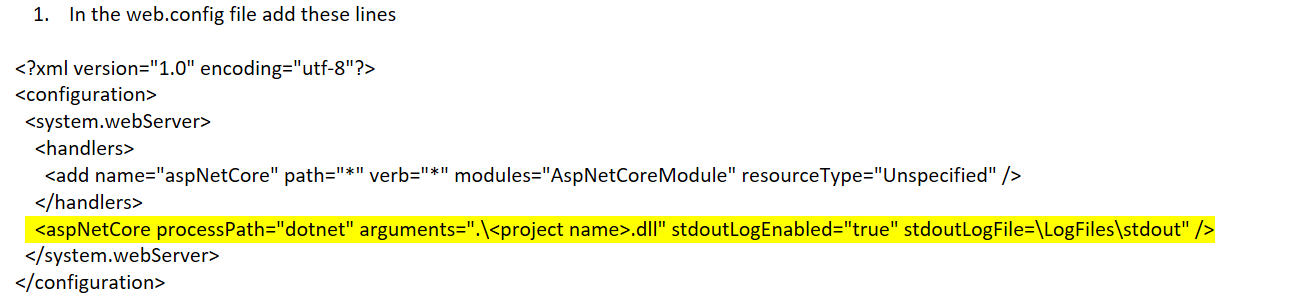
You can also gather more information for the startup issues by adding two lines in Program.cs
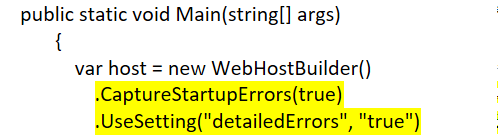
For more information follow this doc : https://docs.microsoft.com/en-us/aspnet/core/host-and-deploy/aspnet-core-module?view=aspnetcore-2.2#log-creation-and-redirection
 DixitArora-MSFT
on 20 May 2019
DixitArora-MSFT
on 20 May 2019
@jonlanceley For now I will proceed with closure of this and If there are further questions regarding this matter, please tag me in your reply. We will gladly continue the discussion and we will reopen the issue.
DixitArora-MSFT
on 21 May 2019
When deployed via "Run From Package", you cannot edit the web.config.
Instead of adding the additional code, you can set the values of the following environment variables to true, from within the Application Settings section in the portal:
ASPNETCORE_CAPTURESTARTUPERRORS
ASPNETCORE_DETAILEDERRORS
You should then see the stack trace of the startup exception when you refresh the page.
 crackalak
on 3 Mar 2020
crackalak
on 3 Mar 2020
@jonlanceley Common causes of startup issues like 502.5 (Process Failure) is listed below:
- The application process start application process failed to start.
- Started but then stopped.
- The application started but failed to listen on the configured port.
For enabling stdlogs, follow this :
You can also gather more information for the startup issues by adding two lines in Program.cs
For more information follow this doc : https://docs.microsoft.com/en-us/aspnet/core/host-and-deploy/aspnet-core-module?view=aspnetcore-2.2#log-creation-and-redirection
There is no web.config in _ASP.NET Core_ app (web.config is generated automatically after publishing the project - at least in my case). As to adding those two lines into ConfigureWebHostDefaults method - it did not work: I still have startup errors and they are not reported in details anywhere: for that, I have to create the folder manually so the app could log _stdout_ errors there (after providing write access for its _application pool_ to that folder). Probably this needs to be configured in other way (via the project file?)
 alexandis
on 18 May 2020
alexandis
on 18 May 2020
@alexandis
running into the same problem -
did you ever find the solution?
 toy-opensource
on 20 Jun 2020
toy-opensource
on 20 Jun 2020
@alexandis
running into the same problem -
did you ever find the solution?
No. So we need to find out the way to override those two stdOutLog[...] parameters via a project file. It’s sad they do not publish anywhere how to do that: it needs to be possible to override EACH line of web.config which is being created.
alexandis
on 20 Jun 2020
@alexandis
ive been googling FOR HOURS!
apparently you and i are the only 2 people on the planet who have a need for this issue
posted to SO...
toy-opensource
on 20 Jun 2020
@alexandis
got an answer and legit response on SO
https://stackoverflow.com/questions/62482070/how-to-set-stdout-true-while-doing-a-webdeploy-for-asp-net-core-v3-1-app
toy-opensource
on 23 Jun 2020
@alexandis
got an answer and legit response on SO
https://stackoverflow.com/questions/62482070/how-to-set-stdout-true-while-doing-a-webdeploy-for-asp-net-core-v3-1-app
Thank you very much!
alexandis
on 24 Jun 2020
Related issues
 Favna
·
3Comments
Favna
·
3Comments
 mrdfuse
·
3Comments
mrdfuse
·
3Comments
 jamesgallagher-ie
·
3Comments
jamesgallagher-ie
·
3Comments
 paulmarshall
·
3Comments
paulmarshall
·
3Comments
 Ponant
·
3Comments
Ponant
·
3Comments
Most helpful comment
@alexandis
got an answer and legit response on SO
https://stackoverflow.com/questions/62482070/how-to-set-stdout-true-while-doing-a-webdeploy-for-asp-net-core-v3-1-app