Azure-docs: I don't see the "Keys" section in Settings
I'm the owner of my CosmosDB resource. Still I don't see the "Keys" section in the left list? Why so?
Document Details
⚠ Do not edit this section. It is required for docs.microsoft.com ➟ GitHub issue linking.
- ID: 6278ead7-854a-a291-89f3-299432737ffb
- Version Independent ID: b2b292bb-1beb-aaef-157c-7b70f5c96bdb
- Content: Learn how to secure access to data in Azure Cosmos DB
- Content Source: articles/cosmos-db/secure-access-to-data.md
- Service: cosmos-db
- GitHub Login: @rimman
- Microsoft Alias: rimman
 croraf
All 5 comments
@croraf Thank you for the inquiry. There should be a blade specific for managing keys:
.png?sv=2018-03-28&sr=b&sig=TCCsKBI30u4%2BqeTA95uXx7Qn%2FEJ5vfe4U4dQ6%2BsJYPs%3D&st=2019-05-07T17%3A49%3A48Z&se=2022-05-07T17%3A54%3A48Z&sp=rw "Screenshot (466).png")
 Mike-Ubezzi-MSFT
on 7 May 2019
Mike-Ubezzi-MSFT
on 7 May 2019
@Mike-Ubezzi-MSFT No. I have completly different view:

And I have the owner role. Maybe it's different cosmos db version, or?
I have a mongo api btw.
croraf
on 7 May 2019
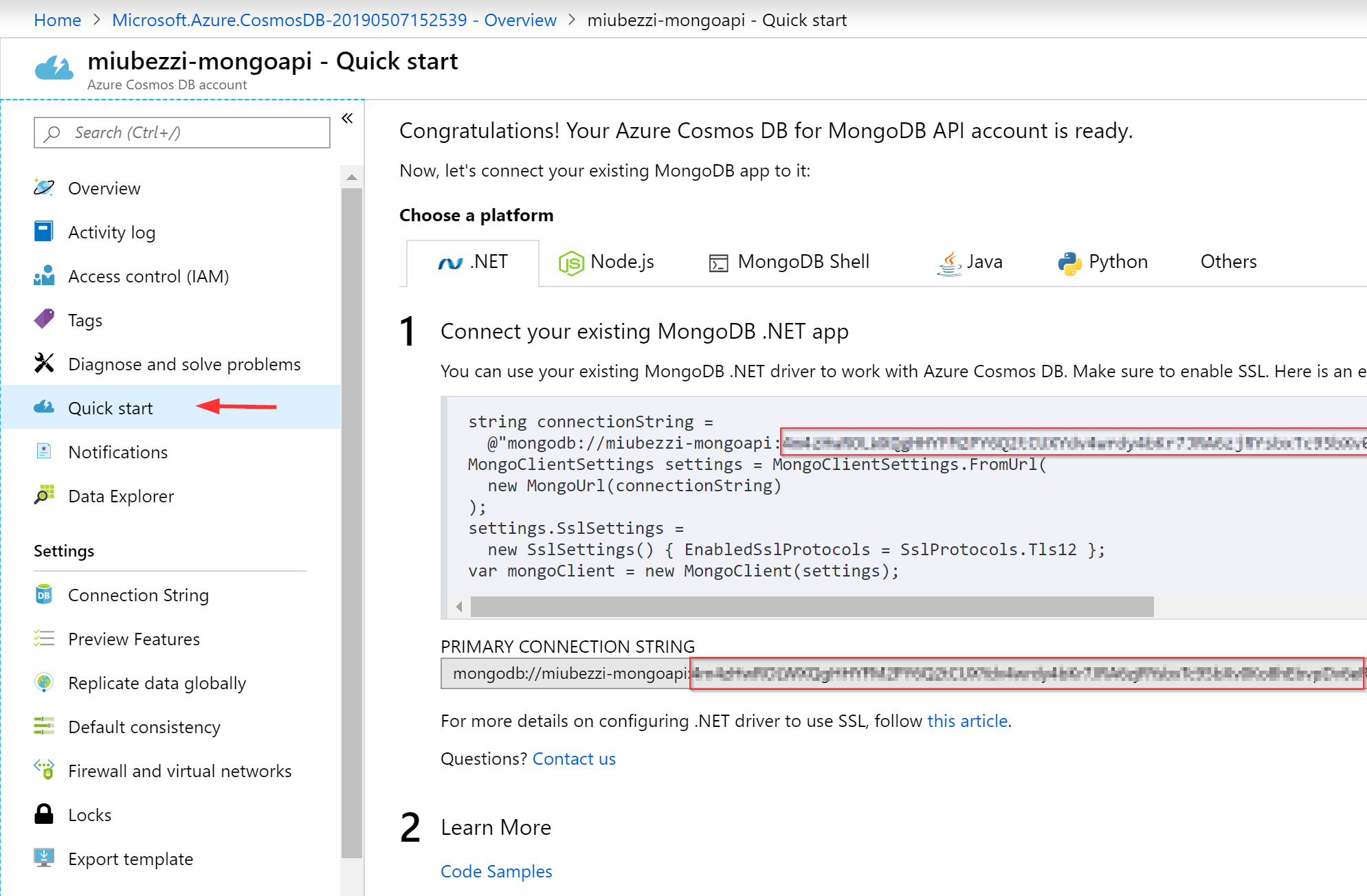
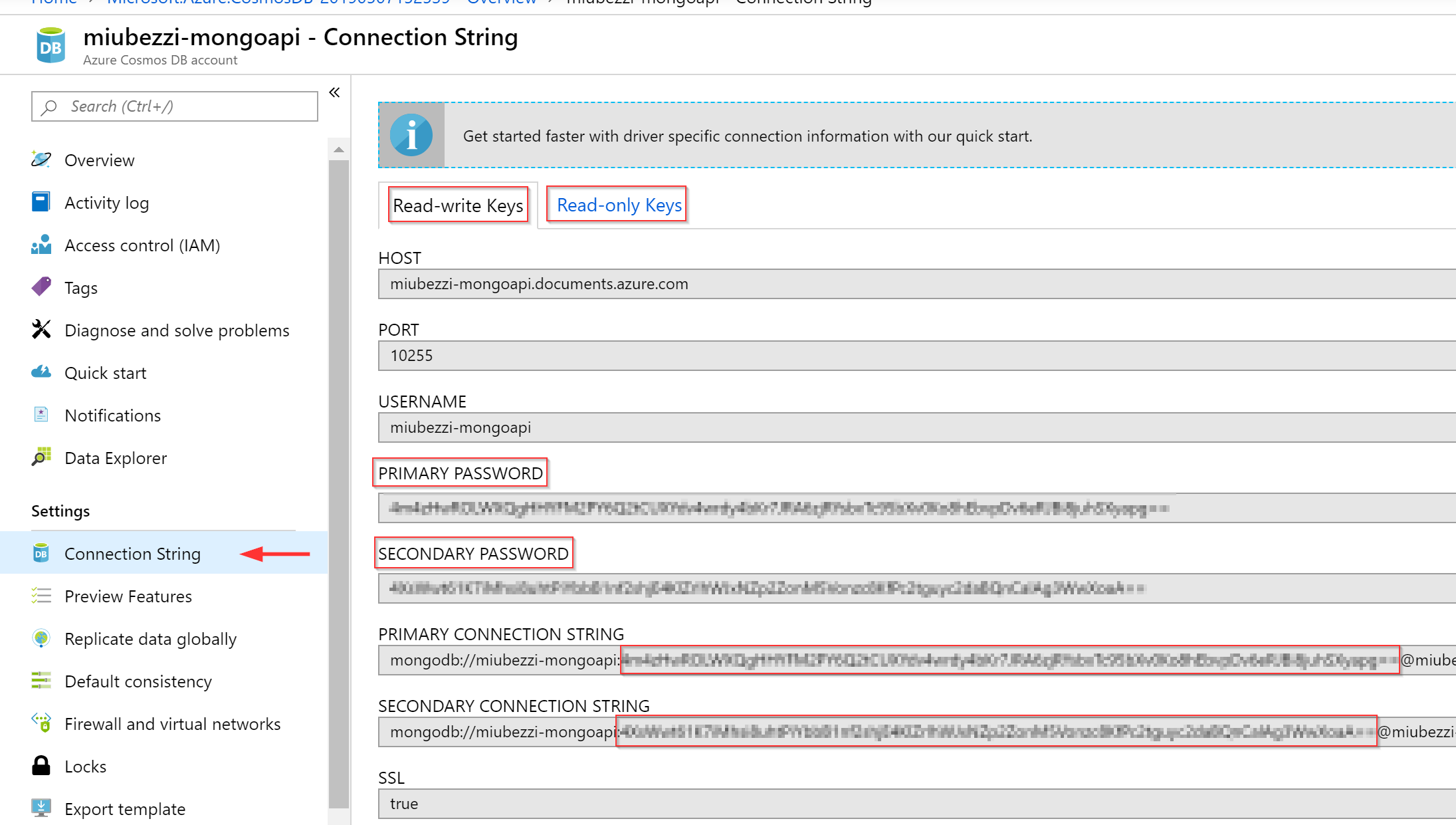
@croraf The Connection String blade and the Quick Start blade can be used to source what is called a password in MongoDB API, for both Read-Write and Read-Only 'keys'. Providing you full screen captures to show you what I see:
Mike-Ubezzi-MSFT
on 8 May 2019
@Mike-Ubezzi-MSFT So these Primary Password and Secondary Password are the same as master primary key and master secondary key from the section "Master key tokens" from this page https://docs.microsoft.com/en-us/rest/api/cosmos-db/access-control-on-cosmosdb-resources?redirectedfrom=MSDN ?
croraf
on 8 May 2019
This is correct. The Cosmos DB for MongoDB API does not have REST capabilities so the keys simply act as a password. The username is the name of the API instance you created. The SQL API has both the SQL API and the REST API as service endpoints and the key concept is part of Access Control, per the document you referenced.
Mike-Ubezzi-MSFT
on 8 May 2019
Related issues
 jamesgallagher-ie
·
3Comments
jamesgallagher-ie
·
3Comments
 Favna
·
3Comments
Favna
·
3Comments
 JeffLoo-ong
·
3Comments
JeffLoo-ong
·
3Comments
 Agazoth
·
3Comments
Agazoth
·
3Comments
 bdcoder2
·
3Comments
bdcoder2
·
3Comments