Azure-docs: How can I add "UPN" to User Attributes & Claims page?
When I set "http://schemas.xmlsoap.org/ws/2005/05/identity/claims/upn" to name and namespace,
it said "This claim type is restricted".
I know "UPN" is under "SAML restricted claim set" in PowerShell page, but I could set
this attribute in "Old experience" page.
It is quite confusing to me and wondering why.
Is there a policy setting or Powershell command to allow Azure AD to output this attribute in SAML response?
Document Details
⚠ Do not edit this section. It is required for docs.microsoft.com ➟ GitHub issue linking.
- ID: d362c1b5-1460-4de9-c53d-f0ec1ef07742
- Version Independent ID: 9dc0a4df-81c8-13eb-720f-f589a3712e42
- Content: Customize claims issued in the SAML token for enterprise applications in Azure AD
- Content Source: articles/active-directory/develop/active-directory-saml-claims-customization.md
- Service: active-directory
- Sub-service: develop
- GitHub Login: @CelesteDG
- Microsoft Alias: celested
 todayppp
All 15 comments
@todayppp Thanks for your question. We are checking on this and will respond to you soon.
 SumanthMarigowda-MSFT
on 2 May 2019
SumanthMarigowda-MSFT
on 2 May 2019
@todayppp I am able to add the claim when I put the name as "upn" and namespace as "http://schemas.xmlsoap.org/ws/2005/05/identity/claims/upn".
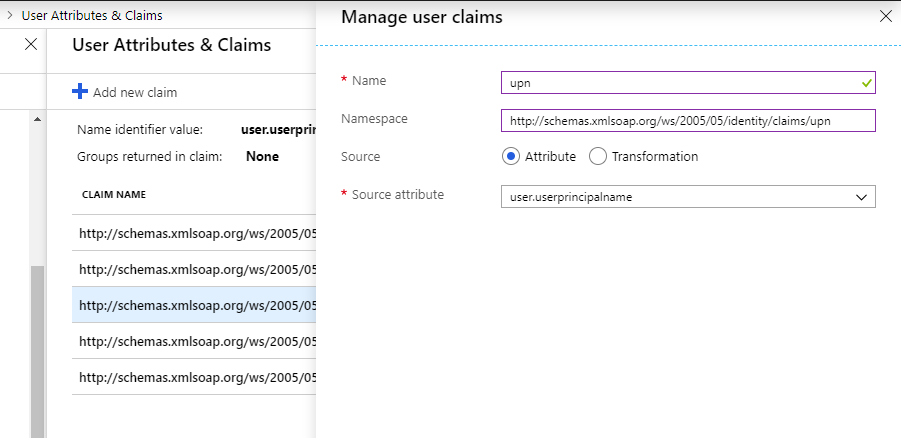
Are you trying to put "http://schemas.xmlsoap.org/ws/2005/05/identity/claims/upn" both in name and namespace ?
 SaurabhSharma-MSFT
on 6 May 2019
SaurabhSharma-MSFT
on 6 May 2019
I have tried putting "http://schemas.xmlsoap.org/ws/2005/05/identity/claims/upn" both in name and namespace, but the attribute in SAML response becomes
Our SP program needs exactly
"http://schemas.xmlsoap.org/ws/2005/05/identity/claims/upn" to identify the user.
I have consulted our development team on more flexible option, but it needs time.
I still hope you can continue checking this issue.
Sorry for the inconvenience.
todayppp
on 7 May 2019
@todayppp I am able to repro it and I can see this message.
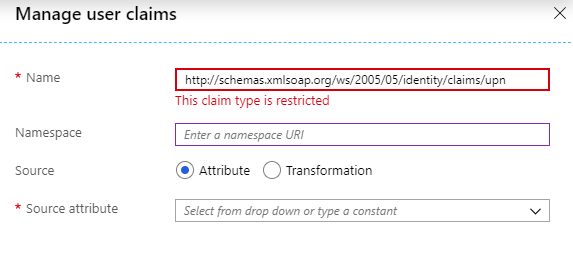
However, If I put "http://schemas.xmlsoap.org/ws/2005/05/identity/claims/upn" first in NameSpace and then in the Name it is allowing me to add the claim.
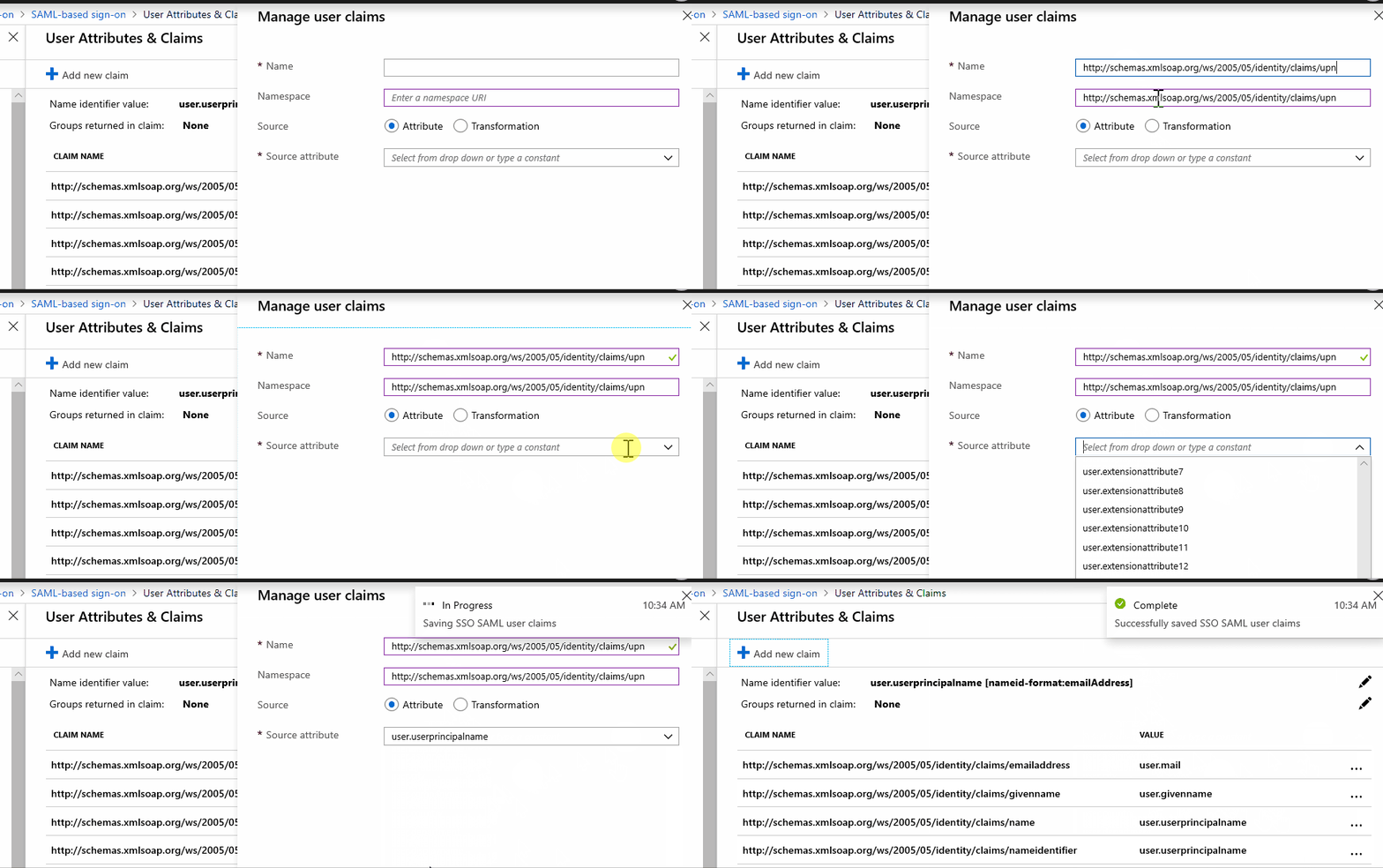
Please check if this works for you.
I will check internally with the product team if this is expected behavior.
SaurabhSharma-MSFT
on 7 May 2019
This should not be expected behavior, based on public Microsoft documentation. The claim "upn" is part of the SAML restricted claim set for Azure AD. See "Table 2" in the following page:
https://docs.microsoft.com/en-us/azure/active-directory/develop/active-directory-claims-mapping
 cap273
on 9 May 2019
cap273
on 9 May 2019
@cap273 I believe so, however, checking with product team on the same.
SaurabhSharma-MSFT
on 9 May 2019
@SaurabhSharma-MSFT I tried it, but the attribute in SAML response becomes like this:
<Attribute Name="http://schemas.xmlsoap.org/ws/2005/05/identity/claims/upn/http://schemas.xmlsoap.org/ws/2005/05/identity/claims/upn">
<AttributeValue>(Username)</AttributeValue>
</Attribute>
It seems stranger than previous one.
I know the claim "upn" is part of the SAML restricted claim, but I don't know why.
I can set this claim in Windows server ADFS and old experience UI of Azure AD.
It doesn't match up though...
todayppp
on 10 May 2019
Seeing the same issue. Cannot use UPN (with upper or lower case) as the claim name in new AAD experience UI, getting the same "This claim type is restricted" error. In older UI experience it is possible.
When configuring SAML SSO for enterprise apps, there is typically no possibility to affect the claim names requested by the application.
 ArttuArstila
on 13 May 2019
ArttuArstila
on 13 May 2019
@todayppp As per the product team this is expected as Azure AD does have some restricted claims and you cannot directly add these claims in the claims configuration. You can see the complete list of restricted claims from here . This is why the UI is showing the error when you are adding the restricted claim.
Also, by putting this value "http://schemas.xmlsoap.org/ws/2005/05/identity/claims/upn" in the namespace and in the claim will email something like this as the claim name "http://schemas.xmlsoap.org/ws/2005/05/identity/claims/upn/http://schemas.xmlsoap.org/ws/2005/05/identity/claims/upn".
The pattern of claims are formed using "Namespace value"+ "/" + "Claim Name". But all the claims have to enter in this fashion and note that Namespace value can be always optional for default Azure AD claims or the claims you are adding for your application.
SaurabhSharma-MSFT
on 13 May 2019
@todayppp We will now proceed to close this thread. If there are further questions regarding this matter, please reopen it and we will gladly continue the discussion.
SaurabhSharma-MSFT
on 14 May 2019
Hi, I know this issue is closed and I know some of the claims are restricted. But what is the workaround for this? The issue is closed without explaining the solution for this. Is there any other way we can add these claims? We have a few legacy apps that need these claims.
 rosdi
on 28 Feb 2020
rosdi
on 28 Feb 2020
Yes, how do we send http://schemas.xmlsoap.org/ws/2005/05/identity/claims/upn claims to a SAML-based application that requires it? I get that it's restricted so we aren't allowed to modify it, but how do we make sure it gets send it in the first place? It's not present in the SAML response by default.
 mtakmddk
on 19 Mar 2020
mtakmddk
on 19 Mar 2020
@SaurabhSharma-MSFT. I dont' see any solution or alternative option for this issue. Can you please address this issue ?
 ashoka99
on 17 Apr 2020
ashoka99
on 17 Apr 2020
I agree, this is a bug - we should be able to release a SAML claim with this name one way or another
 saturnreturn
on 3 Nov 2020
saturnreturn
on 3 Nov 2020
I was able to do a workaround with Customize claims emitted in tokens.
This will disable User Attributes & Claims so you need to add each needed claim.
##Connect-AzureAD

$App_ObjectId = "xxxxxxxx-xxxx-xxxx-xxxx-xxxxxxxxxxxx"
$DisplayName_policy = "Test Claims Policy"

$Claim_UPN = '{"Source":"user","ID":"userprincipalname","SamlClaimType":"http://schemas.xmlsoap.org/ws/2005/05/identity/claims/upn","JwtClaimType":"upn"}'
$Claim_Group = '{"Source":"user","ID":"groups","SamlClaimType":"http://schemas.xmlsoap.org/claims/Group","JwtClaimType":"groups"}'

$Definition = '{"ClaimsMappingPolicy":{"Version":1,"IncludeBasicClaimSet":"true", "ClaimsSchema": ['+"$Claim_UPN,$Claim_Group"+']}}'

$Policy = New-AzureADPolicy -Definition @($Definition) -DisplayName $DisplayName_policy -Type "ClaimsMappingPolicy"
$Policy_ObjectId = $policy.Id

Add-AzureADServicePrincipalPolicy -Id $App_Objectid -RefObjectId $Policy_ObjectId
 Jacobbrixus
on 24 Nov 2020
Jacobbrixus
on 24 Nov 2020
Related issues
 AronT-TLV
·
3Comments
AronT-TLV
·
3Comments
 JamesDLD
·
3Comments
JamesDLD
·
3Comments
 JeffLoo-ong
·
3Comments
JeffLoo-ong
·
3Comments
 varma31
·
3Comments
varma31
·
3Comments
 monteledwards
·
3Comments
monteledwards
·
3Comments