Azure-docs: Can't locate contract address..
Azure documentation issue guidance
- [x] The relevant Azure service or technology.
Deploying an Ethereum POA resource on Azure
- [x] A link to the published documentation article that you have feedback about.
https://docs.microsoft.com/en-us/azure/blockchain/templates/ethereum-poa-deployment#feedback
- [x] Clear, specific feedback that the author can act on.
I can't see where the contract address originates from.
// TODO Replace with your contract address
var address = "0xfe53559f5f7a77125039a993e8d5d9c2901edc58";
I have issued the command:
truffle migrate --network poa
but I do not see a contract address popping up for me.
My Truffle config file is as follows:
/*
 * NB: since truffle-hdwallet-provider 0.0.5 you must wrap HDWallet providers in a
 * function when declaring them. Failure to do so will cause commands to hang. ex:
 */

var HDWalletProvider = require("truffle-hdwallet-provider");

var rpc_endpoint = "http://ethirgqw4-dns-reg1.eastus.cloudapp.azure.com:8540";
var mnemonic = "{redacted}";

module.exports = {
  networks: {
    development: {
      host: "localhost",
      port: 8545,
      network_id: "*" // Match any network id
    },
    "poa": {
      provider: new HDWalletProvider(mnemonic, rpc_endpoint),
      network_id: 10101010,
      gasPrice : 0
    }
  },
  compilers: {
    solc: {
      version: "0.4.23",
    }
  }
};
Document Details
⚠ Do not edit this section. It is required for docs.microsoft.com ➟ GitHub issue linking.
- ID: ce2275c9-8660-ef40-7846-69ab07035809
- Version Independent ID: 0b58551c-1080-380d-29b9-00f71a6f5e51
- Content: Ethereum Proof-of-Authority Consortium - Azure
- Content Source: articles/blockchain/templates/ethereum-poa-deployment.md
- Service: azure-blockchain
- GitHub Login: @codyborn
- Microsoft Alias: coborn
 Sshetty2
All 17 comments
Thanks for the question. We are currently investigating and will update you shortly.
 Karishma-Tiwari-MSFT
on 22 Apr 2019
Karishma-Tiwari-MSFT
on 22 Apr 2019
UPDATE:
I'm not able to see the contract address because the deployment is hanging.. Per the docs for truffle-hdwallet-provider you will need to wrap the provider in a function call;
 * NB: since truffle-hdwallet-provider 0.0.5 you must wrap HDWallet providers in a
 * function when declaring them. Failure to do so will cause commands to hang. ex:
Even when I do this,
my migration deployment hangs and breaks after seeing this output:
Using network 'poa'.

Running migration: 1_initial_migration.js
  Deploying Migrations...
  ... 0x4e4dc84556a379dce393ee6adc3857f8cb1d8f0a7be1a3d4dd238385165e6fbd
@Sshetty2 Assigning the issue to the content author to help answer and evaluate your feedback. Thanks
 Alberto-Vega
on 22 Apr 2019
Alberto-Vega
on 22 Apr 2019
@codyborn Can you take a look at this question?
Thanks,
Pat
 PatAltimore
on 22 Apr 2019
PatAltimore
on 22 Apr 2019
29787 Any updates on this one? I haven't been able to make any headway
Sshetty2
on 24 Apr 2019
@PatAltimore Is there anything you can do here? Have others had success running this demo; migrating their smart contracts to the network?
Sshetty2
on 1 May 2019
@Sshetty2 I actually don't know this article very well. @codyborn is the actual author. However, everyone is heads down preparing for the //build conference next week. I don't expect a response from Cody until after build. The best place for support issues is the forum. https://social.msdn.microsoft.com/Forums/en-US/home?forum=azureblockchain.
Pat
PatAltimore
on 1 May 2019
@codyborn @PatAltimore Still waiting for feedback... The post on the forums has not received any replies..
Has this resource been deprecated?
Sshetty2
on 16 May 2019
Hi @Sshetty2, apologies for the delay. I just saw this thread. I highly recommend giving our new VS Code extension a shot: https://marketplace.visualstudio.com/items?itemName=azblockchain.azure-blockchain
This has Truffle built-in with a simple right-click deploy experience.
 codyborn
on 21 May 2019
codyborn
on 21 May 2019
@codyborn that's great, I just gave this a shot. I was able to deploy my contract to the network and I received a mnemonic. I am guessing that I use the mnemonic to generate a contract address through Meta Mask. Please confirm.
Sshetty2
on 21 May 2019
@Sshetty2 once you deploy the contract, it will have an address. You should be able to see the contract address by scrolling up through the console output. This will be more discoverable in the future :)
codyborn
on 21 May 2019
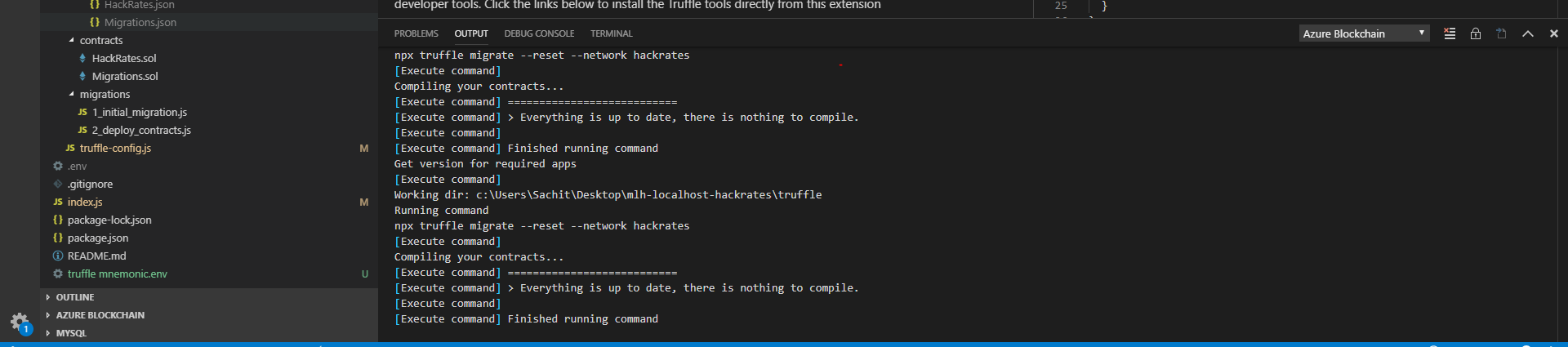
@codyborn I do not see anything in the console output... Is it possible that there is a problem with the migration?
please see attached image
Sshetty2
on 21 May 2019
@cnsegura, where can @Sshetty2 find the contract address in the extension output?
codyborn
on 21 May 2019
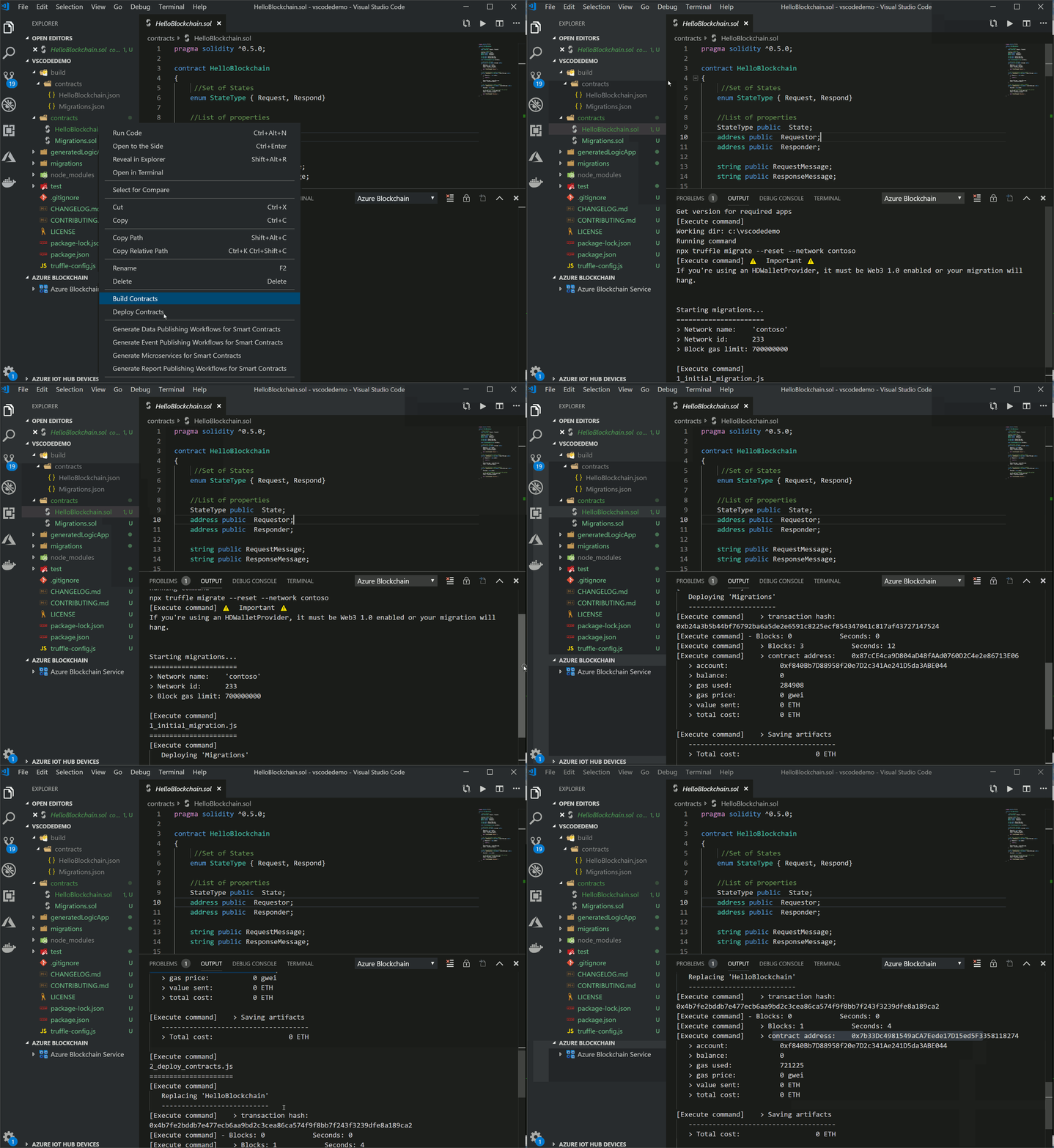
Hi @Sshetty2 - take a look at the attached animated .gif. You can see the contract address in the "Azure Blockchain" output channel in VS Code. You may have to scroll through the output to make sure you see the bottom of the data that gets sent to that output channel. In future revisions of the extension we will add the capability to get contract address at any time, not just at deployment in the window.
 cnsegura
on 21 May 2019
cnsegura
on 21 May 2019
Ok, got it, thanks.
It does appear that the tooling is a bit opinionated specifically because it seems that it will not find a nested truffle-config file and also it seems that it will not work with a build directory that is created through the truffle CLI.
In either case, I will launch a new project through the Azure Blockchain VS Code extension and attempt to incrementally add my project files including the client, client dependencies, and smart contract logic, then use the extension's build tooling to compile and deploy the contract and see if that does the trick. I'm sure that this should work.
Thanks for all of your help @codyborn @cnsegura
Sshetty2
on 21 May 2019
Thanks for the follow up @Sshetty2. As this is a new extension we're constantly rolling out new features and improvements. Don't hesitate to send over feedback as you use it!
codyborn
on 22 May 2019
@codyborn Thank you as well for the follow up. I'll certainly open any new issues in the Github repo for the tool itself unless there is a different preferred method for feedback.
Sshetty2
on 22 May 2019
Related issues
 Agazoth
·
3Comments
Agazoth
·
3Comments
 paulmarshall
·
3Comments
paulmarshall
·
3Comments
 bityob
·
3Comments
bityob
·
3Comments
 spottedmahn
·
3Comments
spottedmahn
·
3Comments
 mrdfuse
·
3Comments
mrdfuse
·
3Comments