Azure-docs: "Do not install software updates" option doesn't exist in ConfigMgr
The 'Manage software updates from Configuration Manager' section instructs us to deploy updates with the 'Do not install software updates' option. I've been using ConfigMgr for a while and I have never seen such a setting. Do you mean deploy the updates as 'Available' (for install) instead of 'Required' (for install) so that the ConfigMgr software update policy is sent to the devices but doesn't actually initiate the install?
Document Details
⚠ Do not edit this section. It is required for docs.microsoft.com ➟ GitHub issue linking.
- ID: af47285c-118e-6142-0380-0bc815cee28d
- Version Independent ID: 9f235e4c-367e-060a-a6a9-95a15dd7d453
- Content: Target Updates using SCCM Collections in Azure Automation - Update Management
- Content Source: articles/automation/oms-solution-updatemgmt-sccmintegration.md
- Service: automation
- Sub-service: update-management
- GitHub Login: @georgewallace
- Microsoft Alias: gwallace
 bryandam
All 10 comments
Thanks for the feedback! We are currently investigating and will update you shortly.
 Karishma-Tiwari-MSFT
on 20 Apr 2019
Karishma-Tiwari-MSFT
on 20 Apr 2019
@bryandam Thanks for reaching out. We are still investigating the whole process due to some of the items you raised on your other issue and working to clear up the integration docs. I did confirm that Do not install software updates is still in the product under Download Settings on a deployment. Do you not see this?
 georgewallace
on 26 Apr 2019
georgewallace
on 26 Apr 2019
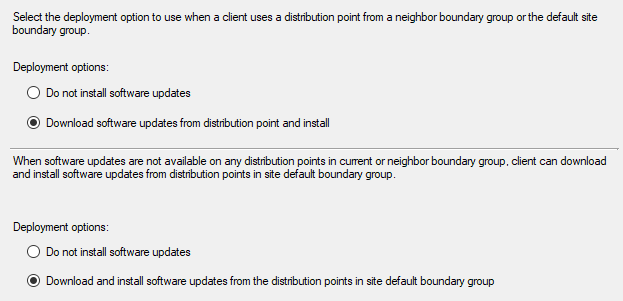
Ahhh, ok, that's what you're talking about. Yes, those are there. In fact, there's two of them now (see below).
However, those settings have to do with handling situations where the content is not available on a distribution point to prevent it from pulling data across WAN links. So if the data is on the DP (let's say that not all servers are in Azure PM ... yet) it's going to install the updates. Is that the desired behavior?
If you ever want we can get on a call. I've drunk deep from ConfigMgr's patching mechanisms and am now doing the same for Azure PM.
bryandam
on 26 Apr 2019
@bryandam Just getting back to this.. So I confirmed with our team that all the settings defined in our doc were provided by the Config Mgr team.
georgewallace
on 30 May 2019
Thanks for following up @georgewallace. Earlier this month I was at a conference and talked to John Messec a bit about this and got him in contact with the ConfigMgr docs team: @aczechowski and @mestew.
I'd highly recommend having them review this document. Because yes, those _are_ ConfigMgr settings, I don't disagree, I was wrong on that. The thing is that those settings don't make much sense in this context. When I described what I think the AzureUM/ConfigMgr integration use case is here and the settings described they were similarly confused.
The use case as I understand it is controlling what updates are deployed to devices using ConfigMgr and using AzureUM to actually install them. If that's true then those settings would only come into play if the content isn't on a ConfigMgr Distribution Point in the client's assigned boundary group. If it is then ConfigMgr is going to happily install those updates.
bryandam
on 30 May 2019
@bryandam Thanks for your patience.. I am working with the ConfigMgr team and the Update Management team to get this sorted out.
georgewallace
on 5 Jun 2019
Awesome, that's great news George. No real rush here, quality takes time. Also, never underestimate the possibility I'm just plain wrong or not understanding the obvious.
bryandam
on 5 Jun 2019
Thanks @georgewallace & @bryandam - since @georgewallace is tracking this offline, closing this issue for now. We will circle back once we have an update and the content has been revised.
Cheers.
 femsulu
on 5 Jun 2019
femsulu
on 5 Jun 2019
I too an interested in this area. Some areas of the document aren'tclear to me. I've tested some things and there are different results to what document says I should expect. For example. I deployed an update from Update management when the SCCM client was on a Server but that update was not part of any active deployment from SCCM (is was part of a disabled SCCM update deployment that had the 'download........' options selected, not the 'Do not install software updates'
 andrewjohnporter
on 20 Aug 2019
andrewjohnporter
on 20 Aug 2019
@andrewjohnporter, I got the Azure UM team in contact with the ConfigMgr docs team at MMS 2019. Unfortunately, we haven't seen any fruit from that yet.
I recently pinged @aczechowski about it and since this is the AzureUM team's issue he's waiting for them to engage his resources.
bryandam
on 20 Aug 2019
Related issues
 jamesgallagher-ie
·
3Comments
jamesgallagher-ie
·
3Comments
 varma31
·
3Comments
varma31
·
3Comments
 Ponant
·
3Comments
Ponant
·
3Comments
 mrdfuse
·
3Comments
mrdfuse
·
3Comments
 Agazoth
·
3Comments
Agazoth
·
3Comments