Azure-docs: Clarify impact of AUTOSHRINK
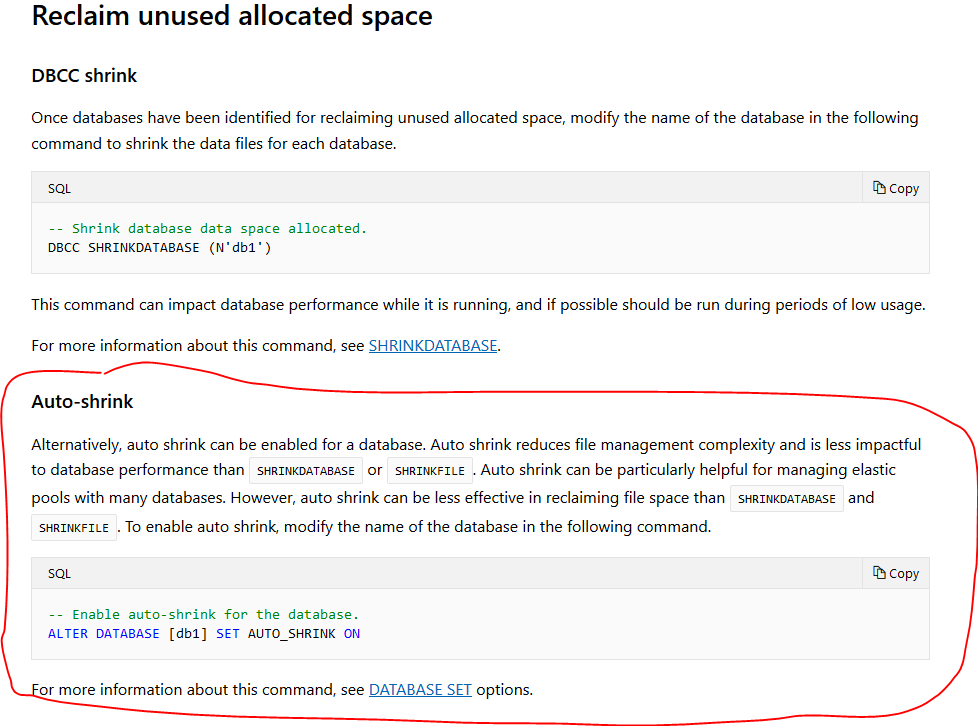
Customer just sent me a direct link to "Reclaim unused allocated space" ( https://docs.microsoft.com/en-us/azure/sql-database/sql-database-file-space-management#reclaim-unused-allocated-space ) and I got asked if it had any drawback, which my on prem SQL knowledge screamed it has :) But reading that section it wasn't totally apparent.
I think there should be added an disclaimer about performance impact of this setting, because when reading "Shrinking data files" ( https://docs.microsoft.com/en-us/azure/sql-database/sql-database-file-space-management#shrinking-data-files ) it's apparent that it has a performance impact.
Document Details
⚠ Do not edit this section. It is required for docs.microsoft.com ➟ GitHub issue linking.
- ID: c60b2433-250b-009c-2794-f5924a8e6c3c
- Version Independent ID: 9448dc48-0b71-42e4-e2d8-d9fafa2d646e
- Content: Azure SQL Database single/pooled databases file space management
- Content Source: articles/sql-database/sql-database-file-space-management.md
- Service: sql-database
- Sub-service: operations
- GitHub Login: @oslake
- Microsoft Alias: moslake
 devlead
All 7 comments
@devlead, Thanks for the Comment. We are actively investigating and will get back to you soon.
 YASWANTHM-MSFT
on 15 Apr 2019
YASWANTHM-MSFT
on 15 Apr 2019
@devlead Want to pointout the following section of the documentation with regard to shrinking data files.
The SQL Database service does not automatically shrink data files to reclaim unused allocated space due to the potential impact to database performance. However, customers may shrink data files via self-service at a time of their choosing by following the steps described in reclaim unused allocated space.
So, I think it is adequately documented unless there is another reference that may need updating. Please let us know if there is an additional update needed. Thank you.
 Mike-Ubezzi-MSFT
on 15 Apr 2019
Mike-Ubezzi-MSFT
on 15 Apr 2019
I had a second customer send a direct link to
reclaim unused allocated space and they didn't scroll up but instead did an alter table.
I just think you need to add a link/note to that segment at this section, as they took the wording _"particulary helpful"_ as an recommendation.
devlead
on 16 Apr 2019
@oslake The Reclaim unused allocated space section is a candidate for a note or additional text indicating the performance hit. I can add this if there is a specific edit you wish to be made.
Mike-Ubezzi-MSFT
on 16 Apr 2019
My $02: I would never enable auto shrink for any of our Azure SQL Databases (~280 across five elastic pools) nor would I recommend it.
 langstonj
on 17 Apr 2019
langstonj
on 17 Apr 2019
I too would never enable autoshrink. This topic is to cover a very specific scenario in which you may need to shrink a database, but this scenario is not common (but does occur).
 CarlRabeler
on 18 Apr 2019
CarlRabeler
on 18 Apr 2019
Doc enhancement has been merged. We will now proceed to close this thread. If there are further questions regarding this matter, please comment and we will gladly continue the discussion.
Mike-Ubezzi-MSFT
on 23 May 2019
Related issues
 jebeld17
·
3Comments
jebeld17
·
3Comments
 paulmarshall
·
3Comments
paulmarshall
·
3Comments
 JamesDLD
·
3Comments
JamesDLD
·
3Comments
 behnam89
·
3Comments
behnam89
·
3Comments
 varma31
·
3Comments
varma31
·
3Comments
Most helpful comment
My $02: I would never enable auto shrink for any of our Azure SQL Databases (~280 across five elastic pools) nor would I recommend it.