Despite all previous steps completing successfully, when I issue the "Add-AzKeyVaultManagedStorageAccount" command, I get an error:
Add-AzKeyVaultManagedStorageAccount : Operation returned an invalid status code 'BadRequest'
At line:1 char:1
- Add-AzKeyVaultManagedStorageAccount -VaultName $keyVaultName -Account ...
~~~~~~~~~~~~~~~~~
- CategoryInfo : CloseError: (:) [Add-AzKeyVaultManagedStorageAccount], KeyVaultErrorException
- FullyQualifiedErrorId : Microsoft.Azure.Commands.KeyVault.AddAzureKeyVaultManagedStorageAccount
Document Details
⚠ Do not edit this section. It is required for docs.microsoft.com ➟ GitHub issue linking.
- ID: 1059069a-e860-f66d-3445-60425a5bffe1
- Version Independent ID: 1d80c823-5a41-7d2b-f40d-b0f2ca3c673f
- Content: Azure Key Vault managed storage account - PowerShell version
- Content Source: articles/key-vault/key-vault-overview-storage-keys-powershell.md
- Service: key-vault
- GitHub Login: @msmbaldwin
- Microsoft Alias: mbaldwin
 ptansey
All 12 comments
@ptansey
Thanks for your feedback! We will investigate and update as appropriate.
 MohitDhingra-MSFT
on 10 Apr 2019
MohitDhingra-MSFT
on 10 Apr 2019
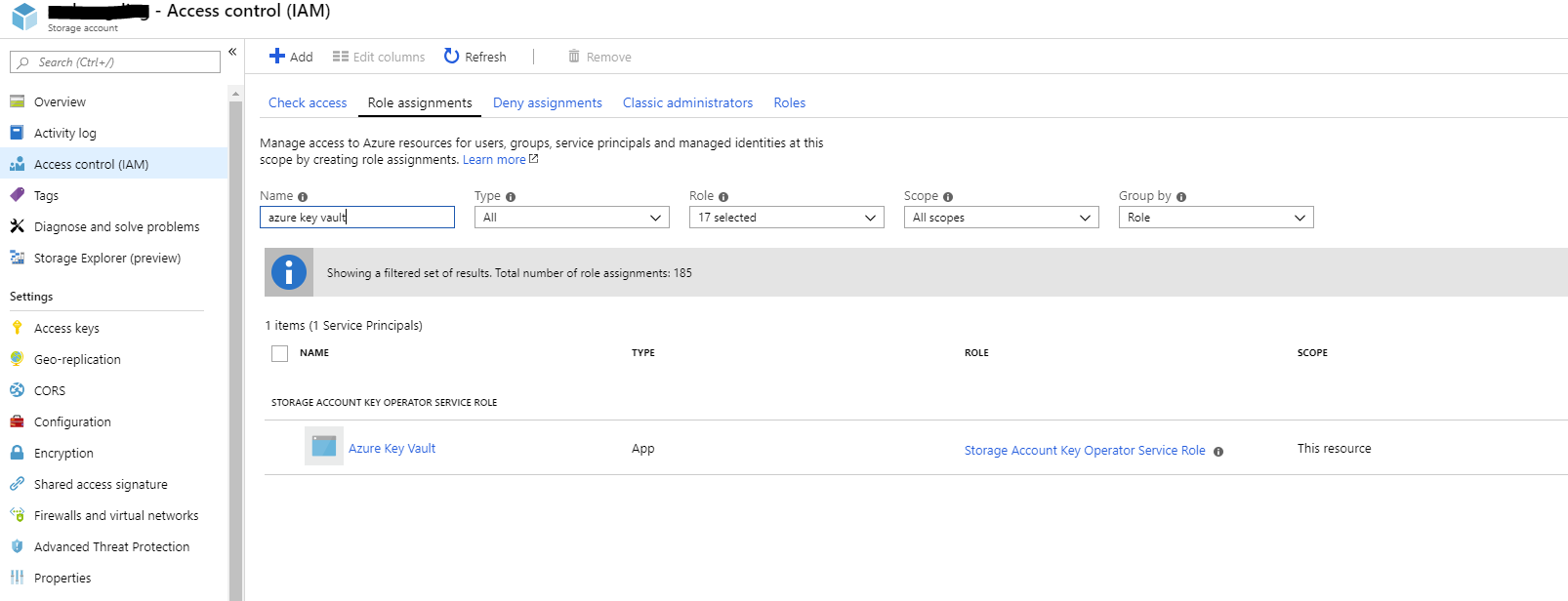
@ptansey I am not getting any error while executing "Add-AzKeyVaultManagedStorageAccount" cmdlet. Can you please check the Azure Key Vault access policy and check of your service principal name if it has all the permissions set correctly. Also, please check if Azure Key vault has "Storage Account Key Operator Service Role" correctly assigned by checking the Access control pane of your storage account.
 SaurabhSharma-MSFT
on 10 Apr 2019
SaurabhSharma-MSFT
on 10 Apr 2019
I am having the same issue with "Bad request". I have verified that Azure Key Vault has the right assigned role for the relevant storage account, and that the right access policies are set appropriately (full management permissions for keys, secrets, and certificates).
I suspected that it was because the vault was on a different subscription than the storage account, but I've tried with one storage account that is on the same sub as the vault, and the error is exactly the same:
"Add-AzKeyVaultManagedStorageAccount : Operation returned an invalid status code 'BadRequest'"
Wish the error was a little more helpful and told me exactly what is invalid in my request...
 mvinicius563
on 11 Apr 2019
mvinicius563
on 11 Apr 2019
@ptansey Can you please open a Azure Support Ticket so that a Support engineer can check further on this issue. In case you limitations in your support plan to open support ticket please let me know.
SaurabhSharma-MSFT
on 12 Apr 2019
We have a meeting scheduled with a Technet/Azure technician through our E5 subscription, I'll try that route first. Thank you for the reply @SaurabhSharma-MSFT :)
ptansey
on 15 Apr 2019
@ptansey We will now proceed to close this thread. If there are further questions regarding this matter, please reopen it and we will gladly continue the discussion.
SaurabhSharma-MSFT
on 16 Apr 2019
We have a meeting scheduled with a Technet/Azure technician through our E5 subscription, I'll try that route first. Thank you for the reply @SaurabhSharma-MSFT :)
Any update? We are running into the exact same issue.
 bdzeeuw
on 24 Apr 2019
bdzeeuw
on 24 Apr 2019
We have a meeting scheduled with a Technet/Azure technician through our E5 subscription, I'll try that route first. Thank you for the reply @SaurabhSharma-MSFT :)
Any update? We are running into the exact same issue.
Sorry @bdzeeuw , I've abandoned trying to get this to work, had to move onto other things
ptansey
on 24 Apr 2019
Sorry @bdzeeuw , I've abandoned trying to get this to work, had to move onto other things
Ah ok, thanks for getting back to me. We worked around this issue, by using the AZ CLI (apparently it does work using the AZ CLI, with the exact same parameters/vars).
bdzeeuw
on 24 Apr 2019
Having the same issue with Az Powershell module, will try azure cli
 rustamm
on 26 Apr 2019
rustamm
on 26 Apr 2019
Azure CLI tool returned meaning error message for me, turns out I was passing actual storage account key instead of the key name (literally should be "key1").
rustamm
on 29 Apr 2019
Azure CLI tool returned meaning error message for me, turns out I was passing actual storage account key instead of the key name (literally should be "key1").
and that is exactly what MS put in their code snippets. @rustamm thanks for your clarification, it saved it saved a lot of time
 ytugarev
on 27 Nov 2019
ytugarev
on 27 Nov 2019
Related issues
 jamesgallagher-ie
·
3Comments
jamesgallagher-ie
·
3Comments
 ianpowell2017
·
3Comments
ianpowell2017
·
3Comments
 bityob
·
3Comments
bityob
·
3Comments
 varma31
·
3Comments
varma31
·
3Comments
 jebeld17
·
3Comments
jebeld17
·
3Comments
Most helpful comment
Azure CLI tool returned meaning error message for me, turns out I was passing actual storage account key instead of the key name (literally should be "key1").