Azure-docs: Get-AzRecoveryServicesVaultSettingsFile not working with parameters shown
In setting the vault context, the PS line "$Vaultsettingsfile = Get-AzRecoveryServicesVaultSettingsFile -Vault $vault -SiteRecovery -Path C:\users\user\Documents\" is shown, but fails as additional parameters (e.g. -Certificate) are required. Help for this command also gives examples that error. The description for the -Certificate parameter is just "{{Fill Certificate Description}}".
Subsequent steps fail with error "Vault Settings are missing. Please import Vault Settings and verify the same".
Document Details
⚠ Do not edit this section. It is required for docs.microsoft.com ➟ GitHub issue linking.
- ID: 32d3f437-872e-7927-2652-6d2606a3342a
- Version Independent ID: 06a7db7e-4ce0-00d0-37fa-968833b121c3
- Content: Azure Site Recovery - Setup and test disaster recovery for Azure virtual machines using Azure PowerShell
- Content Source: articles/site-recovery/azure-to-azure-powershell.md
- Service: site-recovery
- GitHub Login: @sujayt
- Microsoft Alias: sutalasi
 Iain-Morris
All 9 comments
@Iain-Morris Thanks for the question! We will investigate this issue and get back to you soon.
 SadiqhAhmed-MSFT
on 5 Apr 2019
SadiqhAhmed-MSFT
on 5 Apr 2019
Hello.
same problem
error Message -> Get-AzRecoveryServicesVaultSettingsFile : Parameter set cannot be resolved using the specified named parameters.
 oscarkim007
on 16 Apr 2019
oscarkim007
on 16 Apr 2019
Always fails with the following error:
$CredsFileName = Get-AzRecoveryServicesVaultSettingsFile -Backup -Vault $Vault1 -Path $CredsPath -ver
bose
cmdlet Get-AzRecoveryServicesVaultSettingsFile at command pipeline position 1
Supply values for the following parameters:
Certificate: vaultCert01
Get-AzRecoveryServicesVaultSettingsFile : Error parsing NaN value. Path '', line 1, position 1.
At line:1 char:18
- ... sFileName = Get-AzRecoveryServicesVaultSettingsFile -Backup -Vault $V ...
~~~~~~~~~~~~~
- CategoryInfo : CloseError: (:) [Get-AzRecoveryServicesVaultSettingsFile], JsonReaderException
- FullyQualifiedErrorId : Microsoft.Azure.Commands.RecoveryServices.GetAzureRmRecoveryServicesVaultSettingsFile
 cloudnovum
on 24 Apr 2019
cloudnovum
on 24 Apr 2019
Ran into same issue. Check this link https://github.com/Azure/azure-powershell/issues/8885
 willih
on 26 Apr 2019
willih
on 26 Apr 2019
still broken.
 larryclaman
on 15 May 2019
larryclaman
on 15 May 2019
Hi All,
Workarond steps to follow:
Use below cmdlet to set vault context directly
Set- AzRecoveryServicesAsrVaultContext -vault $vault
$dt = $(Get-Date).ToString("M-d-yyyy")
$cert = New-SelfSignedCertificate -DnsName $dnsname
$certficate = [Convert]::ToBase64String($cert.RawData)
$VaultFile = Get-AzRecoveryServicesVaultSettingsFile -SiteRecovery -Vault $vault -Certificate $certficate.ToString()
Import-AzRecoveryServicesAsrVaultSettingsFile -Path $VaultFile.FilePath
$cert | Remove-Item
SadiqhAhmed-MSFT
on 17 May 2019
@SadiqhAhmed-MSFT Thanks for the workaround, but will the docs be updated as well? (users should not be expected to find the workaround in a closed issue)
larryclaman
on 22 May 2019
workaround doesn't seem to work as expected and the commandlet and documentation hasn't been updated over a month later. Can we get an update on the current status?
 ONI-Assassin
on 21 Jun 2019
ONI-Assassin
on 21 Jun 2019
Any update on when this will be resolved? Same issue with the 2.0.0-preview version.
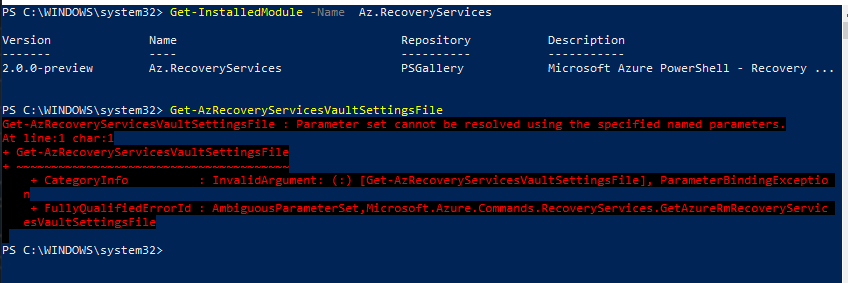
 villanub
on 9 Jul 2019
villanub
on 9 Jul 2019
Related issues
 DeepPuddles
·
3Comments
DeepPuddles
·
3Comments
 mrdfuse
·
3Comments
mrdfuse
·
3Comments
 paulmarshall
·
3Comments
paulmarshall
·
3Comments
 varma31
·
3Comments
varma31
·
3Comments
 spottedmahn
·
3Comments
spottedmahn
·
3Comments