Azure-docs: Scope being ignored?
Device Code
Request
POST /cyberninjas.onmicrosoft.com/oauth2/devicecode
Content-Type: application/x-www-form-urlencoded

client_id={{client_id}}&resource=https%3A%2F%2Fgraph.microsoft.com&scope=directory.read.all
Response
HTTP/1.1 200 OK
Content-Type: application/json; charset=utf-8

{"user_code":"{{user_code}}","device_code":"{{device_code}}","verification_url":"https://microsoft.com/devicelogin","expires_in":"900","interval":"5","message":"To sign in, use a web browser to open the page https://microsoft.com/devicelogin and enter the code {{user_code}} to authenticate."}
Auth Token
Request
POST /common/oauth2/token
Content-Type: application/x-www-form-urlencoded

code={{device_code}}&client_id={{client_id}}&grant_type=urn%3Aietf%3Aparams%3Aoauth%3Agrant-type%3Adevice_code
Response
{
    "token_type": "Bearer",
    "scope": "User.Read",
    "expires_in": "3599",
    "ext_expires_in": "3599",
    "expires_on": "1553533979",
    "not_before": "1553530079",
    "resource": "https://graph.microsoft.com",
    "access_token": "{{access_token}}",
    "refresh_token": "{{refresh_token}}",
    "id_token": "{{id_token}}"
}
NOTE: Scope "User.Read" is returned despite specifying "Directory.Read.All"
Document Details
⚠ Do not edit this section. It is required for docs.microsoft.com ➟ GitHub issue linking.
- ID: 58bc32c3-9e21-a56a-f876-3e750576f228
- Version Independent ID: 83231247-55a8-e69b-0712-8c7b1481a02d
- Content: Use Azure AD v2.0 to sign in users on browser-less devices
- Content Source: articles/active-directory/develop/v2-oauth2-device-code.md
- Service: active-directory
- GitHub Login: @CelesteDG
- Microsoft Alias: celested
 Jnchi
Jnchi
All 12 comments
@Jnchi
Thanks for your feedback! We will investigate and update as appropriate.
 MarileeTurscak-MSFT
on 25 Mar 2019
MarileeTurscak-MSFT
on 25 Mar 2019
I believe that you need to have User.Read.All in the application permissions and delegated permissions.
With grant_type=client_credentials you can also use https://graph.microsoft.com/.default for scope. It will give you the permission defined in your app.
MarileeTurscak-MSFT
on 28 Mar 2019
I added those permissions, but the scope still isn't being updated.
I tried that with the device code grant type but it didn't like it.
Jnchi
on 28 Mar 2019
@Jnchi Have you given Admin consent to 'Directory.Read.All' permissions ?
 SaurabhSharma-MSFT
on 29 Mar 2019
SaurabhSharma-MSFT
on 29 Mar 2019
Yes.
Jnchi
on 29 Mar 2019
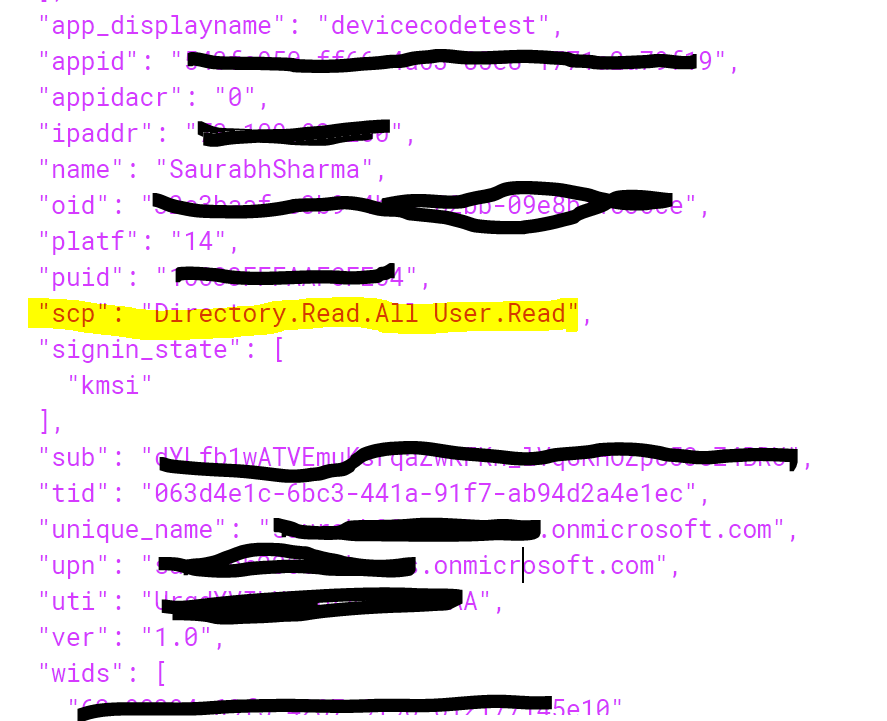
@Jnchi I am able to get the scope with Admin Consent. How you are giving admin consent ?
SaurabhSharma-MSFT
on 29 Mar 2019
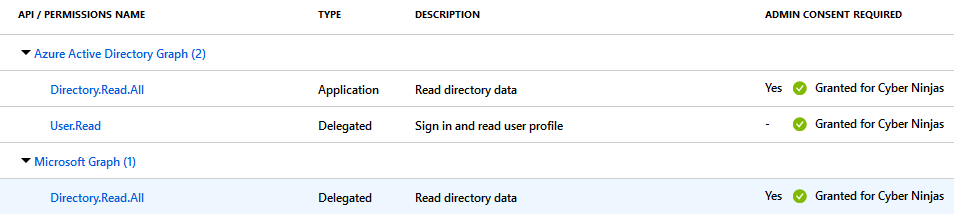
I had my administrator grant privileges for the organization,
Jnchi
on 1 Apr 2019
@Jnchi Can you please open a Azure Support Ticket so that Identity Support engineer can check further on this issue. In case you limitations in your support plan to open support ticket please let me know.
SaurabhSharma-MSFT
on 1 Apr 2019
Thanks for your help. I post here once they figure out the issue.
Jnchi
on 1 Apr 2019
@Jnchi Sure, thanks. We will now proceed to close this thread. If there are further questions regarding this matter, please reopen it and we will gladly continue the discussion.
SaurabhSharma-MSFT
on 1 Apr 2019
Just for future reference, here is the outcome of this issue.
First, I created a new application for testing.
I used https://login.microsoftonline.com/common/oauth2/nativeclient, for the Suggested Redirect URL under the _Authentication_ tab.
Next, I set Default Client Type to Yes.
API Permissions are as follows:
Microsoft Graph API:
 - Directory.Read.All
 - User.Read
Finally, for the device authorization request, the scope was set to directory.read.all.
Jnchi
on 5 Apr 2019
@Jnchi Thank you for sharing the resolution over here. It will help future readers.
SaurabhSharma-MSFT
on 9 Apr 2019
Related issues
 Favna
·
3Comments
Favna
·
3Comments
 Ponant
·
3Comments
Ponant
·
3Comments
 behnam89
·
3Comments
behnam89
·
3Comments
 spottedmahn
·
3Comments
spottedmahn
·
3Comments
 jebeld17
·
3Comments
jebeld17
·
3Comments