Azure-docs: Autoscaling not enabled
I created a cluster with the command below:
az aks create --resource-group RG20BRAM-DEV --name AKS20BRAMDEV --location westeurope --node-count 2 --node-vm-size Standard_E2s_v3 --dns-name-prefix bramdev --kubernetes-version 1.12.5 --service-principal ${SP} --client-secret ${SECRET} --aad-client-app-id ${AAD_CLIENT} --aad-server-app-id ${AAD_SERVER} --aad-server-app-secret ${AAD_SECRET} --aad-tenant-id ${TENANT} --no-ssh-key --skip-subnet-role-assignment --network-policy calico --network-plugin azure --service-cidr 10.0.0.0/16 --dns-service-ip 10.0.0.10 --docker-bridge-address 172.17.0.1/16 --vnet-subnet-id ${SUBNET} --enable-vmss --enable-cluster-autoscaler --min-count 2 --max-count 4 --enable-addons monitoring --workspace-resource
-id ${WORKSPACE}
The cluster is created and has a vmss but autoscaling is not enabled and configured as passed in the command. I have to manually enable autoscaling and configure min, max and default amount of nodes.
I tried it several times and same issue every time.
Document Details
⚠ Do not edit this section. It is required for docs.microsoft.com ➟ GitHub issue linking.
- ID: 077f1bb5-2ba9-490c-2c6e-0de292266539
- Version Independent ID: 0fd87b4f-88a4-c2eb-3ebc-f2b113ac203c
- Content: Use the cluster autoscaler in Azure Kubernetes Service (AKS)
- Content Source: articles/aks/cluster-autoscaler.md
- Service: container-service
- GitHub Login: @iainfoulds
- Microsoft Alias: iainfou
 bramvdklinkenberg
All 12 comments
I noticed that eventhough it seems that scaling is not enabled it actually does. I created a deployment and set some resource requests so I would be sure it needed extra resources and it actually scaled the amount of nodes.
So in the portal it seems to be disabled but it actually is enabled somewhere in the backend/background.
bramvdklinkenberg
on 20 Mar 2019
Thanks for the feedback! We are currently checking and will update you shortly.
 jakaruna-MSFT
on 20 Mar 2019
jakaruna-MSFT
on 20 Mar 2019
I am also wondering based on which metrics it scales. If you enable autoscaling in the portal you need to provide some metric based rules for scaling. These metric based rules is not something that be added to the az aks command.
Another things when I enable autoscaling via the portal it overides settings I provided with the cli.
bramvdklinkenberg
on 20 Mar 2019
So, some more findings...
Via the cli I enabled scaling, the portal doesn't show that but scaling works... so I thought let's try "enabling" it via the portal as well and then delete autoscaling via the cli. This has the opposite effect, in the portal it shows enabled but it is actually disabled on the background because it didn't scale anymore after I applied the deployment again.
bramvdklinkenberg
on 20 Mar 2019
So after I disabled it via the cli it still showed enabled in the portal, but scaling didn't work anymore. So I disabled it in the portal as well and after enabling it again via the az cli it also showed as enabled in the portal.
bramvdklinkenberg
on 20 Mar 2019
@bramvdklinkenberg Thanks for your interest in debugging this scenario.
Cluster autoscaler deploys a pod in the AKS. That pod monitors for the Pods which are in pending state due to no space in the existing cluster. If it finds any pods, Then it triggers the scaling process.
Please check this link for more information.
jakaruna-MSFT
on 20 Mar 2019
Hi @jakaruna-MSFT , thanks for the info. But it also scales back when I scale down the deployment.
Does it check any metrics for that?
Curious about the other issues I found.
bramvdklinkenberg
on 20 Mar 2019
@bramvdklinkenberg It also checks for the underutilized nodes.
It takes care of both scaling up and down as well.
https://github.com/kubernetes/autoscaler/blob/master/cluster-autoscaler/README.md#introduction
jakaruna-MSFT
on 20 Mar 2019
From the doc:
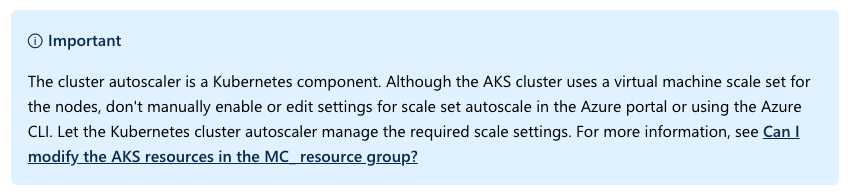
The VMSS autoscaling is not what's used here. It's the Kubernetes cluster autoscaler. The two are quite different. The link to the Kubernetes cluster autoscaler that @jakaruna-MSFT shared provides information what's happening.
 iainfoulds
on 20 Mar 2019
iainfoulds
on 20 Mar 2019
Hi Guys
Does anyone getting bellow error
kasun@Azure:~$ az aks update   --resource-group promakscluster   --name promakscluster   --enable-cluster-autoscaler   --min-count 1   --max-count 10
az aks: 'update' is not in the 'az aks' command group. See 'az aks --help'.
Check with following doc and can't find a update parameter
https://docs.microsoft.com/en-us/cli/azure/aks?view=azure-cli-latest
 kasunsjc
on 21 Mar 2019
kasunsjc
on 21 Mar 2019
@kasunsjc That command is part of the aks-preview CLI extension. From the doc:
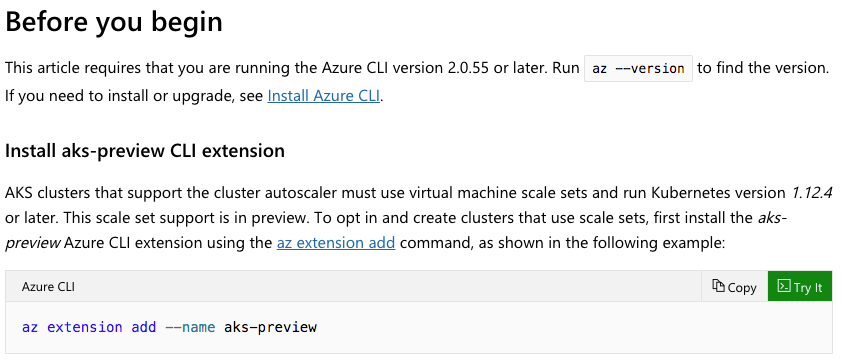
iainfoulds
on 21 Mar 2019
@bramvdklinkenberg @kasunsjc I will close this out for now. If you need additional help please let me know and we can reopen and continue.
jakaruna-MSFT
on 25 Mar 2019
Related issues
 JamesDLD
·
3Comments
JamesDLD
·
3Comments
 monteledwards
·
3Comments
monteledwards
·
3Comments
 spottedmahn
·
3Comments
spottedmahn
·
3Comments
 mrdfuse
·
3Comments
mrdfuse
·
3Comments
 Agazoth
·
3Comments
Agazoth
·
3Comments
Most helpful comment
@kasunsjc That command is part of the
aks-previewCLI extension. From the doc: