Azure-docs: failure of edge startup
all steps up through run-command work, and run-command outputs "success" - however, next step showing systemctl status daemon is failed.
● iotedge.service - Azure IoT Edge daemon
   Loaded: loaded (/lib/systemd/system/iotedge.service; enabled; vendor preset: enabled)
   Active: inactive (dead) (Result: exit-code) since Tue 2019-03-19 15:47:00 UTC; 822ms ago
     Docs: man:iotedged(8)
  Process: 13349 ExecStart=/usr/bin/iotedged -c /etc/iotedge/config.yaml (code=exited, status=1/FAILURE)
 Main PID: 13349 (code=exited, status=1/FAILURE)

Mar 19 15:46:59 edgeVm systemd[1]: iotedge.service: Main process exited, code=exited, status=1/FAILURE
Mar 19 15:46:59 edgeVm systemd[1]: iotedge.service: Unit entered failed state.
Mar 19 15:46:59 edgeVm systemd[1]: iotedge.service: Failed with result 'exit-code'.
Mar 19 15:47:00 edgeVm systemd[1]: iotedge.service: Service hold-off time over, scheduling restart.
Mar 19 15:47:00 edgeVm systemd[1]: Stopped Azure IoT Edge daemon.
Mar 19 15:47:00 edgeVm systemd[1]: Dependency failed for Azure IoT Edge daemon.
Mar 19 15:47:00 edgeVm systemd[1]: iotedge.service: Job iotedge.service/start failed with result 'dependency'.
Document Details
⚠ Do not edit this section. It is required for docs.microsoft.com ➟ GitHub issue linking.
- ID: e2289383-6ce2-a036-c710-7d1fad6e1700
- Version Independent ID: 3b902941-0876-17c3-3f0b-a4b7f7770531
- Content: Quickstart create an Azure IoT Edge device on Linux
- Content Source: articles/iot-edge/quickstart-linux.md
- Service: iot-edge
- GitHub Login: @kgremban
- Microsoft Alias: kgremban
 cicorias
All 13 comments
The docs should be clear in that all commands here are run from a Linux Bash shell.
the reason this failed is that the az vm run-command was initially run in Windows PowerShell. While the command looks OK from the shell perspective, it fails somehwere in parsing and the SharedAccessKey bits got truncated somewhere.
There is some level of an error message embedded, not clearly, in the message.
Essentially, with PowerShell the semicolon is not handled as part of the string but a command separator.
{
  "value": [
    {
      "code": "ProvisioningState/succeeded",
      "displayStatus": "Provisioning succeeded",
      "level": "Info",
      "message": "Enable succeeded: \n[stdout]\n Tue Mar 19 15:52:17 UTC 2019 Connection string set to HostName=scicoriahubone.azure-devices.net\n\n[stderr]\n",
      "time": null
    }
  ]
}
Hi! Ran into a similar issue myself. I was able to manually create the VM and configure my device (I've removed the one I was using for security reasons so the connection key is no longer being used in the supplied picture). However, when I check to see the status using the sudo systemctl status iotedge I get something very similar to the OP.
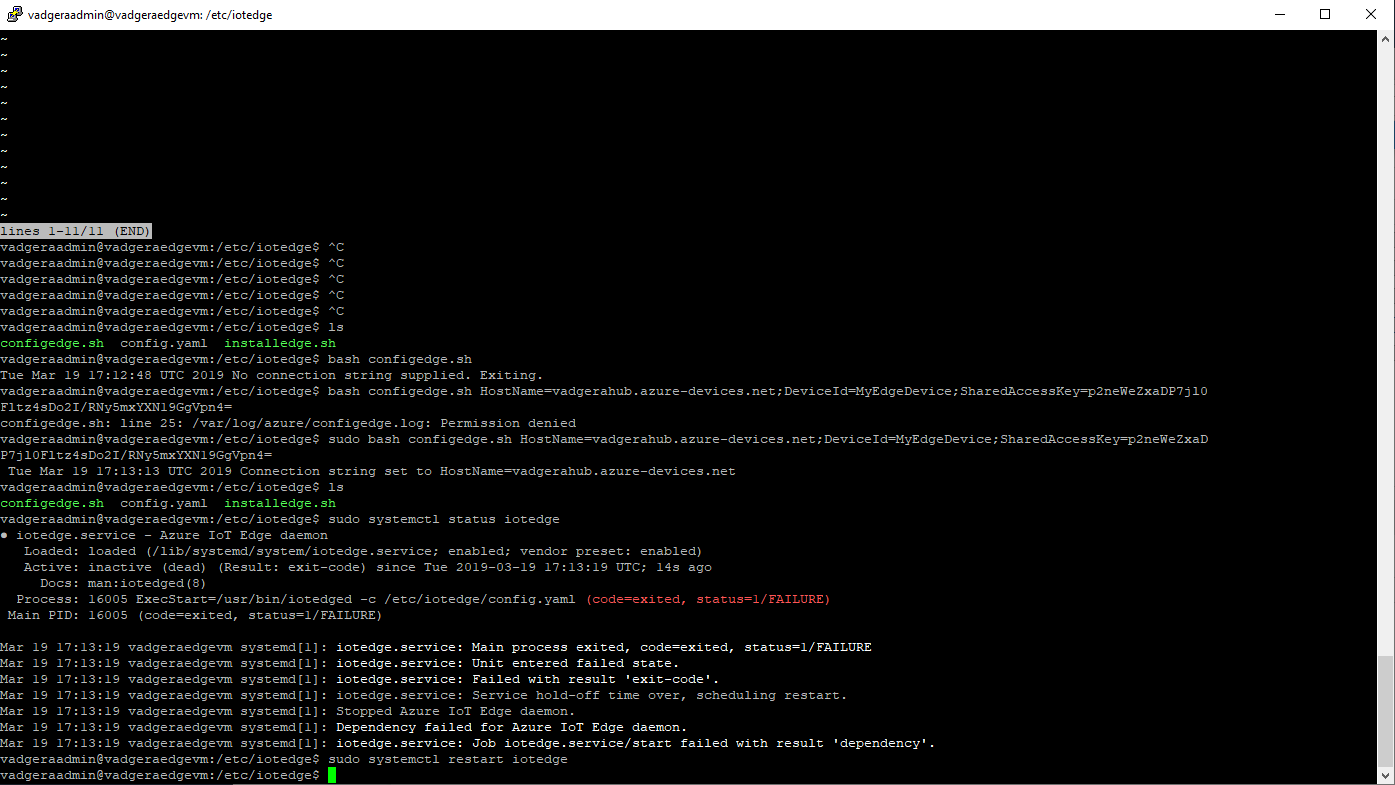
I've restarted my Ubuntu 16.04 LTS with no change. What am I missing here? Thanks!
 KingdomOfEnds
on 19 Mar 2019
KingdomOfEnds
on 19 Mar 2019
I'm guessing your parm is being truncated as it needs to be quoted (double should work.)
At this point ssh into the device/instance and run the diagnostic commands like
journalctl -u iotedge
sudo systemctl status iotedge
sudo iotedge list
The journalctl showed the core issue for me - in that the SharedAccessKey value was truncated. It's probably visible in the /etc/iotedge/config.yaml too
cicorias
on 19 Mar 2019
Ah, my apologies. I see now what you were referring too - sudo nano config.yml.
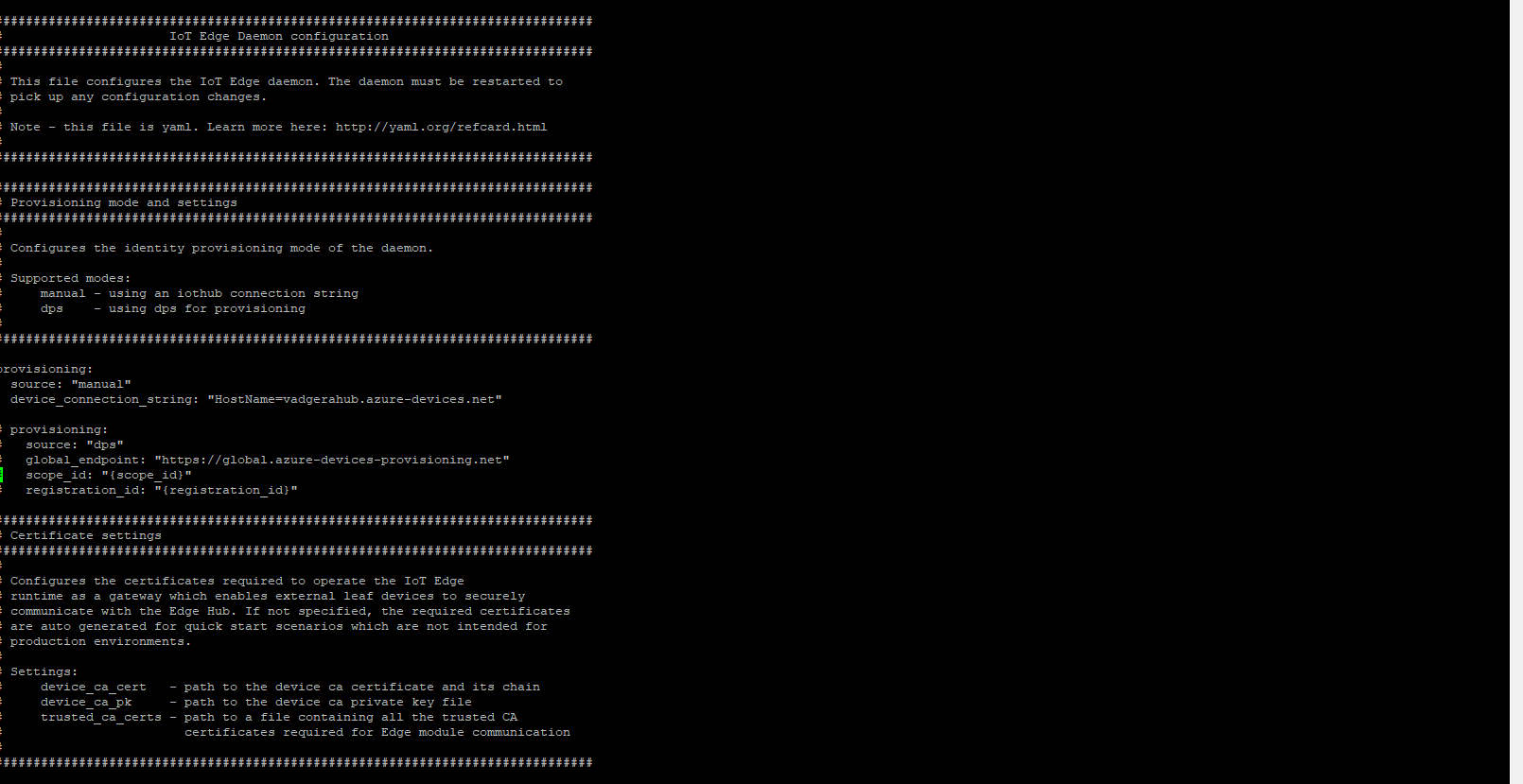
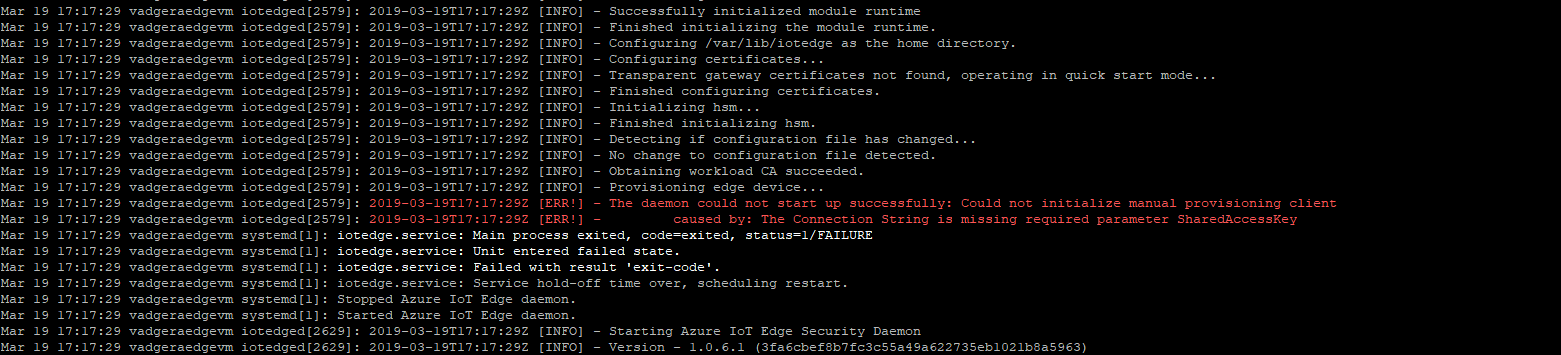
So, if I understand correctly, the config bash script doesn't pass the connection string in correctly into the configuration file? If so, is there a timeline on that fix? Many thanks!
KingdomOfEnds
on 19 Mar 2019
OK - resolved the problem with the supplied examples (above). First, double-quotes are mandatory. Second, I actually created a standard IoT device and not an Edge one. Doing both fixed my issue. Hope that helps both the OP and others as well. Thanks again!
KingdomOfEnds
on 19 Mar 2019
yea, that --edge-enabled flag will get you :)
cicorias
on 19 Mar 2019
@cicorias @KingdomOfEnds Thanks for the feedback! I have assigned the issue to the content author to evaluate and update as appropriate.
 Alberto-Vega
on 19 Mar 2019
Alberto-Vega
on 19 Mar 2019
@cicorias - Yes thanks again for your help and input.
KingdomOfEnds
on 19 Mar 2019
@cicorias Going back to your original issue, was the problem not using quotes to surround the connection string, or was it something related to Bash vs PowerShell as you initially thought?
In the code block that we recommend using to configure your IoT Edge device, there are quotes around the connection string placeholder. Were those accidentally deleted when you pasted in your string because you didn't know their importance, and a specific callout in the text before the command would have prevented the confusion?
az vm run-command invoke -g IoTEdgeResources -n EdgeVM --command-id RunShellScript --script '/etc/iotedge/configedge.sh "{device_connection_string}"'
 kgremban
on 22 Mar 2019
kgremban
on 22 Mar 2019
the issue is using the command as presented in the code box under PowerShell in Windows the device connection string gets truncated.
cicorias
on 23 Mar 2019
Looks like I found the issue. PowerShell needs single quotes around a string in order to escape special characters, and in the example we had double quotes around the connection string.
Works:
"/etc/iotedge/configedge.sh '{device_connection_string}' "
Doesn't work:
'/etc/iotedge/configedge.sh "{device_connection_string}" '
I tested the switched quotes on bash as well, and it works. I'll update the documentation to use this ordering of quotes. Please test this yourself and let me know if this resolves your issue. Thank you.
kgremban
on 29 Mar 2019
sorry i didn't get back to you quickly. yes it does work with double quotes.
cicorias
on 30 Mar 2019
Looks like I found the issue. PowerShell needs single quotes around a string in order to escape special characters, and in the example we had double quotes around the connection string.
Works:
"/etc/iotedge/configedge.sh '{device_connection_string}' "Doesn't work:
'/etc/iotedge/configedge.sh "{device_connection_string}" 'I tested the switched quotes on bash as well, and it works. I'll update the documentation to use this ordering of quotes. Please test this yourself and let me know if this resolves your issue. Thank you.
That solved my problem. Thanks
 rahul-moorkoth
on 23 Jun 2020
rahul-moorkoth
on 23 Jun 2020
Related issues
 Favna
·
3Comments
Favna
·
3Comments
 JeffLoo-ong
·
3Comments
JeffLoo-ong
·
3Comments
 spottedmahn
·
3Comments
spottedmahn
·
3Comments
 Agazoth
·
3Comments
Agazoth
·
3Comments
 jharbieh
·
3Comments
jharbieh
·
3Comments