Azure-docs: Unable to load data in azure sql db using spark connector
I am new to azure databricks . I have written a sample spark program in scala to load in azure sql via below query . I am getting an error . can someone please help me in this
Error Message ----
com.microsoft.sqlserver.jdbc.SQLServerException: The TCP/IP connection to the host b63da5ce2d2d.tr27.northeurope1-a.worker.database.windows.net, port 65535 has failed. Error: "connect timed out. Verify the connection properties. Make sure that an instance of SQL Server is running on the host and accepting TCP/IP connections at the port. Make sure that TCP connections to the port are not blocked by a firewall."
Scala code -
import com.microsoft.azure.sqldb.spark.config.Configimportcom.microsoft.azure.sqldb.spark.connect._// Aquire a DataFrame collection (val collection)valconfig=Config(Map("url"->"mysqlserver.database.windows.net","databaseName"->"MyDatabase","dbTable"->"dbo.Clients""user"->"username","password"->"xxxxxxxx"))importorg.apache.spark.sql.SaveModecollection.write.mode(SaveMode.Append).sqlDB(config
Document Details
⚠ Do not edit this section. It is required for docs.microsoft.com ➟ GitHub issue linking.
- ID: 3a43d656-dbdf-ae04-f88d-488aa1dc78c5
- Version Independent ID: 155c9eb2-92df-1619-4284-17c46a419f1f
- Content: Spark Connector with Azure SQL Database and SQL Server
- Content Source: articles/sql-database/sql-database-spark-connector.md
- Service: sql-database
- GitHub Login: @allenwux
- Microsoft Alias: xiwu
 Raviafkumar
All 10 comments
@Raviafkumar Thank you for bringing this to our attention. Can you ensure that you have the Allow connections from Azure services enabled on both the Azure Databricks instance and the Azure SQL Server instance? It is likely that this is not enabled for the Azure SQL Database and thus the connection fails. If the connection is being made from an on-premise source, you will need to allow traffic from a specific IP Address in the firewall rules setting.
Additional forum support can be found: Azure Databricks Forum
 Mike-Ubezzi-MSFT
on 4 Mar 2019
Mike-Ubezzi-MSFT
on 4 Mar 2019
Hi , Thanks for your response . I am using Azure sql as destination . The setting
"Allow access to azure services" is on for Azure sql db . I am not sure how to make this setting on for databricks instance . could you please help me in this .
Raviafkumar
on 5 Mar 2019
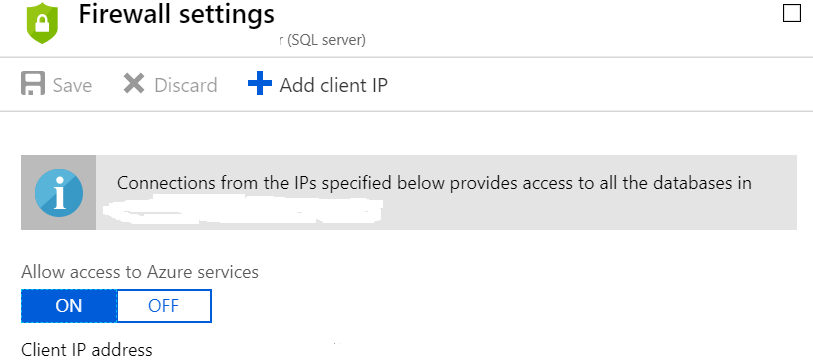
attaching screen shot to show i have "Allow access to azure services" is on for Azure sql db
Raviafkumar
on 5 Mar 2019
@Raviafkumar Thank you for this detail. In the Azure Portal is there any details to a public IP for your deployed Databricks instance? If you do see this information, please add this IP address to your Azure SQL Server setting in the firewall rules blade.
The following documentation discusses how to configure connectivity from Databricks to different data sources: Connect to data sources from Azure Databricks
The error message points out three items:
Verify the connection properties. Make sure that an instance of SQL Server is running on the host and accepting TCP/IP connections at the port. Make sure that TCP connections to the port are not blocked by a firewall.
Please ensure the following:
- The connection properties are correct for your deployed Azure SQL Database. Is Databricks using the correct connection information?
- After investigating and finding the public IP address for the Databricks cluster attempting to connect to the Azure SQL instance, please add that public IP to the Azure SQL Server firewall rules.
Are both the Databricks and Azure SQL Database instances deployed within the same region, or are they deployed to separate regions?
Mike-Ubezzi-MSFT
on 6 Mar 2019
Hi ,
Thank you for your input .
I copied public ip address of two VM and added in azure sql firewall setting . These VM's were created automatically when i had created databricks instance . After updating firewall setting in Azure sql , i ran notebook and got same error message
com.microsoft.sqlserver.jdbc.SQLServerException: The TCP/IP connection to the host b63da5ce2d2d.tr27.northeurope1-a.worker.database.windows.net, port 65535 has failed. Error: "connect timed out. Verify the connection properties. Make sure that an instance of SQL Server is running on the host and accepting TCP/IP connections at the port. Make sure that TCP connections to the port are not blocked by a firewall.".
I have used connection URL as per Microsoft documentation i.e. mysqlserver.database.windows.net .
This is mentioned in below page under heading "Write data to Azure SQL Database or SQL Server"
https://docs.microsoft.com/en-us/azure/sql-database/sql-database-spark-connector
Raviafkumar
on 7 Mar 2019
I will also add that i have used below Jar file and added in library tab in databricks instance . The URL of this jar files is mentioned in
Microsoft doc URL
https://docs.microsoft.com/en-us/azure/sql-database/sql-database-spark-connector
JAR File URL
https://github.com/Azure/azure-sqldb-spark
Raviafkumar
on 7 Mar 2019
@Raviafkumar Thank you for the additional details. I have a couple of questions for you?
- Is this entire solution deployed in a single Azure region?
- Do you have an Azure Support Plan?
Does the following address look familiar?
The TCP/IP connection to the host b63da5ce2d2d.tr27.northeurope1-a.worker.database.windows.net, port 65535 has failed.
Is b63da5ce2d2d.tr27.northeurope1-a.worker.database.windows.net the host value for your Azure SQL Database instance? Or part of your Databricks deployment?
Mike-Ubezzi-MSFT
on 7 Mar 2019
@Raviafkumar Please send your Subscription ID to AzCommunity at Microsoft.com and I will return instructions to have a support request created to have this issue investigated. If you have an Azure support plan, please go ahead and create a support request.
Mike-Ubezzi-MSFT
on 8 Mar 2019
We will now proceed to close this thread, as it is a product issue that needs to go to support although, if there are further questions regarding this matter, please comment and we will gladly continue the discussion.
Mike-Ubezzi-MSFT
on 8 Mar 2019
Hi , I just want to highlight that I used jdbc driver provided in Microsoft and I was able to load the data in azure sql db .
I also want to highlight the piece of code written on this page to load data in azure sql .
Please see the url in below pic . usually when we connect any program like java we use url which has server name ,user name , password etc . however in below pic we are not specifying the server name . so how will spark will know which server it has to connect to ?
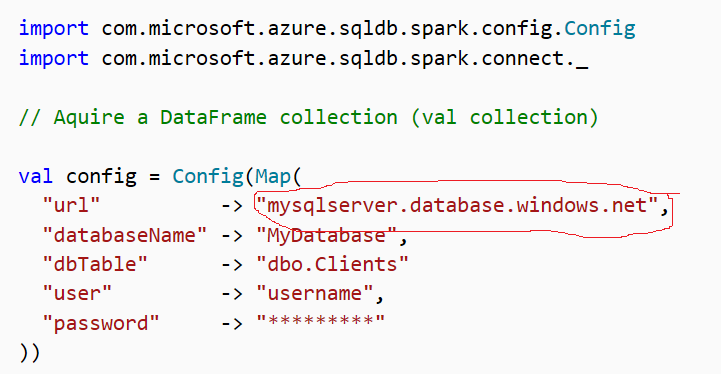
b63da5ce2d2d.tr27.northeurope1-a.worker.database.windows.net is not azure sql instance that I have created . I also cannot find this resource on azure portal .
I just wanted to highlight this and I don't need any technical support from Microsoft .
Raviafkumar
on 11 Mar 2019
Related issues
 jharbieh
·
3Comments
jharbieh
·
3Comments
 monteledwards
·
3Comments
monteledwards
·
3Comments
 DeepPuddles
·
3Comments
DeepPuddles
·
3Comments
 spottedmahn
·
3Comments
spottedmahn
·
3Comments
 Favna
·
3Comments
Favna
·
3Comments
Most helpful comment
Hi , I just want to highlight that I used jdbc driver provided in Microsoft and I was able to load the data in azure sql db .
I also want to highlight the piece of code written on this page to load data in azure sql .
Please see the url in below pic . usually when we connect any program like java we use url which has server name ,user name , password etc . however in below pic we are not specifying the server name . so how will spark will know which server it has to connect to ?
b63da5ce2d2d.tr27.northeurope1-a.worker.database.windows.net is not azure sql instance that I have created . I also cannot find this resource on azure portal .
I just wanted to highlight this and I don't need any technical support from Microsoft .