Azure-docs: Active Learning not working
I followed the steps mentioned here but Active Learning doesn't seem to work. I posted it on Stackoverflow: https://stackoverflow.com/questions/54827888/active-learning-suggestions-in-qnamaker to get some techical. I have mentioned the details in the Stackoverflow thread. Is there any help I can get here?
Document Details
⚠ Do not edit this section. It is required for docs.microsoft.com ➟ GitHub issue linking.
- ID: e302f635-c2b9-e505-7b9e-d947dab75514
- Version Independent ID: 2c1e8216-c9d5-68bd-cbca-6c80dcb2f2b3
- Content: Improve knowledge base - QnA Maker - Azure Cognitive Services
- Content Source: articles/cognitive-services/QnAMaker/How-To/improve-knowledge-base.md
- Service: cognitive-services
- GitHub Login: @diberry
- Microsoft Alias: diberry
 Souvik04
All 17 comments
@Souvik04 Thanks for the feedback. We are investigating into the issue and will update you shortly.
 RohitMungi-MSFT
on 25 Feb 2019
RohitMungi-MSFT
on 25 Feb 2019
@Souvik04 There could be two reasons why the suggestions are not shown:
Active Learning is supported for run time version of 4.4.0 and above. Please check the application settings of your app service to check if the correct version is used for the service in azure portal.
There could not be enough answers returned by QnA Maker for a given query. If the score differences lie within a small range, then the query is considered a possible suggestion for each of the possible answers.
RohitMungi-MSFT
on 25 Feb 2019
@RohitMungi-MSFT Thanks for the response.
- I checked the app settings of the QnAMaker service in the Azure portal. The only relevant key-value I found is:
QNAMAKER_EXTENSION_VERSION:latest
What version (key-value) should I specify here?
- Is there a way I can test this with the chit-chat knowledge base (which comes as an option while creating the KB) of the QnAMaker?
Souvik04
on 25 Feb 2019
@Souvik04 the run time version can be checked on the App Services' application settings page as seen in this screen grab.

You can test with the chit-chat KB using the Test option in qnamaker.ai for your KB, A screen shot of the same is also attached for a test KB I created.
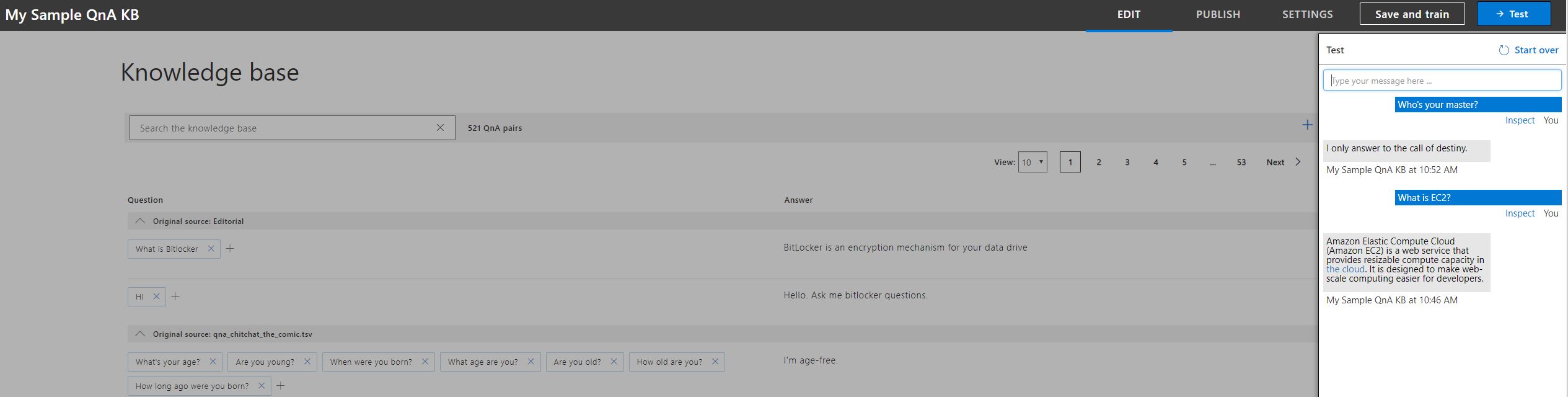
I hope this helps you in testing your KB and it provides enough data for Active Learning to provide suggestions as it is integrated with your application.
RohitMungi-MSFT
on 26 Feb 2019
@RohitMungi-MSFT I checked the version. It is v 4.7 same as yours. I have some confusion understanding how the Active Learning works. Could you please take the chit-chat (professional) and explain it through some example questions? So that I can try the same here and see if those gets added as suggestion.
I tried some questions (similar to few existing question) in the Test window of QnAMaker.
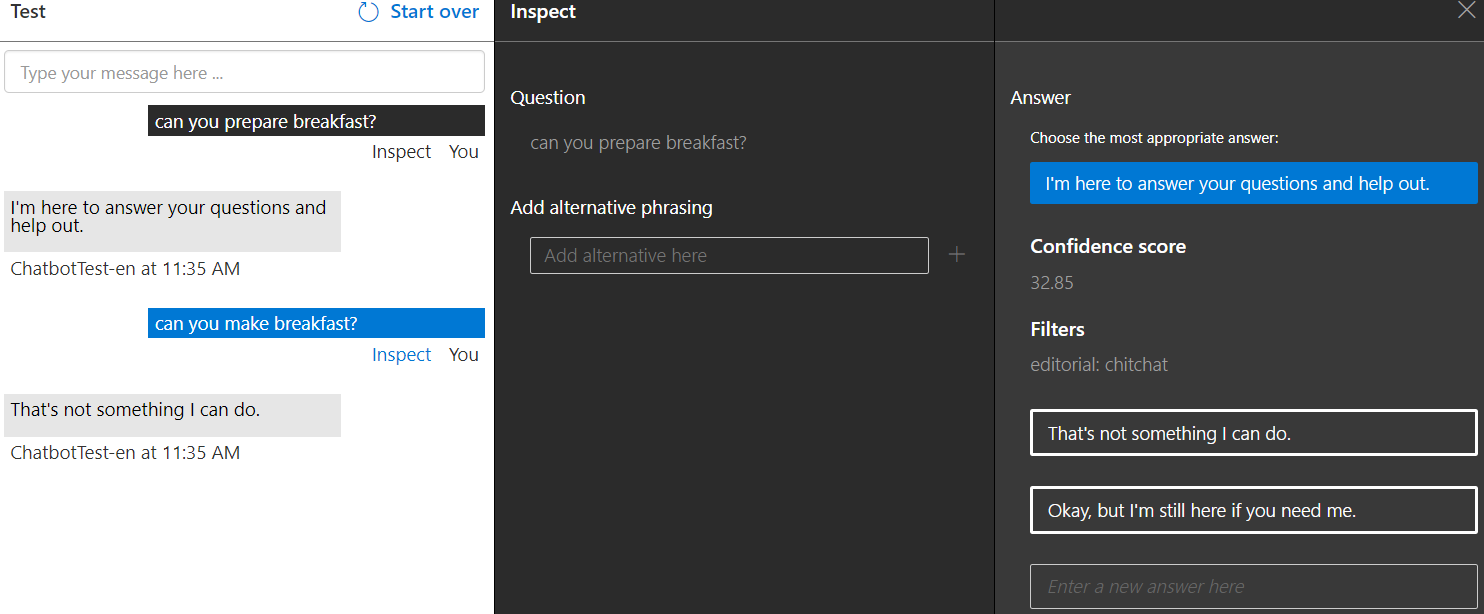
The data in my Chit-chat KB is like this where I was expecting the new question suggestions to get added.
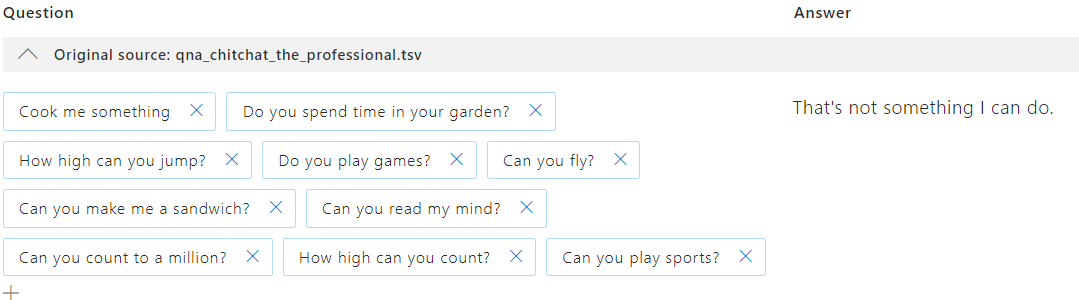
I kept hitting with same similar set of questions and waited for about 20 minutes but I didn't see the suggestions getting added. Please let me know if I can provide some more details.
Souvik04
on 26 Feb 2019
@Souvik04 Here is a github repo which simulates active learning for a test bot. I was able to follow the steps and get some suggestions for sample queries, screen shot below.
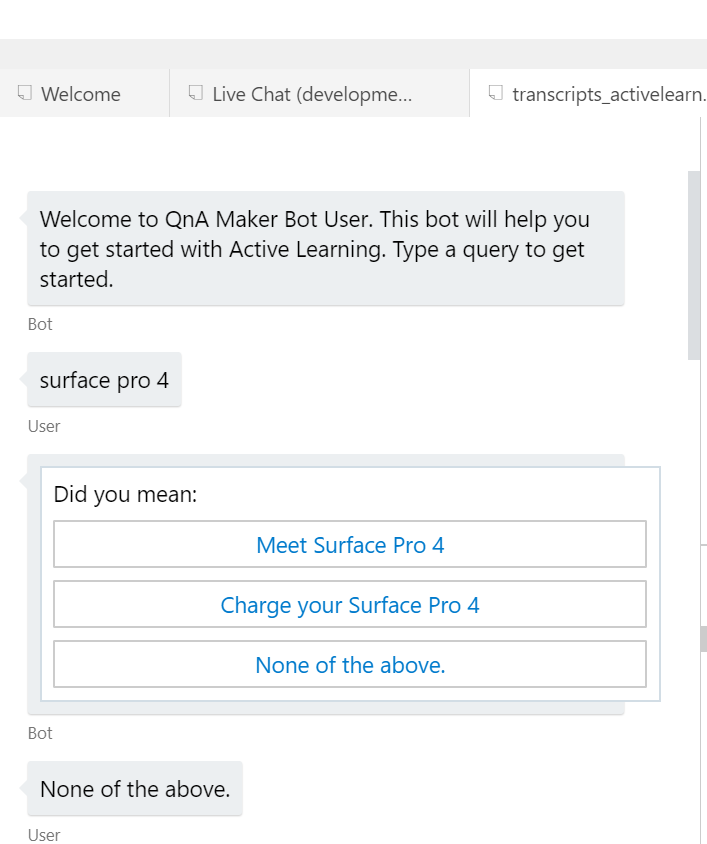
Please ensure the qnamaker-activelearning.bot is correctly updated with your endpoint key, hostname, KBid and subscription key.
You can find the endpoint key, hostname and KBid in the settings page of your KB in qnamaker.ai page.
- The KB id would be the id in the POST request you see in the sample deployment details of the setting page.
- Subscription key is available in azure portal from the keys tab of your QnA service
Please ensure you setup the pre-requisites correctly and login to your azure account where the QnA service is created from the emulator so that the QnA emulator can connect to your endpoint when queries are entered.
I have also tested by adding some editorial content in my KB from qnamaker.ai portal, Screen shot below:

Then tested from the desktop emulator with the following questions.
1) aws
2) what is gcp
3) what is windows azure
For the last question the bot checked what I actually meant by providing suggestions since "windows azure" is not added in my editorial content. Screen shot below.
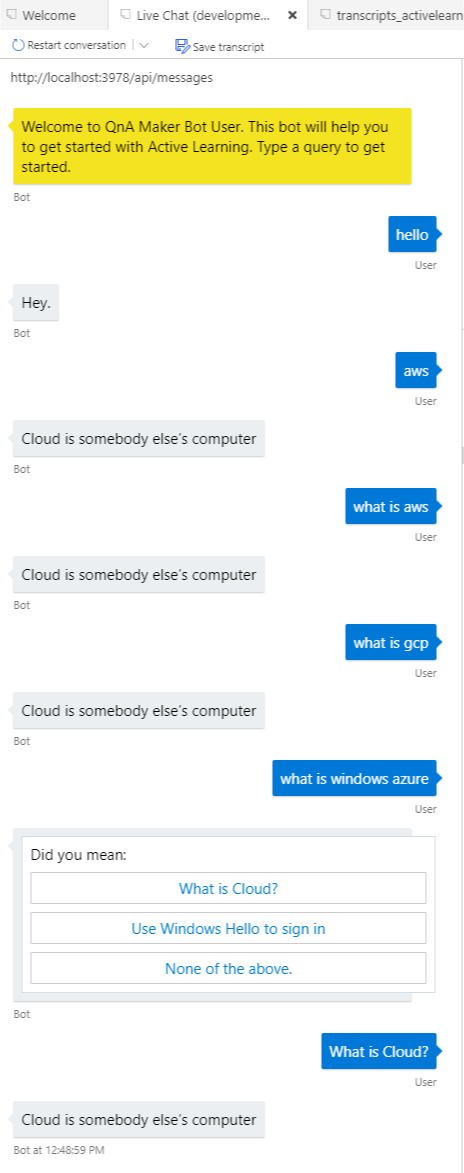
However, I'm still not able to view suggestions in qnamaker.ai portal. I will pass my findings to the product team to understand when the qnamaker.ai portal will display the suggestions and update this issue with their response.
I hope the above steps will help you in getting started with QnAMaker!!
RohitMungi-MSFT
on 27 Feb 2019
Related issue #24709. Suggestions are not showing up in the QnaMaker portal.
 iMicknl
on 27 Feb 2019
iMicknl
on 27 Feb 2019
@Souvik04, follow the link to the Active Learning sample bot in the BotFramework-Samples repo for a example of how you can query the QnA service from your bot with active learning enabled.
After conversing with the QnA team (Rohit is included in the conversation), here's a little more light regarding when you would actually see the suggestions inside the portal at qnamaker.ai.
When there is a low confidence score difference between the top answers, we collect weighted implicit and explicit feedback to cluster suggestions for any QnA ID.
=> When _enough_ feedback is collected for any given suggestion, it will show in the KB.
More specifically, we cluster similar user queries to generate suggestions. When minimum required feedback is collected, only then will the suggestions show in the KB.
The QnA team wants to avoid publicly divulging the exact logic of what exactly is the "minimum required feedback" and how often suggestions are generated (besides, the team is working on improving and optimizing the logic behind active learning as well)
--however to see suggestions appear in the qnamaker.ai portal:
- not only ensure that you've given the bot enough feedback
- but also give the back end "some time" to allow for the suggestions to appear in the portal.
Again, feedback is collected when your user types in a query that returns answers from QnA that have confidence scores that are close together.
It is also good to note that feedback is _not_ collected in the Test panel in the qnamaker.ai portal as of now. You will need to chat with your bot via emulator or a channel to provide feedback to your bot that it can use for active learning.
 Zerryth
on 27 Feb 2019
Zerryth
on 27 Feb 2019
@Zerryth Thanks for updating the issue. @Souvik04 and @iMicknl Please use the active learning sample bot and train your KB with the steps I mentioned before. If the "Did you mean" dialog shows up in the emulator provide the relevant option as feedback and this will ensure the system captures them, When there are enough such similar feedback they are shown as suggestions in the KB on the portal. If you accept the suggestions please ensure to publish the KB again and check if it shows the correct answer without additional prompts. Here are the screen shots of the above question i asked and it shows them as suggestions.
Suggestion in Portal:

Response from bot for before and after accepting & publishing the KB:
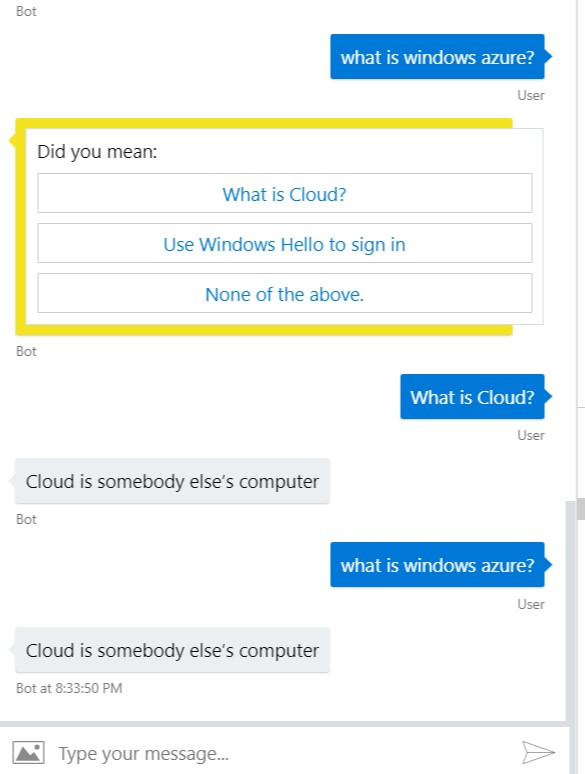
I will now go ahead and close this issue. We will be updating the document as new features are rolled out and please continue to let us know your feedback. If there are further questions regarding this matter, please tag @RohitMungi-MSFT in your reply. We will gladly continue the discussion and we will reopen the issue.
RohitMungi-MSFT
on 28 Feb 2019
@RohitMungi-MSFT and @Zerryth Thanks for explaining it and the solutions provided. I had previously looked into the Bot Builder samples github link. I was able to get the suggestions in the portal. The sample has some amount of code which basically generates the Hero cards and takes the feedback. I was under the impression that I can simply query the knowledge base with QnAMaker library, specifying the top and score options and I will get the Hero cards out of the box, which can be used as feedbacks. The Active Learning document links doesn't explain this at all, at least not in a way a user can pick up easily in my opinion.
Souvik04
on 28 Feb 2019
@Souvik04 We are working on updating the document with the findings of this issue and suggestions from another issue 24709. These updates will provide clarity on these steps and future service updates.
RohitMungi-MSFT
on 1 Mar 2019
@RohitMungi-MSFT Thank you for the update.
Souvik04
on 1 Mar 2019
Seeing the same problems too. It used to work on 4 endpoints and now all 4 have stopped serving suggestions.
 paulio
on 29 Apr 2019
paulio
on 29 Apr 2019
@paulio - please submit a user voice issue from the LUIS portal "General Inquiry through user voice" and include your LUIS app id.
 diberry
on 29 Apr 2019
diberry
on 29 Apr 2019
We have a support call logged I just wanted to comment because it seems like identical symptoms
paulio
on 29 Apr 2019
hello, I am having the same problem, I have raised the Active Learning example https://github.com/microsoft/BotBuilder-Samples/tree/master/experimental/qnamaker-activelearning/csharp_dotnetcore and followed the steps for its implementation to discard any problem in my code, but I have not managed to work, I can not get the bot appear sugenrencias for example to "Surface Pro 4", not in my KB appear suggestions, some help? I have tried different options and I have not succeeded.
Thank you very much for your help!
 renrous
on 20 May 2019
renrous
on 20 May 2019
hello, I am having the same problem, I have raised the Active Learning example https://github.com/microsoft/BotBuilder-Samples/tree/master/experimental/qnamaker-activelearning/csharp_dotnetcore and followed the steps for its implementation to discard any problem in my code, but I have not managed to work, I can not get the bot appear sugenrencias for example to "Surface Pro 4", not in my KB appear suggestions, some help? I have tried different options and I have not succeeded.
Thank you very much for your help!
hello @RohitMungi-MSFT any update for the issue?
@paulio they got some advance with the support call
Thank you
renrous
on 22 May 2019
Related issues
 mrdfuse
·
3Comments
mrdfuse
·
3Comments
 jharbieh
·
3Comments
jharbieh
·
3Comments
 DeepPuddles
·
3Comments
DeepPuddles
·
3Comments
 Favna
·
3Comments
Favna
·
3Comments
 bdcoder2
·
3Comments
bdcoder2
·
3Comments
Most helpful comment
@Souvik04 Here is a github repo which simulates active learning for a test bot. I was able to follow the steps and get some suggestions for sample queries, screen shot below.

Please ensure the qnamaker-activelearning.bot is correctly updated with your endpoint key, hostname, KBid and subscription key.
You can find the endpoint key, hostname and KBid in the settings page of your KB in qnamaker.ai page.
Please ensure you setup the pre-requisites correctly and login to your azure account where the QnA service is created from the emulator so that the QnA emulator can connect to your endpoint when queries are entered.
I have also tested by adding some editorial content in my KB from qnamaker.ai portal, Screen shot below:
Then tested from the desktop emulator with the following questions.
1) aws
2) what is gcp
3) what is windows azure
For the last question the bot checked what I actually meant by providing suggestions since "windows azure" is not added in my editorial content. Screen shot below.
However, I'm still not able to view suggestions in qnamaker.ai portal. I will pass my findings to the product team to understand when the qnamaker.ai portal will display the suggestions and update this issue with their response.
I hope the above steps will help you in getting started with QnAMaker!!