Azure-docs: Help with authorization
I don't know if this is the right forum. I need a little help getting started. I can get tokens with client credential grant types, but still not get to ../Patient resource. (403 Forbidden). Perhaps I need to use authorization_code, but cant because Postman only shows blank screen, never a login. My intent is connect through jvm based client eventually, but cant get past go. If there is some type of support available for the project, please let me know.
Document Details
⚠ Do not edit this section. It is required for docs.microsoft.com ➟ GitHub issue linking.
- ID: 42a59e55-f0a6-4d20-e8d6-9b1ae0e61a52
- Version Independent ID: e3e77337-fcd0-4904-14b0-2e6e9c100029
- Content: Frequently asked questions (FAQ) about FHIR services in Azure - Azure API for FHIR
- Content Source: articles/healthcare-apis/fhir-faq.md
- Service: healthcare-apis
- GitHub Login: @hansenms
- Microsoft Alias: mihansen
 spzitello
All 13 comments
We will need a bit more information to help you out, but here are some things to check:
Take your token to https://jwt.ms and inspect the claims. The claims to validate are that the aud is set to https://azurehealthcareapis.com and check that oid is in the list of allowed object ids that you can find on the "Authentication" blade in the portal.
I am also a bit confused about you trying to access ../Patient, could you put the exact query, it should be something like:
GET https://<ACCOUNT NAME>.azurehealthcareapis.com/Patient
 hansenms
on 21 Feb 2019
hansenms
on 21 Feb 2019
Nice of you to respond. I am thankful.
Query: GET https://zitellodbs.azurehealthcareapis.com/Patient
For this I have only used the client_credentials grant type , which seems that like it explains failure to authenticate. With jwt.ms, I do not see any roles.
I don’t really know which “object”the OID is referring to.
I did add that the Allowed object IDs for the “Azure API for FHIR”, but I do not know which object it is referring to.
The App Registration does not currently have any app roles defined in the Manifest.
I did have some previously but have torn it down to try to get baseline behaviors.
It does not have a Reply URL as I can not use Authorization_Code grant type (Postman always displays blank window) so I removed.
There are application and delegated permissions below.
I get the sense that the problem is the grant_type, I think I’ve learned that a role needs to end up in the token sent for the GET, but I don’t have any easy way of getting to that.
For my project I will be connecting from an application that transforms primarily HL7v2 messages to FHIR. I have done client_credentials with that application but not authorization_code so if this is the essence oft he problem then I need to figure out how to get past that as a next step.
Any guidance here is very much appreciated.
{
"typ": "JWT",
"alg": "RS256",
"x5t": "-sxMJMLCIDWMTPvZyJ6tx-CDxw0",
"kid": "-sxMJMLCIDWMTPvZyJ6tx-CDxw0"
}.{
"aud": "https://azurehealthcareapis.com",
"iss": "https://sts.windows.net/0608222d-e571-48e5-a363-b927d382cb35/",
"iat": 1550761557,
"nbf": 1550761557,
"exp": 1550765457,
"aio": "42JgYHj29cyjUKb1j2Yytws3nxK8AwA=",
"appid": "6aaba910-1cef-442d-b921-6b12f15519db",
"appidacr": "1",
"idp": "https://sts.windows.net/0608222d-e571-48e5-a363-b927d382cb35/",
"oid": "99bd3317-b5f1-4efd-83d8-3c6b932ddeef",
"sub": "99bd3317-b5f1-4efd-83d8-3c6b932ddeef",
"tid": "0608222d-e571-48e5-a363-b927d382cb35",
"uti": "RcxjHiE2QkS0lhxBv_UEAQ",
"ver": "1.0"
}.[Signature]
Sean Paul Zitello
President
Zitello Design Build Solve LLC
Phone: 412-915-4541
Email: [email protected]
On Feb 21, 2019, at 5:18 PM, Michael Hansen notifications@github.com wrote:
We will need a bit more information to help you out, but here are some things to check:
Take your token to https://jwt.ms and inspect the claims. The claims to validate are that the aud is set to https://azurehealthcareapis.com and check that oid is in the list of allowed object ids that you can find on the "Authentication" blade in the portal.
I am also a bit confused about you trying to access ../Patient, could you put the exact query, it should be something like:
GET https://
.azurehealthcareapis.com/Patient
—
You are receiving this because you authored the thread.
Reply to this email directly, view it on GitHub, or mute the thread.
spzitello
on 21 Feb 2019
When configuring the Azure API for FHIR, either during creation or in a subsequent step, you provide a list of identity object ids:
https://docs.microsoft.com/en-us/azure/healthcare-apis/fhir-paas-portal-quickstart#additional-settings
These are identity object ids in Azure Active Directory and can refer to either a user or a service principal. If you use client_credentials flow, you are providing a client id and a secret, and you would be logging in as that client id. Essentially as a service principal. So you have to make sure that the object id for that service principal is in the list of allowed object ids, otherwise you will be denied access.
In your case, go to the authentication blade and ensure that 99bd3317-b5f1-4efd-83d8-3c6b932ddeef is in the list of allowed object ids. If not, add it and save.
It will take a couple of minutes to change the list and then try again.
hansenms
on 22 Feb 2019
I do indeed have 99bd3317-b5f1-4efd-83d8-3c6b932ddeef in the list of allowed object id, but I don’t know what that refers to.
The object id for the object with client_id/client_secret that I am using is not that. — (but see below, it is related)
I created the AD App Registration for this object but it does not show up as Service Principal in the places (add Role) where I would expect to find service principals. When I created a service principal from Powershell [PS], It showed up where I expected (when +Roles) and also as AD App Registration.
There does not appear a place to create Service Principals within the Azure portal.
so it seems, creating a Service Principal also creates an App Registration but not vice versa.
I decided to create a Service Principal in Powershell and then generated client secret for that App Registration that came along with it, but I get the same 403 result.
Back to the object id. Through jwmt.ms I see the object id that is in the claim, and so backtrack with PS to find out what it belongs to.
Here is I discover that the application id and object id are two different values and the Portal does not display both and that is why I did not see it.
As I try to add that object id to the it takes quite a long time, but does finish.
Now this time, it works!
Summary:
So the difference between where I started and where I am now is that even though I had that correct object ID for App Registration #1 (since I copied and pasted from jwt.ms “OID”) I still could not get authorization as there was no Service Principal attached to App Registration.
I don’t know enough about AD architecture to say if that makes perfect sense, but from a documentation standpoint, it is an important distinction i.e.
Creating an App Registration through the portal alone will not do the job as it does not create the Service Principal.
Perhaps there is a combination of settings or actions that does this? not clear on that.
Secondarily, there ought to be a way to get that object id into the Authority w/o going out to PS to do it or by decoding the claim from the token.
However, it that is the only way, then fine, but do make sure to document. Get-AzureADObjectByObjectId
I want to thank you for your help here. I felt like I was getting close but also going in circles, so thanks for responding so quickly.
On Feb 21, 2019, at 6:40 PM, Michael Hansen notifications@github.com wrote:
When configuring the Azure API for FHIR, either during creation or in a subsequent step, you provide a list of identity object ids:
https://docs.microsoft.com/en-us/azure/healthcare-apis/fhir-paas-portal-quickstart#additional-settings
These are identity object ids in Azure Active Directory and can refer to either a user or a service principal. If you use client_credentials flow, you are providing a client id and a secret, and you would be logging in as that client id. Essentially as a service principal. So you have to make sure that the object id for that service principal is in the list of allowed object ids, otherwise you will be denied access.
In your case, go to the authentication blade and ensure that 99bd3317-b5f1-4efd-83d8-3c6b932ddeef is in the list of allowed object ids. If not, add it and save.
It will take a couple of minutes to change the list and then try again
—
You are receiving this because you authored the thread.
Reply to this email directly, view it on GitHub, or mute the thread.
spzitello
on 22 Feb 2019
@spzitello We will now proceed to close this thread. If there are further questions regarding this matter, please tag me in your reply. We will gladly continue the discussion and we will reopen the issue.
 BryanTrach-MSFT
on 22 Feb 2019
BryanTrach-MSFT
on 22 Feb 2019
@spzitello glad you worked it out. I will acknowledge that AAD is a complicated product, I don't think we can replicate all the relevant information in our docs from AAD. If you search for AAD and service principles, there are a lot of articles on the differences between application registration id and service principal ids and object ids. It is a bit complicated, but makes sense after a while. We also have this page:
https://docs.microsoft.com/en-us/azure/healthcare-apis/find-identity-object-ids
Let us know if you have other issues.
hansenms
on 22 Feb 2019
Hi @BryanTrach-MSFT and @hansenms,
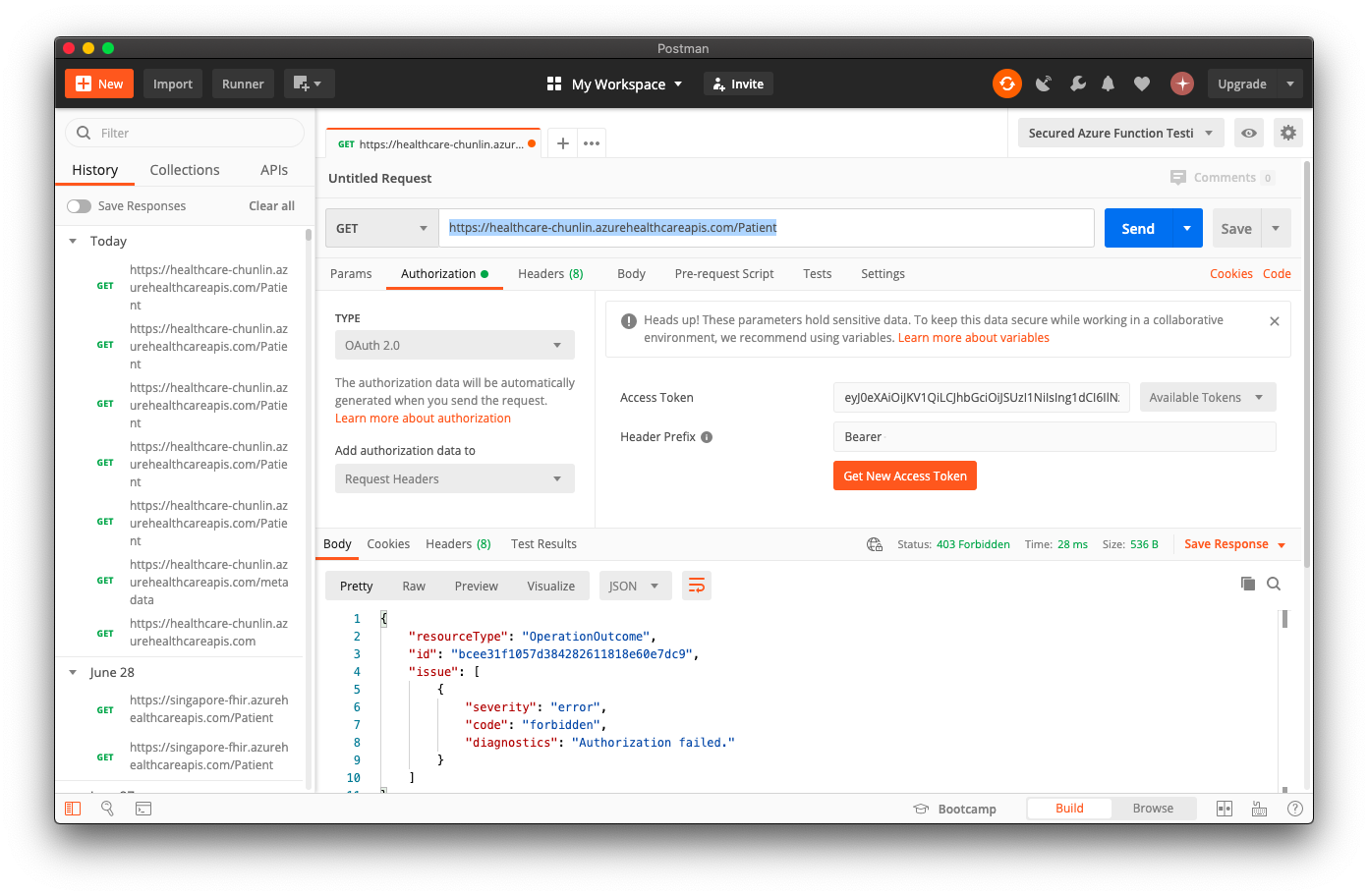
With the change of the FHIR Authentication page on the Azure portal, now we can no longer key in the allowed Object IDs in the box.

Hence, the same problem now comes back. Even though we have added the Client App to have FHIR Data Write role, it still comes back with the following response in the Postman request.
{
    "resourceType": "OperationOutcome",
    "id": "79a0834e1304ff47aaa6cccabec16b71",
    "issue": [
        {
            "severity": "error",
            "code": "forbidden",
            "diagnostics": "Authorization failed."
        }
    ]
}
The steps we took are same as the one documented on https://docs.microsoft.com/en-gb/azure/healthcare-apis/access-fhir-postman-tutorial. Could you please advise which step that we might do it wrongly?
Thank you for your time attending to this.
 goh-chunlin
on 27 Jun 2020
goh-chunlin
on 27 Jun 2020
When you are using the same Azure AD tenant for control plane and data plane access, we now recommend that you use Azure RBAC for configuring access:
https://docs.microsoft.com/en-us/azure/healthcare-apis/configure-azure-rbac
If you look at the greyed out box, there is a note about that underneath with a link for for more information.
hansenms
on 29 Jun 2020
Thanks for your reply, @hansenms .
Yes, we have followed the Azure RBAC documentation you provided above. However, when we sent a POST request to https://xxxxxxxx.azurehealthcareapis.com/Patient, it still told us that we are forbidden to access the Azure APIs for FHIR.
The following screenshot shows the IAM of our Azure APIs for FHIR.

Please advise us if there is any missing steps.
Thank you for your time attending to this.
goh-chunlin
on 4 Jul 2020
Looks like you have given your app access to the FHIR API, but are you getting a token on behalf of the app (service principal) or are you getting a token for a user? Are you signing in as a user when getting a token in Postman? If you are signing in as a user, then give that user access to the FHIR API.
hansenms
on 4 Jul 2020
Dear @hansenms ,
Thank you for pointing out.
Following the tutorial (https://docs.microsoft.com/en-us/azure/healthcare-apis/tutorial-web-app-public-app-reg), it will actually lead to the path of "signing in as a user". Hence, your suggestion of giving that user access to the FHIR API is important.
Thanks again for your fast response. =)
goh-chunlin
on 4 Jul 2020
I'm having a similar issue where I can make HTTP requests with Postman successfully, but can't make the same request from other places. I have a token but still get forbidden. Not sure what permission I'm missing
 divurgentuser
on 8 Jul 2020
divurgentuser
on 8 Jul 2020
You need to inspect the token and see who the token was issued for (the oid claim in the token). If that is a specific user or service principal, you need to grant that user or service principal access to the API.
This issue is closed, we don't always spot comments/questions on closed issues. I would recommend opening a new one for future reference.
hansenms
on 8 Jul 2020
Related issues
 JeffLoo-ong
·
3Comments
JeffLoo-ong
·
3Comments
 bityob
·
3Comments
bityob
·
3Comments
 spottedmahn
·
3Comments
spottedmahn
·
3Comments
 paulmarshall
·
3Comments
paulmarshall
·
3Comments
 mrdfuse
·
3Comments
mrdfuse
·
3Comments
Most helpful comment
Looks like you have given your app access to the FHIR API, but are you getting a token on behalf of the app (service principal) or are you getting a token for a user? Are you signing in as a user when getting a token in Postman? If you are signing in as a user, then give that user access to the FHIR API.