Azure-docs: Error while setting up Chef workstation on an Azure VM
Hello Group,
I am trying to setup Chef workstation as mentioned in the article (on an Azure Windows 2016 VM):
https://docs.microsoft.com/en-us/azure/virtual-machines/windows/chef-automation.
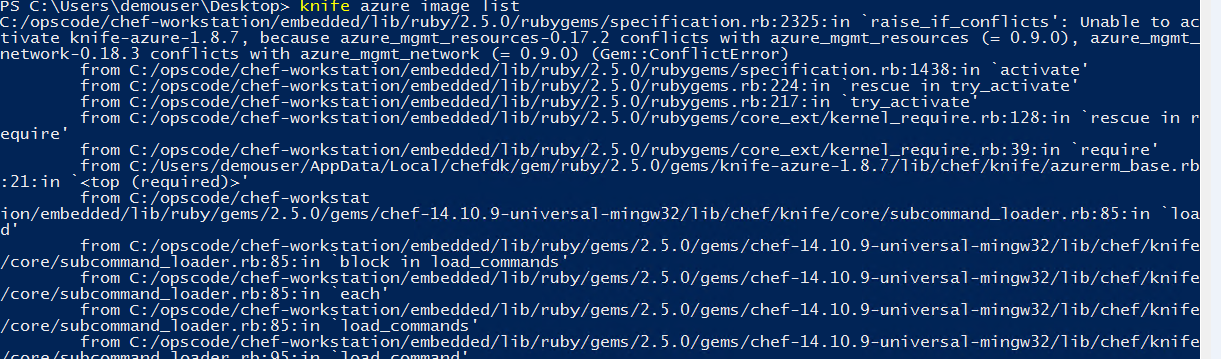
When i execute the 'knife azure image list' command as mentioned in the document, i am getting the attached error. Any inputs to resolve the issue would be of great help.
Thanking in Advance,
Kiran...
Document Details
⚠ Do not edit this section. It is required for docs.microsoft.com ➟ GitHub issue linking.
- ID: 48933ef2-fdcd-9f32-5ae9-bac175c8ffbd
- Version Independent ID: d2f31ebc-3c71-fd49-a288-92e0124b15a3
- Content: Azure virtual machine deployment with Chef
- Content Source: articles/virtual-machines/windows/chef-automation.md
- Service: virtual-machines-windows
- GitHub Login: @diegoviso
- Microsoft Alias: diviso
 kirantsp
All 20 comments
Thanks for the feedback! We are currently investigating and will update you shortly.
 mimckitt
on 7 Feb 2019
mimckitt
on 7 Feb 2019
@kirantsp I ran through the doc and I am seeing similar errors
PS C:\Users\mimckitt> chef --version
Chef Workstation: 0.2.48
chef-run: .chef-workstation/config.toml.
chef-client: 14.10.9
delivery-cli: 0.0.50 (64f556d5ebfd7bac2c0b3cc2c53669688b3ea4b5)
berks: 7.0.7
test-kitchen: 1.24.0
inspec: 3.4.1
PS C:\Users\mimckitt> chef gem install knife-azure --pre
Fetching: ms_rest-0.6.4.gem (100%)
WARNING: You don't have c:\users\mimckitt\appdata\local\chefdk\gem\ruby\2.5.0\bin in your PATH,
gem executables will not run.
Successfully installed ms_rest-0.6.4
Fetching: ms_rest_azure-0.7.0.gem (100%)
Successfully installed ms_rest_azure-0.7.0
Fetching: azure_mgmt_resources-0.9.0.gem (100%)
Successfully installed azure_mgmt_resources-0.9.0
Fetching: azure_mgmt_compute-0.9.0.gem (100%)
Successfully installed azure_mgmt_compute-0.9.0
Fetching: azure_mgmt_storage-0.9.0.gem (100%)
Successfully installed azure_mgmt_storage-0.9.0
Fetching: azure_mgmt_network-0.9.0.gem (100%)
Successfully installed azure_mgmt_network-0.9.0
Fetching: knife-azure-1.8.7.gem (100%)
Successfully installed knife-azure-1.8.7
Parsing documentation for ms_rest-0.6.4
Installing ri documentation for ms_rest-0.6.4
Parsing documentation for ms_rest_azure-0.7.0
Installing ri documentation for ms_rest_azure-0.7.0
Parsing documentation for azure_mgmt_resources-0.9.0
Installing ri documentation for azure_mgmt_resources-0.9.0
Parsing documentation for azure_mgmt_compute-0.9.0
Installing ri documentation for azure_mgmt_compute-0.9.0
Parsing documentation for azure_mgmt_storage-0.9.0
Installing ri documentation for azure_mgmt_storage-0.9.0
Parsing documentation for azure_mgmt_network-0.9.0
Installing ri documentation for azure_mgmt_network-0.9.0
Parsing documentation for knife-azure-1.8.7
Installing ri documentation for knife-azure-1.8.7
Done installing documentation for ms_rest, ms_rest_azure, azure_mgmt_resources, azure_mgmt_compute, azure_mgmt_storage, azure_mgmt_network, knife-azure after 50 seconds
ERROR: Could not find a valid gem '??pre' (>= 0) in any repository
7 gems installed
PS C:\Users\mimckitt> knife azure image list
Traceback (most recent call last):
18: from C:/opscode/chef-workstation/bin/knife:322:in `<main>'
17: from C:/opscode/chef-workstation/bin/knife:322:in `load'
16: from C:/opscode/chef-workstation/embedded/lib/ruby/gems/2.5.0/gems/chef-14.10.9-universal-mingw32/bin/knife:24:in `<top (required)>'
15: from C:/opscode/chef-workstation/embedded/lib/ruby/gems/2.5.0/gems/chef-14.10.9-universal-mingw32/lib/chef/application/knife.rb:161:in `run'
14: from C:/opscode/chef-workstation/embedded/lib/ruby/gems/2.5.0/gems/chef-14.10.9-universal-mingw32/lib/chef/knife.rb:215:in `run'
13: from C:/opscode/chef-workstation/embedded/lib/ruby/gems/2.5.0/gems/chef-14.10.9-universal-mingw32/lib/chef/knife.rb:152:in `subcommand_class_from'
12: from C:/opscode/chef-workstation/embedded/lib/ruby/gems/2.5.0/gems/chef-14.10.9-universal-mingw32/lib/chef/knife/core/subcommand_loader.rb:109:in `command_class_from'
11: from C:/opscode/chef-workstation/embedded/lib/ruby/gems/2.5.0/gems/chef-14.10.9-universal-mingw32/lib/chef/knife/core/subcommand_loader.rb:95:in `load_command'
10: from C:/opscode/chef-workstation/embedded/lib/ruby/gems/2.5.0/gems/chef-14.10.9-universal-mingw32/lib/chef/knife/core/subcommand_loader.rb:85:in `load_commands'
9: from C:/opscode/chef-workstation/embedded/lib/ruby/gems/2.5.0/gems/chef-14.10.9-universal-mingw32/lib/chef/knife/core/subcommand_loader.rb:85:in `each'
8: from C:/opscode/chef-workstation/embedded/lib/ruby/gems/2.5.0/gems/chef-14.10.9-universal-mingw32/lib/chef/knife/core/subcommand_loader.rb:85:in `block in load_commands'
7: from C:/opscode/chef-workstation/embedded/lib/ruby/gems/2.5.0/gems/chef-14.10.9-universal-mingw32/lib/chef/knife/core/subcommand_loader.rb:85:in `load'
6: from C:/Users/mimckitt/AppData/Local/chefdk/gem/ruby/2.5.0/gems/knife-azure-1.8.7/lib/chef/knife/azurerm_base.rb:21:in `<top (required)>'
5: from C:/opscode/chef-workstation/embedded/lib/ruby/2.5.0/rubygems/core_ext/kernel_require.rb:39:in `require'
4: from C:/opscode/chef-workstation/embedded/lib/ruby/2.5.0/rubygems/core_ext/kernel_require.rb:128:in `rescue in require'
3: from C:/opscode/chef-workstation/embedded/lib/ruby/2.5.0/rubygems.rb:217:in `try_activate'
2: from C:/opscode/chef-workstation/embedded/lib/ruby/2.5.0/rubygems.rb:224:in `rescue in try_activate'
1: from C:/opscode/chef-workstation/embedded/lib/ruby/2.5.0/rubygems/specification.rb:1438:in `activate'
C:/opscode/chef-workstation/embedded/lib/ruby/2.5.0/rubygems/specification.rb:2325:in `raise_if_conflicts': Unable to activate knife-azure-1.8.7, because azure_mgmt_resources-0.17.2 conflicts with azure_mgmt_resources (= 0.9.0), azure_mgmt_network-0.18.3 conflicts with azure_mgmt_network (= 0.9.0) (Gem::ConflictError)
I do see this doc has not been updated in quite a while so I am not surprised there are some issues.
@diegoviso could you take a look at this issue? We should probably go back through this doc to ensure it is fully updated.
@cynthn I see I cannot assign to author as well. Do you know a good person to get this addressed?
mimckitt
on 7 Feb 2019
Hi Micah, Appreciate for taking out some time and reproduce the issue. Would you or someone from the team be able to provide a workaround to overcome this issue while the documentation gets updated. Please advise...
Regards
Kiran...
kirantsp
on 8 Feb 2019
@kirantsp I have been trying to find a way to get knife installed correctly but I am still hitting errors. My thought was trying it without the pre variable.
chef gem install knife-azure
It seemed to work a bit better but even after that running the image list command still failed. I will keep trying but if you find anything else please share as well.
mimckitt
on 8 Feb 2019
@diegoviso Diego, can you help? This article has you listed as the author. Thanks!
 cynthn
on 8 Feb 2019
cynthn
on 8 Feb 2019
I also found this open issue
https://github.com/chef/knife-azure/issues/490
Seems to have the same problem opened back in October
and I found some other users with some possible work around in a Stack Overflow post
mimckitt
on 8 Feb 2019
Hello Micha,
Thank you for providing the links...I have started going through them and did the below...
1) Took a new VM and did everything from scratch again...Before doing a "chef gem install knife-azure" (& after installing check workstation), i ran the "knife azure image list" to check if there is another version of knife-azure got installed by workstation installer...But the command returned a response saying that "knife azure command not found" which confirms that there is no other version of knife azure installed that would result in conflicts...
2) Now - i ran "chef gem install knife-azure" & then "knife azure image list" to get the same error message. I am not sure from where 2 versions of the libraries (azure_mgmt_network, azure mgmt_resources) are getting installed...Are you aware if there is a .config file or something of that nature ( i am not fully aware of the Ruby environment :-( ) where i can correct these version conflicts? please advise...
Regards
Kiran...
kirantsp
on 13 Feb 2019
@kirantsp I am still trying to figure it out as well. I have had no luck finding a work around. I am wondering if there are some conflicts between the classic model of Azure the ARM model causing the errors. Just a theory though.
The best resources I can find appear to be directly on the Chef website
https://www.chef.io/partners/azure/
https://docs.chef.io/chef_automate.html
Though, there does not appear to be an identical doc to this one.
I am continuing to work offline on this to find the best route to get the doc addressed. At this point, I would stuck with official docs from chef to continue the work. Might be worth reaching out them as well. I will update you with any new info I get.
mimckitt
on 13 Feb 2019
@kirantsp another update....
I got back that there is some work being done to rewrite these articles with members from the Chef team. That work is ongoing. I have requested an update to see if there is any info we can share in the meantime. It might take a few days to hear back though. Will update as soon as I have something.
CC @TomArcherMsft
mimckitt
on 13 Feb 2019
Great Micah, appreciate your efforts for keeping a pointer on this item...In the meantime, will go through the links provided by you and see if i can pull something out of it, while waiting to get the documentation updated. Will keep you posted if i find anything - Thanks again, Kiran...
kirantsp
on 14 Feb 2019
Update#1: tried uninstalling gems - azure_mgmt_resources (0.9.0) & azure_mgmt_network (0.9.0) using "chef gem uninstall <
kirantsp
on 14 Feb 2019
@kagarmoe could you please help @kirantsp with the issue being described?
 TomArcherMsft
on 20 Feb 2019
TomArcherMsft
on 20 Feb 2019
It looks like it is related to: https://github.com/chef/knife-azure/issues/490
 kagarmoe
on 21 Feb 2019
kagarmoe
on 21 Feb 2019
This should be fixed with knife-azure 1.9.0, which was released today. This can be upgraded in Chef Workstation with chef gem install knife-azure -v 1.9.0.
 btm
on 22 Feb 2019
btm
on 22 Feb 2019
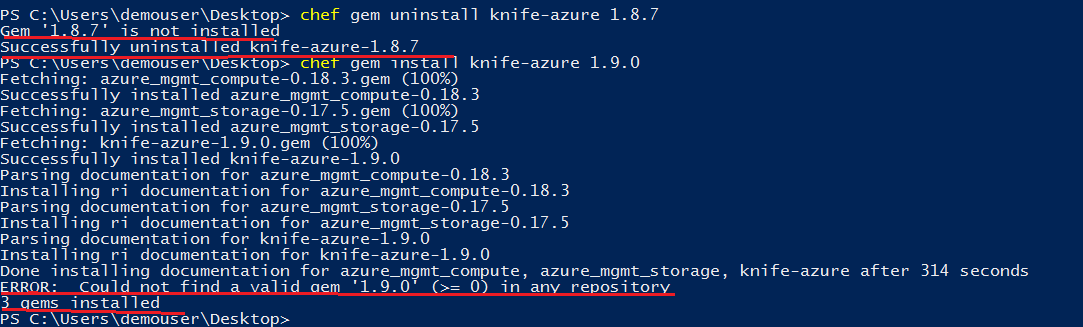
Hi All, Thank you everyone for having the issue addressed...I have uninstalled the previous version of knife-azure (1.8.7) and installed the latest version (1.9.0) as shown in the below screenshot...I am able to issue knife-azure commands now and able to create the VM successfully...
Please advice on the below points:
1) The underlined lines in the above screenshot appears to be misleading (in the sense - 1st line says something & 2nd line contradicts the 1st)...I haven't seen any impact as such but not sure if it would impact anywhere else, so just wanted to bring it to the attention of this group...
2) Chef installation directory on my VM (workstation) is "c:\chef". I have included the azure subscription id, tenant id, client id & secret details in "c:\chef\knife.rb" file. When i run the command "knife azurerm server list", i get the below error:

It only works if i issue the command this way - "knife azurerm server list -c c:\chef\knife.rb". Please let me know if there is a way to execute the command without giving the knife.rb file path in the command.
3) I have issued the command "knife azurerm server create --<
- I am asking this specifically in the context of running knife azurerm commands only. I am aware of configuring a VM using cookbook/recipe. I tried placing the above knife azurerm command in a file-azurevm.rb, saved it & executed "chef-client -z azurevm.rb"; But it errored out with syntax errors..
- I tried saving the knife azurerm command to a .ps1 file and executed it from Powershell command prompt & it worked, but i am trying to find out it it can be done using a chef executable.
Regards
Kiran...
kirantsp
on 22 Feb 2019
1) You're missing a -v in your commands, and it happens to be doing the right thing because you only had one version to uninstall, and then you had wanted to install the latest version anyway. The commands would be:
chef gem uninstall knife-azure -v 1.8.7
chef gem install knife-azure -v 1.9.0
2) c:\chef is more for system level configuration files, like if chef-client is running on the system to manage it. For user configuration files for tools like knife you want to put them in $HOME/.chef which is usually C:\Users\USERNAME\.chef.
The knife.rb file is deprecated in favor of the config.rb file, which is exactly the same except for the name. So you should ultimately move C:\chef\knife.rb to $HOME/.chef/config.rb.
https://docs.chef.io/config_rb.html
3) you could put the entire command in a .ps1 file, like create a create_azure_server.ps1 file that contains knife azurerm server create ... and then when you're in powershell you can run .\create_azure_server.ps1 to run that script.
btm
on 22 Feb 2019
Understood, Thank you very much for the explanation Bryan.... I am going ahead with the closure...
kirantsp
on 23 Feb 2019
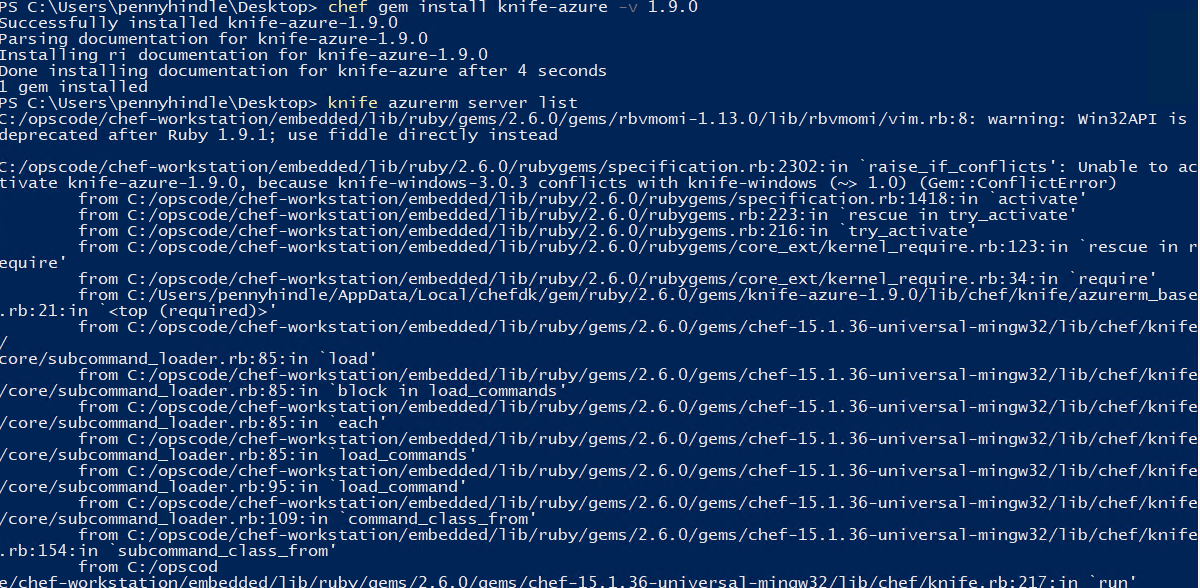
I am getting similar errors as above, after installing knife-azure v 1.9.0
Is there a newer version I should be using?
 pennyhindle
on 1 Aug 2019
pennyhindle
on 1 Aug 2019
Similar dependancy issue - this is on Ubuntu 18 on Windows 10 UNIX sub-system/bash, I get exactly the same error as @pennyhindle above on Windows under PowerShell

 jasonh-edfi
on 5 Aug 2019
jasonh-edfi
on 5 Aug 2019
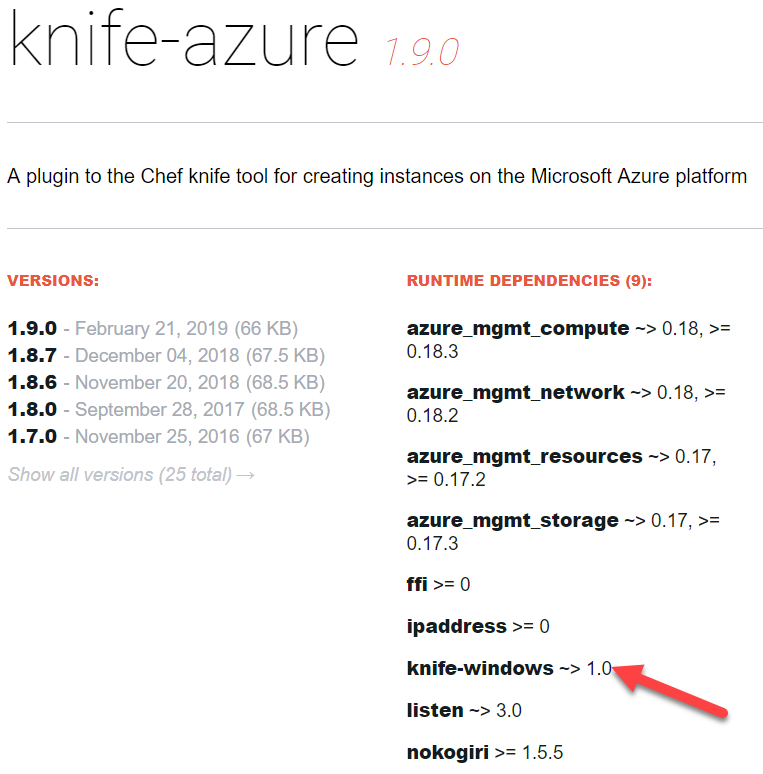
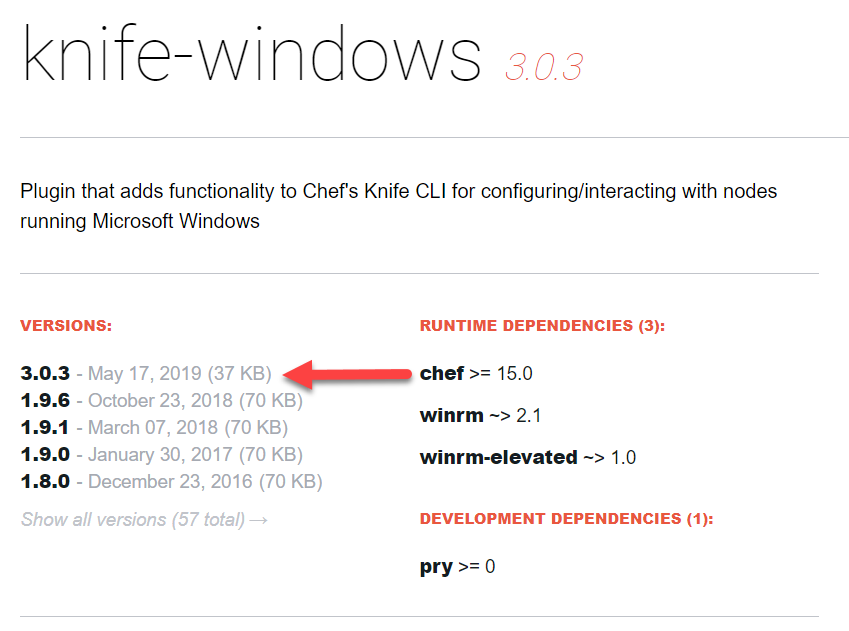
@pennyhindle I found a manual work around is to edit C:\Users\
s.add_runtime_dependency(%q<knife-windows>.freeze, ["~> 1.0"])
to:
s.add_runtime_dependency(%q<knife-windows>.freeze, ["~> 3.0"])
For the longer fix, it appears the gemspec for knife-azure needs to be updated with the same change as knife-windows went from 1.9.6 to 3.0.3:
jasonh-edfi
on 5 Aug 2019
Related issues
 monteledwards
·
3Comments
monteledwards
·
3Comments
 JamesDLD
·
3Comments
JamesDLD
·
3Comments
 varma31
·
3Comments
varma31
·
3Comments
 mrdfuse
·
3Comments
mrdfuse
·
3Comments
 spottedmahn
·
3Comments
spottedmahn
·
3Comments
Most helpful comment
1) You're missing a
-vin your commands, and it happens to be doing the right thing because you only had one version to uninstall, and then you had wanted to install the latest version anyway. The commands would be:2)
c:\chefis more for system level configuration files, like if chef-client is running on the system to manage it. For user configuration files for tools likeknifeyou want to put them in$HOME/.chefwhich is usuallyC:\Users\USERNAME\.chef.The
knife.rbfile is deprecated in favor of theconfig.rbfile, which is exactly the same except for the name. So you should ultimately moveC:\chef\knife.rbto$HOME/.chef/config.rb.https://docs.chef.io/config_rb.html
3) you could put the entire command in a .ps1 file, like create a
create_azure_server.ps1file that containsknife azurerm server create ...and then when you're in powershell you can run.\create_azure_server.ps1to run that script.