Azure-docs: Keyword not supported: '@microsoft.keyvault
I'm trying to reference keyvault secrets in an app service connection strings setting. The error logged in app insights when my code tries to use the connection string is:
"Keyword not supported: '@microsoft.keyvault....."
According to this: https://docs.microsoft.com/en-us/azure/app-service/app-service-key-vault-references
keyvault references are in preview. Does that mean there is some mechanism to opt-in, or should it work?
My connection string value is:
@Microsoft.KeyVault(SecretUri=https://mykeyvault.vault.azure.net/secrets/mysecretname/theversion)
It is a slot setting.
Document Details
⚠ Do not edit this section. It is required for docs.microsoft.com ➟ GitHub issue linking.
- ID: 7feaa3d0-7233-a3cb-cb9b-a9a55b1f0d7a
- Version Independent ID: f41f9d51-52f8-1f45-1043-1344a3b74458
- Content: Key Vault references - Azure App Service
- Content Source: articles/app-service/app-service-key-vault-references.md
- Service: app-service
- GitHub Login: @mattchenderson
- Microsoft Alias: mahender
 crowcoder
All 25 comments
@crowcoder, Thanks for the feedback! We are currently investigating and will update you soon,
 AjayKumar-MSFT
on 25 Jan 2019
AjayKumar-MSFT
on 25 Jan 2019
@crowcoder The feature is working for me and it should work for you as well. There is no opt-in mechanism. Can you include a screenshot of the application settings from your app service ?
In your KUDU environment(https://APPNAME.scm.azurewebsites.net), can you confirm the following ?
1)Under environment variables , are MSI endpoint/MSI secret populated ?
2) Do you see the app setting with key vault reference with actual secret value or the key vault reference text ?
 ManojReddy-MSFT
on 28 Jan 2019
ManojReddy-MSFT
on 28 Jan 2019
- Yes, MSI_ENDPOINT and MSI_SECRET are populated.
- I see the key vault reference, however, my connection strings do not show in the Connection Strings section of the Kudu display. They show in the Environment Variables section as:
SQLCONNSTR_MasterMenuSystemSQLConnectionString
SQLCONNSTR_AppVersionConnectionString

crowcoder
on 28 Jan 2019
I'm having the same problem with a V2 function app. I see the MSI_ENDPOINT and MSI_SECRET environment variables but the Keyvault App settings only appear as the reference text. If i can help @crowcoder issue with any more info, let me know.
 benny-gold
on 28 Jan 2019
benny-gold
on 28 Jan 2019
@AjayKumar-MSFT Is this feature only supported by certain app service plan sku's? I'm on S1 with this app service. The keyvault's Sku is Standard.
@benny-gold what sku are you running in?
crowcoder
on 28 Jan 2019
Good question. I'm on dynamic D1
benny-gold
on 28 Jan 2019
I've got it working over here. Still on the dynamic SKU - I was getting denied by the KeyVault Firewall, a Function is not one of the Azure services that is allowed to bypass my ACL unfortunately.
It's also worth mentioning that it only works using the format @Microsoft.KeyVault(SecretUri=https://myvault.vault.azure.net/secrets/mysecret/ec96f02080254f109xxxxxxxxxxxxxxx), @Microsoft.KeyVault(VaultName=myvault;SecretName=mysecret;SecretVersion=ec96f02080254f109xxxxxxxxxxxxxx) does not work (I had both versions configured on the app).
Edit: PII
benny-gold
on 28 Jan 2019
@AjayKumar-MSFT Could this have something to do with my app being in a slot? When I add a role assignment in Key Vault I cannot find the service identity for my slotted service, I can only find the service identity for the parent App Service. Do the roles on the parent not flow through to the slots?
crowcoder
on 28 Jan 2019
@crowcoder The managed identities are different for each slot and should be enabled separately. So you would have to create an access policy for each slot's manged idenity separately, for it to be able to able to fetch the secret from the key vault.
Also SKU's shouldn't matter for this to work.
ManojReddy-MSFT
on 29 Jan 2019
@ManojReddy-MSFT I understand but I did give the slots separate managed identities but they do not show up when I search for them from the key vault Add Role Assignment. I don't know if "parent" is the correct term but only the identity of the parent app is available.
crowcoder
on 29 Jan 2019
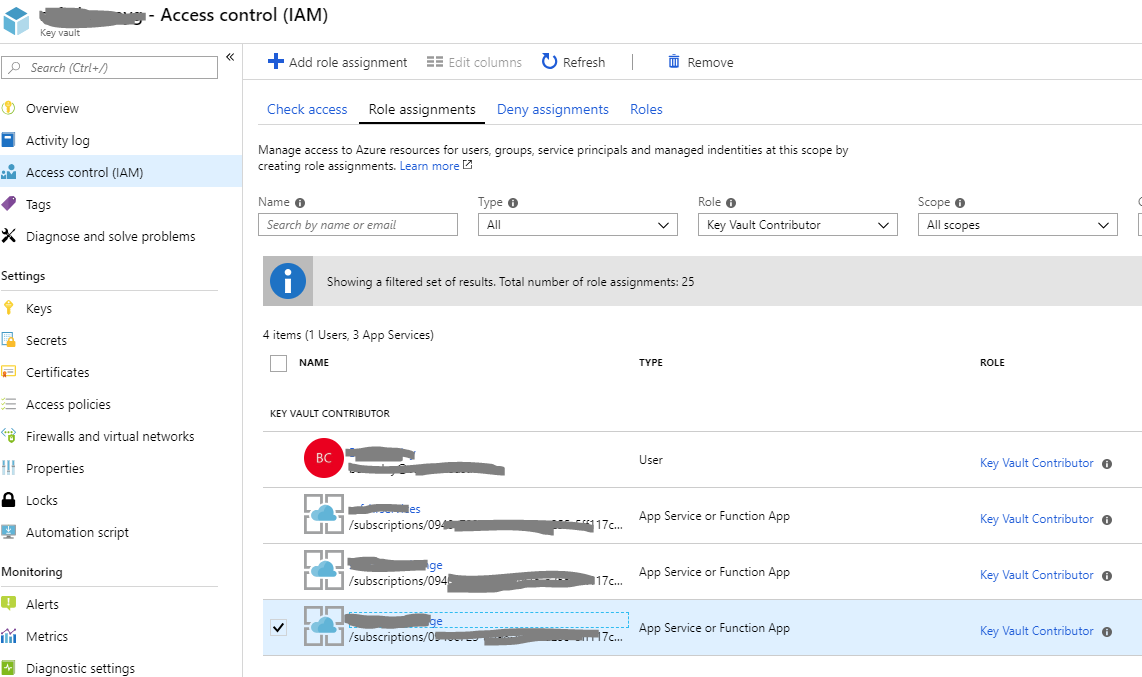
I thought I had it for a minute there. I made the mistake of looking for the System assigned managed identity under the System assigned managed identity section of "Assign access to" drop down. Naturally, that's not where it will be found.
Regardless, I still get the same error now that I have given the identity the Keyvault Contributor role.

crowcoder
on 29 Jan 2019
Edit: PII
Thanks for the edit @AjayKumar-MSFT but those were copied straight out of the documentation. Also, technically that's not PII either but 🤷♂️
@crowcoder - not sure if it will help you, but I finally got to the bottom of my issue by enabling appInsights on the Keyvault, so I could see what was being logged there. The Function logs weren't very helpful for my particular issue.
benny-gold
on 29 Jan 2019
@benny-gold thanks, but I don't see AppInsights as an option for keyvault. Maybe my account doesn't have permission but I would expect it to show in the list then deny me any changes if that were the case.
crowcoder
on 29 Jan 2019
It's not _actually_ called AppInsights for keyvault, took me a while to find it: Diagnostic Settings down the bottom.
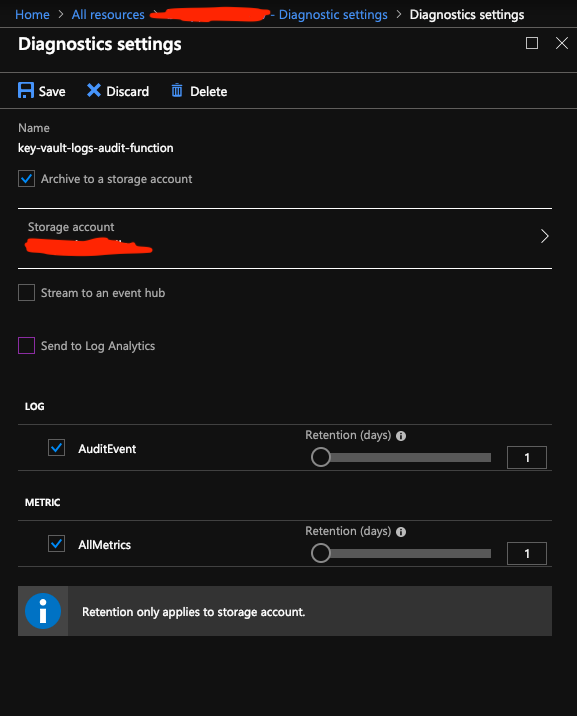
Mine took a couple of hours before the container started being populated, and then it was pretty soon after events (2-3 minutes).
benny-gold
on 29 Jan 2019
@benny-gold thanks, I tried it but don't have rights to enable it. I'll get my manager to do it.
crowcoder
on 29 Jan 2019
@benny-gold I just noticed role Keyvault Contributor does not have permission to view secrets. What role are you using for your service identity?
crowcoder
on 29 Jan 2019
I made an access policy for the Object Id of the MSI (Application Id is not needed to save you some guessing!) with only the Get permission on secrets, and that was enough.
benny-gold
on 29 Jan 2019
I can't figure it out. I did this but still does not work (same result):
https://docs.microsoft.com/en-us/azure/key-vault/key-vault-group-permissions-for-apps
crowcoder
on 29 Jan 2019
@crowcoder, could you share the WebApp name directly here or indirectly with the time of occurrence (in UTC) for further investigation.
Just to highlight, when you clone configuration from another deployment slot, the cloned configuration is editable. Furthermore, some configuration elements follow the content across a swap (not slot specific) while other configuration elements stay in the same slot after a swap (slot specific), both the App settings and Connection strings can be configured to stick to a slot.
AjayKumar-MSFT
on 29 Jan 2019
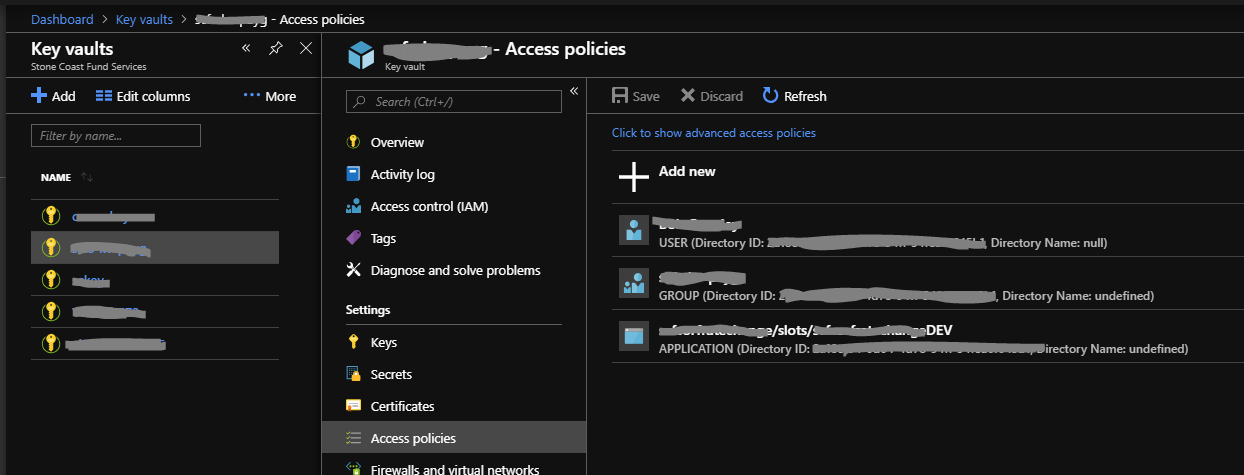
I have created access policies. One is an AD Group that contains the app's service identity and the other is direct policy on the service identity. They both have get and list.
At this point I don't know if it is an access issue or something else.
crowcoder
on 29 Jan 2019
@AjayKumar-MSFT Thank you. My app name is: sc_s____atecha__eDEV
There are many occurrences, the most recent are:
16:36:11 and 16:36:12
I have not done any slot swaps yet so It can't be that I lost settings. And I can see in my logging that it appears to try to use the key vault reference verbatim instead of using it to look up a secret.
crowcoder
on 29 Jan 2019
It appears my IP Address restriction was blocking it. I thought resources in the same subscription were exempt from this but I guess I need to figure out how virtual networks work.
Thanks everyone for looking into this.
crowcoder
on 29 Jan 2019
@crowcoder, Thanks for the update! Kindly let us know if you need more information on this matter.
AjayKumar-MSFT
on 30 Jan 2019
I just wanted to let you all know this post helped me fix my Azure Web App!
 ttaylor29
on 23 Apr 2020
ttaylor29
on 23 Apr 2020
I just wanted to let you all know this post helped me fix my Azure Web App!
Thanks for the update. Much appreciate the follow-up.
AjayKumar-MSFT
on 29 Apr 2020
Related issues
 Favna
·
3Comments
Favna
·
3Comments
 bityob
·
3Comments
bityob
·
3Comments
 monteledwards
·
3Comments
monteledwards
·
3Comments
 jharbieh
·
3Comments
jharbieh
·
3Comments
 mrdfuse
·
3Comments
mrdfuse
·
3Comments