Azure-docs: List md5 hash for uploaded files
Hi,
So we're uploading bulk of files from our SAN to Azure Blob Storage using azcopy with the sample command below:
azcopy --source /random/source/location --destination https://random.blob.core.windows.net/location --dest-key gibberish key --resume --exclude-older --exclude-newer --recursive --verbose |& tee -a random/source/location/logs/log.txt
Question is, is there a way we could list the md5 of each uploaded file in the logs?
Thanks!
Aaron
Document Details
⚠ Do not edit this section. It is required for docs.microsoft.com ➟ GitHub issue linking.
- ID: e224df65-311e-166c-caff-918f47ad2f57
- Version Independent ID: 21914f58-1720-39d9-acb7-ed8475cab9d4
- Content: Copy or move data to Azure Storage with AzCopy on Linux
- Content Source: articles/storage/common/storage-use-azcopy-linux.md
- Service: storage
- GitHub Login: @seguler
- Microsoft Alias: seguler
 akosibananaman
All 10 comments
Using PowerShell, you can run the following to get the MD5 hash of a file
Get-FileHash -Path "C:\temp\somefile.zip" -Algorithm MD5
If you're using C# you can also use the below code snippet
using (var md5 = System.Security.Cryptography.MD5.Create())
{
    using (var stream = File.OpenRead(filename))
    {
        return md5.ComputeHash(stream);
    }
}
 YASWANTHM-MSFT
on 16 Jan 2019
YASWANTHM-MSFT
on 16 Jan 2019
Hi @YASWANTHM-MSFT,
Thanks for the quick response!
Since we're into it, I'm using a Linux box for azcopy and I would very much like to have a command to get the md5 checksum recursively including subdirectories (if it's not too much to ask). Please help.
Thanks,
Aaron
akosibananaman
on 16 Jan 2019
OK. A deeper search solved the md5 checksum for the folder to be uploaded.
Here:
_find /folder/to/be/uploaded -type f -print0 | xargs -0 md5sum -b 2>&1 |tee /folder/to/be/uploaded/md5sum.txt_
Last thing I need is getting the md5 from the files that were uploaded to Azure. The --check-md5 option should be able to do the trick, but it's not writing into the log file.
This is my azcopy command to get list the Azure files and get their md5:
_azcopy --source https://someazurecontainer.blob.core.windows.net/folder/folder_uploaded/ --destination /folder/to/be/uploaded --source-key gibberish source key --recursive --verbose --check-md5 --dry-run|& tee -a /folder/to/be/uploaded/dryrun_log.txt_
Any help would be appreciated.
akosibananaman
on 16 Jan 2019
@akosibananaman , Sorry for the delayed response, did you try the example commands mentioned here to get the list of MD5 checksum recursively for folders and its subdirectories?
YASWANTHM-MSFT
on 17 Jan 2019
Hi @YASWANTHM-MSFT. Indeed. Like I've said, I managed to resolve the issue using the same link you've just provided. I'm just asking now about how to use the --check-md5 switch for azcopy. Because if you refer to my command:
_azcopy --source https://someazurecontainer.blob.core.windows.net/folder/folder_uploaded/ --destination /folder/to/be/downloaded --source-key "gibberish source key" --recursive --verbose --check-md5 |& tee -a /folder/to/be/uploaded/log.txt_
The logs will still not show the md5 checksum information of the downloaded files.
akosibananaman
on 17 Jan 2019
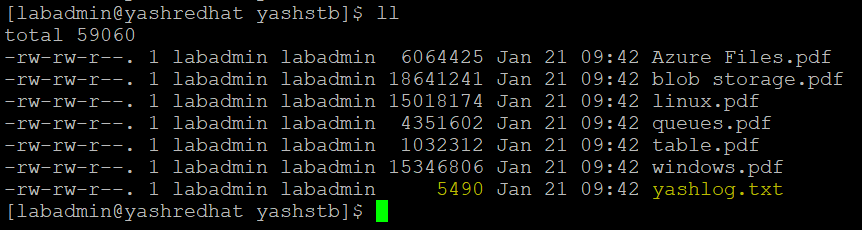
@akosibananaman ,Sorry for the delayed response. When I reproduced the issue, I can able to get the information related to the MD5 checksum to the log file as shown below using the flag --check-md5. But the issue seen here is “The MD5 hash calculated from the downloaded data does not match the MD5 hash stored in the property of source: https://yashxxxx.blob.core.windows.net/yashcntmd5/blob storage.pdf. Please refer to help or documentation for detail.” When researched little about this error, I could see another GitHub issue which looks to be related to the similar one here.


YASWANTHM-MSFT
on 21 Jan 2019
@akosibananaman, we will now proceed to close this thread. If there are further questions regarding this matter, please tag me in your reply. We will gladly reopen the issue and continue the discussion
YASWANTHM-MSFT
on 28 Jan 2019
The md5 hash generated by AZCopy is not the same as generated by another tools like md5checker or FCIV.
Can you explain how to check if a file uploaded to Azure Blob is not corrupt?
Regards.
 roberdaniel
on 30 Jul 2019
roberdaniel
on 30 Jul 2019
See https://galdin.dev/blog/md5-has-checks-on-azure-blob-storage-files/ for how to get a comparable MD5 hash.
 suterma
on 2 Jul 2020
suterma
on 2 Jul 2020
Is there no tutorial which walks you threw the steps? Because I have a similar task. I transfered >1TB to azure blog storage with data factory. The files have their md5 in the metadata and I have a txt file with the filenames and the md5checksum. Now I am looking for an easy way to compare these two. Does anyone know what's the easiest way to do that?
 Manubi
on 21 Dec 2020
Manubi
on 21 Dec 2020
Related issues
 jamesgallagher-ie
·
3Comments
jamesgallagher-ie
·
3Comments
 Ponant
·
3Comments
Ponant
·
3Comments
 AronT-TLV
·
3Comments
AronT-TLV
·
3Comments
 DeepPuddles
·
3Comments
DeepPuddles
·
3Comments
 spottedmahn
·
3Comments
spottedmahn
·
3Comments
Most helpful comment
The md5 hash generated by AZCopy is not the same as generated by another tools like md5checker or FCIV.
Can you explain how to check if a file uploaded to Azure Blob is not corrupt?
Regards.