Azure-docs: "Change PITR backup retention period using the Azure portal" instructions are outdated
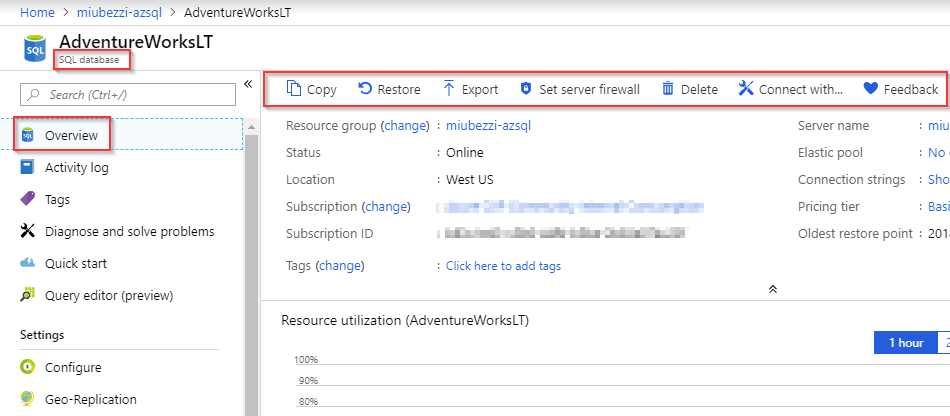
There is no "Configure backup retention" choice on the Overview blade for an Azure SQL Database. I do not see a current location for this function in the portal at this time. Is this only configurable through PowerShell or the API now?
Document Details
⚠ Do not edit this section. It is required for docs.microsoft.com ➟ GitHub issue linking.
- ID: 9492cedc-cea0-af9d-29a0-52cbca8c5e21
- Version Independent ID: 969a8654-8f95-d5de-351d-73c8e02e5d3a
- Content: Azure SQL Database automatic, geo-redundant backups
- Content Source: articles/sql-database/sql-database-automated-backups.md
- Service: sql-database
- GitHub Login: @anosov1960
- Microsoft Alias: sashan
 m60freeman
All 9 comments
@m60freeman Thank you very much for the detailed feedback. I see the discrepancy. The screen image is from a Managed Instance but the documentation does not infer a specific PaaS instance of Azure SQL Database, and appears to apply to all deployment options. I believe this is a doc-bug and I am assigning it to the content owner to evaluate and update as appropriate. Thank you!
 Mike-Ubezzi-MSFT
on 11 Dec 2018
Mike-Ubezzi-MSFT
on 11 Dec 2018
Agreed. None of the options mentioned in the doc are available. (I can restore but not determine backup schedule in place or retention period.)
 triadadvisors
on 17 Dec 2018
triadadvisors
on 17 Dec 2018
@anosov1960 @CarlRabeler Making this a doc-bug and removing product-question label.
Mike-Ubezzi-MSFT
on 18 Dec 2018
@Mike-Ubezzi-MSFT please assign to @mashamsft
 CarlRabeler
on 18 Dec 2018
CarlRabeler
on 18 Dec 2018
@MashaMSFT fixed issue yesterday - @Mike-Ubezzi-MSFT please close
CarlRabeler
on 3 Jan 2019
We will now proceed to close this thread. If there are further questions regarding this matter, please comment and we will gladly continue the discussion.
Mike-Ubezzi-MSFT
on 3 Jan 2019
The doc was updated with images for both logical servers, and for managed instance. @m60freeman , thanks for bringing this to our attention! Can you please confirm this better suits your needs?
 MashaMSFT
on 3 Jan 2019
MashaMSFT
on 3 Jan 2019
Looks good, although the date in the header (at https://docs.microsoft.com/en-us/azure/sql-database/sql-database-automated-backups) still shows as "12/09/2018" and that date is also shown in the Google search results. If I was looking only for more recent articles, I wouldn't find this one. But the content of the article itself is fine now.
m60freeman
on 3 Jan 2019
Hi @m60freeman , awesome! Glad to hear it :) please let us know if we can be of further assistance! And thanks again for your feedback.
MashaMSFT
on 3 Jan 2019
Related issues
 Ponant
·
3Comments
Ponant
·
3Comments
 Agazoth
·
3Comments
Agazoth
·
3Comments
 jamesgallagher-ie
·
3Comments
jamesgallagher-ie
·
3Comments
 bdcoder2
·
3Comments
bdcoder2
·
3Comments
 bityob
·
3Comments
bityob
·
3Comments