I tried the MSDN walkthrough, am able to launch the HTTTrigger written in python, however when developing an app debugging step by step is really a core feature.
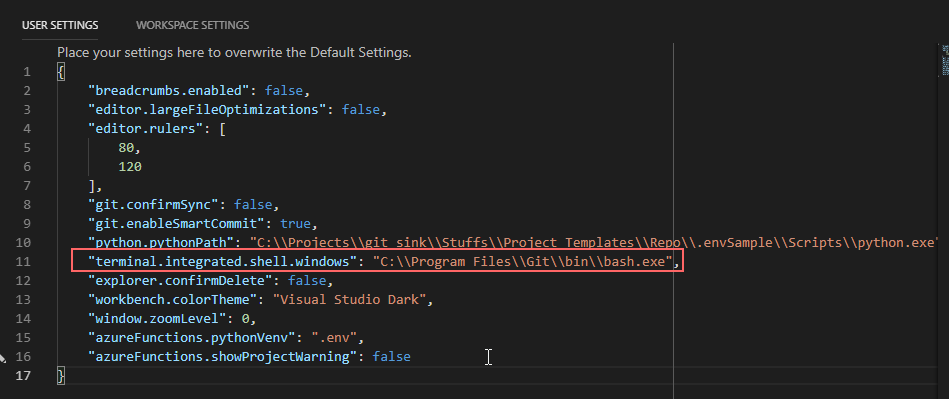
with User Settings as "terminal.integrated.shell.windows": "C:Program FilesGitbinbash.exe", however it works with powershell.exe ONLY. Can this be addressed or is it something happening only on my machine?
Full details of the issue posted in StackOver Flow thread:
More details about the issue I face.
- My User Settings:
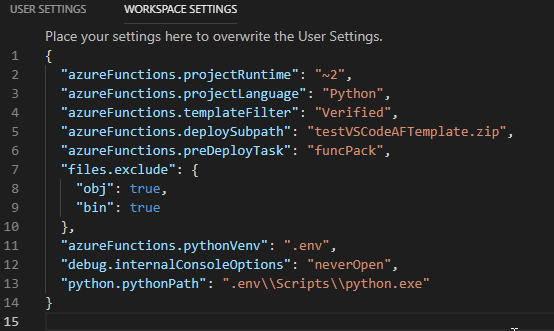
- My Workspace settings:
__init__.py when debugged: the python HttpTrigger default function app starts properly, as shown below.

However, the problem I face is while trying to debug by pressing F5 and lands in this terminal disconnection.

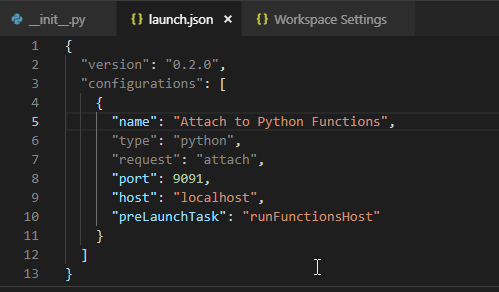
- My launch.json
 vchandm23
All 8 comments
Hello @vchandm23 Thank you for your feedback! This channel is for driving improvements towards MS Docs. In order to best address your question with the right team, could you provide us with the URL of the MS Doc that you were following, if any?
 mike-urnun-msft
on 10 Dec 2018
mike-urnun-msft
on 10 Dec 2018
Hello @vchandm23 Thank you for your feedback! This channel is for driving improvements towards MS Docs. In order to best address your question with the right team, could you provide us with the URL of the MS Doc that you were following, if any?
This is the one:
https://docs.microsoft.com/en-us/azure/azure-functions/functions-create-first-function-python
vchandm23
on 10 Dec 2018
Document Details
⚠ Do not edit this section. It is required for docs.microsoft.com ➟ GitHub issue linking.
- ID: 4a509bdc-f8b8-8488-7ab4-2c03cae6bfb5
- Version Independent ID: 3174a893-394c-c622-6c96-0b89955edfb5
- Content: Create your first Python function in Azure
- Content Source: articles/azure-functions/functions-create-first-function-python.md
- Service: functions
- GitHub Login: @ggailey777
- Microsoft Alias: glenga
mike-urnun-msft
on 10 Dec 2018
+ @asavaritayal for awareness
 ggailey777
on 10 Dec 2018
ggailey777
on 10 Dec 2018
@vchandm23 The problem is that the default .vscode/tasks.json has a command for PowerShell.
You can see in the image that you shared for step 4 that the activate command has failed. Hence, the venv error later.
For bash, you have to call source .env/Scripts/activate instead.
You can just update the .vscode/tasks.json file to reflect this. It should look something like this instead.
{
  "version": "2.0.0",
  "tasks": [
    {
      "label": "runFunctionsHost",
      "type": "shell",
      "osx": {
        "command": ". ${config:azureFunctions.pythonVenv}\\bin\\activate && func extensions install && pip install -r requirements.txt && func host start"
      },
      "windows": {
        "command": ". ${config:azureFunctions.pythonVenv}/Scripts/activate ; func extensions install ; pip install -r requirements.txt ; func host start"
      },
      "linux": {
        "command": ". ${config:azureFunctions.pythonVenv}\\bin\\activate && func extensions install && pip install -r requirements.txt && func host start"
      },
      "isBackground": true,
      "options": {
        "env": {
          "languageWorkers__python__arguments": "-m ptvsd --host 127.0.0.1 --port 9091"
        }
      },
      "problemMatcher": "$func-watch"
    },
    {
      "label": "funcPack",
      "type": "shell",
      "osx": {
        "command": ". ${config:azureFunctions.pythonVenv}\\bin\\activate && func pack"
      },
      "windows": {
        "command": ". ${config:azureFunctions.pythonVenv}/Scripts/activate ; func pack"
      },
      "linux": {
        "command": ". ${config:azureFunctions.pythonVenv}\\bin\\activate && func pack"
      },
      "isBackground": true
    }
  ]
}
 PramodValavala-MSFT
on 11 Dec 2018
PramodValavala-MSFT
on 11 Dec 2018
@vchandm23 Just following up... Were you able to try this out?
PramodValavala-MSFT
on 13 Dec 2018
@vchandm23 Just following up... Were you able to try this out?
Yes, it worked! Thanks for the help and now I understood the task.json file a bit. To add more I would mention this setup in detail in azure function docs under Visual Studio Code Python.
Anyways thanks heaps!
vchandm23
on 14 Dec 2018
@vchandm23 Glad that helped! 😄
As Jerry Liu mentioned on SO, the open issue will fix it and is planned for the next release. This workaround wouldn't be needed anymore then.
@ggailey777 Do you think having a note for this would make sense for the time being until the next release?
PramodValavala-MSFT
on 14 Dec 2018
Related issues
 varma31
·
3Comments
varma31
·
3Comments
 bdcoder2
·
3Comments
bdcoder2
·
3Comments
 jamesgallagher-ie
·
3Comments
jamesgallagher-ie
·
3Comments
 bityob
·
3Comments
bityob
·
3Comments
 Agazoth
·
3Comments
Agazoth
·
3Comments
Most helpful comment
@vchandm23 The problem is that the default
.vscode/tasks.jsonhas a command for PowerShell.You can see in the image that you shared for step 4 that the activate command has failed. Hence, the venv error later.
For bash, you have to call
source .env/Scripts/activateinstead.You can just update the
.vscode/tasks.jsonfile to reflect this. It should look something like this instead.{ "version": "2.0.0", "tasks": [ { "label": "runFunctionsHost", "type": "shell", "osx": { "command": ". ${config:azureFunctions.pythonVenv}\\bin\\activate && func extensions install && pip install -r requirements.txt && func host start" }, "windows": { "command": ". ${config:azureFunctions.pythonVenv}/Scripts/activate ; func extensions install ; pip install -r requirements.txt ; func host start" }, "linux": { "command": ". ${config:azureFunctions.pythonVenv}\\bin\\activate && func extensions install && pip install -r requirements.txt && func host start" }, "isBackground": true, "options": { "env": { "languageWorkers__python__arguments": "-m ptvsd --host 127.0.0.1 --port 9091" } }, "problemMatcher": "$func-watch" }, { "label": "funcPack", "type": "shell", "osx": { "command": ". ${config:azureFunctions.pythonVenv}\\bin\\activate && func pack" }, "windows": { "command": ". ${config:azureFunctions.pythonVenv}/Scripts/activate ; func pack" }, "linux": { "command": ". ${config:azureFunctions.pythonVenv}\\bin\\activate && func pack" }, "isBackground": true } ] }