Azure-docs: There is no Features or Tasks tab
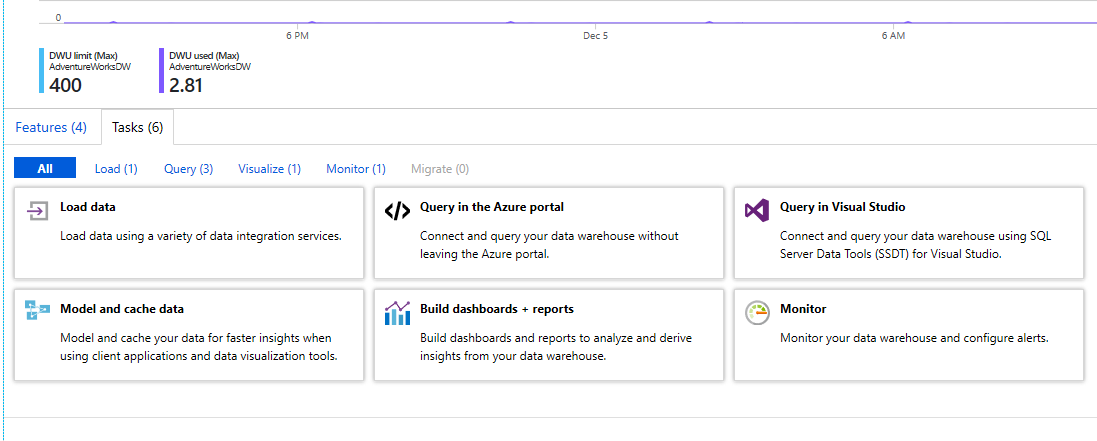
Under step 1, these are not present in the portal. Where do you go once you've selected your ADW? You're missing steps.
Document Details
⚠ Do not edit this section. It is required for docs.microsoft.com ➟ GitHub issue linking.
- ID: 5420c88a-e3ef-c4d5-c6b7-4d0687a517d3
- Version Independent ID: 51c05994-b001-e853-4726-ca8deb82e6f9
- Content: Upgrade to the latest generation of Azure SQL Data Warehouse
- Content Source: articles/sql-data-warehouse/upgrade-to-latest-generation.md
- Service: sql-data-warehouse
- GitHub Login: @kevinvngo
- Microsoft Alias: kevin
 TheSaltyKorean
All 7 comments
@vonlar Thank you very much for pointing this out. Due to my subscription and DWH deployed region, I am unable to get past step 1 in the Start the Upgrade section. Can you provide a screen capture of what you are seeing after selecting Upgrade to Gen2? You can send this to AzCommunity at Microsoft.com, if you are unable to post an image to this GitHub issue? Thank you...
 Mike-Ubezzi-MSFT
on 5 Dec 2018
Mike-Ubezzi-MSFT
on 5 Dec 2018
There is actually no way to upgrade to Gen 2 because you can't get to the Tasks tab. That's the first step to upgrade to Gen 2. So there's no screenshot to send. Thanks for looking into this.
TheSaltyKorean
on 5 Dec 2018
@vonlar Thank you for the additional detail. I am assigning this to the content author to evaluate and update as appropriate.
Mike-Ubezzi-MSFT
on 6 Dec 2018
@TheSaltyKorean Hello, thank you for your input. There was a previously resolved issue. If your DW is in one of the regions that can be upgrade, you should see the migrate on the tasks tab.
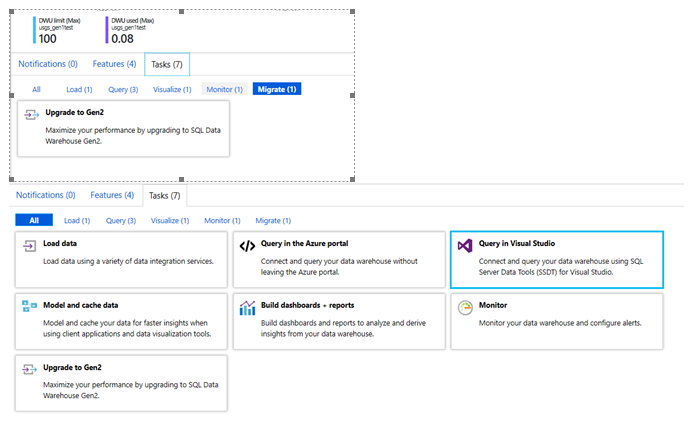
If your Gen1 DW in a region that does not have capacity for Gen 2 (Low end SLO) you should see this…

 julieMSFT
on 28 Jan 2019
julieMSFT
on 28 Jan 2019
You might update the docs to say that the Task only shows up when running, and is at the bottom of the page. Other than that, thanks, it now works and properly shows up.
TheSaltyKorean
on 28 Jan 2019
@TheSaltyKorean Thank you Randy. I will look at adding that. I hope this addressed your issue. I will proceed with closing this issue. Please feel free to contact us if we can be of further assistance.
julieMSFT
on 28 Jan 2019
please-close
julieMSFT
on 28 Jan 2019
Related issues
 AronT-TLV
·
3Comments
AronT-TLV
·
3Comments
 JeffLoo-ong
·
3Comments
JeffLoo-ong
·
3Comments
 bityob
·
3Comments
bityob
·
3Comments
 bdcoder2
·
3Comments
bdcoder2
·
3Comments
 DeepPuddles
·
3Comments
DeepPuddles
·
3Comments