Azure-docs: BackupRestoreService erroring on activation
I have an on-premise 5-node windows secure cluster, configured with a GMSA. I have upgraded to the latest SF6.4 runtime, which went ok.
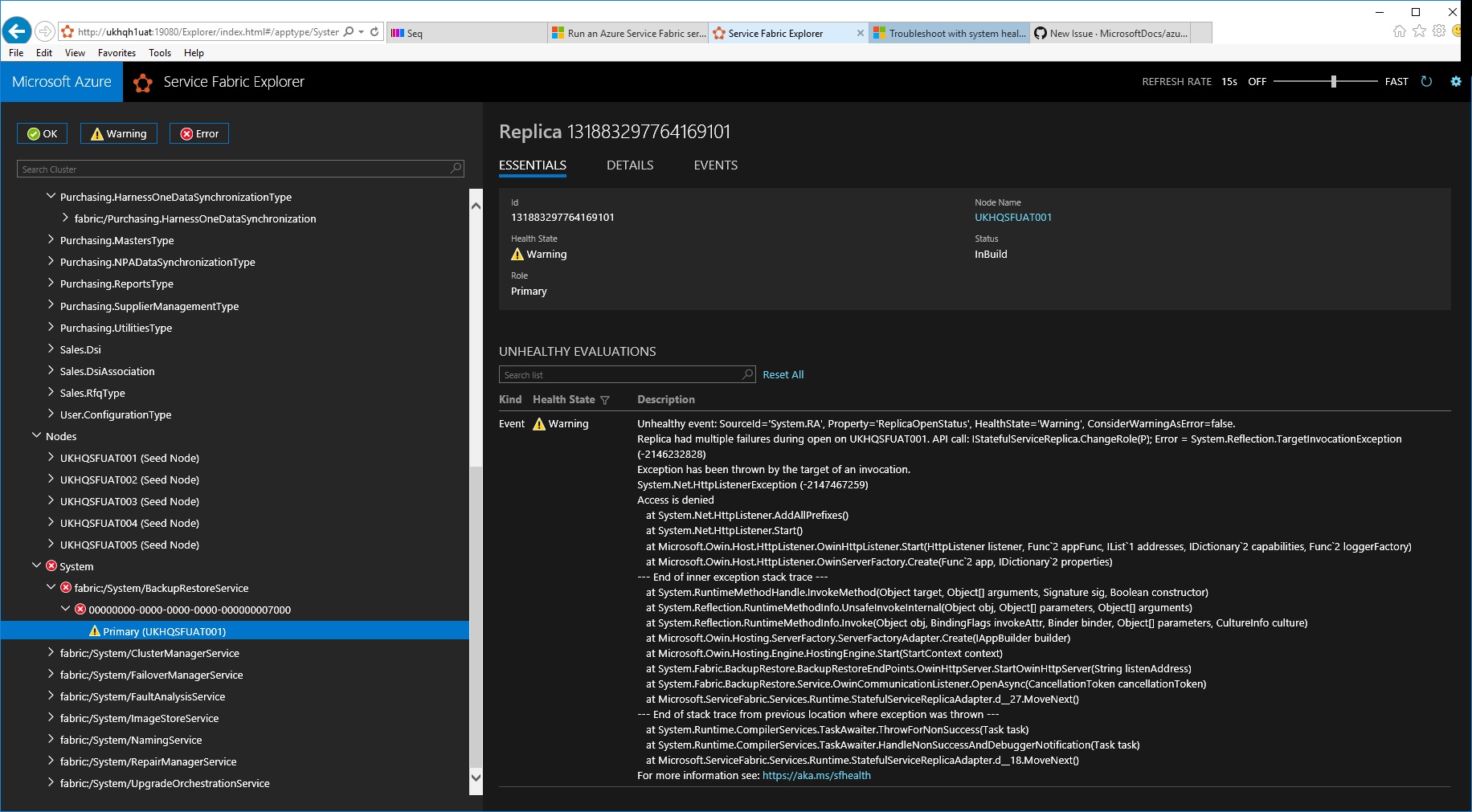
However, when I activated the new BackupRestoreService, the clusterconfig upgrade ended up rolling back, due to a IStatefulServiceReplica.ChangeRole(P); error when trying to start the backuprestore service
After the upgrade rolled back, I am left with the BackupRestoreService still showing as a System service, but it will not start up. It has one primary node showing. The cluster reports the error:
Exception has been thrown by the target of an invocation. System.Net.HttpListenerException -2147467259) Access is denied at System.Net.HttpListener.AddAllPrefixes() at System.Net.HttpListener.Start() at Microsoft.Owin.Host.HttpListener.OwinHttpListener.Start(HttpListener listener, Func2 appFunc, IList1 addresses, IDictionary2 capabilities, Func2 loggerFactory) at Microsoft.Owin.Host.HttpListener.OwinServerFactory.Create(Func2 app, IDictionary2 properties)
I have tried updating the cluster to remove the backup service but the error prevents any configuration upgrade from completing. So I am stuck with the error on the cluster.
Is there any way to resolve this error? Or do I need some other Identity to run the backup service?
@hrushib
Thanks you,
Darran
 darran1971
All 20 comments
Can you share your cluster Manifest and the logs around the time period when you saw this failure.
 hrushib
on 4 Dec 2018
hrushib
on 4 Dec 2018
e8fb74f2cf373516634a3b7ff8f76b65_fabric_traces_6.4.617.9590_131883214707055120_26_00636794485538235042_2147483647.dtr.zip
e8fb74f2cf373516634a3b7ff8f76b65_fabric_traces_6.4.617.9590_131883214707055120_27_00636794487854259640_0000000000.dtr.zip
Can you share your cluster Manifest and the logs around the time period when you saw this failure.
Hi, Here's the cluster manifest. I've included some logs, but let me know if you need others.
ClusterConfig.gMSA.Windows.MultiMachineUAT.zip
darran1971
on 4 Dec 2018
Hi @darran1971 Was there a specific MS Doc that you were following?
 mike-urnun-msft
on 4 Dec 2018
mike-urnun-msft
on 4 Dec 2018
Hi Mike,
I had an existing stand alone 5 node secure cluster (windows security) that has been running fine. This was updated to the new 6.4 runtime and I then enabled the Backup Restore service fillowing this guide: https://docs.microsoft.com/en-us/azure/service-fabric/service-fabric-backuprestoreservice-quickstart-standalonecluster
I tested the Backup Restore service a few months ago on an unsecure cluster and that activated with no issue.
Thank you,
Darran
darran1971
on 4 Dec 2018
Document Details
⚠ Do not edit this section. It is required for docs.microsoft.com ➟ GitHub issue linking.
- ID: 4f4a65fe-da61-bd83-a058-a0b8f8b36d1d
- Version Independent ID: 46af682a-ea5d-5e3a-85f2-5e7a07e9e5f0
- Content: Periodic backup and restore in Azure Service Fabric
- Content Source: articles/service-fabric/service-fabric-backuprestoreservice-quickstart-standalonecluster.md
- Service: service-fabric
- GitHub Login: @hrushib
- Microsoft Alias: hrushib
mike-urnun-msft
on 5 Dec 2018
cc: @MicahMcKittrick-MSFT
mike-urnun-msft
on 5 Dec 2018
Hi @darran1971,
Had a look at the log but did not get any pointer for this issue. I will need following info to investigate further
- Need logs from the time period when BackupRestore service was attempted for activation on UKHQSFUAT001.
- Please attach cluster manifest, follow the below steps to get cluster manifest,
- Open Service Fabric Explorer
- Click on
Cluster. - In right panel, click on
Manifesttab.
Thanks for your patience!
Regards,
Hrushikesh
hrushib
on 6 Dec 2018
Hi,
Here is the Manifest as required. I will try to locate more logs.
Regards,
Darran
From: Hrushikesh Bokil [mailto:[email protected]]
Sent: 06 December 2018 15:14
To: MicrosoftDocs/azure-docs
Cc: Williams, Darran (YST); Mention
Subject: Re: [MicrosoftDocs/azure-docs] BackupRestoreService erroring on activation (#19950)
--- This email was sent from an external source ---
Hi @darran1971https://github.com/darran1971,
Had a look at the log but did not get any pointer for this issue. I will need following info to investigate further
- Need logs from the time period when BackupRestore service was attempted for activation on UKHQSFUAT001.
Please attach cluster manifest, follow the below steps to get cluster manifest,
- Open Service Fabric Explorer
- Click on Cluster.
- In right panel, click on Manifest tab.
Thanks for your patience!
Regards,
Hrushikesh
—
You are receiving this because you were mentioned.
Reply to this email directly, view it on GitHubhttps://github.com/MicrosoftDocs/azure-docs/issues/19950#issuecomment-444904790, or mute the threadhttps://github.com/notifications/unsubscribe-auth/AmzSNofDX0892rDSvv7gaDTzrcVkXc62ks5u2TQ8gaJpZM4ZAkm9.
This email was scanned by Symantec.Cloud on behalf of SEWS-E.
Sumitomo Electric Wiring Systems (Europe) Ltd
Confidential information may be contained in this message. If you are not the addressee indicated (or responsible for delivery of the message), you may not copy or deliver this message to anyone. In such case, you should destroy this message and notify the sender. Please advise immediately if you or your employer does not consent to Internet email for messages of this kind. Opinions, conclusions and other information in this message that do not relate to the official business of SEWS-E shall be understood as neither given nor endorsed by it.
darran1971
on 7 Dec 2018
Ok, here is the cluster manifest. I will try to locate the logs.
Thank you
<ClusterManifest xmlns:xsd="http://www.w3.org/2001/XMLSchema" xmlns:xsi="http://www.w3.org/2001/XMLSchema-instance" Name="WRP_Generated_ClusterManifest" Version="10" Description="This is a generated file. Do not modify." xmlns="http://schemas.microsoft.com/2011/01/fabric">
  <NodeTypes>
    <NodeType Name="NodeType0">
      <Endpoints>
        <ClientConnectionEndpoint Port="19000" />
        <LeaseDriverEndpoint Port="19002" />
        <ClusterConnectionEndpoint Port="19001" />
        <HttpGatewayEndpoint Port="19080" Protocol="http" />
        <HttpApplicationGatewayEndpoint Port="19081" Protocol="http" />
        <ServiceConnectionEndpoint Port="19003" />
        <ApplicationEndpoints StartPort="20001" EndPort="22000" />
        <EphemeralEndpoints StartPort="22001" EndPort="29999" />
      </Endpoints>
      <PlacementProperties>
        <Property Name="NodeTypeName" Value="NodeType0" />
      </PlacementProperties>
    </NodeType>
  </NodeTypes>
  <Infrastructure>
    <WindowsServer>
      <NodeList>
        <Node NodeName="UKHQSFUAT001" IPAddressOrFQDN="192.168.53.12" IsSeedNode="true" NodeTypeRef="NodeType0" FaultDomain="fd:/SEWSEdc/r0" UpgradeDomain="UD0" />
        <Node NodeName="UKHQSFUAT002" IPAddressOrFQDN="192.168.53.152" IsSeedNode="true" NodeTypeRef="NodeType0" FaultDomain="fd:/SEWSEdc/r1" UpgradeDomain="UD1" />
        <Node NodeName="UKHQSFUAT003" IPAddressOrFQDN="192.168.53.153" IsSeedNode="true" NodeTypeRef="NodeType0" FaultDomain="fd:/SEWSEdc/r2" UpgradeDomain="UD2" />
        <Node NodeName="UKHQSFUAT004" IPAddressOrFQDN="192.168.53.154" IsSeedNode="true" NodeTypeRef="NodeType0" FaultDomain="fd:/SEWSEdc/r3" UpgradeDomain="UD3" />
        <Node NodeName="UKHQSFUAT005" IPAddressOrFQDN="192.168.53.156" IsSeedNode="true" NodeTypeRef="NodeType0" FaultDomain="fd:/SEWSEdc/r4" UpgradeDomain="UD4" />
      </NodeList>
    </WindowsServer>
  </Infrastructure>
  <FabricSettings>
    <Section Name="ApplicationGateway/Http">
      <Parameter Name="BodyChunkSize" Value="65536" />
      <Parameter Name="DefaultHttpRequestTimeout" Value="600" />
      <Parameter Name="IsEnabled" Value="true" />
    </Section>
    <Section Name="BackupRestoreService">
      <Parameter Name="MinReplicaSetSize" Value="3" />
      <Parameter Name="TargetReplicaSetSize" Value="5" />
    </Section>
    <Section Name="ClusterManager">
      <Parameter Name="MinReplicaSetSize" Value="3" />
      <Parameter Name="PlacementConstraints" Value="NodeTypeName==NodeType0" />
      <Parameter Name="TargetReplicaSetSize" Value="5" />
    </Section>
    <Section Name="Common">
      <Parameter Name="EnableEndpointV2" Value="True" />
    </Section>
    <Section Name="Diagnostics">
      <Parameter Name="ClusterId" Value="7ca71271-5a0b-45e2-9aed-634c09fcb06c" />
      <Parameter Name="ConsumerInstances" Value="FileShareWinFabEtw, FileShareWinFabCrashDump, FileShareWinFabPerfCtr" />
      <Parameter Name="EnableTelemetry" Value="False" />
      <Parameter Name="MaxDiskQuotaInMB" Value="5120" />
      <Parameter Name="ProducerInstances" Value="WinFabEtlFile, WinFabCrashDump, WinFabPerfCtrFolder" />
    </Section>
    <Section Name="FailoverManager">
      <Parameter Name="ExpectedClusterSize" Value="5" />
      <Parameter Name="IsSingletonReplicaMoveAllowedDuringUpgrade" Value="True" />
      <Parameter Name="MinReplicaSetSize" Value="3" />
      <Parameter Name="PlacementConstraints" Value="NodeTypeName==NodeType0" />
      <Parameter Name="TargetReplicaSetSize" Value="5" />
    </Section>
    <Section Name="FaultAnalysisService">
      <Parameter Name="MinReplicaSetSize" Value="3" />
      <Parameter Name="PlacementConstraints" Value="NodeTypeName==NodeType0" />
      <Parameter Name="TargetReplicaSetSize" Value="5" />
    </Section>
    <Section Name="Federation">
      <Parameter Name="NodeIdGeneratorVersion" Value="V4" />
    </Section>
    <Section Name="FileShareWinFabCrashDump">
      <Parameter Name="ConsumerType" Value="FileShareFolderUploader" />
      <Parameter Name="DataDeletionAgeInDays" Value="4" />
      <Parameter Name="IsEnabled" Value="true" />
      <Parameter Name="ProducerInstance" Value="WinFabCrashDump" />
      <Parameter Name="StoreConnectionString" Value="\\ukhqbks001\HOBUS$\UATDiagnosticsStore\fabricdumps-7ca71271-5a0b-45e2-9aed-634c09fcb06c" />
    </Section>
    <Section Name="FileShareWinFabEtw">
      <Parameter Name="ConsumerType" Value="FileShareEtwCsvUploader" />
      <Parameter Name="DataDeletionAgeInDays" Value="4" />
      <Parameter Name="IsEnabled" Value="true" />
      <Parameter Name="ProducerInstance" Value="WinFabEtlFile" />
      <Parameter Name="StoreConnectionString" Value="\\ukhqbks001\HOBUS$\UATDiagnosticsStore\fabriclogs-7ca71271-5a0b-45e2-9aed-634c09fcb06c" />
    </Section>
    <Section Name="FileShareWinFabPerfCtr">
      <Parameter Name="ConsumerType" Value="FileShareFolderUploader" />
      <Parameter Name="DataDeletionAgeInDays" Value="4" />
      <Parameter Name="IsEnabled" Value="true" />
      <Parameter Name="ProducerInstance" Value="WinFabPerfCtrFolder" />
      <Parameter Name="StoreConnectionString" Value="\\ukhqbks001\HOBUS$\UATDiagnosticsStore\fabricperf-7ca71271-5a0b-45e2-9aed-634c09fcb06c" />
    </Section>
    <Section Name="Hosting">
      <Parameter Name="EndpointProviderEnabled" Value="true" />
      <Parameter Name="FirewallPolicyEnabled" Value="true" />
      <Parameter Name="RunAsPolicyEnabled" Value="true" />
    </Section>
    <Section Name="HttpGateway">
      <Parameter Name="IsEnabled" Value="true" />
    </Section>
    <Section Name="ImageStoreService">
      <Parameter Name="MinReplicaSetSize" Value="3" />
      <Parameter Name="PlacementConstraints" Value="NodeTypeName==NodeType0" />
      <Parameter Name="TargetReplicaSetSize" Value="5" />
    </Section>
    <Section Name="Management">
      <Parameter Name="ImageStoreConnectionString" Value="fabric:ImageStore" />
    </Section>
    <Section Name="NamingService">
      <Parameter Name="MinReplicaSetSize" Value="3" />
      <Parameter Name="PlacementConstraints" Value="NodeTypeName==NodeType0" />
      <Parameter Name="TargetReplicaSetSize" Value="5" />
    </Section>
    <Section Name="PlacementAndLoadBalancing">
      <Parameter Name="QuorumBasedReplicaDistributionPerFaultDomains" Value="true" />
      <Parameter Name="QuorumBasedReplicaDistributionPerUpgradeDomains" Value="true" />
    </Section>
    <Section Name="ReconfigurationAgent">
      <Parameter Name="IsDeactivationInfoEnabled" Value="true" />
    </Section>
    <Section Name="RepairManager">
      <Parameter Name="EnableHealthChecks" Value="True" />
      <Parameter Name="MinReplicaSetSize" Value="3" />
      <Parameter Name="TargetReplicaSetSize" Value="5" />
    </Section>
    <Section Name="RunAs">
      <Parameter Name="RunAsAccountName" Value="sews-e\srvh1uatgmsa" />
      <Parameter Name="RunAsAccountType" Value="ManagedServiceAccount" />
    </Section>
    <Section Name="Security">
      <Parameter Name="AdminClientIdentities" Value="sews-e\UAT Cluster Admin,sews-e\williad,NT AUTHORITY\SYSTEM" />
      <Parameter Name="AllowDefaultClient" Value="False" />
      <Parameter Name="ClientIdentities" Value="sews-e\UAT Cluster Users" />
      <Parameter Name="ClientRoleEnabled" Value="true" />
      <Parameter Name="ClusterCredentialType" Value="Windows" />
      <Parameter Name="ClusterSpn" Value="HTTP/srvh1uatgmsa.sews-e.com" />
      <Parameter Name="DisableFirewallRuleForDomainProfile" Value="false" />
      <Parameter Name="DisableFirewallRuleForPrivateProfile" Value="false" />
      <Parameter Name="DisableFirewallRuleForPublicProfile" Value="false" />
      <Parameter Name="ServerAuthCredentialType" Value="Windows" />
    </Section>
    <Section Name="Setup">
      <Parameter Name="FabricDataRoot" Value="E:\SF" />
      <Parameter Name="FabricLogRoot" Value="E:\SF\Log" />
    </Section>
    <Section Name="Trace/Etw">
      <Parameter Name="Level" Value="4" />
    </Section>
    <Section Name="UpgradeOrchestrationService">
      <Parameter Name="AutoupgradeEnabled" Value="False" />
      <Parameter Name="AutoupgradeInstallEnabled" Value="False" />
      <Parameter Name="ClusterId" Value="7ca71271-5a0b-45e2-9aed-634c09fcb06c" />
      <Parameter Name="GoalStateExpirationReminderInDays" Value="30" />
      <Parameter Name="MinReplicaSetSize" Value="3" />
      <Parameter Name="PlacementConstraints" Value="NodeTypeName==NodeType0" />
      <Parameter Name="TargetReplicaSetSize" Value="5" />
    </Section>
    <Section Name="WinFabCrashDump">
      <Parameter Name="DataDeletionAgeInDays" Value="4" />
      <Parameter Name="FolderType" Value="WindowsFabricCrashDumps" />
      <Parameter Name="IsEnabled" Value="true" />
      <Parameter Name="ProducerType" Value="FolderProducer" />
    </Section>
    <Section Name="WinFabEtlFile">
      <Parameter Name="DataDeletionAgeInDays" Value="4" />
      <Parameter Name="IsEnabled" Value="true" />
      <Parameter Name="ProducerType" Value="EtlFileProducer" />
    </Section>
    <Section Name="WinFabPerfCtrFolder">
      <Parameter Name="DataDeletionAgeInDays" Value="4" />
      <Parameter Name="FolderType" Value="WindowsFabricPerformanceCounters" />
      <Parameter Name="IsEnabled" Value="true" />
      <Parameter Name="ProducerType" Value="FolderProducer" />
    </Section>
  </FabricSettings>
</ClusterManifest
>
darran1971
on 7 Dec 2018
e8fb74f2cf373516634a3b7ff8f76b65_fabric_traces_6.4.617.9590_131883214707055120_32_00636794494218324538_2147483647.dtr.zip
e8fb74f2cf373516634a3b7ff8f76b65_fabric_traces_6.4.617.9590_131883214707055120_33_00636794494339748682_2147483647.dtr.zip
e8fb74f2cf373516634a3b7ff8f76b65_fabric_traces_6.4.617.9590_131883214707055120_37_00636794495251386050_0000000000.dtr.zip
Some logs from around the time the service was activated.
darran1971
on 10 Dec 2018
I have tried to remove the erroring BackupRestoreService by removing it from AddonFeatures. However, after doing a cluster configuration upgrade with the addonfeature removed, the backup service is still enabled on the cluster. Updating the cluster for any other settings is difficult when the BackupRestore System Service is in error state, as I have to update the health policy to ignore system service errors.
Is there a way to remove the backup service in addition to removing the addonfeature from below snippet?
"properties": {
    ...
    "addonFeatures":  ["BackupRestoreService"],
    "fabricSettings": [ ... ]
    ...
}
I was going to try to remove and then re-activate the Backuprestore service to see if that would help.
The backupRestoreService is still showing the below error when trying to activate.
Unhealthy event: SourceId='System.RA', Property='ReplicaOpenStatus', HealthState='Warning', ConsiderWarningAsError=false. Replica had multiple failures during open on UKHQSFUAT001. API call: IStatefulServiceReplica.ChangeRole(P); Error = System.Reflection.TargetInvocationException (-2146232828) Exception has been thrown by the target of an invocation. System.Net.HttpListenerException (-2147467259) Access is denied at System.Net.HttpListener.AddAllPrefixes() at System.Net.HttpListener.Start() at Microsoft.Owin.Host.HttpListener.OwinHttpListener.Start(HttpListener listener, Func2 appFunc, IList1 addresses, IDictionary2 capabilities, Func2 loggerFactory) at Microsoft.Owin.Host.HttpListener.OwinServerFactory.Create(Func2 app, IDictionary2 properties) --- End of inner exception stack trace
darran1971
on 12 Dec 2018
@darran1971 - We identified an issue with Backup Restore service when the cluster is configured with gMSA authentication. Unfortunately, due to another known issue Backup Restore service is a non deletable service which is why it doesn't get removed when you remove the addOnFeatures section as well. To mitigate the issue on you cluster, you can perform the following steps:
- Get the port where the Backup Restore service is listening on
a. Login to the node where the primary of the Backup Restore service is running and giving the above error you facing.
b. Open file\ \Fabric\work\Applications__FabricSystem_App4294967295\BRS.Endpoints.txt - Looking at your Cluster Manifest, the fabric data root is E:\SF
c. The content of the file would look like this - RestEndpoint;tcp;Internal;20001;;;;;localhost
In this case the port is 20001. Take a note of that. - ACL that URL for the gMSA account
a. Open cmd in elevated mode
b. Execute - netsh http del urlacl url=http://+:< port from above>/
c. Execute - netsh http add urlacl url=http://+: < port from above>/ user=- This needs to be done every time the primary of backup restore service moves to a new node. To ensure that happens rare, increase the replica movement cost for Backup Restore service partition temporarily using the following command.
Update-ServiceFabricService -Stateful -ServiceName fabric:/System/BackupRestoreService -DefaultMoveCost High - This needs to be done every time the primary of backup restore service moves to a new node. To ensure that happens rare, increase the replica movement cost for Backup Restore service partition temporarily using the following command.
We understand this is a bit of trouble and are planning to release a fix for this soon.
 raunakpandya
on 12 Dec 2018
raunakpandya
on 12 Dec 2018
Thanks @raunakpandya ,
I have also found a viable workaround/solution until any other fix is released.
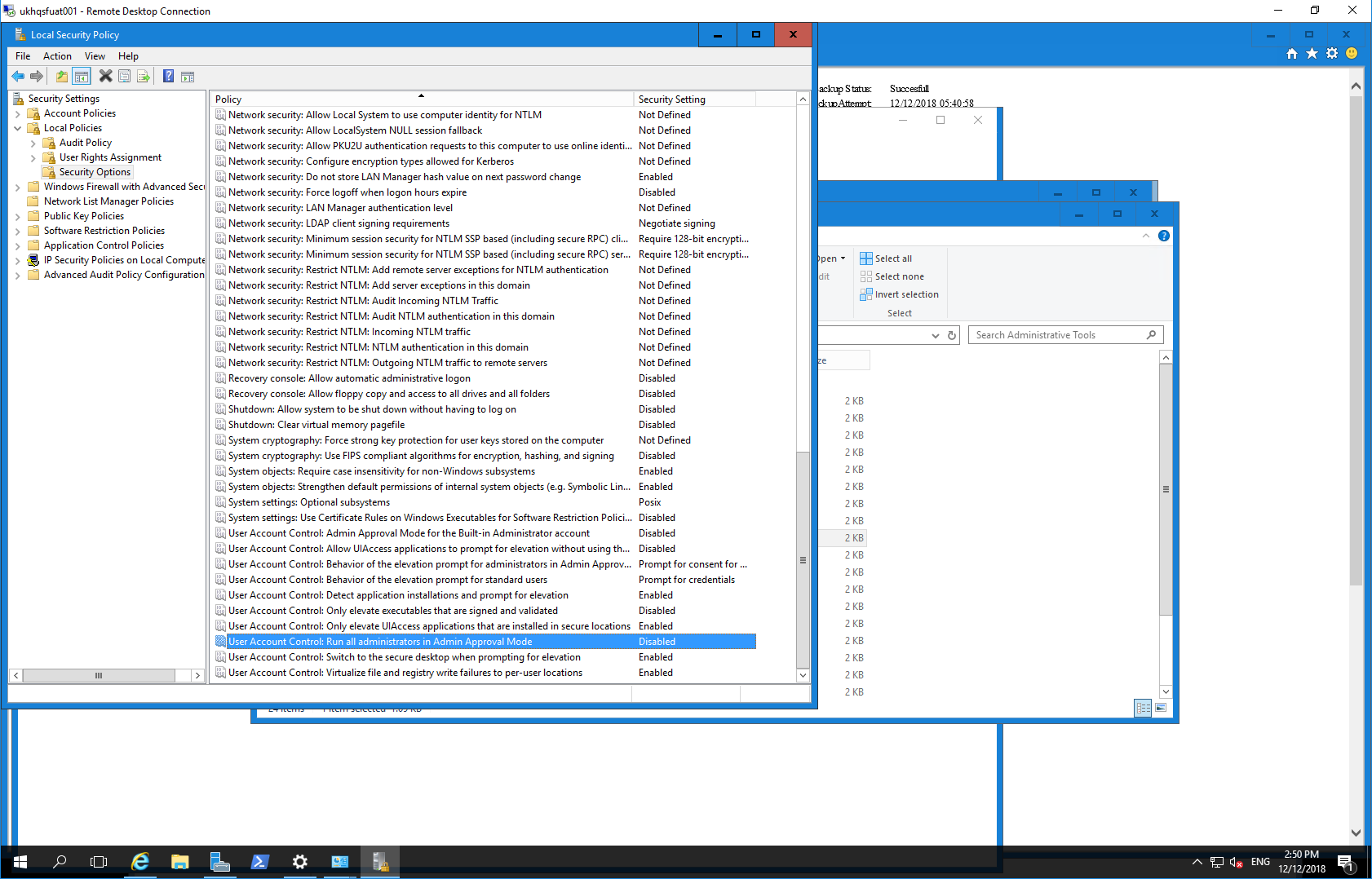
I had been looking at options using netsh, but I had a hunch that the gMSA account was the only major difference from an unsecure cluster, and it pointed to a permission issue creating the OWIN Listener. So the gMSA account I used was actually in a local Administrator group on each node, but it would appear that only the Built in local administrator (SYSTEM) has a a default option in Windows server 2016 security options (User Account Control: Admin Approval Mode for the Built-in Administrator account) to run tasks requiring elevation without a prompt. So what I did was set the User Account Control: Run all administrators in Admin Approval Mode option to Disabled (see image below).
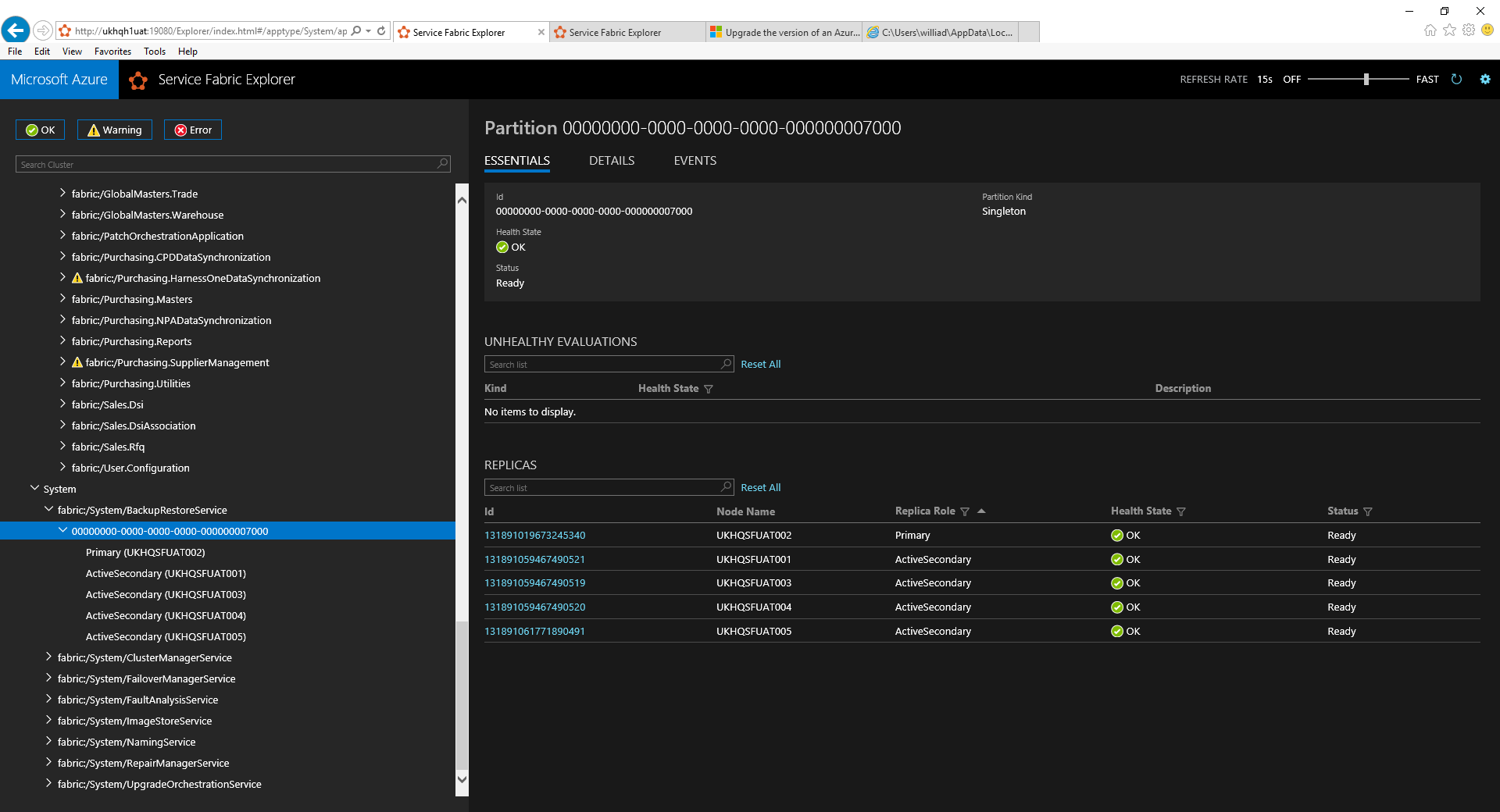
After changing the flag to disabled on all nodes, and then rebooting individually, the Backup Service started activating successfully with no errors.
darran1971
on 12 Dec 2018
Great. Yes that would also work. Just that it would give the service admin level access on the nodes. Once again, sorry for the trouble. We would fix it soon.
raunakpandya
on 12 Dec 2018
Hi @raunakpandya , @hrushib
Now that the backup restore service is operational, I have tried to create a backup policy as follows:
$ScheduleInfo = @{
    Interval = 'PT30M'
    ScheduleKind = 'FrequencyBased'
}

$StorageInfo = @{
    Path = '\\ukhqbks001\HOBUS$\UATPeriodicBackupStore'
    StorageKind = 'FileShare'
}

$RetentionPolicy = @{
    RetentionPolicyType = 'Basic'
    RetentionDuration =  'P30D'
}

$BackupPolicy = @{
    Name = 'GlobalMastersBackupPolicy1'
    MaxIncrementalBackups = 20
    Schedule = $ScheduleInfo
    Storage = $StorageInfo
    RetentionPolicy = $RetentionPolicy
}

$body = (ConvertTo-Json $BackupPolicy)
$url = "http://localhost:19080/BackupRestore/BackupPolicies/$/Create?api-version=6.4"

Invoke-WebRequest -Uri $url -Method Post -Body $body -ContentType 'application/json'
However, when calling the Invoke-WebRequest I get a (401) unauthorized error:

This happens with the other backup API methods as well. I have run powershell as admin, and sent my own credentials in but I get the same error.
I'm not sure if this is related to the issues you are going to fix, but i'm blocked again :). Any help would be appreciated. The log attached has some details of the error.
Thank you,
Darran
e8fb74f2cf373516634a3b7ff8f76b65_fabric_traces_6.4.617.9590_131890990982540202_250_00636802991912614024_2147483647.dtr.zip
darran1971
on 13 Dec 2018
@darran1971 Hey, assuming your current user is among the list of AdminClientIdentities, you would need to pass in the parameter -UseDefaultCredentials to Invoke-WebRequest cmdlet. Also note that in your example you have the retention duration passed in as 30 days. Currently we have a issue where the max value supported there is around 24 days. It fails when converting it into milliseconds where it exceeds timer's due time which is Int32.MaxValue.
raunakpandya
on 14 Dec 2018
@raunakpandya . Brilliant, that worked for me :). I added the -UseDefaultCredentials option, and changed the duration to 15 days as you recommended.
I had previously sent in the full credential of my account and that didn't work. But your method above did.
Thank you,
Darran
darran1971
on 14 Dec 2018
Glad to hear that. I would go ahead and close this issue as the original issue is resolved now.
raunakpandya
on 14 Dec 2018
@mike-urnun-msft - Can you please close the issue? I don't have permission to do that.
raunakpandya
on 14 Dec 2018
BTW, given that we haven't released the fix for this yet, I will open an issue on Service Fabric repo page and reference this there for more visibility. Will keep that issue open till we release a fix.
raunakpandya
on 17 Dec 2018
Related issues
 spottedmahn
·
3Comments
spottedmahn
·
3Comments
spottedmahn
·
3Comments
spottedmahn
·
3Comments
 DeepPuddles
·
3Comments
DeepPuddles
·
3Comments
 JamesDLD
·
3Comments
JamesDLD
·
3Comments
 jebeld17
·
3Comments
jebeld17
·
3Comments