Azure-docs: ImportError: cannot import name 'prediction_endpoint' (Python 3.6)
I am getting "_ImportError: cannot import name 'prediction_endpoint' when I do the following import:
from azure.cognitiveservices.vision.customvision.prediction import prediction_endpoint
I have done the required
pip install azure-cognitiveservices-vision-customvision
without any errors.
The error can be seen / replicatedin this google colab notebook
I get the same error in an Azure Notebook and a localy hosted Jupyter notebook.
Any suggestions or recommendations of a fix would be appreciated.
 AnalyticsInAction
All 13 comments
Hello @AnalyticsInAction Thank you for your feedback. In order to best address your question with right team, could you provide us with the URL of the MS Doc that you were following?
 mike-urnun-msft
on 4 Dec 2018
mike-urnun-msft
on 4 Dec 2018
@mike-urnun-msft https://docs.microsoft.com/en-us/azure/cognitive-services/custom-vision-service/python-tutorial-od#get-and-use-the-default-prediction-endpoint
AnalyticsInAction
on 4 Dec 2018
Document Details
⚠ Do not edit this section. It is required for docs.microsoft.com ➟ GitHub issue linking.
- ID: b9957cb6-3fc1-b7ae-db20-f90b6a833faf
- Version Independent ID: 90421a02-0e49-5bf4-3cd1-f94c80031b3a
- Content: Quickstart: Create an object detection project with the Custom Vision SDK for Python
- Content Source: articles/cognitive-services/Custom-Vision-Service/python-tutorial-od.md
- Service: cognitive-services
- GitHub Login: @areddish
- Microsoft Alias: areddish
mike-urnun-msft
on 4 Dec 2018
Thanks @AnalyticsInAction. This import line can be removed. It refers to the previous module name and the latest SDK generation changed the module names. I've submitted a PR to correct the documentation.
 areddish
on 4 Dec 2018
areddish
on 4 Dec 2018
@mike-urnun-msft Is there any documentation for the parameters (Project.id Test_data, iteration.id) in the new prediction code? :
results = predictor.predict_image(project.id, test_data, iteration.id)
In the old code (results = predictor.predict_image(project_id, test_data.read(), iteration_id)) the parameters were :
- project_id = Project_id from the "project settings page"
- test_data = Image file for inference to be run on
- Iteration_id = Can be left blank unless working against an existing training set in customvision.ai
Can you clarify these parameters : project.id, test_data, iteration.id ? Its appears I can't directly subsitute the variables used in the old code for those in the new code.
AnalyticsInAction
on 5 Dec 2018
@AnalyticsInAction: the parameters are the same and have the same meaning.
They have only been modified to match the naming so you could put all of the code into one file and have it run. So what was previously project_id = project.id, iteration_id = iteration.id, and test_data is the same. You can pass either the file or the array to the predict_image function as it accepts a generator.
You can replace project.id with the project id from the settings page, test_data can still be the file for inference, and iteration.id must be replaced with the iteration id if you don't have a default set, otherwise you can leave it blank.
areddish
on 5 Dec 2018
@areddish Hi Andrew- thanks for persisting with this. I am still tripping up on something here-to do with the parameters. Here is the code (screenshot has correctly formatted code)
! pip install azure-cognitiveservices-vision-customvision
from azure.cognitiveservices.vision.customvision.prediction import CustomVisionPredictionClient
Project.id="Project Id from the settings page"
prediction_key = "Prediction Key from the settings page"
ENDPOINT = "https://southcentralus.api.cognitive.microsoft.com"
predictor = CustomVisionPredictionClient(prediction_key, endpoint=ENDPOINT)
with open("Swimming/14.jpg", mode="rb") as test_data:
`results = predictor.predict_image(Project.id, test_data)`
for prediction in results.predictions:
`print ("\t" + prediction.tag_name + ": {0:.2f}%".format(prediction.probability * 100), prediction.bounding_box.left, prediction.bounding_box.top, prediction.bounding_box.width, prediction.bounding_box.height)`
Then I get the error
`NameError Traceback (most recent call last)
2 from azure.cognitiveservices.vision.customvision.prediction import CustomVisionPredictionClient
3
----> 4 Project.id="2e51XXXXXXXXXXXXXXXXXXXXXXXXXX5a4e"
5 prediction_key = "91fXXXXXXXXXXXXXXXXXXXXXXX658acc"
6 ENDPOINT = "https://southcentralus.api.cognitive.microsoft.com"
NameError: name 'Project' is not defined`
Any suggestion to get me over the line on this would be appreciated.
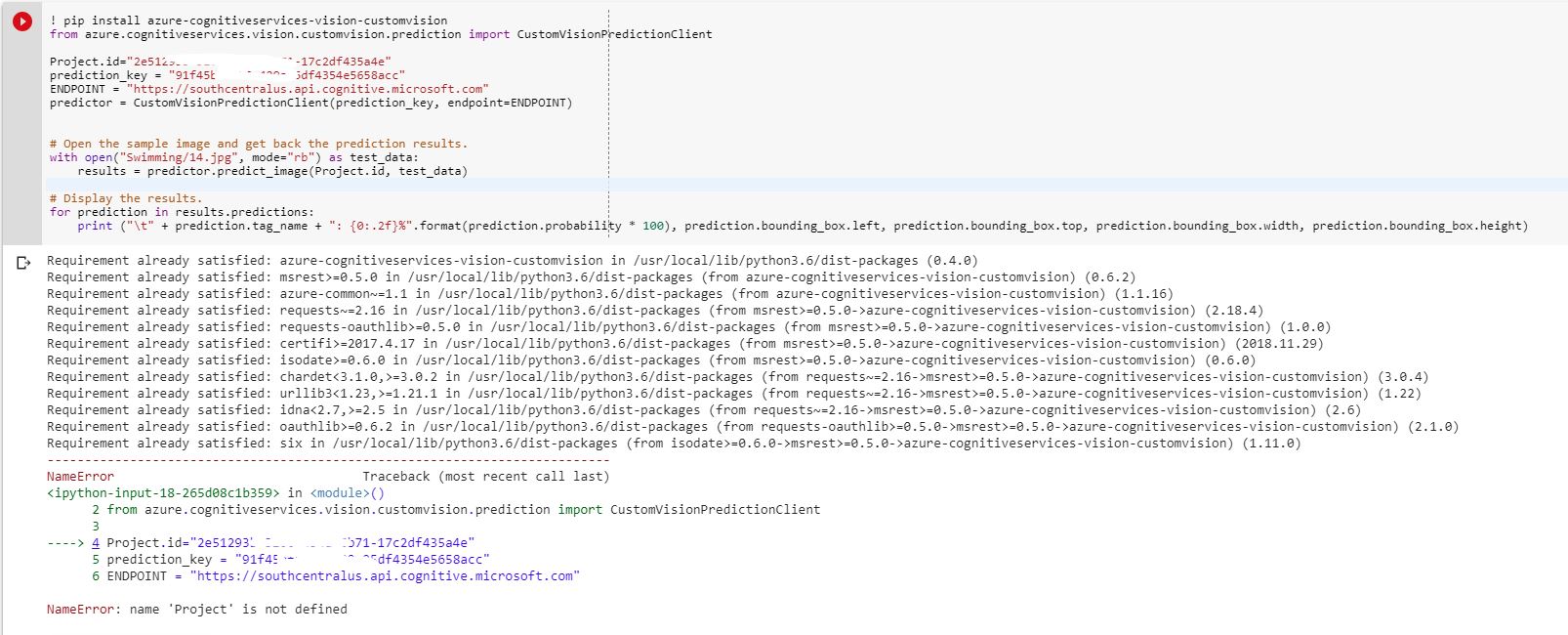
Accepting that the indenting in the code pasted above is out of wack'
AnalyticsInAction
on 6 Dec 2018
HI @AnalyticsInAction,
Happy to help. So it looks like you don't have a variable named Project defined in your program so it's complaining that you are trying to get the id property off that undefined object.
In the sample we create a Project variable and populate it when we call the create_project API off of the training client. So it then has properties such as id, description, etc.
If you want to just use the prediction part then you should just pass the id in directly to the PredictAsync call or put it in a variable and pass that in. For example you could put the id from the settings page into a variabel called my_project_id
! pip install azure-cognitiveservices-vision-customvision
from azure.cognitiveservices.vision.customvision.prediction import CustomVisionPredictionClient

my_project_id = "Project Id from the settings page"
prediction_key = "Prediction Key from the settings page"

ENDPOINT = "https://southcentralus.api.cognitive.microsoft.com"
predictor = CustomVisionPredictionClient(prediction_key, endpoint=ENDPOINT)

with open("Swimming/14.jpg", mode="rb") as test_data:
    results = predictor.predict_image(my_project_id, test_data)
@areddish Hmm - Still no Joy. Error below. Have attached the code (text format as can't share .py file)
microsoft_custom_vision_api_just_prediction.txt
HttpOperationError Traceback (most recent call last)
9
10 with open("Swimming/14.jpg", mode="rb") as test_data:
---> 11 results = predictor.predict_image(my_project_id, test_data)
/usr/local/lib/python3.6/dist-packages/azure/cognitiveservices/vision/customvision/prediction/custom_vision_prediction_client.py in predict_image(self, project_id, image_data, iteration_id, application, custom_headers, raw, **operation_config)
204
205 if response.status_code not in [200]:
--> 206 raise HttpOperationError(self._deserialize, response)
207
208 deserialized = None
HttpOperationError: Operation returned an invalid status code 'Not Found'
AnalyticsInAction
on 7 Dec 2018
I suspect that you don't have a default iteration set. So that means you need to either set a default iteration for the project in the portal or you need to specify an iteration to predictImage
my_iteration_id = "iteration id from portal"
with open("Swimming/14.jpg", mode="rb") as test_data:
    results = predictor.predict_image(my_project_id, test_data, iteration_id=my_iteration_id)
@areddish Boom! Yes it was the iteration id. I was thrown off the scent as the location of the iteration id wasn't intuitive (feels like it should really be located in on the setting page next to the number of iterations saved). Eventually found it under "Performance" ->"Prediction URL" ->then inspected the end of the prediction URL provided. Thanks for persisting with me on this one! API looks like it has a huge amount of potential. Cheers Steve
AnalyticsInAction
on 7 Dec 2018
@AnalyticsInAction Glad you got it working!
areddish
on 7 Dec 2018
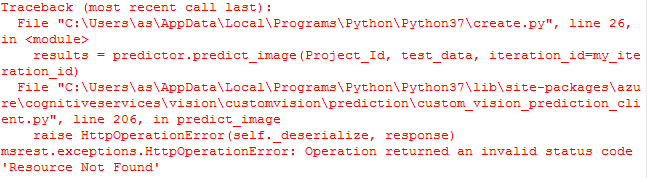
@areddish need your help!
 abdulbasit24434
on 21 Feb 2019
abdulbasit24434
on 21 Feb 2019
Related issues
 AronT-TLV
·
3Comments
AronT-TLV
·
3Comments
 mrdfuse
·
3Comments
mrdfuse
·
3Comments
 ianpowell2017
·
3Comments
ianpowell2017
·
3Comments
 bityob
·
3Comments
bityob
·
3Comments
 spottedmahn
·
3Comments
spottedmahn
·
3Comments