Azure-docs: Load Certificate on Linux Web App
Hey Team. Is this feature available for 'Web Apps for Containers' deployed on Linux App Service Plan?
- I imported certificate to my web app
- Added WEBSITE_LOAD_CERTIFICATES=<thumbprint> (also tried with *)
- The following code deployed to Azure is not able to retrieve my certificate (works on my local Windows machine):
private static X509Certificate2 LoadCertificateFromStore(string thumbprint)
        {
            Log.Information($"Loading {thumbprint} certificate from local store.");
            using (var store = new X509Store(StoreName.My, StoreLocation.CurrentUser))
            {
                store.Open(OpenFlags.ReadOnly);
                var certs = store.Certificates.Find(X509FindType.FindByThumbprint, thumbprint, false);
                store.Close();

                if (certs.Count == 0)
                {
                    Log.Error($"Certificate {thumbprint} not found in local store.");
                    throw new InvalidOperationException($"Certificate {thumbprint} not found in local store.");
                }

                return certs[0];
            }
        }
Please advise.
Document Details
⚠ Do not edit this section. It is required for docs.microsoft.com ➟ GitHub issue linking.
- ID: ee2ce9e8-8504-ddab-1880-485962b99ffa
- Version Independent ID: 1dc67396-c348-d66b-bbab-0d424375ed51
- Content: Use an uploaded SSL certificate in your application code in Azure App Service
- Content Source: articles/app-service/app-service-web-ssl-cert-load.md
- Service: app-service-web
- GitHub Login: @cephalin
- Microsoft Alias: cephalin
 pawelros
All 16 comments
Hi @Rosiv, thanks for the feedback! We are currently investigating and will update you shortly.
 Grace-MacJones-MSFT
on 21 Nov 2018
Grace-MacJones-MSFT
on 21 Nov 2018
@pawelros This doc was originally written for App Service on Windows, which has different feature parity than App Service on Linux. I was unable to properly call my certificate on my container web app as well.
I have requested the doc author to investigate whether or not this feature is supported, and if so, determine if adding Linux steps would be necessary.
 BryanTrach-MSFT
on 8 Dec 2018
BryanTrach-MSFT
on 8 Dec 2018
Would also like this feature for Linux Docker Container deployed app service.
 mweinand
on 13 Dec 2018
mweinand
on 13 Dec 2018
Hi. Import certs through the portal is necessary for apps hosted on Windows (Clarification: .NET apps hosted on Windows) because the certificate store is off limits to you. This is not the case in App Service on Linux (or Web App for Containers for that matter). You don't need to import through the portal at all. Simply deploy the certificate file with your files and load it directly in your code.
var x509 = new X509Certificate2(File.ReadAllBytes("BaltimoreCyberTrustRoot.crt.pem"));
 cephalin
on 14 Dec 2018
cephalin
on 14 Dec 2018
You should definitely not load certificate from file, that will likely cause developers to pass certificate and/or its password among with other secrets to the code base sooner or later. Azure Key Vault with managed identity should be used for that purpose, but loading cert automatically from the store like on Windows web apps is a nice and super easy alternative.
pawelros
on 20 Dec 2018
@pawelros You're right that Key Vault is the way to go for certs and we need to update the doc with that option.
I'm mainly commenting on WEBSITE_LOAD_CERTIFICATES. The app setting is only for .NET apps on Windows because it's tied to the Windows cert store. Language frameworks other than .NET/Core don't access the Windows cert store, nor does any Linux apps (including .NET Core). Therefore they can't use this option.
cephalin
on 20 Dec 2018
I think we are looking for a similar feature on Linux that would inject a certificate loaded via the portal into the container/runtime. This is useful so that certificates only exist in the portal and never have to leave or be packaged into a deployment. Whether or not it works like the certificate store isn't important. If it was a volume mount into the docker container at like /certificates or something that would work great.
mweinand
on 20 Dec 2018
@pawelros @mweinand The best place to track this feedback is at https://feedback.azure.com/. Can you submit your product feedback there?
cephalin
on 3 Jan 2019
please-close
cephalin
on 23 Jan 2019
I guess there is still no direct way to import cert to linux based app service?
Unlike Windows based, the only way we can get through is to import via keyvault?
 hmheng
on 30 Sep 2019
hmheng
on 30 Sep 2019
You can import the certificate into the app service hosted on Linux, see the section 'Load certificate in Linux apps' in the link below. I've just managed to get this working myself.
https://docs.microsoft.com/en-us/azure/app-service/configure-ssl-certificate-in-code
 asad-c
on 1 Jan 2020
asad-c
on 1 Jan 2020
@BryanTrach-MSFT @Grace-MacJones-MSFT Opening this case again, as i believe this still not working, i wasn't able to see the loaded certificates into linux app container, using Linux App Service Multi Container, with .Net 3.0.1
SSL is already attached to domain and loaded correctly inside app service, however when navigating to /var/ssl folder does not exists
Added WEBSITE_LOAD_CERTIFICATES=* as well
 abomadi
on 16 Jul 2020
abomadi
on 16 Jul 2020
@abomadi yes,I am also running .Net Core application on Azure Webapp for Linux container and i tired same thing but /var/ssl dir not found, even i check with /etc/ssl dir but certificate with i uploaded was not their in /var/ssl/certs dir.
 MustafaC114
on 20 Jul 2020
MustafaC114
on 20 Jul 2020
It looks i was mistaken certificates are loaded correctly as mentioned above, verified after i ssh into the container, apologies for the inconvenience.
abomadi
on 22 Jul 2020
@abomadi yes,I am also running .Net Core application on Azure Webapp for Linux container and i tired same thing but /var/ssl dir not found, even i check with /etc/ssl dir but certificate with i uploaded was not their in /var/ssl/certs dir.
Hi @MustafaC114 , have you solved this question?
I'm trying for hours, with no success. If you have the solution and could save me :)
 gabrielbarceloscn
on 18 Oct 2020
gabrielbarceloscn
on 18 Oct 2020
@abomadi yes,I am also running .Net Core application on Azure Webapp for Linux container and i tired same thing but /var/ssl dir not found, even i check with /etc/ssl dir but certificate with i uploaded was not their in /var/ssl/certs dir.
Hi @MustafaC114 , have you solved this question?
I'm trying for hours, with no success. If you have the solution and could save me :)
✅ RESOLVED
Notes that will help you:
1. Don't try to see certificates in bash:
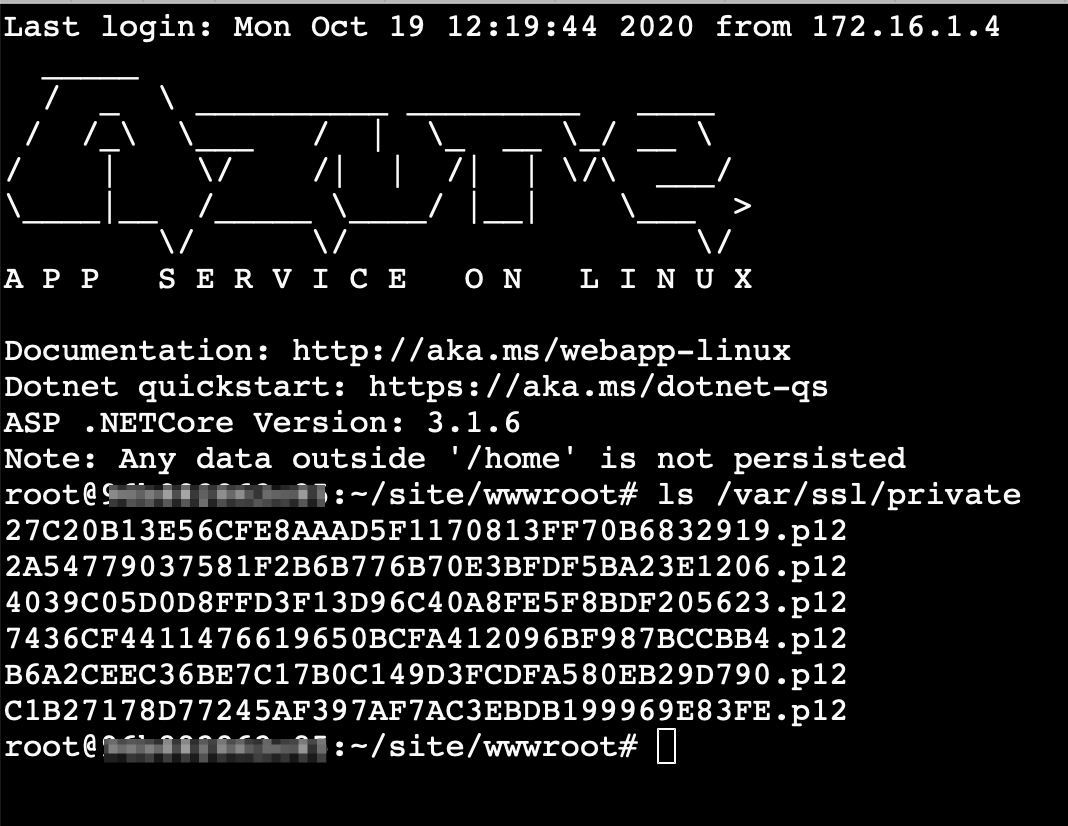
I was expecting to see the certificates using the Bash console in Kudu. However, the /var/ssl folder is completely absent in there. To check if the certificates are there, we should write an app to output certificate info.
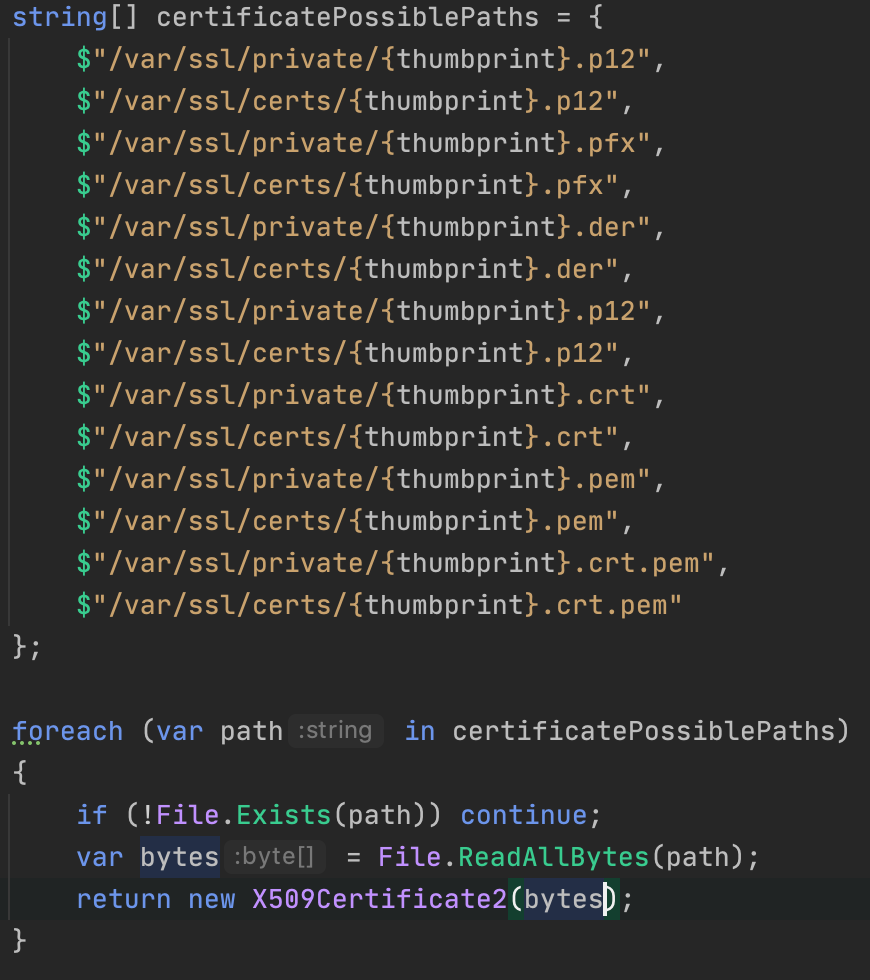
Expected paths:
Public: /var/ssl/certs/
Private: /var/ssl/private/
2. Don't use File.Exists. It is causing an weird problem.
string certificateFileName = $"/var/ssl/private/{thumbprint}.p12";

if (!File.Exists(certificateFileName))
                return null;

            var bytes = File.ReadAllBytes(certificateFileName);
            return new X509Certificate2(bytes);
3. Removing FileExists made it work:
string finalPath = $"/var/ssl/private/{thumbprint}.p12";
            var bytes2 = File.ReadAllBytes(finalPath);
            var cert = new X509Certificate2(bytes2);
EDIT 10/19/2020
The folder /var/ssl/private is accessible under SSH connection:
References:
gabrielbarceloscn
on 18 Oct 2020
Related issues
 behnam89
·
3Comments
behnam89
·
3Comments
 JeffLoo-ong
·
3Comments
JeffLoo-ong
·
3Comments
 AronT-TLV
·
3Comments
AronT-TLV
·
3Comments
 ianpowell2017
·
3Comments
ianpowell2017
·
3Comments
 jamesgallagher-ie
·
3Comments
jamesgallagher-ie
·
3Comments