Azure-docs: Upgrade fails when the maximum allowed number of cores is 4
Some people may use a student subscription or have some sort of restrictions about the number of cores per subscription. In my case the maximum number is 4. I'm trying to upgrade from v-1.9.11 to v-1.10.8 which fails giving me the next error:
Operation results in exceeding quota limits of Core. Maximum allowed: 4, Current in use: 4, Additional requested: 2
So, I ended up with my aks cluster in a failed state and I don't know how to solve the issue. How could I revert back the upgrade or get aks to upgrade using maximum 4 cores by default?
I looked for a --node-count option when upgrading but isn't there. Any suggestions here?
Finally, I think this section should cover a case like this, in case people face issues upgrading like me.
Thanks.
Document Details
⚠ Do not edit this section. It is required for docs.microsoft.com ➟ GitHub issue linking.
- ID: a14a3f84-28b4-0a2a-4da7-47cb4d66689f
- Version Independent ID: d1ffdd88-ab9a-9f55-8689-526e7415b326
- Content: Kubernetes on Azure tutorial - Upgrade a cluster
- Content Source: articles/aks/tutorial-kubernetes-upgrade-cluster.md
- Service: container-service
- GitHub Login: @iainfoulds
- Microsoft Alias: iainfou
 Lroca88
All 10 comments
Thanks for the feedback! We are currently investigating and will update you shortly.
 mimckitt
on 15 Nov 2018
mimckitt
on 15 Nov 2018
@Lroca88 were you just running the following command?
az aks upgrade --resource-group myResourceGroup --name myAKSCluster --kubernetes-version 1.10.8
If you are just upgrading your cluster there should not be a need for additional cores since you are not changing the size
@iainfoulds do you know if we are updating the version if on the backend we provision a new VM and swap it out? I tested on my subscription but I see no size operations
mimckitt
on 15 Nov 2018
@MicahMcKittrick-MSFT During an upgrade, a new VM node is deployed, pods are scheduled on it, then the old node is removed. Free / student accounts typically only provide 4 cores, so in a two-node cluster where each node has 2 cores, yes, that operation would fail as an additional 2 cores are needed for that interim new VM. That's what the error message is indicating.
The tutorial and quickstarts on creating an AKS cluster define --node-count 1 to try and avoid this issue. Can use az aks scale to return node count to 1 and then upgrade, which should complete correctly.
 iainfoulds
on 15 Nov 2018
iainfoulds
on 15 Nov 2018
@iainfoulds ah okay. That makes sense then. We just do a good job of masking it :)
@Lroca88 so as Iain mentioned, it does make sense you ran into the issue. I understand it can be frustrating when on a student account as you can run into issues such as this.
To fix the state of your cluster, try the scale down option to scale to a single CPU, perform the upgrade, then you should be able to scale back to 4 cores if you like.
I will close this for now. Let us know if that doesn't work for you and you need further assistance.
mimckitt
on 15 Nov 2018
@MicahMcKittrick-MSFT, @iainfoulds thank you guys. That was my first attempt, I tried to scale down, but since my aks cluster is in a failed state it can't.

It's good to know about the additional VM node during the upgrade, I would add that info to the article.
At this point what else can be done to get my aks cluster functioning properly?
Lroca88
on 15 Nov 2018
@Lroca88 fair point. We can have @iainfoulds take a look to see if we should add that info to the doc.
As per the failed state, can you go to the resource group where the AKS resources are held? This will be a different recourse group than the actual AKS is hosted. So for example, in my case my AKS resource group is called MicahAKSCluster. If I go to the portal and go to Reosurce Groups, I also find a resource group called MC_MicahAKS_Cluster_MyAKSCluster_EastUS
If I go into that resource group I will see all the backend resources of my cluster
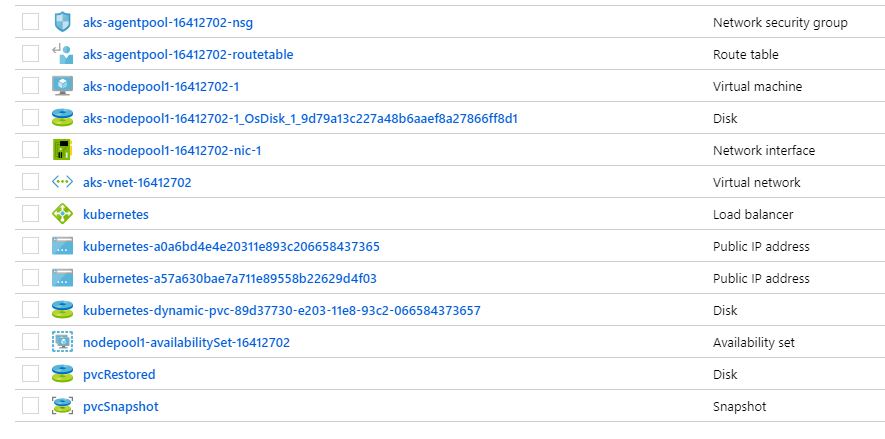
Select the Virtual machine Resource

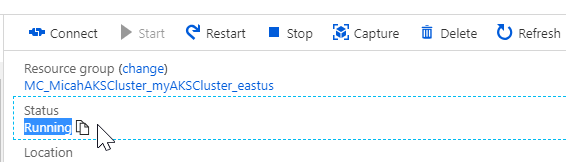
Check the status of your cluster
mimckitt
on 15 Nov 2018
It is running.
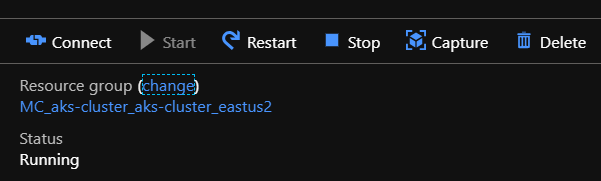
Still can't scale down:
az aks scale --resource-group aks-cluster --name aks-cluster --node-count 1
Operation failed with status: 'Conflict'. Details: Operation is not allowed while cluster is being upgrading or failed in upgrade
@Lroca88 you could attempt to restart the VM to get it out of that state.
mimckitt
on 16 Nov 2018
@Lroca88 and looking into further documentation, if restarting the VM itself does not clear the failed state then the next step would be to delete the cluster and re provision it. I do not find any other ways to clear the failed state other than that. Not ideal, but it should take care of the issue.
Then would suggest you create a cluster using the new version or just ensure you are using a small enough cluster that will allow you to upgrade the cluster before assigning more resources to it.
I will close this out as we already have the document suggesting to create a node count of 1. Most users will not have a core limit of 4 but I can understand where it can come into play such as in this case. If you have issues deleting the cluster and rebuilding just let me know.
We also have a container services forum in MSDN you can post to for any additional troubleshooting assistance. I am also active on that forum.
https://social.msdn.microsoft.com/Forums/en-US/home?forum=AzureContainerServices
mimckitt
on 16 Nov 2018
@MicahMcKittrick-MSFT, restarting the VM didn't clear the failed state.
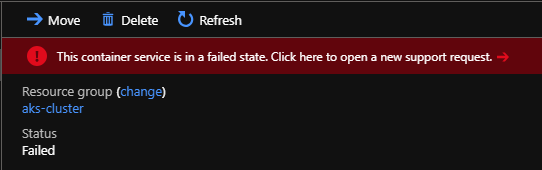
I guess my last option is deleting the AKS cluster and re provision it as you said. I hope no one faces this issue in prod, they won't like to start from the ground again.
Thanks for taking the time to deal with this issue!
Lroca88
on 19 Nov 2018
Related issues
 Ponant
·
3Comments
Ponant
·
3Comments
 bdcoder2
·
3Comments
bdcoder2
·
3Comments
 monteledwards
·
3Comments
monteledwards
·
3Comments
 AronT-TLV
·
3Comments
AronT-TLV
·
3Comments
 Agazoth
·
3Comments
Agazoth
·
3Comments