Azure-docs: Gremlin Console - Error during 'connect' - Cannot create property=hosts
I have followed the instructions as provided in this link --> https://docs.microsoft.com/en-us/azure/cosmos-db/create-graph-gremlin-console

Below is the remote-secure.yaml configuration file (masked the primary key for security reasons).

Downloaded Tinkerpop version: 3.3.4
Document Details
⚠ Do not edit this section. It is required for docs.microsoft.com ➟ GitHub issue linking.
- ID: cc248d85-e363-bfe6-e374-e265316e7afe
- Version Independent ID: 9941f04e-9553-7054-45d6-0d1023713db2
- Content: Azure Cosmos DB tutorial: Create, query, and traverse in Apache TinkerPops Gremlin Console
- Content Source: articles/cosmos-db/create-graph-gremlin-console.md
- Service: cosmos-db
- GitHub Login: @LuisBosquez
- Microsoft Alias: lbosq
 vmunagala0117
All 3 comments
@vmunagala0117 We are investigating the issue.
Thanks.
James
 JamesLee-MSFT
on 15 Nov 2018
JamesLee-MSFT
on 15 Nov 2018
@vmunagala0117 It appears that you are missing brackets [ ] around the FQDN host value.
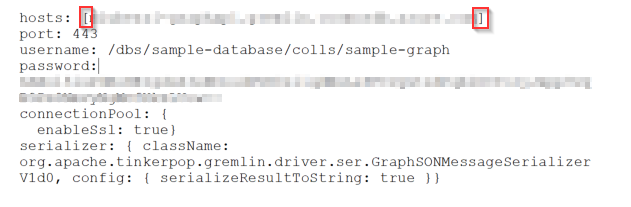
Can you you please confirm that the brackets are in place and try again.
 Mike-Ubezzi-MSFT
on 15 Nov 2018
Mike-Ubezzi-MSFT
on 15 Nov 2018
👍2
Awesome it worked for me now.
vmunagala0117
on 15 Nov 2018
👍1
Was this page helpful?
0 / 5 - 0 ratings
Related issues
 bityob
·
3Comments
bityob
·
3Comments
 Ponant
·
3Comments
Ponant
·
3Comments
 spottedmahn
·
3Comments
spottedmahn
·
3Comments
 DeepPuddles
·
3Comments
DeepPuddles
·
3Comments
 bdcoder2
·
3Comments
bdcoder2
·
3Comments
Most helpful comment
@vmunagala0117 It appears that you are missing brackets
[ ]around the FQDN host value.Can you you please confirm that the brackets are in place and try again.