Azure-docs: Are Network Security Groups supported on the application gateway subnet?
Exceptions must be put in for incoming traffic on ports 65503-65534 for the Application Gateway v1 SKU and ports 65200 - 65535 for the v2 SKU. This port-range is required for Azure infrastructure communication. They are protected (locked down) by Azure certificates. Without proper certificates, external entities, including the customers of those gateways, will not be able to initiate any changes on those endpoints.
I think it should be clarified that this rule is not strictly speaking required.
When I denied 65503-65534 in my NSG, my app traffic could still be routed through the gateway, because the application still responded to health probes. The application and gateway are within the same VNET and VNET to VNET traffic was allowed in the NSG.
The only thing that did not work was Backend Health tab in the gateway - it showed Unknown health status.
It's also not necesssary to open this rule to the Internet. You can pick GatewayManager service tag (in my instance, GatewayManager.WestEurope) and the backend health tab will come back with Healthy status. AzureCloud service tag will also do - which is a much smaller address space than the internet.
It could also be more spelled out that destination for this rule should only be the gateway subnet and none other.
Similar thing is repeated in:
https://docs.microsoft.com/en-us/azure/application-gateway/application-gateway-faq#can-i-whitelist-application-gateway-access-to-a-few-source-ips
Document Details
⚠ Do not edit this section. It is required for docs.microsoft.com ➟ GitHub issue linking.
- ID: 88466307-81b8-1e5b-7f2c-191d8e818071
- Version Independent ID: 08ad49f3-6a57-b925-794a-37215e985aba
- Content: Frequently asked questions for Azure Application Gateway
- Content Source: articles/application-gateway/application-gateway-faq.md
- Service: application-gateway
- GitHub Login: @vhorne
- Microsoft Alias: victorh
 xenalite
All 16 comments
@xenalite Thanks for the feedback! I have assigned the issue to the content author to evaluate and update as appropriate.
 TravisCragg-MSFT
on 13 Nov 2018
TravisCragg-MSFT
on 13 Nov 2018
@TravisCragg-MSFT I have an update to this.
The documentation is correct for V2 App Gateway, as this (unprecendented) behaviour was added to App Gateway V2 deployment:
Network security group
<id> blocks incoming internet traffic on ports 65200 - 65535 to subnet
<id>, associated with Application Gateway
<id>. This is not permitted for Application Gateways that have V2 Sku.
I suppose the issue can be closed as the documentation is correct.
However, can you advise on what is the best place to leave product behaviour feedback, as I believe it is wrong. Microsoft should always recommend the most secure advice. Opening an endpoint to the Internet tag is far less secure, when we know that the traffic will be coming from a much narrower service tag. As such, the behaviour and subsequently the documentation recommend a less secure practice.
xenalite
on 23 Feb 2019
@xenalite App Gateway V2 is still in preview, and there will be changes and features regularly during this time, along with some strange functions like this.
Please give any Feature Requests or Feedback you have for App Gateway V2 Here.
We will now proceed to close this thread. If there are further questions regarding this matter, please tag me in your reply. We will gladly continue the discussion and we will reopen the issue.
TravisCragg-MSFT
on 23 Feb 2019
@TravisCragg-MSFT Thank you.
Link to product feedback:
https://feedback.azure.com/forums/217313-networking/suggestions/36933709-remove-nsg-validation-from-app-gateway-v2-deployme
xenalite
on 23 Feb 2019
@TravisCragg-MSFT same issue here, I was not able to configure the proper NSG rule that satisfies the rule check on AzureRM deployment.
No matter how open I make the NSG rule, deployment always fails with this error:
Microsoft.Network/applicationGateways 'net-appgateway-xxxxxxxx' failed with message '{
  "error": {
    "code": "ApplicationGatewaySubnetInboundTrafficBlockedByNetworkSecurityGroup",
    "message": "Network security group /subscriptions/xxxxxx-xxxxxx-xxxxxx-xxxxxx/resourceGroups/tt-dev1/providers/Microsoft.Network/networkSecurityGroups/nsg-Subnet-AppGw-xxxxxxxx blocks incoming internet traffic on ports 65200 - 65535 to subnet /subscriptions/xxxxxx-xxxxxx-xxxxxx-xxxxxx/resourceGroups/tt-dev1/providers/Microsoft.Network/virtualNetworks/net-vnet-xxxxxxxx/subnets/Subnet-AppGw, associated with Application Gateway /subscriptions/xxxxxx-xxxxxx-xxxxxx-xxxxxx/resourceGroups/tt-dev1/providers/Microsoft.Network/applicationGateways/net-appgateway-xxxxxxxx. This is not permitted for Application Gateways that have V2 Sku.",
    "details": []
  }
}'
I tried all of these variations, but the deployment always fails due to the above rule check:
with explicit service tag 'Internet' for source / 'VirtualNetwork' for destination:

with source 'Any' and subnet CIDR for destination:
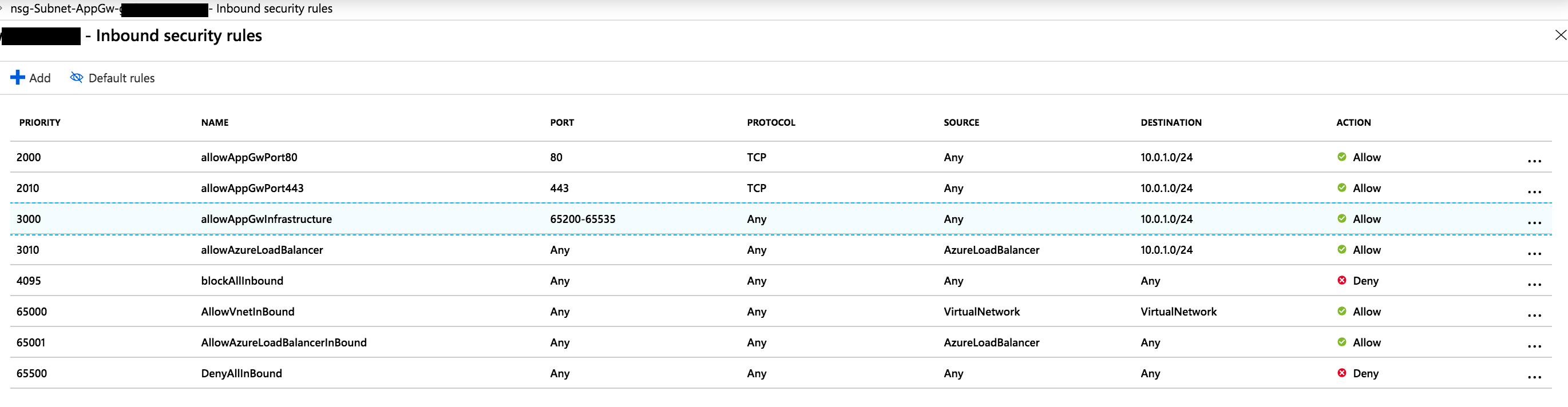
 tknerr
on 19 Mar 2019
tknerr
on 19 Mar 2019
UPDATE: it finally worked with using "Any" destination (which is way too open):

Now I' struggling with the next validation error for the outbound rule...
@TravisCragg-MSFT regarding the docs, it would be helpful if the concrete rules that need to be added would be documented (for sure it would be better if the rule checks would be fixed, but at least until then the docs would help the users to set up the rules -- even if too open for now -- correctly)
tknerr
on 19 Mar 2019
After finally finding out the required inbound rule, I am now as open as it possibly can be with my outbound rules:
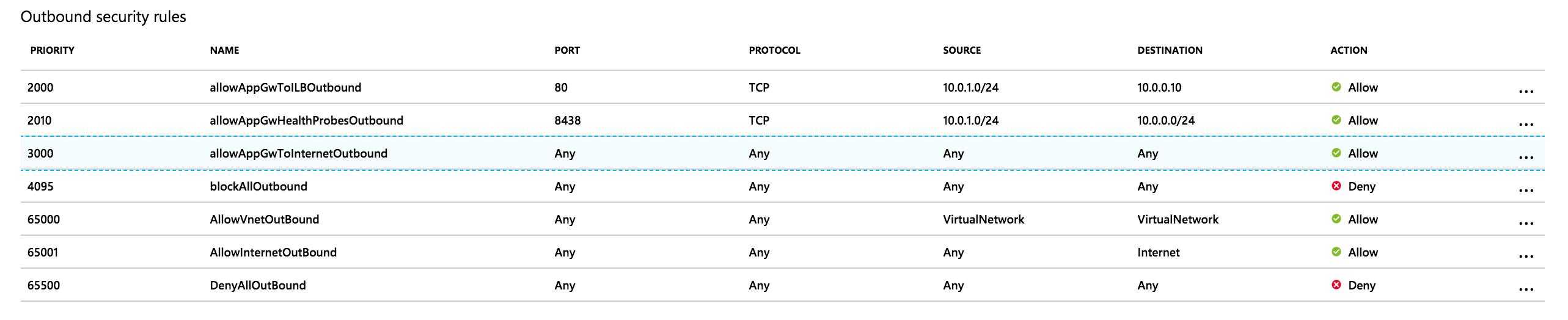
But still getting the "ApplicationGatewaySubnetOutboundTrafficBlockedByNetworkSecurityGroup" rule validation error below:
PM - Resource Microsoft.Network/applicationGateways 'net-appgateway-xxxxxxxxxx' failed with message '{
  "error": {
    "code": "ApplicationGatewaySubnetOutboundTrafficBlockedByNetworkSecurityGroup",
    "message": "Network security group /subscriptions/xxxxxx-xxxxxx-xxxxxx-xxxxxx/resourceGroups/tt-dev1/providers/Microsoft.Network/networkSecurityGroups/nsg-Subnet-AppGw-xxxxxxxxxx blocks outgoing internet traffic on subnet /subscriptions/xxxxxx-xxxxxx-xxxxxx-xxxxxx/resourceGroups/tt-dev1/providers/Microsoft.Network/virtualNetworks/net-vnet-xxxxxxxxxx/subnets/Subnet-AppGw, associated with Application Gateway /subscriptions/xxxxxx-xxxxxx-xxxxxx-xxxxxx/resourceGroups/tt-dev1/providers/Microsoft.Network/applicationGateways/net-appgateway-xxxxxxxxxx. This is not permitted for Application Gateways that have fast update enabled or have V2 Sku.",
    "details": []
  }
}'
@xenalite @TravisCragg-MSFT any ideas how to fix this?
tknerr
on 19 Mar 2019
@tknerr try removing your "BlockAllOutbound" rule. The validation seems to be quite strange, and even though there is a higher priority AllowAll rule, it still does not like the block.
You should also go vote for Xenalite's feedback asking for the removal of the NSG validation.
TravisCragg-MSFT
on 20 Mar 2019
@TravisCragg-MSFT thanks for the suggestion, I will try that and report back if that helped or not
Left my votes + comments on @xenalite's feedback.azure.com entry as well :)
tknerr
on 20 Mar 2019
@TravisCragg-MSFT thanks for the suggestion. By removing the lower prio "blockAllOutbound" rule I could indeed bypass the rule validation error and got the AppGateway v2 deployment to finally work.
Not ideal imho but it works for now and good enough to continue with evaluation of AppGw v2 on our end.
Maybe that would be worth a mentioning as a known issue in the docs though, maybe in https://github.com/MicrosoftDocs/azure-docs/blob/master/articles/application-gateway/application-gateway-autoscaling-zone-redundant.md#known-issues-and-limitations / #23773 ?
tknerr
on 21 Mar 2019
@vhorne can you add a note to the known issues that no rules can block outbound access besides the default rules to the known issues?
TravisCragg-MSFT
on 23 Mar 2019
@tknerr In principle you could work around this - deploy AGWv2 and have your rules.
In your ARM template, you could first deploy NSG attached to no subnets, then deploy AGW, then attach NSG to subnets. Because ARM is DSC, it will ensure NSG is not attached before AGW on every redeployment.
xenalite
on 23 Mar 2019
@tknerr In principle you could work around this - deploy AGWv2 and have your rules.
In your ARM template, you could first deploy NSG attached to no subnets, then deploy AGW, then attach NSG to subnets. Because ARM is DSC, it will ensure NSG is not attached before AGW on every redeployment.
This workaround doesn't work. I had a NSG with inbound/outbound in place & then created an application gateway v2. Then I tried to attach the NSG to the gateway that the AGv2 is running on but the validation fails with the folowing error:
Failed to save network security group for subnet 'gateway_subnet_v2'. Error: Network security group XX/XX/XX-NSG blocks outgoing internet traffic on subnet XXX/subnets/gateway_subnet_v2, associated with Application Gateway XXX/XXX/XXX-v2. This is not permitted for Application Gateways that have fast update enabled or have V2 Sku.
The workaround suggested by @tknerr might work but I do not feel comfortable removing the deny all rule. The validation check on the NSG rule is a little ludicrous in my opinion, why should users have to leave their entire virtual network (not just the AG subnet) open to outbound traffic for this to work?!
 ojasp
on 17 Apr 2019
ojasp
on 17 Apr 2019
As of today I'm still unable to limit the INBOUND ports (65200-65353) on the Application Gateway V2 SKU to the "GatewayManager.
 BenMitchell1979
on 9 Aug 2019
BenMitchell1979
on 9 Aug 2019
Hi @TravisCragg-MSFT , you closed the issue but I'm affected, any news on this?
Thanks,
 evmimagina
on 7 Jan 2020
evmimagina
on 7 Jan 2020
@evmimagina guidance on NSGs for the App Gateway subnet was moved Here. Can you clarify your current issue?
TravisCragg-MSFT
on 9 Jan 2020
Related issues
 varma31
·
3Comments
varma31
·
3Comments
 bdcoder2
·
3Comments
bdcoder2
·
3Comments
 paulmarshall
·
3Comments
paulmarshall
·
3Comments
 mrdfuse
·
3Comments
mrdfuse
·
3Comments
 ianpowell2017
·
3Comments
ianpowell2017
·
3Comments
Most helpful comment
As of today I'm still unable to limit the INBOUND ports (65200-65353) on the Application Gateway V2 SKU to the "GatewayManager.