Azure-docs: Storage account configuration doesn't work
When you try to select a storage account via the portal nothing happens. You can select a storage account and a container but there's no way to actually apply that selection to the export job and no error messages indicating what the problem might be.
Document Details
⚠ Do not edit this section. It is required for docs.microsoft.com ➟ GitHub issue linking.
- ID: 5c0b8c1d-41ff-f7ab-bc23-72a48fc46e1e
- Version Independent ID: dfb8cad9-6233-f97f-c849-1820ad642c7c
- Content: Export an Azure SQL database to a BACPAC file
- Content Source: articles/sql-database/sql-database-export.md
- Service: sql-database
- GitHub Login: @CarlRabeler
- Microsoft Alias: carlrab
 chaholl
All 9 comments
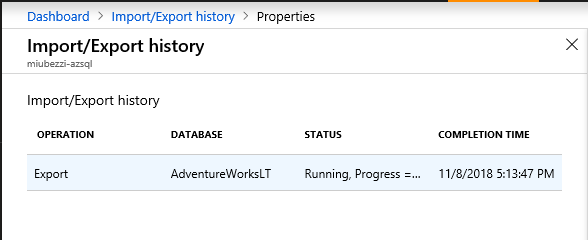
@chaholl Thank you very much for the feedback. I have navigated through this process in the portal, and you can in fact create and select a specific container to locate the backup. Premium Storage is not support.
Creating and Selecting the specific container:

And after creating a firewall rule and modifying the specific permissions for the blob container, the export process runs successfully:
 Mike-Ubezzi-MSFT
on 8 Nov 2018
Mike-Ubezzi-MSFT
on 8 Nov 2018
Thanks for checking @Mike-Ubezzi-MSFT
It still doesn't work for me but I suspect that's due to security restrictions on my subscription. It might be worth adding more detail on the required container permissions to the document and/or adding some kind of message in the UI where security settings are preventing configuration. At the moment there's no way to know what's going on.
chaholl
on 9 Nov 2018
Thanks for the feedback! I have assigned the issue to the content author to evaluate and update as appropriate.
Mike-Ubezzi-MSFT
on 9 Nov 2018
@VanMSFT please review this re: permission issue
 CarlRabeler
on 20 Dec 2018
CarlRabeler
on 20 Dec 2018
Hi @chaholl, are you saying that you can't apply an existing storage available, or one that you are creating as part of this process?
 VanMSFT
on 2 Jan 2019
VanMSFT
on 2 Jan 2019
@Mike-Ubezzi-MSFT please assign this to @VanMSFT
CarlRabeler
on 3 Jan 2019
Hi @chaholl, please let me know if you were able to get past your error. If you have any clarification regarding the doc that needs to be updated, I would be happy to help. For example, are you running into an issue with creating a new storage/container as part of this process, or use an existing one? If you are trying to use an existing one, did you check your permissions on that storage?
VanMSFT
on 14 Jan 2019
Sorry @VanMSFT I can't remember the specifics of this one. I suspect it was security related because I managed to get it working in the end.
chaholl
on 14 Jan 2019
@chaholl Thanks for the update. We will now proceed to close this thread. If there are further questions regarding this matter, please comment and we will gladly continue the discussion.
Mike-Ubezzi-MSFT
on 14 Jan 2019
Related issues
 Ponant
·
3Comments
Ponant
·
3Comments
 mrdfuse
·
3Comments
mrdfuse
·
3Comments
 bdcoder2
·
3Comments
bdcoder2
·
3Comments
 paulmarshall
·
3Comments
paulmarshall
·
3Comments
 spottedmahn
·
3Comments
spottedmahn
·
3Comments