Azure-docs: Azure fileshares for ACI in vnet-subnet inaccessible
Hello,
i have an issue with deploying a container instance in an existig vnet-subnet.
Without deploying an container in a subnet, i can use an azure-file-volume-share to store data persistent.
As soon as i deploy an container in a subnet, i can't use the azure-file-volume-share anymore. The share is'nt reachable and can't be used.
To solve the prolem, i've tried to add the service endpoint "Microsoft.Storage" to the container's subnet, but it can't be used with the delegation "Microsoft.ContainerInstance/containerGroups".
I've had the idea, to create a new subnet in the exisiting container's vnet, add the service endpoint "Microsoft.Storage" and add an routing table to the container's subnet, which point's to the new subnet with the service endpoint. But this doesn't function either, a routing table can't be added to a subnet, which delegation is given to Microsoft.ContainerInstance/containerGroups.
So, for me, the azure fileshares are inaccessible for containers, which are in an vnet-subnet.
If I understand it correctly, no azure services are reachable over an service endpoint, when you deploy a container in an vnet-subnet.
Is this correct or is there any other way, to use azure services over a service endpoint with a container instance?
Thanks in advance.
 clangnerakq
All 19 comments
@clangnerakq Thank you very much for your interest in Azure services. Do you have a document you are attempting to follow or reference to solve your issue? I did find a Stack Overflow thread related to your question: How do I map an Azure File Share as a volume in a Docker Compose file? but, will assign this to a resource who may better able to answer your question.
 Mike-Ubezzi-MSFT
on 18 Oct 2018
Mike-Ubezzi-MSFT
on 18 Oct 2018
@Mike-Ubezzi-MSFT Thank you for your fast answer.
Sorry for giving just short information about the issue.
Here are more informations of how i've deployed the aci:
I've followed the following microsoft documentation to create a container over the cli:
https://docs.microsoft.com/en-us/cli/azure/container?view=azure-cli-latest
Then i've looked up, how to mount an Azure file share in Azure Container Instances:
https://docs.microsoft.com/de-de/azure/container-instances/container-instances-volume-azure-files
After that, i tired to deploy the container in an Azure virtual network:
https://docs.microsoft.com/de-de/azure/container-instances/container-instances-vnet
In the end, i have the following cli commands:
ACI_PERS_RESOURCE_GROUP=XXX
ACI_PERS_STORAGE_ACCOUNT_NAME=XXX
ACI_PERS_LOCATION=westeurope
ACI_PERS_SHARE_NAME=XXX
az storage account create \
    --resource-group $ACI_PERS_RESOURCE_GROUP \
    --name $ACI_PERS_STORAGE_ACCOUNT_NAME \
    --location $ACI_PERS_LOCATION \
    --sku Standard_LRS

export AZURE_STORAGE_CONNECTION_STRING=`az storage account show-connection-string --resource-group $ACI_PERS_RESOURCE_GROUP --name $ACI_PERS_STORAGE_ACCOUNT_NAME --output tsv`
az storage share create -n $ACI_PERS_SHARE_NAME
STORAGE_ACCOUNT=$(az storage account list --resource-group $ACI_PERS_RESOURCE_GROUP --query "[?contains(name,'$ACI_PERS_STORAGE_ACCOUNT_NAME')].[name]" --output tsv)
echo $STORAGE_ACCOUNT
STORAGE_KEY=$(az storage account keys list --resource-group $ACI_PERS_RESOURCE_GROUP --account-name $STORAGE_ACCOUNT --query "[0].value" --output tsv)
echo $STORAGE_KEY

az network vnet create -n XXX \
--resource-group XXX \
--address-prefix 10.0.0.0/16 \
--subnet-name XXX --subnet-prefix 10.0.0.0/24 \
--location westeurope

az network vnet subnet update --name XXX \
--resource-group XXX \
--vnet-name XXX \
--delegations Microsoft.ContainerInstance/containerGroups

az container create \
-g test \
--name Container1 \
--image IMAGE1 \
--cpu 2 --memory 4.0 \
--registry-login-server SERVER1\
--registry-username admin \
--registry-password password \
--location westeurope \
--azure-file-volume-account-name $ACI_PERS_STORAGE_ACCOUNT_NAME \
--azure-file-volume-account-key $STORAGE_KEY \
--azure-file-volume-share-name $ACI_PERS_SHARE_NAME \
--azure-file-volume-mount-path /home/user \
--vnet-name XXX \
--subnet XXX \
--debug
With the deployed aci, the azure-file-share doesn't work.
clangnerakq
on 19 Oct 2018
@clangnerakq I deployed the sample container from the doc in a vnet with attached fileshare.
I am able to access the file share in the Container.
In my deployment I have given a new subnet and CIDR block to the cli. So it created the subnet and configured it in an existing vnet.
Please share your container status (Container1) and also check the container logs if your container is in running state.
/usr/src/app # df -h
Filesystem Size Used Available Use% Mounted on
overlay 48.4G 7.2G 41.2G 15% /
tmpfs 965.0M 0 965.0M 0% /dev
tmpfs 965.0M 0 965.0M 0% /sys/fs/cgroup
//<storage account name>.file.core.windows.net/aci-share 1.0G 64.0K 1023.9M 0% /aci/logs
Also check the environment variables values once.
 jakaruna-MSFT
on 19 Oct 2018
jakaruna-MSFT
on 19 Oct 2018
@jakaruna-MSFT thank you for your fast reply.
I've tried to deploy a new container in an new subnet with the azure-file-volume with the following cli command:
CLI Command(I've had to anonymize some data)
ACI_PERS_RESOURCE_GROUP=test
ACI_PERS_STORAGE_ACCOUNT_NAME=test001
ACI_PERS_LOCATION=westeurope
ACI_PERS_SHARE_NAME=testshare
az storage account create \
    --resource-group $ACI_PERS_RESOURCE_GROUP \
    --name $ACI_PERS_STORAGE_ACCOUNT_NAME \
    --location $ACI_PERS_LOCATION \
    --sku Standard_LRS

export AZURE_STORAGE_CONNECTION_STRING=`az storage account show-connection-string --resource-group $ACI_PERS_RESOURCE_GROUP --name $ACI_PERS_STORAGE_ACCOUNT_NAME --output tsv`
az storage share create -n $ACI_PERS_SHARE_NAME
STORAGE_ACCOUNT=$(az storage account list --resource-group $ACI_PERS_RESOURCE_GROUP --query "[?contains(name,'$ACI_PERS_STORAGE_ACCOUNT_NAME')].[name]" --output tsv)
echo $STORAGE_ACCOUNT
STORAGE_KEY=$(az storage account keys list --resource-group $ACI_PERS_RESOURCE_GROUP --account-name $STORAGE_ACCOUNT --query "[0].value" --output tsv)
echo $STORAGE_KEY

az container create \
-g test \
--name Container1 \
--image test/testimage \
--cpu 2 --memory 4.0 \
--registry-login-server XXX.azurecr.io \
--registry-username admin \
--registry-password test \
--location westeurope \
--ports 8080 \
--azure-file-volume-account-name $ACI_PERS_STORAGE_ACCOUNT_NAME \
--azure-file-volume-account-key $STORAGE_KEY \
--azure-file-volume-share-name $ACI_PERS_SHARE_NAME \
--azure-file-volume-mount-path /home/test/shared \
--vnet-name test_vnet \
--vnet-address-prefix 10.0.0.0/16 \
--subnet test_subnet\
--subnet-address-prefix 10.0.0.0/24 \
--debug
After that, i get the following protocol output of the container, cant't connect to it and it is restarting every 5 Minutes
Protocol(Some data is anonymized):
+ XX_PROCESS=/home/XXX/wildfly-10.0.0.Final/Wildfly
+ sudo -u XXX /home/XXX/scripts/XXXPreCopy.sh -f /home/XXX/scripts/XXXPreCopy.conf
#########################################################################
# copy files on container-start
#########################################################################
# PreCopyObjectFile.......: /home/XXX/scripts/XXX.conf
#------------------------------------------------------------------------
# Objects.................: 3
# date/Time...............: Fri Oct 19 15:44:33 UTC 2018
#########################################################################
create path [/home/test/shared/XXX]
#########################################################################
# error [1] create path [/home/test/shared/XXX]
#########################################################################
+ RC=1
+ '[' 1 -ne 0 ']'
+ echo 'Error [1] executing precopy-script [/home/XXX/scripts/XXXPreCopy.sh -f /home/XXX/scripts/XXXPreCopy.conf]'
+ exit 1
Error [1] executing precopy-script [/home/XXX/scripts/XXXPreCopy.sh -f /home/XXX/scripts/XXXPreCopy.conf]
These are the informations about the container:
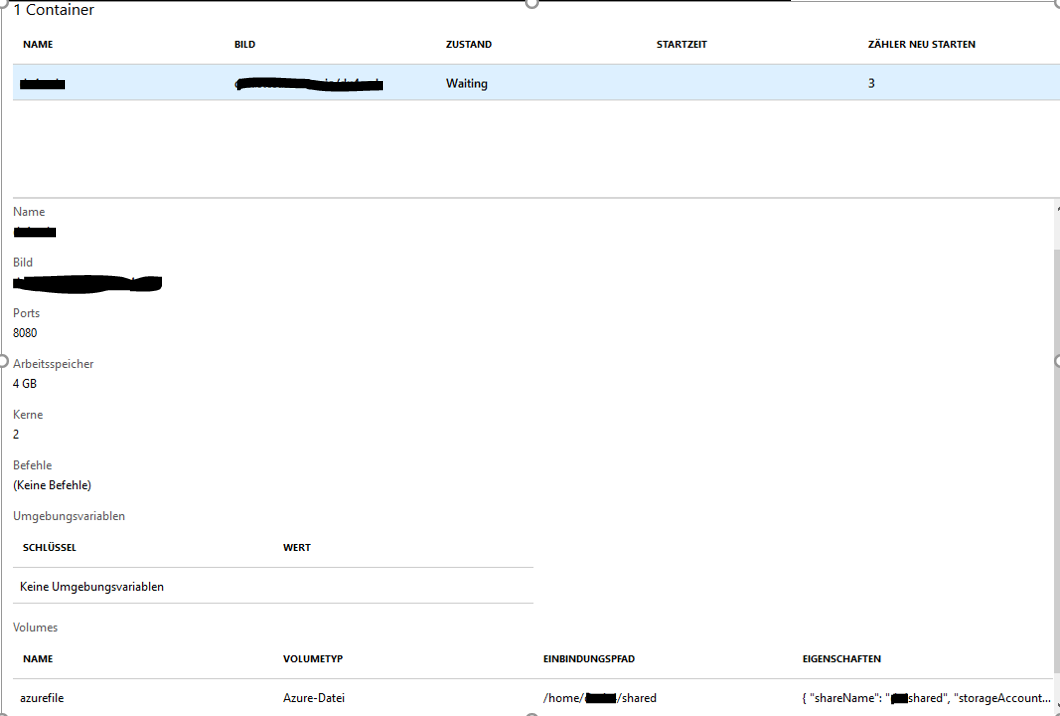
These are the events:

Interesting fact:
When i change the command in the cli for mounting the share to another mount-path but in the same vnet, then there is no problem:
--azure-file-volume-mount-path /home/user
And I can connect to the container:
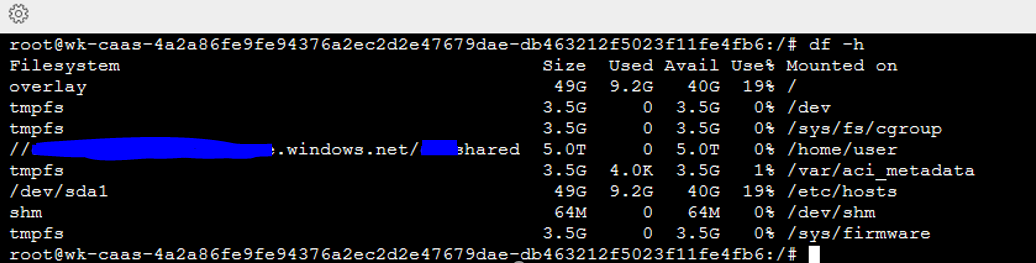
So, genrally using the azure-file-volume with a container in a vnet is possible!
It seems, that a script in the container loads at container-startup and can't use the mountpoint /home/test/shared, where I mounted the azure-file-volume.
When I deploy a container without a vnet with the same azure-file-mountpoint, the script loads without errors and it can use the path /home/test/shared.
Perhaps I could imagine, that the azure-file-volume is mounted diffrent, later or with another sequence if used with a container in a vnet.
I hope, i could give you some informations about the container.
Thanks in advance.
clangnerakq
on 19 Oct 2018
@clangnerakq Good to hear that you got the Azure files working with another path.
You are having error while creating the path to mount. That create path command is failing with RC(return code) 1.
Generally mkdir command, will only create the leaf directory.
Lets take your working example. /home/user. You will have /home directory. Then user directory wil be created for you.
Lets take /home/test/shared as the example. Here mkdir will fail if you don't have the test directory.
You can ask mkdir to create the parent directories also by using -p switch(mkdir -p /home/test/shared).
If you don't have control over the scripts, Then you need to make sure the path you are going to mount exists in the image except the leaf path.
Try this solution and let me know.
jakaruna-MSFT
on 22 Oct 2018
@jakaruna-MSFT Thank you for your reply.
I have looked in the script in the container. The script is using the -p flag for creating a new dir /home/test/shared and the parent directory .
It looks like this:
mkdir -p $DEST_PATH
RC=$?
if [ $RC -ne 0 ]; then
Abort 1 "error [$RC] create path [$DEST_PATH]"
As soon as I start the same container with the same azure-file-share and the same mountpoint but without a vnet, the script can create the directory and mount the azure-file-share:

Im am using the following cli command for this:
ACI_PERS_RESOURCE_GROUP=test
ACI_PERS_STORAGE_ACCOUNT_NAME=test001
ACI_PERS_LOCATION=westeurope
ACI_PERS_SHARE_NAME=testshare
az storage account create \
    --resource-group $ACI_PERS_RESOURCE_GROUP \
    --name $ACI_PERS_STORAGE_ACCOUNT_NAME \
    --location $ACI_PERS_LOCATION \
    --sku Standard_LRS

export AZURE_STORAGE_CONNECTION_STRING=`az storage account show-connection-string --resource-group $ACI_PERS_RESOURCE_GROUP --name $ACI_PERS_STORAGE_ACCOUNT_NAME --output tsv`
az storage share create -n $ACI_PERS_SHARE_NAME
STORAGE_ACCOUNT=$(az storage account list --resource-group $ACI_PERS_RESOURCE_GROUP --query "[?contains(name,'$ACI_PERS_STORAGE_ACCOUNT_NAME')].[name]" --output tsv)
echo $STORAGE_ACCOUNT
STORAGE_KEY=$(az storage account keys list --resource-group $ACI_PERS_RESOURCE_GROUP --account-name $STORAGE_ACCOUNT --query "[0].value" --output tsv)
echo $STORAGE_KEY

az container create \
-g test \
--name Container1 \
--image test/testimage \
--cpu 2 --memory 4.0 \
--registry-login-server XXX.azurecr.io \
--registry-username admin \
--registry-password test \
--location westeurope \
--ports 8080 \
--azure-file-volume-account-name $ACI_PERS_STORAGE_ACCOUNT_NAME \
--azure-file-volume-account-key $STORAGE_KEY \
--azure-file-volume-share-name $ACI_PERS_SHARE_NAME \
--azure-file-volume-mount-path /home/test/shared \
--debug
Could there be a possibility, that the azure-file-share have a diffrent behavior when used in a vnet than without a vnet?
If you need more informations to this, let me know.
Thanks in advance.
clangnerakq
on 22 Oct 2018
@clangnerakq Since the script fails when the directory is getting created, I feel that this doesn't have anything to do with file share. Because after creating the directory, We will attempt to mount.
Provided that the container is same and created with same options, We may have a permission issue.
I am not sure about the behaviour difference when we deploy containers within or out of a VNET.
I am adding the author @dlepow to investigate and provide more information.
jakaruna-MSFT
on 23 Oct 2018
@clangnerakq - Just want to confirm a couple of points:
- What version of the CLI are you using? Version 2.0.49 was released this week and is now available in Cloud Shell. I followed the general steps in your scenario using that and was able to mount and use a file share on a simple Ubuntu container instance deployed in a VNet. Obviously, I didn't run the image or code in your scenario.
- Did you add the service endpoint "Microsoft.Storage" to the container's subnet, with the delegation "Microsoft.ContainerInstance/containerGroups"? I found that the subnet created by ACI was already delegated to "Microsoft.ContainerInstance/containerGroups", and I could use the mounted share with or without the service endpoint.
Thanks for providing this information.
 dlepow
on 25 Oct 2018
dlepow
on 25 Oct 2018
@dlepow
@clangnerakq is able to mount when he is using "/home/user" as the mount point within the vnet.
But when he use "/home/test/shared" as the mount point, All goes well if he deploys outside of the vnet. But that directory creation fails within the vnet.
He want to know if there are any different in deployment between within the vnet and outside of the vnet.
I asked him to check if the images used is same or not.
@clangnerakq I hope those scripts are written by you. Please clarify
jakaruna-MSFT
on 26 Oct 2018
Hello @dlepow and @jakaruna-MSFT, thank you for your answers.
@dlepow Here are my answers for your questions:
I've tried the cli command mentioned above for deploying a container in vnet with azure-file-share again in the web-cli in the azure portal. I hope, there's already the new version installed:
'User-Agent': 'python/3.6.5 (Linux-4.15.0-1025-azure-x86_64-with-debian-stretch-sid) msrest/0.6.1 cloud-shell/1.0 msrest_azure/0.5.0 azure-mgmt-containerinstance/1.2.1 Azure-SDK-For-Python AZURECLI/2.0.49 cloud-shell/1.0'
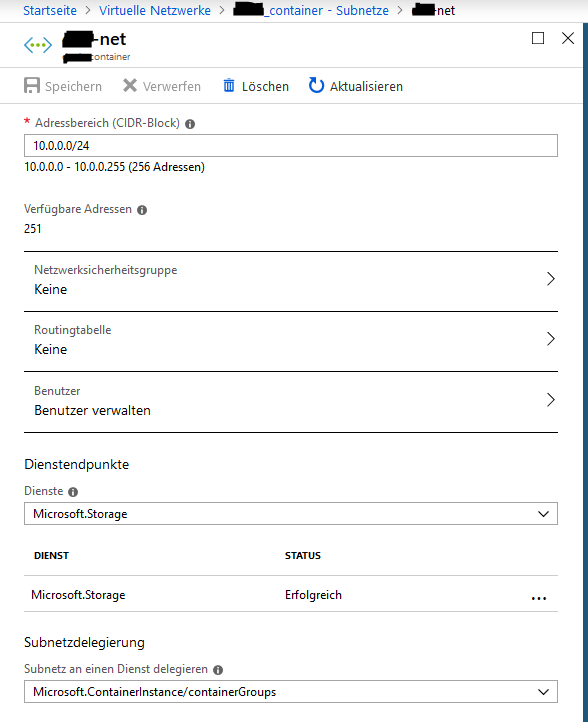
I'm getting the same problem, that the script can't create the a directory in the mounted pathI've tried it with adding the servicepoint to the same subnet.
But i'm getting the same problem with the cli command.
The container can't create a directory in the mounted azure-file-share.
@jakaruna-MSFT The scripts are not written by me, but I stay in contact to a development-team, who created the scripts.
I'm wondering, why i'm expiriencing this problem only in the vnet.
The script, which is trying to create a directory in the mounted azure-file-share at container start, is running fine when the container isn't deployed in a vnet.
When I mount the file-share in another path when deployed container in a net, i can manually create directory or files there.
Can it be, that the azure-file-share, when container is deployed in a vnet, is mounted slower or in a different point of time at container-creation?
So, that the script at container-start can't access the mount-path, because it is mounted later?
Is there a possibility to prove that?
Thanks in advance.
clangnerakq
on 26 Oct 2018
@clangnerakq @jakaruna-MSFT - I will ask the engineering team to investigate. Thanks all for the info.
dlepow
on 26 Oct 2018
I have used following command to try to repro the issue:
(setup storage account, file share...)

ACI_MOUNT_PATH=/tmp/path/not/exist

az container create \
-g $ACI_PERS_RESOURCE_GROUP \
--name container1 \
--image alpine \
--cpu 2 --memory 4.0 \
--location westeurope \
--command-line "/bin/sh -c 'while true; do date; ls -l $ACI_MOUNT_PATH; touch $ACI_MOUNT_PATH/testfile1; mkdir $ACI_MOUNT_PATH/testdir1; ls -l $ACI_MOUNT_PATH; df | grep .file. -A 1; sleep 10; done;'" \
--azure-file-volume-account-name $ACI_PERS_STORAGE_ACCOUNT_NAME \
--azure-file-volume-account-key $STORAGE_KEY \
--azure-file-volume-share-name $ACI_PERS_SHARE_NAME \
--azure-file-volume-mount-path $ACI_MOUNT_PATH \
--vnet-name $TEST_VNET \
--vnet-address-prefix 10.0.0.0/16 \
--subnet $TEST_SUBNET \
--subnet-address-prefix 10.0.0.0/24 \
--debug

az container logs -g $ACI_PERS_RESOURCE_GROUP --name container1
The command
--command-line "/bin/sh -c 'while true; do date; ls -l $ACI_MOUNT_PATH; touch $ACI_MOUNT_PATH/testfile1; mkdir $ACI_MOUNT_PATH/testdir1; ls -l $ACI_MOUNT_PATH; df | grep .file. -A 1; sleep 10; done;'" \
will list the path, create a test file and directory, right after the container started.
This is output logs at my end:
Fri Oct 26 20:55:29 UTC 2018
total 0
total 0
drwx------    2 root     root             0 Oct 26 20:55 testdir1
-rwx------    1 root     root             0 Oct 26 20:55 testfile1
//<scrubbed>.file.core.windows.net/<scrubbed>
                     5368709120         0 5368709120   0% /tmp/path/not/exist
Fri Oct 26 20:55:39 UTC 2018
total 0
drwx------    2 root     root             0 Oct 26 20:55 testdir1
-rwx------    1 root     root             0 Oct 26 20:55 testfile1
mkdir: can't create directory '/tmp/path/not/exist/testdir1': File exists
total 0
drwx------    2 root     root             0 Oct 26 20:55 testdir1
-rwx------    1 root     root             0 Oct 26 20:55 testfile1
//<scrubbed>.file.core.windows.net/<scrubbed>
                     5368709120         0 5368709120   0% /tmp/path/not/exist
It looks like the mount path is accessible after the container starts.
@clangnerakq , would you please share us the output of your test? maybe with "alpine" image and your iamge?
 wenwu449
on 26 Oct 2018
wenwu449
on 26 Oct 2018
@wenwu449 Thank you for your fast answer.
I've tested your command with my image and the alpine image, you are using.
The following lines are my result:
Alpine Image
The CLI command is:
(storage setup)
az container create \
-g my_ressource_group \
--name container1 \
--image alpine \
--cpu 2 --memory 4.0 \
--location westeurope \
--command-line "/bin/sh -c 'while true; do date; ls -l $ACI_MOUNT_PATH; touch $ACI_MOUNT_PATH/testfile1; mkdir $ACI_MOUNT_PATH/testdir1; ls -l $ACI_MOUNT_PATH; df | grep .file. -A 1; sleep 10; done;'" \
--azure-file-volume-account-name $ACI_PERS_STORAGE_ACCOUNT_NAME \
--azure-file-volume-account-key $STORAGE_KEY \
--azure-file-volume-share-name $ACI_PERS_SHARE_NAME \
--azure-file-volume-mount-path /mnt \
--vnet my_vnet \
--subnet my_subnet \
--debug
az container logs -g $ACI_PERS_RESOURCE_GROUP --name container1
The log is:
@Azure:~$ az container logs -g $ACI_PERS_RESOURCE_GROUP --name container1
Mon Oct 29 07:49:13 UTC 2018
total 48
drwxr-xr-x    2 root     root          4096 Sep 11 20:23 bin
drwxr-xr-x    5 root     root           360 Oct 29 07:49 dev
drwxr-xr-x    1 root     root          4096 Oct 29 07:49 etc
drwxr-xr-x    2 root     root          4096 Sep 11 20:23 home
drwxr-xr-x    5 root     root          4096 Sep 11 20:23 lib
drwxr-xr-x    5 root     root          4096 Sep 11 20:23 media
drwx------    2 root     root             0 Oct 26 07:38 mnt
dr-xr-xr-x  162 root     root             0 Oct 29 07:49 proc
drwx------    2 root     root          4096 Sep 11 20:23 root
drwxr-xr-x    2 root     root          4096 Sep 11 20:23 run
drwxr-xr-x    2 root     root          4096 Sep 11 20:23 sbin
drwxr-xr-x    2 root     root          4096 Sep 11 20:23 srv
dr-xr-xr-x   12 root     root             0 Oct 29 07:49 sys
drwxrwxrwt    2 root     root          4096 Sep 11 20:23 tmp
drwxr-xr-x    7 root     root          4096 Sep 11 20:23 usr
drwxr-xr-x    1 root     root          4096 Oct 29 07:49 var
total 52
drwxr-xr-x    2 root     root          4096 Sep 11 20:23 bin
drwxr-xr-x    5 root     root           360 Oct 29 07:49 dev
drwxr-xr-x    1 root     root          4096 Oct 29 07:49 etc
drwxr-xr-x    2 root     root          4096 Sep 11 20:23 home
drwxr-xr-x    5 root     root          4096 Sep 11 20:23 lib
drwxr-xr-x    5 root     root          4096 Sep 11 20:23 media
drwx------    2 root     root             0 Oct 26 07:38 mnt
dr-xr-xr-x  161 root     root             0 Oct 29 07:49 proc
drwx------    2 root     root          4096 Sep 11 20:23 root
drwxr-xr-x    2 root     root          4096 Sep 11 20:23 run
drwxr-xr-x    2 root     root          4096 Sep 11 20:23 sbin
drwxr-xr-x    2 root     root          4096 Sep 11 20:23 srv
dr-xr-xr-x   12 root     root             0 Oct 29 07:49 sys
drwxr-xr-x    2 root     root          4096 Oct 29 07:49 testdir1
-rw-r--r--    1 root     root             0 Oct 29 07:49 testfile1
drwxrwxrwt    2 root     root          4096 Sep 11 20:23 tmp
drwxr-xr-x    7 root     root          4096 Sep 11 20:23 usr
drwxr-xr-x    1 root     root          4096 Oct 29 07:49 var
//test001.file.core.windows.net/my_share
                     5368709120        64 5368709056   0% /mnt
Mon Oct 29 07:49:23 UTC 2018
total 52
drwxr-xr-x    2 root     root          4096 Sep 11 20:23 bin
drwxr-xr-x    5 root     root           360 Oct 29 07:49 dev
drwxr-xr-x    1 root     root          4096 Oct 29 07:49 etc
drwxr-xr-x    2 root     root          4096 Sep 11 20:23 home
drwxr-xr-x    5 root     root          4096 Sep 11 20:23 lib
drwxr-xr-x    5 root     root          4096 Sep 11 20:23 media
drwx------    2 root     root             0 Oct 26 07:38 mnt
dr-xr-xr-x  154 root     root             0 Oct 29 07:49 proc
drwx------    2 root     root          4096 Sep 11 20:23 root
drwxr-xr-x    2 root     root          4096 Sep 11 20:23 run
drwxr-xr-x    2 root     root          4096 Sep 11 20:23 sbin
drwxr-xr-x    2 root     root          4096 Sep 11 20:23 srv
dr-xr-xr-x   12 root     root             0 Oct 29 07:49 sys
drwxr-xr-x    2 root     root          4096 Oct 29 07:49 testdir1
-rw-r--r--    1 root     root             0 Oct 29 07:49 testfile1
drwxrwxrwt    2 root     root          4096 Sep 11 20:23 tmp
drwxr-xr-x    7 root     root          4096 Sep 11 20:23 usr
drwxr-xr-x    1 root     root          4096 Oct 29 07:49 var
mkdir: can't create directory '/testdir1': File exists
total 52
drwxr-xr-x    2 root     root          4096 Sep 11 20:23 bin
drwxr-xr-x    5 root     root           360 Oct 29 07:49 dev
drwxr-xr-x    1 root     root          4096 Oct 29 07:49 etc
drwxr-xr-x    2 root     root          4096 Sep 11 20:23 home
drwxr-xr-x    5 root     root          4096 Sep 11 20:23 lib
drwxr-xr-x    5 root     root          4096 Sep 11 20:23 media
drwx------    2 root     root             0 Oct 26 07:38 mnt
dr-xr-xr-x  154 root     root             0 Oct 29 07:49 proc
drwx------    2 root     root          4096 Sep 11 20:23 root
drwxr-xr-x    2 root     root          4096 Sep 11 20:23 run
drwxr-xr-x    2 root     root          4096 Sep 11 20:23 sbin
drwxr-xr-x    2 root     root          4096 Sep 11 20:23 srv
dr-xr-xr-x   12 root     root             0 Oct 29 07:49 sys
drwxr-xr-x    2 root     root          4096 Oct 29 07:49 testdir1
-rw-r--r--    1 root     root             0 Oct 29 07:49 testfile1
drwxrwxrwt    2 root     root          4096 Sep 11 20:23 tmp
drwxr-xr-x    7 root     root          4096 Sep 11 20:23 usr
drwxr-xr-x    1 root     root          4096 Oct 29 07:49 var
//test001.file.core.windows.net/my_share
                     5368709120        64 5368709056   0% /mnt
My Image
The cli command is:
(Storage setup)
az container create \
-g my_ressource_group \
--name test \
--image test.azurecr.io/test \
--cpu 2 --memory 4.0 \
--command-line "/bin/sh -c 'while true; do date; ls -l $ACI_MOUNT_PATH; touch $ACI_MOUNT_PATH/testfile1; mkdir $ACI_MOUNT_PATH/testdir1; ls -l $ACI_MOUNT_PATH; df | grep .file. -A 1; sleep 10; done;'" \
--registry-login-server test.azurecr.io \
--registry-username test \
--registry-password test \
--location westeurope \
--azure-file-volume-account-name $ACI_PERS_STORAGE_ACCOUNT_NAME \
--azure-file-volume-account-key $STORAGE_KEY \
--azure-file-volume-share-name $ACI_PERS_SHARE_NAME \
--azure-file-volume-mount-path /home/test/shared \
--vnet my_vnet \
--subnet my_subnet\
--debug

az container logs -g $ACI_PERS_RESOURCE_GROUP --name test
The log is:
@Azure:~$ az container logs -g $ACI_PERS_RESOURCE_GROUP --name test
Mon Oct 29 07:33:21 UTC 2018
total 64
drwxr-xr-x   1 root root 4096 Jul  6 07:24 bin
drwxr-xr-x   2 root root 4096 Apr 12  2016 boot
drwxr-xr-x   5 root root  360 Oct 29 07:33 dev
drwxr-xr-x   1 root root 4096 Oct 29 07:33 etc
drwxr-xr-x   1 root root 4096 Jul  6 07:26 home
drwxr-xr-x   1 root root 4096 Jul  6 07:24 lib
drwxr-xr-x   1 root root 4096 Jul  6 07:24 lib64
drwxr-xr-x   2 root root 4096 Aug  2  2017 media
drwxr-xr-x   2 root root 4096 Aug  2  2017 mnt
drwxr-xr-x   2 root root 4096 Aug  2  2017 opt
dr-xr-xr-x 158 root root    0 Oct 29 07:33 proc
drwx------   2 root root 4096 Aug  2  2017 root
drwxr-xr-x   1 root root 4096 Jul  6 07:24 run
drwxr-xr-x   1 root root 4096 Jul  6 07:24 sbin
drwxr-xr-x   2 root root 4096 Aug  2  2017 srv
dr-xr-xr-x  12 root root    0 Oct 29 07:26 sys
drwxrwxrwt   1 root root 4096 Jul  6 07:24 tmp
drwxr-xr-x   1 root root 4096 Jul  6 07:25 usr
drwxr-xr-x   1 root root 4096 Oct 29 07:33 var
total 68
drwxr-xr-x   1 root root 4096 Jul  6 07:24 bin
drwxr-xr-x   2 root root 4096 Apr 12  2016 boot
drwxr-xr-x   5 root root  360 Oct 29 07:33 dev
drwxr-xr-x   1 root root 4096 Oct 29 07:33 etc
drwxr-xr-x   1 root root 4096 Jul  6 07:26 home
drwxr-xr-x   1 root root 4096 Jul  6 07:24 lib
drwxr-xr-x   1 root root 4096 Jul  6 07:24 lib64
drwxr-xr-x   2 root root 4096 Aug  2  2017 media
drwxr-xr-x   2 root root 4096 Aug  2  2017 mnt
drwxr-xr-x   2 root root 4096 Aug  2  2017 opt
dr-xr-xr-x 159 root root    0 Oct 29 07:33 proc
drwx------   2 root root 4096 Aug  2  2017 root
drwxr-xr-x   1 root root 4096 Jul  6 07:24 run
drwxr-xr-x   1 root root 4096 Jul  6 07:24 sbin
drwxr-xr-x   2 root root 4096 Aug  2  2017 srv
dr-xr-xr-x  12 root root    0 Oct 29 07:33 sys
drwxr-xr-x   2 root root 4096 Oct 29 07:33 testdir1
-rw-r--r--   1 root root    0 Oct 29 07:33 testfile1
drwxrwxrwt   1 root root 4096 Jul  6 07:24 tmp
drwxr-xr-x   1 root root 4096 Jul  6 07:25 usr
drwxr-xr-x   1 root root 4096 Oct 29 07:33 var
//test001.file.core.windows.net/test 5368709120       0 5368709120   0% /home/test/shared
tmpfs                                                 3568576       0    3568576   0% /sys/firmware
Mon Oct 29 07:33:31 UTC 2018
total 68
drwxr-xr-x   1 root root 4096 Jul  6 07:24 bin
drwxr-xr-x   2 root root 4096 Apr 12  2016 boot
drwxr-xr-x   5 root root  360 Oct 29 07:33 dev
drwxr-xr-x   1 root root 4096 Oct 29 07:33 etc
drwxr-xr-x   1 root root 4096 Jul  6 07:26 home
drwxr-xr-x   1 root root 4096 Jul  6 07:24 lib
drwxr-xr-x   1 root root 4096 Jul  6 07:24 lib64
drwxr-xr-x   2 root root 4096 Aug  2  2017 media
drwxr-xr-x   2 root root 4096 Aug  2  2017 mnt
drwxr-xr-x   2 root root 4096 Aug  2  2017 opt
dr-xr-xr-x 151 root root    0 Oct 29 07:33 proc
drwx------   2 root root 4096 Aug  2  2017 root
drwxr-xr-x   1 root root 4096 Jul  6 07:24 run
drwxr-xr-x   1 root root 4096 Jul  6 07:24 sbin
drwxr-xr-x   2 root root 4096 Aug  2  2017 srv
dr-xr-xr-x  12 root root    0 Oct 29 07:33 sys
drwxr-xr-x   2 root root 4096 Oct 29 07:33 testdir1
-rw-r--r--   1 root root    0 Oct 29 07:33 testfile1
drwxrwxrwt   1 root root 4096 Jul  6 07:24 tmp
drwxr-xr-x   1 root root 4096 Jul  6 07:25 usr
drwxr-xr-x   1 root root 4096 Oct 29 07:33 var
mkdir: cannot create directory '/testdir1': File exists
total 68
drwxr-xr-x   1 root root 4096 Jul  6 07:24 bin
drwxr-xr-x   2 root root 4096 Apr 12  2016 boot
drwxr-xr-x   5 root root  360 Oct 29 07:33 dev
drwxr-xr-x   1 root root 4096 Oct 29 07:33 etc
drwxr-xr-x   1 root root 4096 Jul  6 07:26 home
drwxr-xr-x   1 root root 4096 Jul  6 07:24 lib
drwxr-xr-x   1 root root 4096 Jul  6 07:24 lib64
drwxr-xr-x   2 root root 4096 Aug  2  2017 media
drwxr-xr-x   2 root root 4096 Aug  2  2017 mnt
drwxr-xr-x   2 root root 4096 Aug  2  2017 opt
dr-xr-xr-x 151 root root    0 Oct 29 07:33 proc
drwx------   2 root root 4096 Aug  2  2017 root
drwxr-xr-x   1 root root 4096 Jul  6 07:24 run
drwxr-xr-x   1 root root 4096 Jul  6 07:24 sbin
drwxr-xr-x   2 root root 4096 Aug  2  2017 srv
dr-xr-xr-x  12 root root    0 Oct 29 07:33 sys
drwxr-xr-x   2 root root 4096 Oct 29 07:33 testdir1
-rw-r--r--   1 root root    0 Oct 29 07:33 testfile1
drwxrwxrwt   1 root root 4096 Jul  6 07:24 tmp
drwxr-xr-x   1 root root 4096 Jul  6 07:25 usr
drwxr-xr-x   1 root root 4096 Oct 29 07:33 var
//test001.file.core.windows.net/test 5368709120       0 5368709120   0% /home/test/shared
tmpfs                                                 3568576       0    3568576   0% /sys/firmware
It looks like, the testfile and test directory could be created successfully and without a problem.
Now im wondering, what is different to the script i'm using.
I've done some research and found out, that the script is executed in the entrypoint.sh.
It looks like this:
!/bin/bash
set -x

# Prozess
process=$1

# Precopy
sudo -u test ${Test_Pre_copy_SCRIPT} -f ${test_CONF}
RC=$?
if [ $RC -ne 0 ]; then
  echo "Error [$RC] executing test-script"
  exit 1
fi

# PID 1
#exec gosu root ${test_PROCESS}
exec gosu test ${test}
After that, i tried to execute the test-copy-script in the running container:
./testPreCopy.sh -f "./testPreCopy.conf"
#########################################################################
# copy files on container-start
#########################################################################
# PreCopyObjectFile.......: ./testPreCopy.conf
#------------------------------------------------------------------------
# Objects.................: 3
# date/Time...............: Mon Oct 29 07:39:28 UTC 2018
#########################################################################
create path [/home/test/shared/test2]
moved objects to path [/home/test/shared/test2]
#########################################################################
# evertything looks like OK
#########################################################################
The script is ok and running, the directories could be created.
So, I could think, that there is a diffrence in running the entrypoint for the container with and without a vnet.
Could this be possible? Do you know how a container-entrypoint is executed in Azure?
Thanks in advance.
clangnerakq
on 29 Oct 2018
@clangnerakq, the entry point script is trying to run as user "test" to create the directory and do the copy.
Currently ACI is fixing a bug related to this: files and directories in an Azure file is read-only for non-root user for container group with VNET. The fix is to allow all users to write files and directories in Azure file, it should be rolled out in next 2-3 weeks.
wenwu449
on 30 Oct 2018
@wenwu449 Thank you for your answer and your report about the current bug.
@jakaruna-MSFT Your thought about permission issue was right then.
I will wait, until the bug is rolled out, to test it again and inform you.
Do you know, if there will be an information from Microsoft when the fix is rolled out?
Thanks in advance.
clangnerakq
on 30 Oct 2018
Hello,
i want to ask you, if you know if the bug in azure is fixed for ACI?
I've tested it today and I'm getting the following error code, when i want to deploy a container in a vnet with an azure-file-volume:
Deployment failed. Correlation ID: 3487ec09-7f5a-4d3a-b60b-a9cbca87f94d. Operation failed with status: 200. Details: Resource state Failed
I was using the following cli commands:
ACI_PERS_RESOURCE_GROUP=test
ACI_PERS_STORAGE_ACCOUNT_NAME=test001
ACI_PERS_LOCATION=westeurope
ACI_PERS_SHARE_NAME=shared
export AZURE_STORAGE_CONNECTION_STRING=`az storage account show-connection-string --resource-group $ACI_PERS_RESOURCE_GROUP --name $ACI_PERS_STORAGE_ACCOUNT_NAME --output tsv`
az storage share create -n $ACI_PERS_SHARE_NAME
STORAGE_ACCOUNT=$(az storage account list --resource-group $ACI_PERS_RESOURCE_GROUP --query "[?contains(name,'$ACI_PERS_STORAGE_ACCOUNT_NAME')].[name]" --output tsv)
echo $STORAGE_ACCOUNT
STORAGE_KEY=$(az storage account keys list --resource-group $ACI_PERS_RESOURCE_GROUP --account-name $STORAGE_ACCOUNT --query "[0].value" --output tsv)
echo $STORAGE_KEY


az container create \
-g test \
--name testvnet \
--image test.azurecr.io/test \
--cpu 2 --memory 4.0 \
--registry-login-server test.azurecr.io \
--registry-username test \
--registry-password XXXXX \
--location westeurope \
--vnet container \
--subnet net \
--azure-file-volume-account-name $ACI_PERS_STORAGE_ACCOUNT_NAME \
--azure-file-volume-account-key $STORAGE_KEY \
--azure-file-volume-share-name $ACI_PERS_SHARE_NAME \
--azure-file-volume-mount-path /home/dtest/shared \
--verbose
Do you know, why I am getting this problem right know and when the bug is fixed?
Thanks in advance.
clangnerakq
on 22 Nov 2018
Hello,
I can report, that the problem is now fixed.
Today, I've tried to create a container in a vnet with a mounted azure file volume that is used in the entry point of the container.
After creation, the container is working as expected and the deployment is about two times faster than before.
Thank you for your fast and excellent help.
Greetings, Clemens Langner
clangnerakq
on 25 Nov 2018
Thank you @clangnerakq for letting us know the issue is resolved. The fix for the bug was deployed in all Azure regions early this week.
Thank you again for helping to verify.
wenwu449
on 30 Nov 2018
Closing this issue. Thanks all for resolving.
please-close
dlepow
on 30 Nov 2018
Related issues
 spottedmahn
·
3Comments
spottedmahn
·
3Comments
 JamesDLD
·
3Comments
JamesDLD
·
3Comments
 bityob
·
3Comments
bityob
·
3Comments
 mrdfuse
·
3Comments
mrdfuse
·
3Comments
 jamesgallagher-ie
·
3Comments
jamesgallagher-ie
·
3Comments