I might be missing something, so hopefully this isn't a really dumb question....
C# is not one of the runtime stack options for a new functionapp. I am referring to Step 1 under "Create function to clean HTML." So you choose .net runtime. With that setting chosen in the app, I can't see how to create the C# function in the app as mentioned in Step 3: "open the Scenario list, and select Core. In the HTTP Trigger template, select C#"
Please let me know if I missed something or if there's another way to make a C++ functionapp.
Document Details
⚠ Do not edit this section. It is required for docs.microsoft.com ➟ GitHub issue linking.
- ID: 771c44cc-a284-0c97-dae3-218e7319018f
- Version Independent ID: e4b73a57-0c44-2453-2baa-7652bbbafc51
- Content: Build workflows that process emails and attachments - Azure Logic Apps
- Content Source: articles/logic-apps/tutorial-process-email-attachments-workflow.md
- Service: logic-apps
- GitHub Login: @ecfan
- Microsoft Alias: estfan
 siobhter
All 11 comments
Never mind, I'm a moron and I was clicking on the wrong option in the new function process.
siobhter
on 17 Oct 2018
@siobhter Glad to hear you were able to locate the right option. Please reach out if any questions in the future.
 mike-urnun-msft
on 17 Oct 2018
mike-urnun-msft
on 17 Oct 2018
@mike-urnun-msft it appears I'm still having one problem (and it's more likely ID10T than anything):
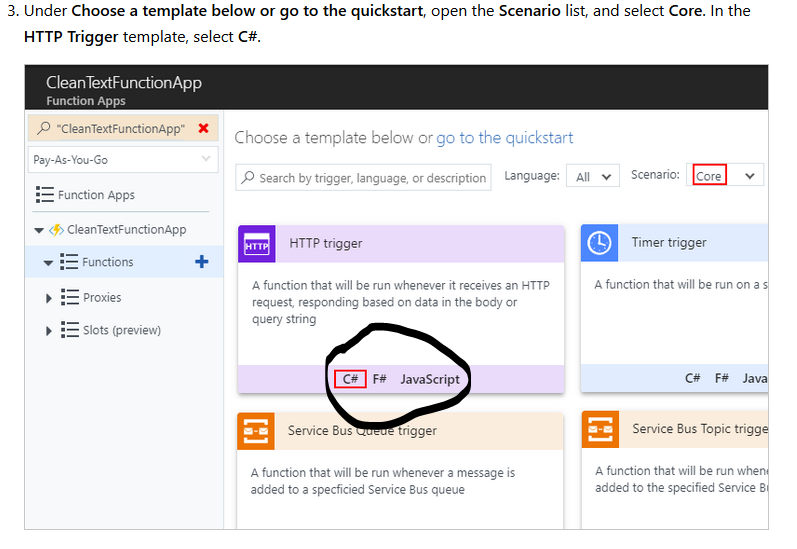
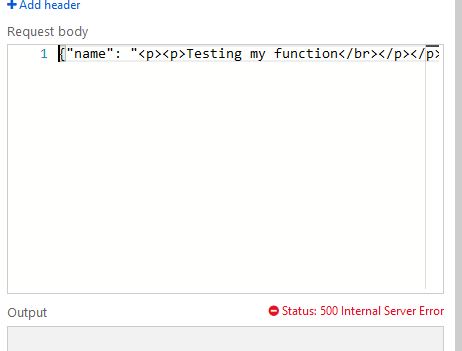
I don't see the C# option when setting up the HTTP trigger. If I create the trigger and paste the code from the guide, tests don't pass (500 error)
siobhter
on 17 Oct 2018
@siobhter Even though the visuals aren't as accurate yet, were you able to create the HTTP trigger function, which should be in c# language by default now, and still continue on with the rest of the steps? If you have any further questions and need assistance, please open an MSDN thread and we'd be happy to weigh in.
There were some changes in recent times for Azure Functions and some details on this documentation need to be updated to reflect those changes for sample code as well as the visuals (screenshots). @ecfan can we create an internal work item for this one?
mike-urnun-msft
on 24 Oct 2018
@mike-urnun-msft Ah, I see. I can try to play with it and see where my error comes from. I'm not much of a coder so the C# stuff is a little hard for me. I'll post in the MSDN forum and see what happens.
siobhter
on 24 Oct 2018
I get the same Status: 500 Internal Server Error
2018-10-24T11:19:07.510 [Error] run.csx(17,15): error CS1501: No overload for method 'CreateResponse' takes 2 arguments
 paulowendevelopment
on 24 Oct 2018
paulowendevelopment
on 24 Oct 2018
@siobhter and @mike-urnun-msft Thanks for reporting! I've created a work item for updating the content.
please-close
 ecfan
on 25 Oct 2018
ecfan
on 25 Oct 2018
Thanks for the tutorial and the updated code supplied in the forum. Just wondered if there is a way to get the actual URL of the attachment in the email sent back? I can see there is a URL in my storage account when I select the attachment.
paulowendevelopment
on 25 Oct 2018
i am also getting below error
[Error] run.csx(17,15): error CS1501: No overload for method 'CreateResponse' takes 2 arguments
please help me how to fix this issue....
 Nareshkadali
on 25 Oct 2018
Nareshkadali
on 25 Oct 2018
See here https://social.msdn.microsoft.com/Forums/en-US/491ddd45-71c6-4472-a272-2a46c20755e5/logic-app-500-error-error-runcsx1715-error-cs1501-no-overload-for-method-createresponse?forum=azurelogicapps#491ddd45-71c6-4472-a272-2a46c20755e5
paulowendevelopment
on 25 Oct 2018
Thanks alot @paulowendevelopment
now it's working for me
Nareshkadali
on 26 Oct 2018
Related issues
 JeffLoo-ong
·
3Comments
JeffLoo-ong
·
3Comments
 bdcoder2
·
3Comments
bdcoder2
·
3Comments
 Ponant
·
3Comments
Ponant
·
3Comments
 behnam89
·
3Comments
behnam89
·
3Comments
 jharbieh
·
3Comments
jharbieh
·
3Comments
Most helpful comment
See here https://social.msdn.microsoft.com/Forums/en-US/491ddd45-71c6-4472-a272-2a46c20755e5/logic-app-500-error-error-runcsx1715-error-cs1501-no-overload-for-method-createresponse?forum=azurelogicapps#491ddd45-71c6-4472-a272-2a46c20755e5