Azure-docs: Azure portal: Missing templates for SignalR Service bindings
Document didn't describe how to install manually an extension for SignalR Service bindings, when the binding (for example output) is declared manually, the following error is displaying:
Error: The binding type(s) 'signalR' are not registered. Please ensure the type is correct and the binding extension is installed.
The question is: How can be installed this extension?
Note, that adding a nuget package to the extensions.csproj like is shown in the following snippet didn't help:
`<Project Sdk="Microsoft.NET.Sdk">
    <PropertyGroup>
      <TargetFramework>netstandard2.0</TargetFramework>
      <WarningsAsErrors />
    </PropertyGroup>
    <ItemGroup>
      <PackageReference Include="Microsoft.Azure.WebJobs.Extensions.EventGrid" Version="2.0.0" />
      <PackageReference Include="Microsoft.Azure.WebJobs.Extensions.SignalRService" Version="1.0.0-preview1-10002" />
      <PackageReference Include="Microsoft.Azure.WebJobs.Script.ExtensionsMetadataGenerator" Version="1.0.1" />
    </ItemGroup>
  </Project>`
Thanks
Roman
Document Details
⚠ Do not edit this section. It is required for docs.microsoft.com ➟ GitHub issue linking.
- ID: 2ca50463-807e-fd04-de4d-25be2199ae70
- Version Independent ID: 7a8f74f9-81b5-735e-fe85-4a5f1482456a
- Content: Azure Functions SignalR Service bindings
- Content Source: articles/azure-functions/functions-bindings-signalr-service.md
- Service: functions
- GitHub Login: @anthonychu
- Microsoft Alias: antchu
 romankiss
All 11 comments
@romankiss Are you trying this in the portal or locally in VSCode?
 anthonychu
on 27 Sep 2018
anthonychu
on 27 Sep 2018
It is a portal with a fresh new FunctionApp for version 2. I have successful created an EventGridTrigger function, then the HttpTrigger function with a SignalR output binding.
The function with a SignalR Service binding failed.
But, a few minutes ago, I have installed a storage extension (not a trigger function) and it looks like the problem with the extension SignalR has been resolved. It's working fine. I think, the additional extension (such as storage) triggered an installation process based on the extensions.csproj.
It looks like, the changes (editing) in the extensions.csproj didn't trigger any action.
Thanks
Roman
romankiss
on 27 Sep 2018
Yes. There's not a good method of installing extensions that do not appear in the portal. But you should be able to use the console in the Azure Functions portal to manually run func extensions install -p Microsoft.Azure.WebJobs.Extensions.SignalRService -v 1.0.0-preview1-10002 to install it.
Sounds like what happened in your case was that you added the entry to extensions.json, but func extensions install still needed to be run to install the extension. When you added the storage extension, that was run automatically.
anthonychu
on 27 Sep 2018
That's correct. It will be nice to have this workaround in the document.
Btw. Thanks for the SignalR Service extension bindings, it's very useful.
romankiss
on 27 Sep 2018
@ggailey777 What's the best way to add this to docs? We should probably do it centrally across all bindings.
anthonychu
on 27 Sep 2018
We are working on official documentation for installing binding extensions in the portal manually. In the meantime, you can find the instructions here
 ggailey777
on 27 Sep 2018
ggailey777
on 27 Sep 2018
@anthonychu The current version of the SignalR Service extension bindings is configured with 5001 port. Based on the azure team notification email, the action is required for updating 5001/5002 ports to the standard https port 443.
My question is: Is there a plan (and when we can expect it) for new version of the Microsoft.Azure.WebJobs.Extensions.SignalRService assembly?
Thanks
Roman
romankiss
on 3 Oct 2018
@romankiss Yes. Tracking the issue here: https://github.com/Azure/azure-functions-signalrservice-extension/issues/28
anthonychu
on 3 Oct 2018
Thanks Anthony
romankiss
on 4 Oct 2018
@romankiss the SignalR binding article does link to the instructions for manually installing the binding in the portal, but maybe it got missed:
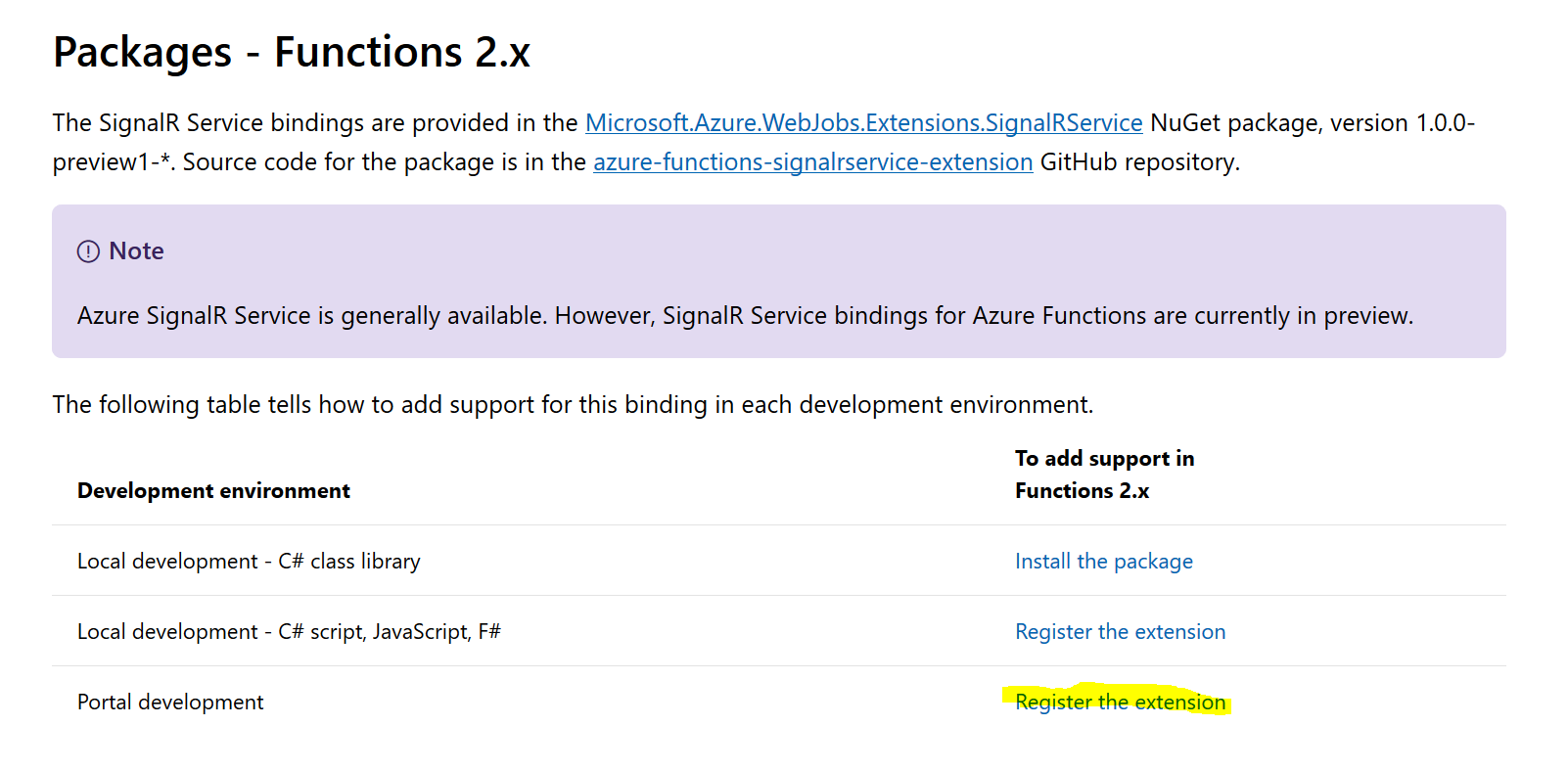
There is a step to build the extension project, which installs the NuGet packages in the function app.
ggailey777
on 2 Nov 2018
If we are tracking the issue with adding support for the SignalR binding in the portal elsewhere, we should probably #please-close issue.
ggailey777
on 2 Nov 2018
Related issues
 JeffLoo-ong
·
3Comments
JeffLoo-ong
·
3Comments
 varma31
·
3Comments
varma31
·
3Comments
 AronT-TLV
·
3Comments
AronT-TLV
·
3Comments
 spottedmahn
·
3Comments
spottedmahn
·
3Comments
 bdcoder2
·
3Comments
bdcoder2
·
3Comments
Most helpful comment
That's correct. It will be nice to have this workaround in the document.
Btw. Thanks for the SignalR Service extension bindings, it's very useful.