Azure-docs: Broken folder structure
I have a custom activity that had some dependencies in a folder. I had no issues transferring it to blob storage but when the custom activity was copied to Azure Batch, the folder structure was flattened. This behaviour is not documented. Is it expected?
Document details
⚠ Do not edit this section. It is required for docs.microsoft.com ➟ GitHub issue linking.
- ID: a73a1ff2-94e8-a570-ff7b-7a57acca06e6
- Version Independent ID: 9ec244a7-d939-3918-fc87-34ab1eec5293
- Content: Use custom activities in an Azure Data Factory pipeline
- Content Source: articles/data-factory/transform-data-using-dotnet-custom-activity.md
- Service: data-factory
- GitHub Login: @douglaslMS
- Microsoft Alias: douglasl
 know-where
All 13 comments
@Anded Thanks for the feedback! We are currently investigating and will update you shortly.
 Alberto-Vega
on 25 Sep 2018
Alberto-Vega
on 25 Sep 2018
@Anded Can you please provide more detail on your specific scenario?
Alberto-Vega
on 26 Sep 2018
I have a custom activity to decrypt PGP encrypted files. I am using GnuPG binaries to do it, so they have to be included with the activity. So, when built, I have activity executables and a folder with GnuPG binaries. Like so:
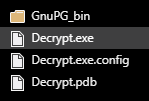
The problem is that it is structured exactly the same way on blob storage but the folder structure gets flatenned when Azure Batch copies the activity's files. My activity is expecting GnuPG binaries in GnuPG_bin folder and fails to find them when run on Azure Batch. I have figured this out by listing the activity's run directory on Azure Batch. It just ends up looking this this:
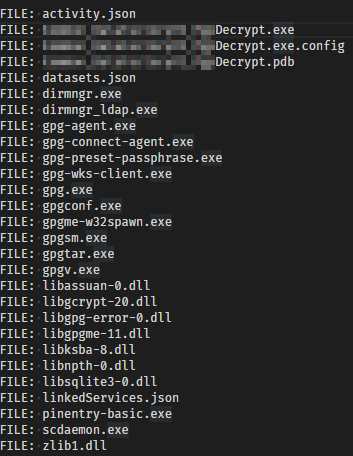
It looks like this is either an undocumented behaviour or a bug.
know-where
on 26 Sep 2018
@Anded I have assigned the issue to the content author to evaluate and update as appropriate. Thanks again!
Alberto-Vega
on 26 Sep 2018
Forwarded question to PM
in-progress
 douglaslMS
on 28 Sep 2018
douglaslMS
on 28 Sep 2018
@Anded Yes this is the behavior by design. It is on our backlog to improve this in order to maintain the same structure.
For now, suggestion is to zip the folder, so custom activity copies it as is, and then unzip it in custom code in the path you want.
 nabhishek
on 28 Sep 2018
nabhishek
on 28 Sep 2018
please-close
douglaslMS
on 28 Sep 2018
While the behaviour is by design, it is still undocumented in the article...
know-where
on 1 Oct 2018
@Anded We're talking about the contents of the _folderPath_ property of the Custom Activity, correct? Mentioned under here Custom activity?
douglaslMS
on 1 Oct 2018
That is correct.
know-where
on 1 Oct 2018
@Anded I have added the explanation and suggested workaround to the article under the _folderPath_ property. I'll let you know late tomorrow (Tuesday) when the updated page is published, for you to take a look at for me. Thanks.
douglaslMS
on 2 Oct 2018
@Anded Please check the expanded description of folderpath. I believe that this resolves the issue.
douglaslMS
on 4 Oct 2018
please-close
douglaslMS
on 4 Oct 2018
Related issues
 behnam89
·
3Comments
behnam89
·
3Comments
 varma31
·
3Comments
varma31
·
3Comments
 paulmarshall
·
3Comments
paulmarshall
·
3Comments
 jharbieh
·
3Comments
jharbieh
·
3Comments
 mrdfuse
·
3Comments
mrdfuse
·
3Comments