Azure-docs: Showing Info or Not Secure instead of secured.
I successfully configured SSL using the steps here https://docs.microsoft.com/en-us/azure/app-service/web-sites-purchase-ssl-web-site
But I see the Info icon in the url box instead on Green Colored Lock icon with Secure Text.
I also enabled 'HTTPS only' option to On in SSL settings section.
What can I do to see Green Colored Lock with Secure instead of info icon in grey
When I checked the following link,
(https://support.google.com/chrome/answer/95617?visit_id=636721821097228776-3666236594&p=ui_security_indicator&rd=1)
it says that my site is having info or Not Secure status.
Please let me know how to turn the site into full secure mode.
Document Details
⚠ Do not edit this section. It is required for docs.microsoft.com ➟ GitHub issue linking.
- ID: fa7e21c2-d024-dda5-a468-b140422b9fae
- Version Independent ID: 5475c8e6-1186-8ed1-2ad6-6eaa2cac871f
- Content: Buy and Configure an SSL Certificate for your Azure App Service
- Content Source: articles/app-service/web-sites-purchase-ssl-web-site.md
- Service: app-service
- GitHub Login: @cephalin
- Microsoft Alias: apurvajo;cephalin
 windson
All 11 comments
@windson Thanks for the feedback! We are currently investigating and will update you shortly.
 BryanTrach-MSFT
on 10 Sep 2018
BryanTrach-MSFT
on 10 Sep 2018
@windson Assuming that you have properly added a binding for the site and not just uploaded your cert to your site, it's likely that you may need to take action in your code in order to use the secure protocols.
To ensure that your site is properly configured, can you please follow these steps to create a dummy site? This will allow you to avoid sharing private information in a public forum.
BryanTrach-MSFT
on 10 Sep 2018
@windson Since we have not heard back from you we will now proceed to close this thread. If there are further questions regarding this matter, please tag me in your reply. We will gladly reopen the issue and continue the discussion.
BryanTrach-MSFT
on 17 Sep 2018
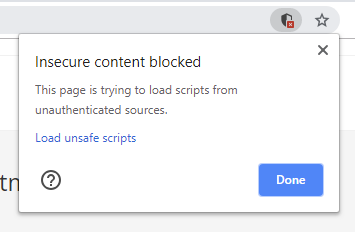
@windson It appears that your site is trying to load scripts from unauthenticated resources. Is this something you can resolve?
BryanTrach-MSFT
on 18 Sep 2018
@windson I should add, this is not Azure causing this warning at this point. We verified your custom domain name and SSL bindings are properly setup. Microsoft Edge views your site as secure but Google Chrome has the additional security requirement that your site cannot pull scripts from unauthenticated sources in order to be considered 'secure'.
BryanTrach-MSFT
on 18 Sep 2018
@BryanTrach-MSFT Can you please elaborate what it means? Actually its a WordPress site. Just
adding an ssl shouldn't be that hard on azure.
Also, May I know how did you figure out that this site is loading scripts
from unauthenticated resources mean?
On Wed, Sep 19, 2018, 1:56 AM Bryan Trach notifications@github.com wrote:
@windson https://github.com/windson It appears that your site is trying
to load scripts from unauthenticated resources. Is this something you can
resolve?—
You are receiving this because you were mentioned.
Reply to this email directly, view it on GitHub
https://github.com/MicrosoftDocs/azure-docs/issues/14737#issuecomment-422540568,
or mute the thread
https://github.com/notifications/unsubscribe-auth/ABvfej1xP5utuIq-jNgZ4ZHsmUVpNuHlks5ucVcBgaJpZM4WhYr7
.
windson
on 18 Sep 2018
This was identified by a warning given in Chrome.
BryanTrach-MSFT
on 18 Sep 2018
@windson This is not an issue with SSL at this point. You have successfully setup SSL and the connection is considered secure. Google Chrome has an extra layer of security requirements though that require all scripts to be pulled from authenticated resources in order for the site to be marked as secure. This is now an issue with your site and Google Chrome's security requirements, not an issue with Azure Web App's SSL implementation.
BryanTrach-MSFT
on 18 Sep 2018
@BryanTrach-MSFT
Thanks for the info. All I did to make it work is
1 In the app service, I disabled HTTPS only mode
2 Installed and activated the plugin named 'Really Simple SSL' for wordpress
3 Enabled the HTTPS only mode back again.
Working now properly.
Also demonstrated this in this video https://youtu.be/api6HM4kpWc in detail.
windson
on 18 Sep 2018
@windson We're happy to hear that this issue is resolve!
BryanTrach-MSFT
on 19 Sep 2018
You can check this video to see how SSL is configured for a WordPress site
on Azure App Service https://youtu.be/api6HM4kpWc
On Wed, Aug 26, 2020, 3:13 PM Muhammad Salik Khan notifications@github.com
wrote:
@BryanTrach-MSFT https://github.com/BryanTrach-MSFT I've uploaded a
wordpress website on Azure, bought a certificate from Azure, and bind it
properly with the custom domain. Google chrome also do not show any error,
but still it is not showing the lock icon with https though the website is
being loaded with HTTPS protocol. I've tried the solution of @windson
https://github.com/windson but couldn't succeed. Any help would be
appreciated.—
You are receiving this because you were mentioned.
Reply to this email directly, view it on GitHub
https://github.com/MicrosoftDocs/azure-docs/issues/14737#issuecomment-680775828,
or unsubscribe
https://github.com/notifications/unsubscribe-auth/AAN566TCAY7OK2BRBGOILRTSCTKMJANCNFSM4FUFRL5Q
.
windson
on 26 Aug 2020
Related issues
 DeepPuddles
·
3Comments
DeepPuddles
·
3Comments
 Favna
·
3Comments
Favna
·
3Comments
 Agazoth
·
3Comments
Agazoth
·
3Comments
 bdcoder2
·
3Comments
bdcoder2
·
3Comments
 jamesgallagher-ie
·
3Comments
jamesgallagher-ie
·
3Comments
Most helpful comment
@BryanTrach-MSFT
Thanks for the info. All I did to make it work is
1 In the app service, I disabled HTTPS only mode
2 Installed and activated the plugin named 'Really Simple SSL' for wordpress
3 Enabled the HTTPS only mode back again.
Working now properly.
Also demonstrated this in this video https://youtu.be/api6HM4kpWc in detail.