Azure-docs: How do you execute ps1 files once they are edited in editor?
Since all migrated to .NET core and runs on UNIX, I'm confused how do you execute ps1 files which you edited in editor?
Document Details
⚠ Do not edit this section. It is required for docs.microsoft.com ➟ GitHub issue linking.
- ID: 42286006-6839-08fd-bc75-391e33edf058
- Version Independent ID: 61499ec3-299c-e044-1eb2-2a95ce807594
- Content: Using the Azure Cloud Shell editor
- Content Source: articles/cloud-shell/using-cloud-shell-editor.md
- Service: azure
- GitHub Login: @jluk
- Microsoft Alias: juluk
 artisticcheese
All 13 comments
@artisticcheese are you using the PowerShell Cloud Shell for this? The editor flow is similar to a text editor like nano/vim, once your script is saved and ready to be executed run the regular execution cmd in the terminal like .myscript.ps1 for example.
- @maertendMSFT from PS Cloud Shell team as FYI
 jluk
on 28 Aug 2018
jluk
on 28 Aug 2018
Yes, trying to do it in Powershell Cloud Shell. Since it's hosted in Linux it does not work as simple as .\myscript.ps1
artisticcheese
on 28 Aug 2018
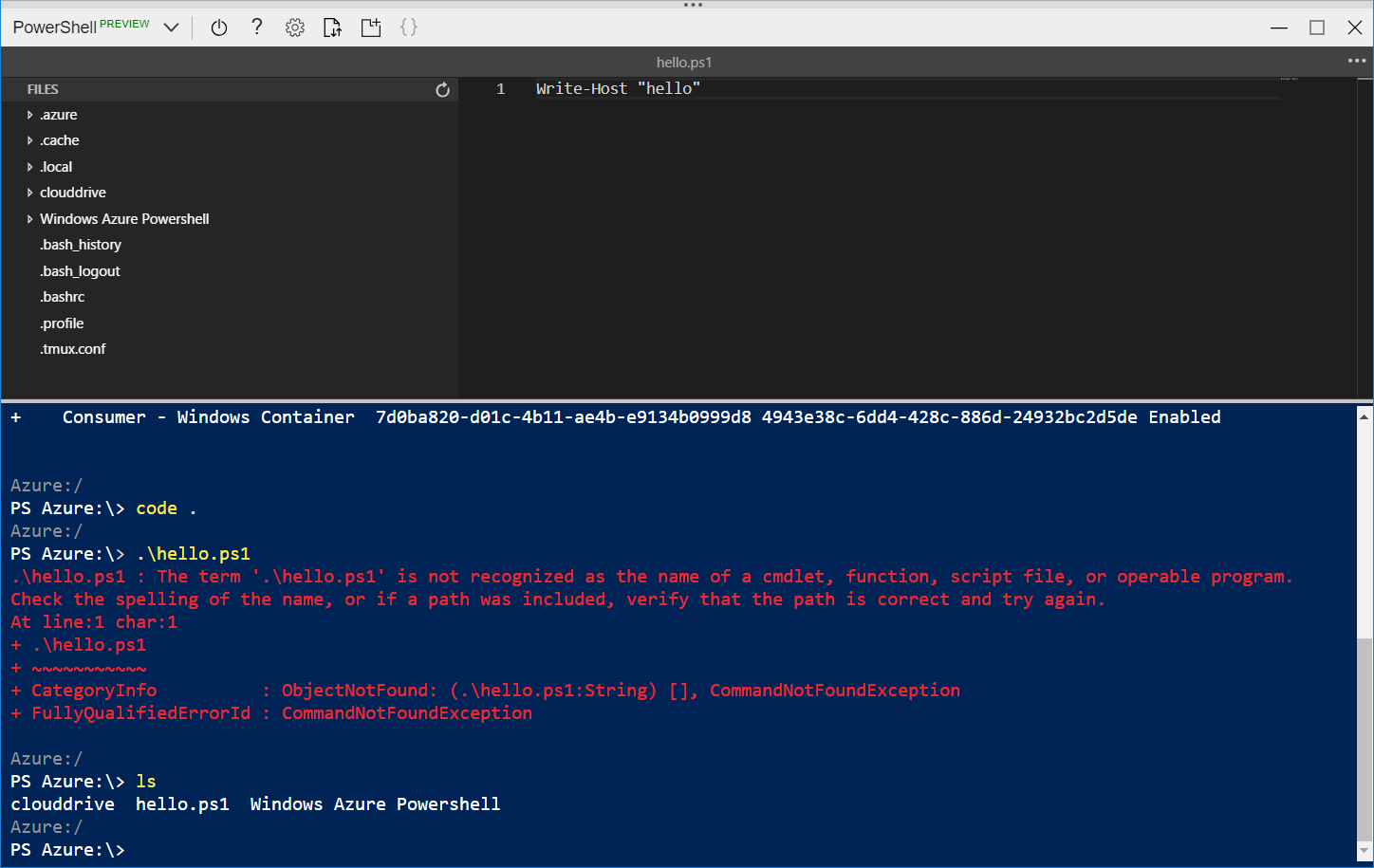
@artisticcheese, I do not see a similar experience. Are you sure you are in the same directory as myscript.ps1? If so can you provide a screenshot?
 maertendMSFT
on 28 Aug 2018
maertendMSFT
on 28 Aug 2018
artisticcheese
on 28 Aug 2018
Ah, I see the issue. Since the Azure: drive is not actually a file system, the written file is saved to your home directory so it is persisted. If you run cd $HOME, then you should be in the correct directory to run .\hello.ps1.
ls is no longer an alias for Get-ChildItem in PowerShell 6, as it is a built-in Linux command. We recommend using dir or Get-ChildItem as they retain the same functionality as Windows PowerShell.
maertendMSFT
on 28 Aug 2018
@maertendMSFT thx for the insight - I can see why this would be confusing for a user, can you open a PR on this doc detailing this issue? That behavior of Azure drive isn't easily inferred.
jluk
on 28 Aug 2018
@jluk @artisticcheese Thanks for the feedback! I have assigned the issue to the content author to evaluate and update as appropriate.
 Mike-Ubezzi-MSFT
on 29 Aug 2018
Mike-Ubezzi-MSFT
on 29 Aug 2018
@Mike-Ubezzi-MSFT, can you remove @jluk and assign it to me?
maertendMSFT
on 29 Aug 2018
can we execute PS1 file which is located in GIT directly from azure command?
 Ismailmgl
on 28 Nov 2018
Ismailmgl
on 28 Nov 2018
@Ismailmgl, can you provide more details?
maertendMSFT
on 28 Nov 2018
hello @maertendMSFT ,
In Azure cloud shell we have an option of executing Power Shell commands.
For example Example: New-AzureRmResourceGroupDeployment -ResourceGroupName $resourceGroupName -TemplateFile $templateFilePath.. What I wanted to know was, what if we have all these commands in PS1 file and which is located in github. Can we directly call or give the path of ps1 file from cloud shell? " https://raw.githubusercontent.com/
Ismailmgl
on 29 Nov 2018
@Ismailmgl, there is not a way to execute a script from Github in Cloud Shell.
Git is available in Cloud Shell, so you could clone the repository and execute the script. If you are worried about having the most up-to-date version, logic could be added to your PowerShell profile to pull from the repository.
maertendMSFT
on 29 Nov 2018
please-close as this has been resolved
maertendMSFT
on 22 Mar 2019
Related issues
 bityob
·
3Comments
bityob
·
3Comments
 jamesgallagher-ie
·
3Comments
jamesgallagher-ie
·
3Comments
 spottedmahn
·
3Comments
spottedmahn
·
3Comments
 DeepPuddles
·
3Comments
DeepPuddles
·
3Comments
 monteledwards
·
3Comments
monteledwards
·
3Comments
Most helpful comment
Ah, I see the issue. Since the
Azure:drive is not actually a file system, the written file is saved to your home directory so it is persisted. If you runcd $HOME, then you should be in the correct directory to run.\hello.ps1.lsis no longer an alias forGet-ChildItemin PowerShell 6, as it is a built-in Linux command. We recommend usingdirorGet-ChildItemas they retain the same functionality as Windows PowerShell.