Azure-docs: No "Application Insights Search" window
I have dotnet 2.1.302 and Visual Studio 15.7.6 installed. Although all conditions specified in "prerequisites" are satisfied, I can't find "Application Insights Search" window in menus in Visual Studio (searching using ctrl+q doesn't help either). Do I need to enable it somewhere?
Document Details
⚠ Do not edit this section. It is required for docs.microsoft.com ➟ GitHub issue linking.
- ID: 4b88d8c4-0013-70aa-7997-a2203afd9743
- Version Independent ID: 0ab99d5e-4ebd-8cb9-3d27-efe58def249f
- Content: Azure Application Insights for ASP.NET Core
- Content Source: articles/application-insights/app-insights-asp-net-core.md
- Service: application-insights
- GitHub Login: @mrbullwinkle
- Microsoft Alias: mbullwin
 piotrek-k
All 18 comments
@piotrek-k Thanks for the feedback. We are actively investigating and will get back to you soon.
 TravisCragg-MSFT
on 19 Aug 2018
TravisCragg-MSFT
on 19 Aug 2018
I've updated Visual Studio to 15.8 today and I suprisingly found "Application Insights Search" in "View" panel. I used it for some time, then closed Visual Studio. After a few hours I've opened VS again, but I can't find it anymore. Looks like this option is present, but not always shows up.
piotrek-k
on 20 Aug 2018
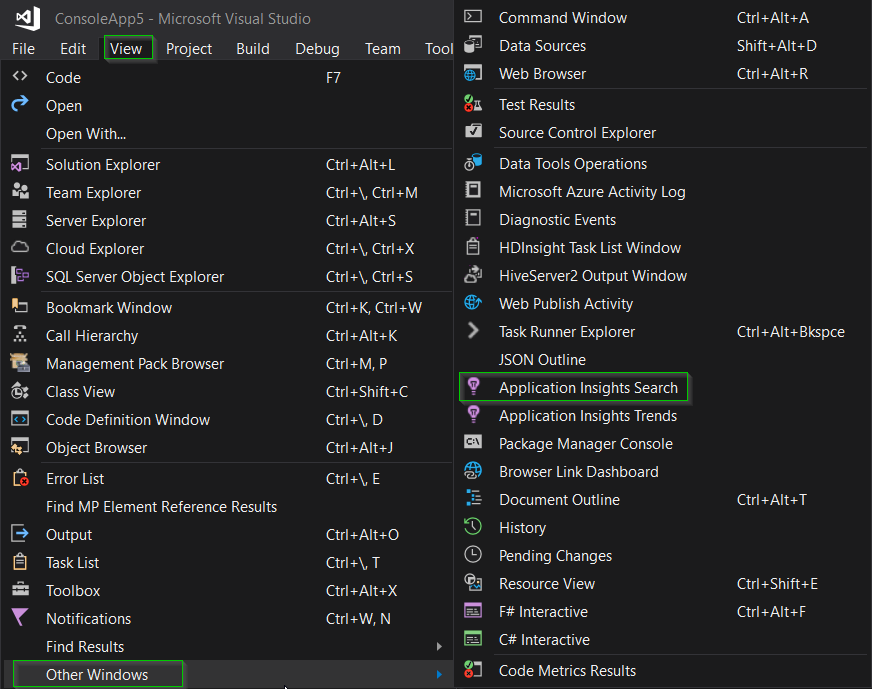
@piotrek-k do you see it consistently if you go to View > Other Windows ? (I believe it's location in the UI can vary sometimes based on project template.)
 mrbullwinkle
on 20 Aug 2018
mrbullwinkle
on 20 Aug 2018
Here is what I see. I have currently opened solution containing three aspnet core projects. Each has target framework set to .NET Core 2.0. What exactly requirements should be met to display "Application Insights Search" in View menu? Should it be some specific type of project?

piotrek-k
on 20 Aug 2018
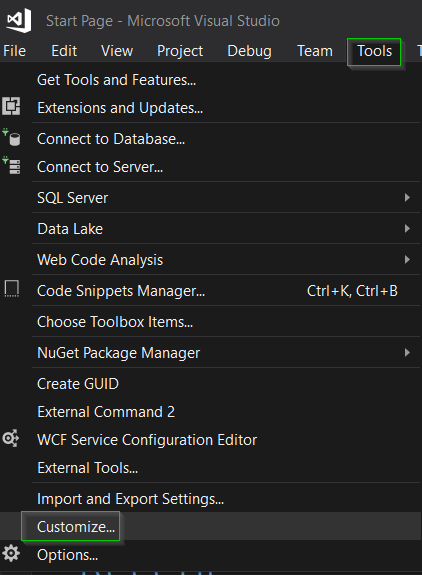
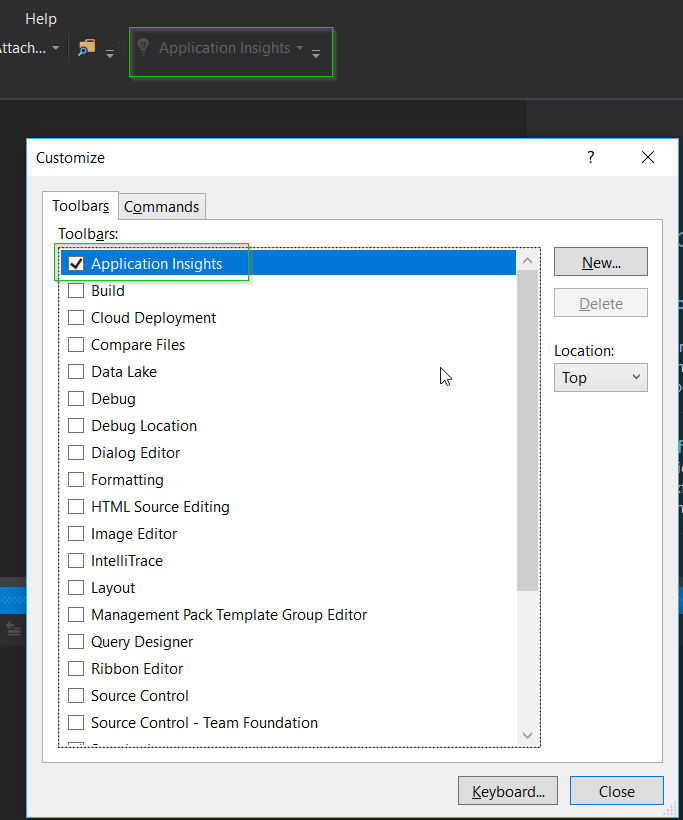
If you go to Tools > Customize can you add Application Insights?
mrbullwinkle
on 20 Aug 2018
Can't see anything like that

piotrek-k
on 20 Aug 2018
@piotrek-k Are you using Visual Studio Community or Enterprise edition? (I was testing with Enterprise Edition, but I can spin up a copy of VS Community if that is what you are using?)
mrbullwinkle
on 20 Aug 2018
@mrbullwinkle It's Visual Studio Enterprise 2017.
Here is info from About window if you needed more information:
Microsoft Visual Studio Enterprise 2017 (2)
Version 15.8.1
VisualStudio.15.Release/15.8.1+28010.2003
Microsoft .NET Framework
Version 4.7.03056Installed Version: Enterprise
ASP.NET and Web Tools 2017 15.8.05074.0
ASP.NET and Web Tools 2017ASP.NET Core Razor Language Services 15.8.31590
Provides languages services for ASP.NET Core Razor.ASP.NET Web Frameworks and Tools 2017 5.2.60618.0
For additional information, visit https://www.asp.net/Azure App Service Tools v3.0.0 15.8.05023.0
Azure App Service Tools v3.0.0Azure Data Lake Node 1.0
This package contains the Data Lake integration nodes for Server Explorer.Azure Data Lake Tools for Visual Studio 2.3.3000.2
Microsoft Azure Data Lake Tools for Visual StudioAzure Stream Analytics Tools for Visual Studio 2.3.3000.2
Microsoft Azure Stream Analytics Tools for Visual StudioC# Tools 2.9.0-beta8-63208-01
C# components used in the IDE. Depending on your project type and settings, a different version of the compiler may be used.Common Azure Tools 1.10
Provides common services for use by Azure Mobile Services and Microsoft Azure Tools.JavaScript Language Service 2.0
JavaScript Language ServiceMerq 1.1.38 (5b3c069)
Command Bus, Event Stream and Async Manager for Visual Studio extensions.Microsoft Azure HDInsight Azure Node 2.3.3000.2
HDInsight Node under Azure NodeMicrosoft Azure Hive Query Language Service 2.3.3000.2
Language service for Hive queryMicrosoft Azure Stream Analytics Language Service 2.3.3000.2
Language service for Azure Stream AnalyticsMicrosoft Azure Stream Analytics Node 1.0
Azure Stream Analytics Node under Azure NodeMicrosoft Azure Tools 2.9
Microsoft Azure Tools for Microsoft Visual Studio 2017 - v2.9.10730.2Microsoft Continuous Delivery Tools for Visual Studio 0.4
Simplifying the configuration of continuous build integration and continuous build delivery from within the Visual Studio IDE.Microsoft JVM Debugger 1.0
Provides support for connecting the Visual Studio debugger to JDWP compatible Java Virtual MachinesMicrosoft Library Manager 1.0
Install client-side libraries easily to any web projectMicrosoft MI-Based Debugger 1.0
Provides support for connecting Visual Studio to MI compatible debuggersMicrosoft Visual Studio Tools for Containers 1.1
Develop, run, validate your ASP.NET Core applications in the target environment. F5 your application directly into a container with debugging, or CTRL + F5 to edit & refresh your app without having to rebuild the container.Mono Debugging for Visual Studio 4.11.7-pre (8955b2a)
Support for debugging Mono processes with Visual Studio.NuGet Package Manager 4.6.0
NuGet Package Manager in Visual Studio. For more information about NuGet, visit http://docs.nuget.org/.ProjectServicesPackage Extension 1.0
ProjectServicesPackage Visual Studio Extension Detailed InfoRedgate ReadyRoll 1.17.18155.10346
Extend DevOps processes to your SQL Server databases and safely automate database deployments.Visit https://www.red-gate.com/readyroll for more information.
Copyright (C) 2011 Red Gate Software Ltd. All rights reserved.
This software contains components from Component Owl.
SQL Server is a registered trademark of Microsoft Corporation.
Visual Studio is a registered trademark of Microsoft Corporation.ReadyRoll contains code from the following open source software:
NuGet https://www.nuget.org/
SQL LocalDB Wrapper https://github.com/martincostello/sqllocaldb
Autofac https://autofac.org/
Json.NET https://json.net/
MahApps.Metro http://mahapps.com/
SemVer https://github.com/maxhauser/semver
Log4Net http://logging.apache.org/log4net/
StringTemplate https://github.com/antlr/stringtemplate4
Extended WPF Toolkit https://wpftoolkit.codeplex.com/
Code InfoBox VSX http://www.codeproject.com/Articles/55196/Code-InfoBox-Visual-Studio-Extension-VSX
OctoPack https://github.com/OctopusDeploy/OctoPack
SQLite https://sqlite.org/This product contains icons from http://www.visualpharm.com distributed under a free backlink license.
For license details or other notices relating to the above software, please see NOTICE.TXT and EULA.rtf in the ReadyRoll application folder.
Redgate SQL Prompt 9.2.0.5601
Write, format, and refactor SQL effortlesslyRedgate SQL Search 3.1.7.2062
Search functionality for SQL Server databases, from within Visual StudioResourcePackage Extension 1.0
ResourcePackage Visual Studio Extension Detailed InfoResourcePackage Extension 1.0
ResourcePackage Visual Studio Extension Detailed InfoSnapshot Debugging Extension 1.0
Snapshot Debugging Visual Studio Extension Detailed InfoSQL Server Data Tools 15.1.61808.07020
Microsoft SQL Server Data ToolsToolWindowHostedEditor 1.0
Hosting json editor into a tool windowTypeScript Tools 15.8.20801.2001
TypeScript Tools for Microsoft Visual StudioVisual Basic Tools 2.9.0-beta8-63208-01
Visual Basic components used in the IDE. Depending on your project type and settings, a different version of the compiler may be used.Visual F# Tools 10.2 for F# 4.5 15.8.0.0. Commit Hash: c55dd2c3d618eb93a8d16e503947342b1fa93556.
Microsoft Visual F# Tools 10.2 for F# 4.5Visual Studio Code Debug Adapter Host Package 1.0
Interop layer for hosting Visual Studio Code debug adapters in Visual StudioVisual Studio Tools for Containers 1.0
Visual Studio Tools for ContainersVisualStudio.Mac 1.0
Mac Extension for Visual StudioXamarin 4.11.0.732 (d15-8@33e83e124)
Visual Studio extension to enable development for Xamarin.iOS and Xamarin.Android.Xamarin Designer 4.14.218 (79f535bdd)
Visual Studio extension to enable Xamarin Designer tools in Visual Studio.Xamarin Templates 1.1.113 (e1d02a7)
Templates for building iOS, Android, and Windows apps with Xamarin and Xamarin.Forms.Xamarin.Android SDK 9.0.0.18 (HEAD/3d8a28f1a)
Xamarin.Android Reference Assemblies and MSBuild support.Xamarin.iOS and Xamarin.Mac SDK 11.14.0.13 (373c313)
Xamarin.iOS and Xamarin.Mac Reference Assemblies and MSBuild support.
piotrek-k
on 20 Aug 2018
Thanks for the added info. I did a new install of VS 2017 with the default ASP.NET and web development components just to test and confirm that nothing has changed.
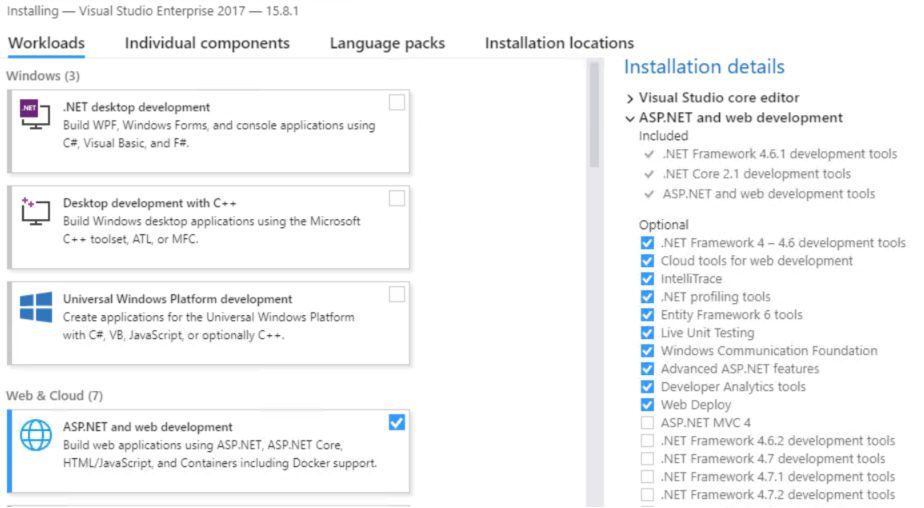
Post install I still had Application Insights Search under View > Other Windows
I did a little more digging it looks like what you might be missing is the Developer Analytics Tools
To check if you have it go to Tools > Extensions and Updates
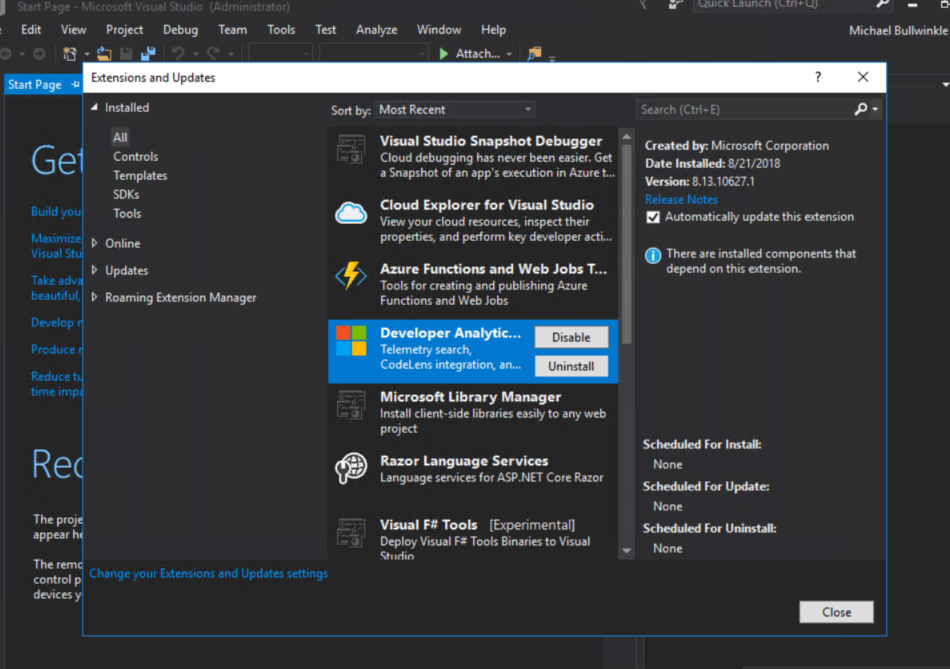
If you don't have it launch your Visual Studio Installer and you should be able to add it.
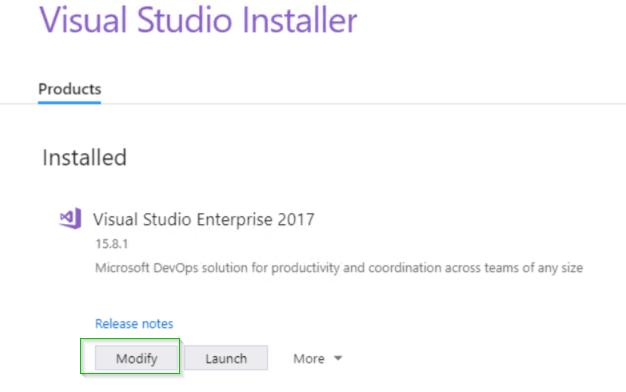
Click Modify
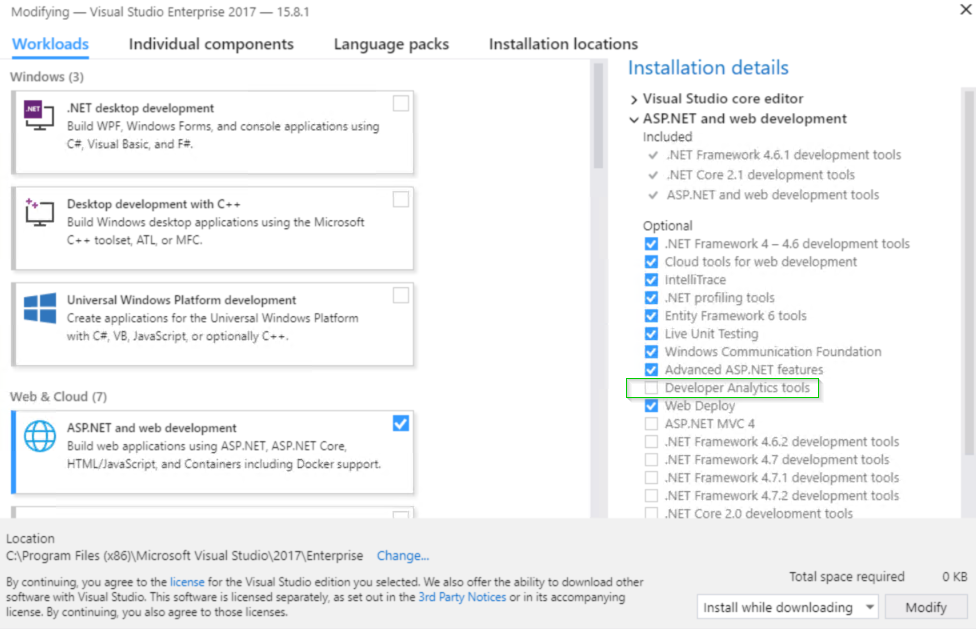
This doesn't explain how you saw it briefly and now don't anymore, but hopefully this will help a little in narrowing things down.
mrbullwinkle
on 21 Aug 2018
Yes! It seems Developer Analytics Tools was disabled. After enabling it I can find Application Insights Search in menu. Thanks for help 😃
piotrek-k
on 21 Aug 2018
@piotrek-k Good to hear that everything is working out!
 kobulloc-MSFT
on 21 Aug 2018
kobulloc-MSFT
on 21 Aug 2018
This is happening to me in VS2019 enterprise, and none of these have worked for me.
 jalvarezca
on 20 May 2020
jalvarezca
on 20 May 2020
@jalvarezca what version of VS 2019 enterprise are you running? I just tested with the latest stable release that came out yesterday 16.6.0 and the App Insights search experience is still there. I did see the experience removed temporarily in one of the preview releases a few weeks back, but if you have the latest stable release you shouldn't see this issue.
mrbullwinkle
on 20 May 2020
Hi, I have disabled the Developer Analytics Tools extension and now I don't know how to re-enable it. It is not listed under Extensions and Updates. How can I enable this extension again? I do have it installed in my Visual Studio 2019 though.
 evillegas92
on 1 Jul 2020
evillegas92
on 1 Jul 2020
@evillegas92 when disabled it should still show up:

With the option to re-enable:

If you aren't seeing it and it is still showing as installed I would try uninstalling by unchecking the box in VS installer > restart > re-add developer analytics tools from the VS installer


mrbullwinkle
on 1 Jul 2020
Hi @mrbullwinkle thanks for your response! I had tried that but with no luck. Only repairing Visual Studio worked.
evillegas92
on 2 Jul 2020
Thanks for following back up, glad to hear you got it working again.
mrbullwinkle
on 2 Jul 2020
@jalvarezca what version of VS 2019 enterprise are you running? I just tested with the latest stable release that came out yesterday
16.6.0and the App Insights search experience is still there. I did see the experience removed temporarily in one of the preview releases a few weeks back, but if you have the latest stable release you shouldn't see this issue.
I decided to reinstall visual studio and SDK and that fixed the issue. I'm back to business.
jalvarezca
on 11 Jul 2020
Related issues
 spottedmahn
·
3Comments
spottedmahn
·
3Comments
 Favna
·
3Comments
Favna
·
3Comments
 jebeld17
·
3Comments
jebeld17
·
3Comments
 JamesDLD
·
3Comments
JamesDLD
·
3Comments
 mrdfuse
·
3Comments
mrdfuse
·
3Comments
Most helpful comment
Hi @mrbullwinkle thanks for your response! I had tried that but with no luck. Only repairing Visual Studio worked.