Azure-docs: Dark theme does not show the query plan images correctly
Selecting the dark them makes the query plan images above render with a black background, which makes the diagram illegible.
Document Details
⚠ Do not edit this section. It is required for docs.microsoft.com ➟ GitHub issue linking.
- ID: 8861a34a-7684-3032-b4be-46c470f4b862
- Version Independent ID: 04581fa9-6af6-f6b9-5946-16223a387b42
- Content: Azure SQL Database performance tuning guidance
- Content Source: articles/sql-database/sql-database-performance-guidance.md
- Service: sql-database
- GitHub Login: @CarlRabeler
- Microsoft Alias: carlrab
 rajeevac
All 7 comments
@rajeevac Thanks for the feedback! I have assigned the issue to the content author to evaluate and update as appropriate.
 Mike-Ubezzi-MSFT
on 17 Aug 2018
Mike-Ubezzi-MSFT
on 17 Aug 2018
Fixed
please-close
 CarlRabeler
on 24 Aug 2018
CarlRabeler
on 24 Aug 2018
@rajeevac We will now proceed to close this thread. If there are further questions regarding this matter, please reopen it and we will gladly continue the discussion.
Mike-Ubezzi-MSFT
on 24 Aug 2018
Thanks a ton for taking a look at this!
However, I am not sure quite sure that it still makes it easier to read the images.
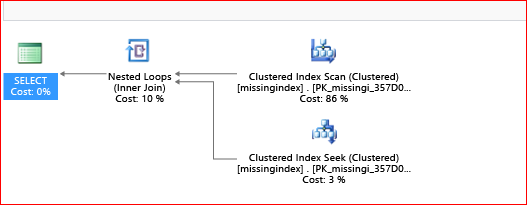
THat's the image with the light theme
and here is the dark theme version:

As you may see, the dark theme doesn't reder the text sharply and it still makes it very hard to read the image contents.
Thanks!
Rajeev
rajeevac
on 25 Aug 2018
@rajeevac I understand and I still have it in my backlog to reshoot the images at some point.
CarlRabeler
on 26 Aug 2018
Thanks!! Is there a way we can keep the issue active until then?
rajeevac
on 27 Aug 2018
you can request to re-open or create new issue - I am investigating this issue
CarlRabeler
on 27 Aug 2018
Related issues
 spottedmahn
·
3Comments
spottedmahn
·
3Comments
 jebeld17
·
3Comments
jebeld17
·
3Comments
 JamesDLD
·
3Comments
JamesDLD
·
3Comments
 Agazoth
·
3Comments
Agazoth
·
3Comments
 monteledwards
·
3Comments
monteledwards
·
3Comments