setTraffic - it's great, but how can I hide the traffic after setTraffic()
Document Details
⚠ Do not edit this section. It is required for docs.microsoft.com ➟ GitHub issue linking.
- ID: 158abea9-9cdb-6c55-0633-8e9282f258e6
- Version Independent ID: 8de5d5f2-4e1d-bd0c-342c-a0fc37f276a0
- Content: Show traffic with Azure Maps
- Content Source: articles/azure-maps/map-show-traffic.md
- Service: azure-maps
- GitHub Login: @jingjing-z
- Microsoft Alias: jinzh
 HuckFin7b
All 4 comments
You can hide the traffic flow by setting the "flow" parameter from TrafficOption class to "none".
map.setTraffic({
  incidents: true,
  flow: "none"
});
 buffalo-sauce-rules
on 2 Jul 2018
buffalo-sauce-rules
on 2 Jul 2018
👍2
@HuckFin7b We will now close this issue. If there are further questions regarding this matter, please reopen it and we will gladly continue the discussion.
 femsulu
on 3 Jul 2018
femsulu
on 3 Jul 2018
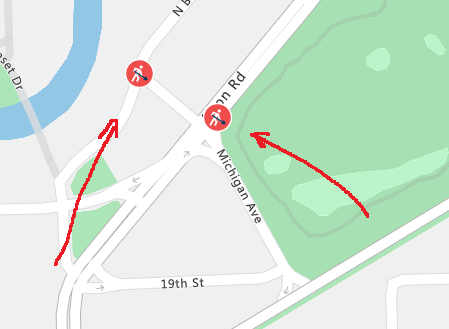
This does not work completely, images remain after disabling traffic
HuckFin7b
on 3 Jul 2018
Those images are incidents images. You can remove them by setting the "incidents" parameter from TrafficOption class to "false"
map.setTraffic({
  incidents: false,
  flow: "none"
})
buffalo-sauce-rules
on 3 Jul 2018
👍1
Was this page helpful?
0 / 5 - 0 ratings
Related issues
 ianpowell2017
·
3Comments
ianpowell2017
·
3Comments
 JamesDLD
·
3Comments
JamesDLD
·
3Comments
 mrdfuse
·
3Comments
mrdfuse
·
3Comments
 DeepPuddles
·
3Comments
DeepPuddles
·
3Comments
 monteledwards
·
3Comments
monteledwards
·
3Comments
Most helpful comment
You can hide the traffic flow by setting the "flow" parameter from TrafficOption class to "none".